
| Ontwikkelaar: | Tohru Itoh (2) | ||
| Prijs: | Gratis | ||
| Beoordelingen: | 0 | ||
| Recensies: | 0 Schrijf een review | ||
| Lijsten: | 0 + 0 | ||
| Punten: | 0 + 0 ¡ | ||
| Mac App Store | |||
Beschrijving

[example of data file]
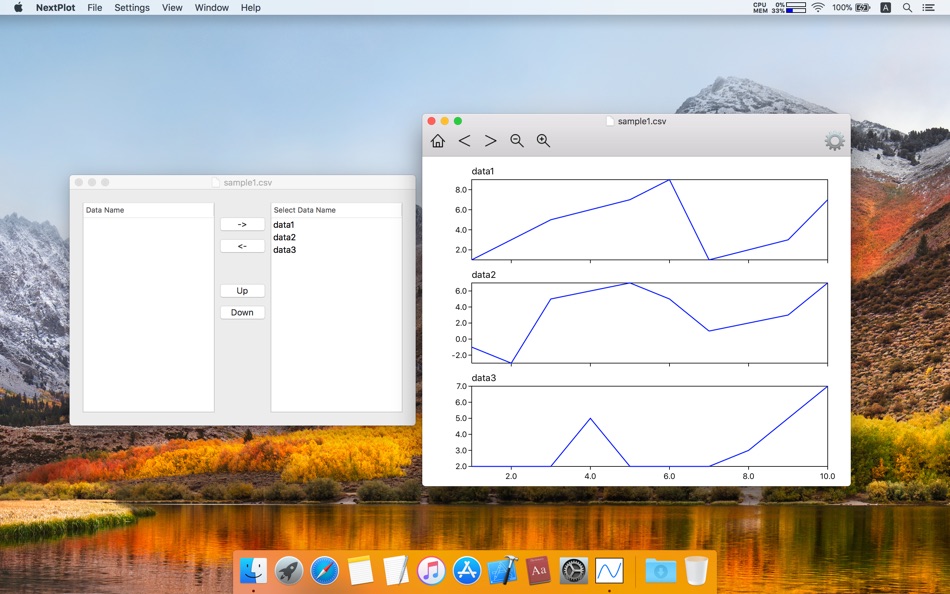
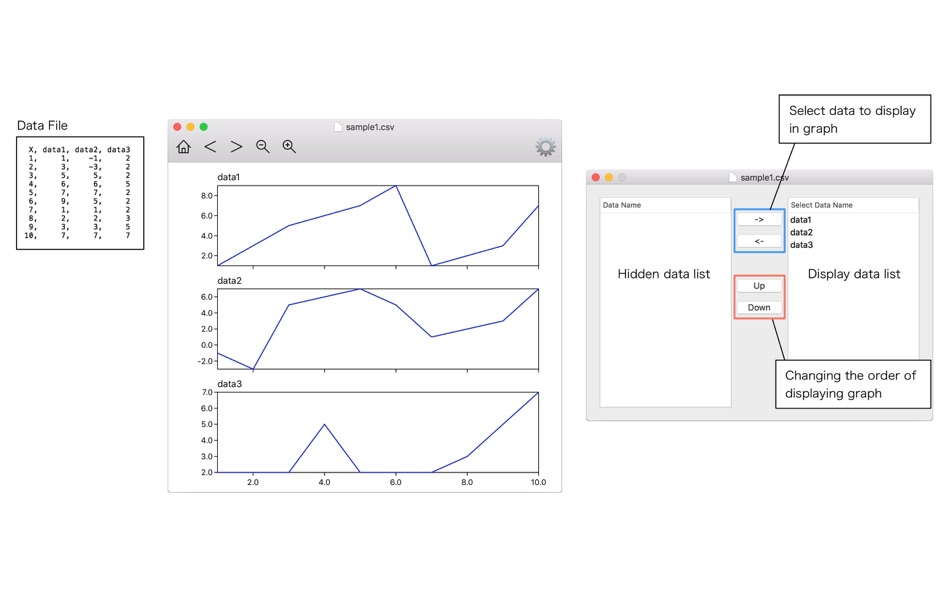
Display a graph for each column from a comma (,) delimiter or a semicolon (;) delimited data file.
===========================
X, data1, data2, data3
1, 1, -1, 2
2, 3, -3, 2
3, 5, 5, 2
4, 6, 6, 5
5, 7, 7, 2
6, 9, 5, 2
7, 1, 1, 2
8, 2, 2, 3
9, 3, 3, 5
10, 7, 7, 7
===========================
[file format]
For information about the file format, please refer to the Instruction Manual(“NextPlot menu” -> “Help” -> “Manual”) and sample data(“NextPlot menu” -> “Help” -> “Sample Data”).
Ad
Screenshots
Wat is er nieuw?
- Versie: 1.0
- Bijgewerkt:
Prijs
- Vandaag: Gratis
- Minimum: Gratis
- Maximaal: Gratis
Prijzen volgen
Ad
Ontwikkelaar
- Tohru Itoh
- Platforms: macOS Apps (2)
- Lijsten: 0 + 0
- Punten: 0 + 0 ¡
- Beoordelingen: 0
- Recensies: 0
- Kortingen: 0
- Videos: 0
- RSS: Abonneren
Punten
0 ☹️
Beoordelingen
0 ☹️
Lijsten
0 ☹️
- NextPlot
Recensies
Schrijf als eerste een review 🌟
Aanvullende informatie
- Versie: 1.0
- Categorie:
macOS Apps›Productiviteit - Besturingssystemen:
macOS,macOS 10.13 en hoger - Grootte:
4 Mb - Ondersteunde talen:
English - Beoordeling van content:
4+ - Mac App Store Beoordeling:
0 - Bijgewerkt:
- Releasedatum:
NextPlot Korte URL: Gekopieerd!- 🌟 Delen
- Mac App Store
Mogelijk vindt u dit ook interessant
-
- Next Meeting
- macOS Apps: Productiviteit Door: Nathan Spindel
- Gratis
- Lijsten: 0 + 0 Beoordelingen: 0 Recensies: 0
- Punten: 0 + 0 Versie: 2.7 Quickly see your next meeting right in your menu bar with Next Meeting. The meetings come from the built-in macOS Calendar app so it works with Google, iCloud, Exchange, Facebook, ... ⥯
-
- Timi - What's Next?
- macOS Apps: Productiviteit Door: dasol kim
- $6.99
- Lijsten: 0 + 0 Beoordelingen: 0 Recensies: 0
- Punten: 0 + 0 Versie: 1.2.1 "What's next?" - That question disappears. Timi is a productivity app that unifies your calendar events and reminders right in the menu bar. See your schedule without opening any app, ... ⥯
-
- Mydoma Studio NEXT Web Clipper
- macOS Apps: Productiviteit Door: Mydoma Inc
- Gratis
- Lijsten: 0 + 0 Beoordelingen: 0 Recensies: 0
- Punten: 1 + 0 Versie: 2.0.11 Easily clip product images and information to use in projects and packages. The Mydoma Studio Product Clipper is your one stop product sourcing solution. Products from any vendor ... ⥯
-
- Plot2
- macOS Apps: Productiviteit Door: Mike Wesemann
- Gratis
- Lijsten: 0 + 0 Beoordelingen: 0 Recensies: 0
- Punten: 1 + 0 Versie: 2.8.0 Plot is a scientific 2D plotting program. This project started in 1993 with SciPlot on NeXTStep and continues with "Plot" for OS X till 2007. Plot is designed for everyday plotting, it ⥯
-
- Fantastical - Calendar
- macOS Apps: Productiviteit Door: Flexibits Inc.
- * Gratis
- Lijsten: 5 + 7 Beoordelingen: 0 Recensies: 0
- Punten: 9 + 0 Versie: 4.1.10 Fantastical is the multiple award-winning calendar app with powerful features including intuitive natural language text parsing, a full calendar window with day, week, month, quarter ... ⥯
-
- Scrivener 3
- macOS Apps: Productiviteit Door: Literature & Latte
- $59.99
- Lijsten: 3 + 11 Beoordelingen: 0 Recensies: 0
- Punten: 2 + 0 Versie: 3.5.2 Typewriter. Corkboard. Scrapbook. Scrivener combines all the writing tools you need to craft your first draft, from nascent notion to final full stop. The biggest software advance for ... ⥯
-
- TextSniper
- macOS Apps: Productiviteit Door: Valerijs Boguckis
- $9.99
- Lijsten: 7 + 2 Beoordelingen: 0 Recensies: 0
- Punten: 13 + 0 Versie: 1.12.2 Transform any text on your Mac screen into editable, copyable text in seconds. No more manual retyping from sources that won't let you copy text normally. Capture text from any app, ... ⥯
-
- Calendar 366 II
- macOS Apps: Productiviteit Door: Vincent Miethe
- $14.99
- Lijsten: 4 + 8 Beoordelingen: 0 Recensies: 0
- Punten: 9 + 0 Versie: 2.15.8 For all your plans! Appointments and to-dos, meetings and deadlines, birthdays and dates - make the most of your time with Calendar 366! Anything a calendar can do... Calendar 366 can ... ⥯
-
- Be Focused Pro - Focus Timer
- macOS Apps: Productiviteit Door: Denys Ievenko
- $12.99
- Lijsten: 5 + 4 Beoordelingen: 0 Recensies: 0
- Punten: 9 + 0 Versie: 2.5.2 Staying on task seems is a real challenge for our screen-bound generation. The Be Focused lets you get things done by breaking up individual tasks among discrete intervals, separated ... ⥯
-
- Spark Classic – Email App
- macOS Apps: Productiviteit Door: Readdle Technologies Limited
- Gratis
- Lijsten: 3 + 2 Beoordelingen: 5 (1) Recensies: 0
- Punten: 10 + 0 Versie: 2.11.57 This is Spark Classic. Since 2022, all new features have been added to the latest version, which is a separate application from this outdated version. To use the newest version of ... ⥯
-
- Floating Clipboard
- macOS Apps: Productiviteit Door: Ebey Tech LLC
- $1.99
- Lijsten: 1 + 1 Beoordelingen: 0 Recensies: 0
- Punten: 21 + 0 Versie: 1.0 Features: -Clipboard history. -Auto fetching of clipboard contents (optional). -Float Window above other apps & windows (optional). -Fast & fluid type-based filtering. -Inserted ... ⥯
-
- Airmail - Lightning Fast Email
- macOS Apps: Productiviteit Door: Bloop S.R.L.
- * Gratis
- Lijsten: 4 + 5 Beoordelingen: 0 Recensies: 0
- Punten: 5 + 0 Versie: 26.0.3 Apple Design Award 2017 Winner Airmail is a mail client designed with performance and intuitive interaction in mind optimized for macOS and iOS! Support for iCloud™, MS Exchange, ... ⥯
-
- Gestimer (Legacy)
- macOS Apps: Productiviteit Door: Tuan Anh Nguyen
- $6.99
- Lijsten: 6 + 5 Beoordelingen: 0 Recensies: 0
- Punten: 2 + 0 Versie: 1.2.8 Gestimer is a beautiful Mac menu bar app for those little reminders during the day. Simply drag the Gestimer menu bar icon onto the screen to create your reminder. Drag & drop from the ⥯
-
- Dato
- macOS Apps: Productiviteit Door: Sindre Sorhus
- $18.00
- Lijsten: 3 + 3 Beoordelingen: 0 Recensies: 0
- Punten: 10 + 0 Versie: 5.7.1 Dato gives you a local clock, date, multiple world clocks, and upcoming events in the menu bar. When you click Dato in the menu bar, you get a menu with a calendar, calendar events, ... ⥯