
| 開發人員: | Greg Temchenko (1) | ||
| 價錢: | * 免費 | ||
| 排名: | 0 | ||
| 評測: | 0 寫評論 | ||
| 清單: | 0 + 1 | ||
| 點數: | 1 + 0 ¡ | ||
| Mac App Store | |||
描述

‣ Unique AI-powered table of contents generation (ToC, or PDF outline): the generated outline is saved and can also be used by other PDF readers. Use the ToC for easily navigating large PDF files in PDF Owl or any other app
‣ Search text with advanced options: search only annotated pages, search within selected outline items, match regular expressions (RegEx), and more
‣ Highlight text and add notes on the margins
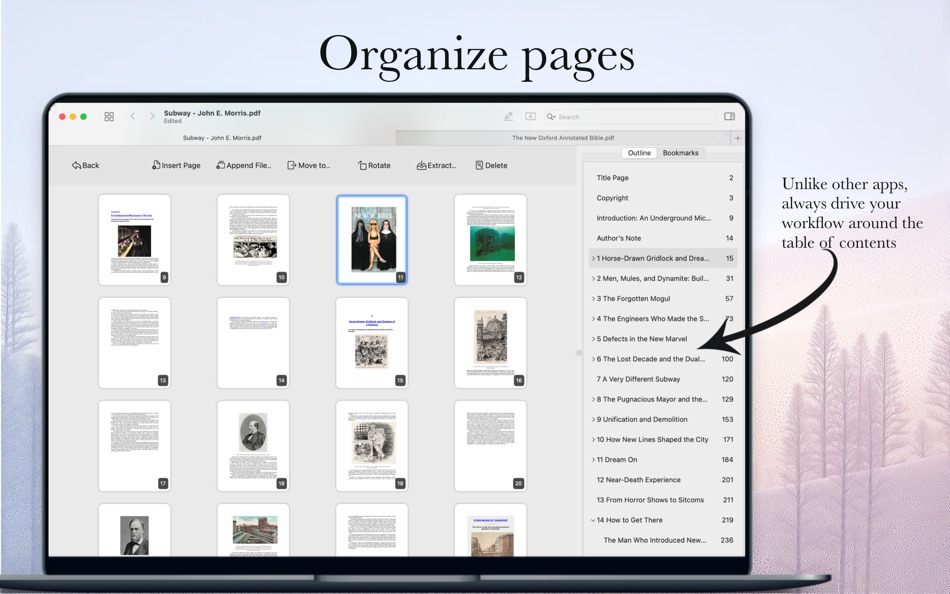
‣ Organize pages: merge and split files, rearrange, copy and paste, insert or delete pages
‣ Edit outline: fine-tune generated outline by editing it manually
‣ Bookmarks with tricks: use bookmarks and assign keyboard shortcuts for quickly jump between important places in your file
‣ Privacy-first: the app runs in macOS sandbox and never uploads anything to the cloud or external parties. The AI runs locally on the device
‣ Cloud-friendly and restart-friendly: no worries about losing your reading position when you edit cloud-backed files on other devices, or between computer restarts
‣ Minimalist-inspired design: we keep things simple and elegant with minimal UI clutter
# Table of Contents Generator
PDF Owl app will examine the visual layout of each page of your PDF file, then it will use computer vision techniques to detect headings on the pages. Next, it will OCR the headings and automatically construct the table of contents for your file (also known as ToC, or PDF outline). The technique is powered by the latest AI research in transformer models and runs directly on your device without uploading anything to the cloud.
# Highlight Text and Add Text Annotations
Highlight text for later reference in colors of your choice. Add text notes to highlighted text. Add free text comments with color and font size of your choice. Later use search to find only annotated pages.
# Advanced Text Search Inside PDF Files
Type the text you're looking for and navigate between found places in a Safari-like minimalist interface.
Use advanced search options:
‣ RegExes are powerful text-matching techniques used in many other applications. Examples include matching differently spelled words, finding numbers, or finding a list of words
‣ Search across annotated pages. Remember that you highlighted it? Limit your search only to the annotated pages
‣ Search across selected outline items. Know the chapter or section? Then use PDF Owl to search in a section that you select
‣ Search on the current page only or in any range of pages
‣ Match whole words, and case sensitivity
# Organize Pages
Split and merge files, rearrange pages, copy and paste pages, delete or insert blank pages. Unlike other apps, it lets you organize your PDFs in bird-eye pages view while viewing the outline and bookmarks on the side - because it's key to navigating large files.
# Outline Editor
Select text on the page, then click "Add Outline" or use keyboard shortcuts to add new outline items. Delete, rename, and rearrange existing outline.
# Use Batch Outline Generation for Multiple Files
The outline generation may take some time, especially on older Macs. Schedule a queue of multiple files to generate the outline when you are away. For reference, on Apple Silicon M1 chip, it takes approximately 1 second to process 1 page.
# Friendly with Other Apps on Multiple Devices
Edit PDF files on iPad, iPhone, or other devices using other apps, then sync the files in the cloud. PDF Owl will seamlessly reload the updated document while keeping your current viewing position unchanged.
# Friendly to App Restarts
PDF Owl will keep exact reading position and interface arrangement between application restarts – never lose your view.
# Trusted
We take privacy and security seriously. PDF Owl functions 100% on-device and does not depend on the cloud.
Great tool for students, teachers, professors, researchers for affordable price for study and work.
Terms: https://138street.com/pdf-owl/terms.html
Privacy: https://138street.com/pdf-owl/privacy.html
螢幕擷取畫面




價錢
-
* 應用內購買 - 今天: 免費
- 最小值: 免費
- 最大值: 免費
追蹤票價
開發人員
- Greg Temchenko
- 平台: macOS 應用程式 (1)
- 清單: 0 + 1
- 點數: 1 + 0 ¡
- 排名: 0
- 評測: 0
- 折扣: 0
- 影片: 0
- RSS: 訂閱
點數
-

- 667 Erin
- +1

排名
0 ☹️
清單
0 ☹️
評測
成為第一個評論 🌟
其他資訊
- 版本: 1.3.1
- 類別 :
macOS 應用程式›生產應用 - OS:
macOS,macOS 12.4 以上版本 - 大小:
453 Mb - 支援的語言 :
Chinese,English,German - 內容分級:
4+ - Mac App Store 評分:
0 - 發佈日期:
- 發行日期:
聯絡人
 https://138street.com/pdf-owl/PDF Owl: Build PDF Outline/ToC 縮短網址: 已複製!
- 🌟 分享
- Mac App Store
你可能還喜歡
-
- Outline Dashboard
- macOS 應用程式: 生產應用 由: Outline Pro Audio
- 免費
- 清單: 1 + 0 排名: 0 評測: 0
- 點數: 0 + 0 版本: 1.9.6 Outline Dashboard gives you full control over your Outline PA: deliver the True Audience Experience! Outline Dashboard remote control application for use with any Outline Processors ... ⥯
-
- PDF Professional Suite
- macOS 應用程式: 生產應用 由: Build to Connect, Inc.
- $29.99
- 清單: 0 + 0 排名: 0 評測: 0
- 點數: 1 + 0 版本: 2.10.0 PDF Professional is a feature-rich PDF Ultimate Solution for reading, annotating, form filling, editing, signing, and converting PDFs on your Mac, iPhone and iPad. PDF Professional ... ⥯
-
- PDF Master - AI & PDF
- macOS 應用程式: 生產應用 由: PDF Technologies, Inc.
- 免費
- 清單: 0 + 0 排名: 0 評測: 0
- 點數: 6 + 0 版本: 1.3.0 PDF Master incorporates AI technology to empower your productivity. AI enables advanced features like AI translation, AI rewriting and AI error correction. Besides, PDF Master s rich ... ⥯
-
- PDF Editor ℠
- macOS 應用程式: 生產應用 由: Free PDF Inc
- 免費
- 清單: 0 + 0 排名: 0 評測: 0
- 點數: 0 + 0 版本: 1.1.2 PDF Editor is a professional, efficient, and user-friendly PDF editing and management tool designed specifically for Mac users. Whether you are handling study materials, work reports, ... ⥯
-
- Meeting Owl
- macOS 應用程式: 生產應用 由: Owl Labs
- 免費
- 清單: 0 + 0 排名: 0 評測: 0
- 點數: 0 + 11 (3.2) 版本: 4.7.1 The Meeting Owl App powers Owl Labs' award-winning hybrid technology, including the Meeting Owl. Use this app to: register and set up Owl Labs devices, select and adjust device ... ⥯
- 全新
- PDF Converter: Reader Editor ®
- macOS 應用程式: 生產應用 由: Netron
- * 免費
- 清單: 0 + 0 排名: 0 評測: 0
- 點數: 0 + 0 版本: 1.0.1 PDF Convertor is a modern and efficient PDF workspace built for macOS. With fast conversions, essential PDF tools, secure signing, OCR, and AI-powered PDF chat, it helps you manage ... ⥯
-
- PDF Photos - Converter
- macOS 應用程式: 生產應用 由: 崴 杨
- * 免費
- 清單: 0 + 0 排名: 0 評測: 0
- 點數: 0 + 0 版本: 1.3.2 "PDF Photos" is a special converter for PDF files and images. Supports batch conversion of PDF files to image files, supports image output quality customization, and image compression ... ⥯
-
- PDF Attributes
- macOS 應用程式: 生產應用 由: Alexey Nikitin & Alexandr Bondar
- 免費
- 清單: 1 + 1 排名: 0 評測: 0
- 點數: 2 + 0 版本: 2.1.2 PDF Attributes are perfect to view and edit basic information about a document Base featured * Edit basic attributes * Detail info about the document * Preview and read PDF document ... ⥯
-
- PDF Squeezer 4
- macOS 應用程式: 生產應用 由: Daniel Witt
- $19.99
- 清單: 2 + 3 排名: 0 評測: 0
- 點數: 2 + 0 版本: 4.6.2 PDF Squeezer for macOS makes compressing PDFs easier than ever. Simply drag and drop your file into the app, and it quickly reduces the file size without compromising quality. At the ... ⥯
-
- PDF Editor : PDF Reader,Signer
- macOS 應用程式: 生產應用 由: AppDash LLC
- 免費
- 清單: 0 + 1 排名: 0 評測: 0
- 點數: 7 + 66 (4.2) 版本: 1.4.4 PDF Editor is a powerful and user-friendly tool specifically designed for handling PDF files. It integrates a wealth of features that empower you when dealing with PDF files. Here is a ⥯
-
- PDF to JPG - A Batch Converter
- macOS 應用程式: 生產應用 由: RootRise Technologies Pvt. Ltd.
- $2.99
- 清單: 0 + 0 排名: 0 評測: 0
- 點數: 0 + 0 版本: 8.0 PDF to JPG is as simple as effective conversion tool for fastest way to batch convert PDF documents into best quality images. PDF to JPG converts each PDF page into JPEG, JPEG2000, ... ⥯
-
- PDF to JPG Converter - JPEG
- macOS 應用程式: 生產應用 由: Asad Ahsan
- * 免費
- 清單: 0 + 0 排名: 0 評測: 0
- 點數: 0 + 3 (3.7) 版本: 1.0.2 PDF to JPG Converter Fast, Free & Easy PDF to JPG or PNG Images Conversion Looking for a simple and reliable way to convert PDF to JPG or PNG on your device? The PDF to JPG Converter ... ⥯
-
- PDF Converter, Reader & Editor
- macOS 應用程式: 生產應用 由: Muhammad Afzal Noor Muhammad
- * 免費
- 清單: 0 + 1 排名: 0 評測: 0
- 點數: 5 + 0 版本: 6.4 PDF converter is for everyone who wants to convert File to PDF or into other formats or vice versa, without any hassle. This PDF Maker , PDF Reader, PDF Viewer comes with multiple ... ⥯
-
- PDF Shrink: Compress your PDFs
- macOS 應用程式: 生產應用 由: Erik Wegener
- $2.99
- 清單: 0 + 1 排名: 0 評測: 0
- 點數: 4 + 0 版本: 1.2.2 PDF Shrink makes it quick and easy to compress your PDF files! There are two presets (High and Medium) that should work for the majority of users, but you can also select custom ... ⥯