
| Utvikler: | Philip Marell (1) | ||
| Pris: | * Gratis | ||
| Rangeringer: | 0 | ||
| Anmeldelser: | 0 Skrive en omtale | ||
| Kommentarer: | 0 Legg inn kommentar | ||
| Lister: | 0 + 0 | ||
| Poeng: | 0 + 0 ¡ | ||
| Mac App Store | |||
Beskrivelse

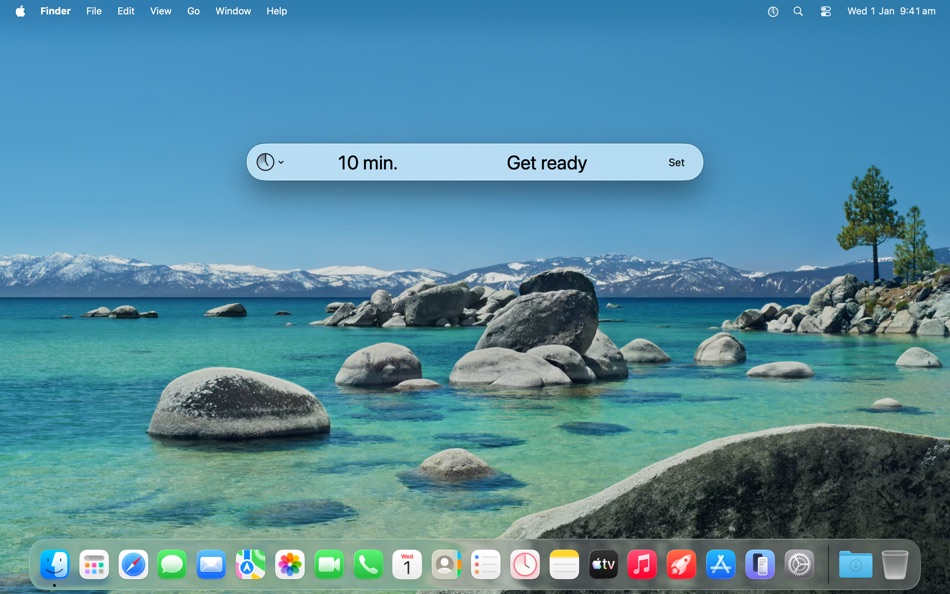
Bring it up, set a time with an optional message, then get back to what you were doing.
Features:
• A fast, clear and familiar interface that gets out of your way.
• Use h/m/s abbreviations to specify a relative time, e.g. 3m 30. Or use colon notation such as to specify a time of day, e.g. 6:30. When you’re done, the time becomes a clear, easy-to-read format.
• Make minor adjustments to the time with the up & down arrow keys, and by 10-minute increments by holding the Command key.
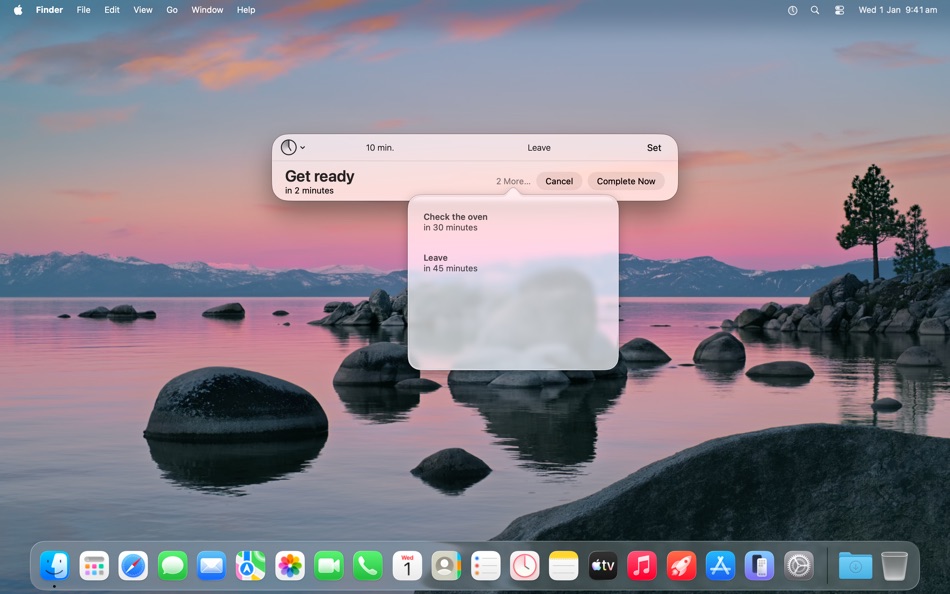
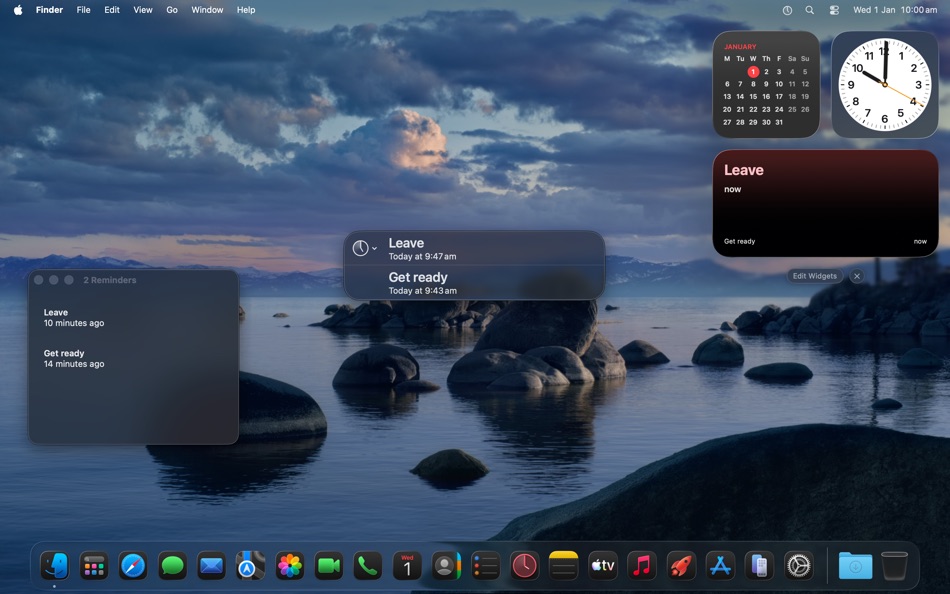
• Keep track of multiple reminders in a way that best suits your workflow, using a popover, window, or widget.
• Activate Quickly using the app icon, the menu bar or a system-wide keyboard shortcut.
• Use a system alert sound, or add your own.
• Supports dark mode.
A single in-app purchase adds more features:
• Integration with the Reminders app to have Quickly reminders across all of your devices.
• Keep frequently-used reminders as favourites, and set using numbered keyboard shortcuts.
• Select favourites and recents from the menu bar.
• To get your attention, you can choose to show the reminder in a dedicated alert window instead.
• Automate Quickly with the Shortcuts app or AppleScript.
Ad
Skjermbilder
Dette er nytt
- Versjon: 2.1.3
- Oppdatert:
- • Added an "Open at login" setting
• The alert window is now resizable
• Fixed an issue where the alert window would still appear after cancelling or completing a reminder
• Fixed an issue where script handlers that control Quickly (such as creating a new reminder) would hang. As a result of this, errors thrown by script handlers no longer affect Quickly.
Kommentarer (0)
Vær den første til å kommentere 🌟
Prishistorie
-
* Kjøp i appen - I dag: Gratis
- Minimum: Gratis
- Maksimalt: Gratis
Spor priser
Ad
Utvikler
- Philip Marell
- Plattformer: macOS Apper (1)
- Lister: 0 + 0
- Poeng: 0 + 0 ¡
- Rangeringer: 0
- Anmeldelser: 0
- Kommentarer: 0
- Rabatter: 0
- Videoer: 0
- RSS: Abonner
Poeng (0)
0 ☹️
Rangeringer (0)
0 ☹️
Lister (0)
0 ☹️
- Quickly
Anmeldelser (0)
Bli den første til å vurdere 🌟
Tilleggsinformasjon
- Versjon: 2.1.3
- Kategori:
macOS Apper›Produktivitet - OS:
macOS,macOS 10.14.4 og nyere - Størrelse:
7 Mb - Språk som støttes:
English - Egnethet:
4+ - Mac App Store Vurdering:
0 - Oppdatert:
- Utgivelsesdato:
Kontakter
- Nettsted:
 https://philmarell.com/quickly
«Quickly». Plattform: macOS. Kategori: Produktivitet. Utvikler: «Philip Marell». Første utgivelse: . Siste oppdatering: . Gjeldende pris: gratis. Denne tittelen har ennå ikke mottatt vurderinger eller anmeldelser på AppAgg. Tilgjengelige språk: English. AppAgg sporer prishistorikk, rangeringer og tilbakemeldinger fra brukere for «Quickly». Følg fremtidige rabatter og oppdateringer via RSS. AppAgg er ikke vert for applikasjoner eller distribuerer programvare. Alle varemerker, logoer og skjermbilder tilhører deres respektive eiere.
Quickly Kort nettadresse: Kopiert!- 🌟 Dele
- Mac App Store
Du vil kanskje også like
-
- QuickLy Server
- macOS Apper: Produktivitet Av: Samuel Atana
- $0.99
- Lister: 0 + 0 Rangeringer: 0 Anmeldelser: 0
- Poeng: 0 + 0 Kommentarer: 0 Versjon: 1.2.2 With the Quickly app on iPhone and Quickly Server installed on your computer, you can easily control presentations, PowerPoint slides, Teams meetings, and remote work sessions. Perfect ⥯
-
- TextGetter - Copy text quickly
- macOS Apper: Produktivitet Av: 伟坤 方
- * Gratis
- Lister: 0 + 1 Rangeringer: 0 Anmeldelser: 0
- Poeng: 2 + 0 Kommentarer: 0 Versjon: 1.3.0 TextGetter allows you to quickly copy any text on the screen, whether it's in images, videos, menus or interfaces, making it possible to directly copy text. Feature - Innovative ... ⥯
-
- ToMenu - New&Move File Quickly
- macOS Apper: Produktivitet Av: 仕华 罗
- $1.99
- Lister: 0 + 0 Rangeringer: 0 Anmeldelser: 0
- Poeng: 0 + 0 Kommentarer: 0 Versjon: 1.6.0 Power Menu for Finder ToMenu is a highly configurable Finder extension that adds powerful actions to the right click menu and toolbar within Finder - this makes it quick and easy to do ⥯
-
- Static Copy
- macOS Apper: Produktivitet Av: Ebey Tech LLC
- $1.99
- Lister: 0 + 2 Rangeringer: 0 Anmeldelser: 0
- Poeng: 14 + 0 Kommentarer: 0 Versjon: 1.5 Quickly copy text with one click! Static Copy provides a user adjustable list of text, where text can be copied either from the app's main window or the embedded menu bar. Use the ... ⥯
-
- Notes.ai
- macOS Apper: Produktivitet Av: Meisheng Zhou
- * Gratis
- Lister: 1 + 2 Rangeringer: 0 Anmeldelser: 0
- Poeng: 8 + 0 Kommentarer: 0 Versjon: 3.0.2 Quickly and easily transcribe audio files into organized transcripts using local AI models. Whether you're recording a meeting, lecture, or other important audio, Notes.ai quickly and ... ⥯
-
- Menu Bar Calendar
- macOS Apper: Produktivitet Av: Sindre Sorhus
- Gratis
- Lister: 1 + 1 Rangeringer: 0 Anmeldelser: 0
- Poeng: 4 + 0 Kommentarer: 0 Versjon: 1.6.2 Quickly access a monthly calendar from your menu bar. You can click a date in the calendar to reveal it in the Calendar app or Google Calendar. The calendar displays dates and days in ... ⥯
-
- Folder Cleaner
- macOS Apper: Produktivitet Av: 永康 李
- Gratis
- Lister: 0 + 0 Rangeringer: 0 Anmeldelser: 0
- Poeng: 5 + 0 Kommentarer: 0 Versjon: 7.5.16 Quickly scan folders, list the files in them according to categories, and you can select unnecessary files to clean up. Default scannable path 1. Home folder 2. Desktop 3. Downloads 4. ⥯
-
- Rename-a-Batch
- macOS Apper: Produktivitet Av: Tractus
- $0.99
- Lister: 0 + 0 Rangeringer: 0 Anmeldelser: 0
- Poeng: 0 + 0 Kommentarer: 0 Versjon: 4.3 Quickly rename, and/or relocate large batches of files! This app is extremely simple, yet extremely powerful. Rename thousands of files in just seconds! Save yourself hours! Lots of ... ⥯
-
- WPXO for Mac OS X
- macOS Apper: Produktivitet Av: Dale Gillard
- $2.99
- Lister: 0 + 0 Rangeringer: 0 Anmeldelser: 0
- Poeng: 0 + 0 Kommentarer: 0 Versjon: 1.1.3 Quickly shows you which Office documents you've worked on recently (Requires Microsoft Office 2016 or 2011) WPXO - convenience and speed! Simple, speedy menu bar application Up to 50 ... ⥯
-
- Blik · easy file organization
- macOS Apper: Produktivitet Av: Patrick Smith
- Gratis
- Lister: 0 + 0 Rangeringer: 0 Anmeldelser: 0
- Poeng: 0 + 0 Kommentarer: 0 Versjon: 1.5.5 Quickly open your most important files with Blik. Do you have lots of folders and files that you work with on your Mac? Do you juggle numerous projects? Do you collaborate with others ... ⥯
-
- Quick View Calendar
- macOS Apper: Produktivitet Av: Jeffrey Morgan
- Gratis
- Lister: 0 + 0 Rangeringer: 0 Anmeldelser: 0
- Poeng: 2 + 0 Kommentarer: 0 Versjon: 2.4 Quickly view a calendar of the current month from the menu bar. Today's date is highlighted in the current system preference highlight color. The week starts on the day selected by the ⥯
-
- Calinsight - Menu Bar Calendar
- macOS Apper: Produktivitet Av: Magus Inc.
- $12.99
- Lister: 0 + 1 Rangeringer: 0 Anmeldelser: 0
- Poeng: 0 + 0 Kommentarer: 0 Versjon: 1.2.8 Quickly manage the events and reminders from the menu bar in calendar. Finished events and already completed reminders are displayed in a graph that helps to create an effective ... ⥯
-
- RuneSigner 4 - PDF Signer
- macOS Apper: Produktivitet Av: Runecats
- $3.99
- Lister: 0 + 0 Rangeringer: 0 Anmeldelser: 0
- Poeng: 0 + 0 Kommentarer: 0 Versjon: 4.0 Quickly fill and sign any PDF form or agreement! No need to print and scan to fill out PDF forms! RuneSigner is great for: - Filling out and saving any PDF Form - Signing and ... ⥯
-
- Next Meeting
- macOS Apper: Produktivitet Av: Nathan Spindel
- Gratis
- Lister: 0 + 0 Rangeringer: 0 Anmeldelser: 0
- Poeng: 0 + 0 Kommentarer: 0 Versjon: 2.7 Quickly see your next meeting right in your menu bar with Next Meeting. The meetings come from the built-in macOS Calendar app so it works with Google, iCloud, Exchange, Facebook, ... ⥯