
| Concepteur: | Pawel Jankiewicz (2) | ||
| Prix: | $9.99 | ||
| Classements: | 0 | ||
| Avis: | 0 Rédiger un avis | ||
| Commentaires: | 0 Publier un commentaire | ||
| Listes: | 0 + 0 | ||
| Points: | 0 + 0 ¡ | ||
| Mac App Store | |||
Description

Why TempFolder?
Cluttered Systems Be Gone: Temporary files accumulate, slowing down your Mac and making it harder to find what you truly need. TempFolder isolates them.
Reclaim Wasted Time: Manually cleaning up is tedious and often forgotten. TempFolder automates this, freeing you from digital disorganization.
Restore Lost Focus: A messy digital workspace is distracting. TempFolder helps maintain a clean environment so you can concentrate on important tasks.
Powerful Features, Simple Interface:
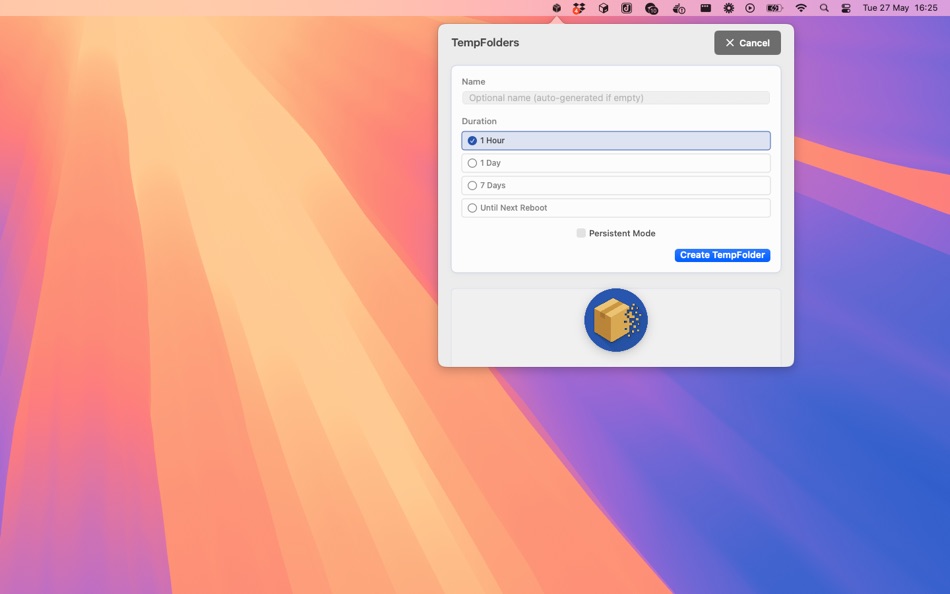
Create "TempFolders" Instantly: Quickly generate isolated storage spaces. Name them, choose an expiration, and you're set. Perfect for downloads, quick projects, or any temporary need.
Automatic Expiration & Cleanup: Set TempFolders to self-destruct after a specific time (e.g., 1 hour, 1 day, 7 days) or until the next Mac reboot. Expired TempFolders and their contents are automatically moved to the Trash, ensuring your system stays tidy.
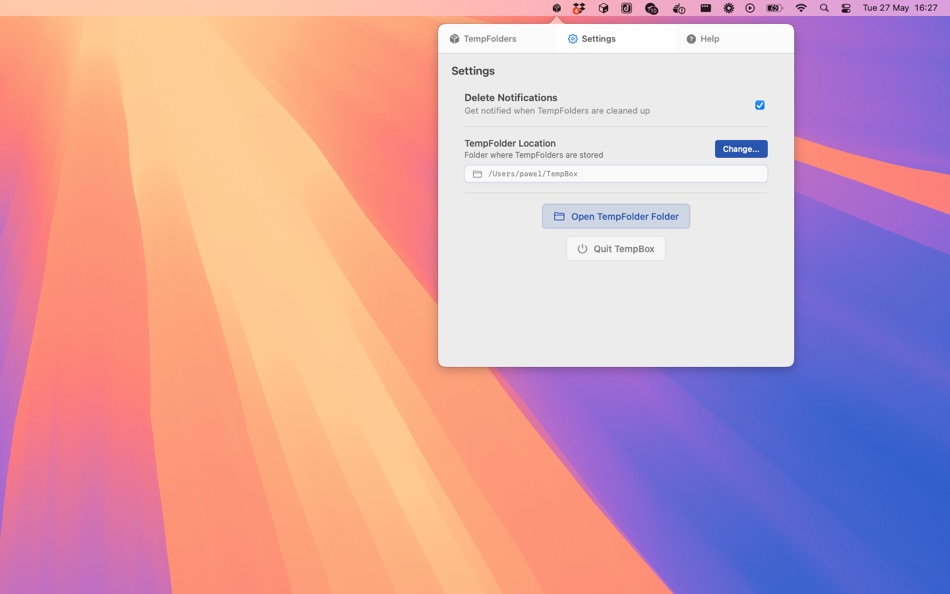
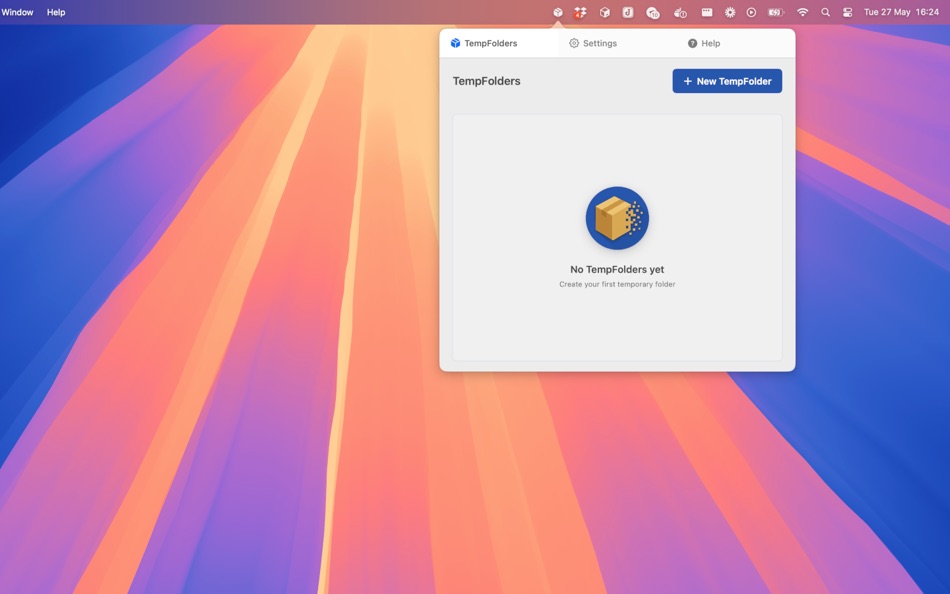
Seamless Menu Bar Access: Manage all your TempFolders directly from the macOS menu bar. Create new ones, check remaining times, open folders, or delete them manually with ease.
Benefits You'll Love:
Stay Organized: Keep your primary folders (Desktop, Downloads) clean by isolating temporary items in their own auto-managed spaces.
Save Disk Space: Automatic cleanup prevents forgotten temporary files from hogging valuable storage.
Boost Productivity: Less clutter means fewer distractions and a smoother, more efficient workflow.
Peace of Mind: Work confidently, knowing that temporary items will be handled automatically without requiring manual intervention.
Download TempFolder today and experience a cleaner, more organized, and more productive Mac!
Ad
Captures d'écran

Nouveautés
- Version: 1.0
- Mis à jour:
Historique des prix
- Aujourd’hui: $9.99
- Minimum: $9.99
- Maximum: $9.99
Suivre l'évolution des prix
Ad
Concepteur
- Pawel Jankiewicz
- Plateformes: macOS Applications (2)
- Listes: 0 + 0
- Points: 0 + 0 ¡
- Classements: 0
- Avis: 0
- Commentaires: 0
- Remises: 0
- Vidéos: 0
- RSS: S'abonner
Points (0)
0 ☹️
Classements (0)
0 ☹️
Listes (0)
0 ☹️
- TempFolder
Avis (0)
Soyez le premier à donner votre avis 🌟
Commentaires (0)
Soyez le premier à commenter 🌟
Informations supplémentaires
- Version: 1.0
- Catégorie:
macOS Applications›Productivité - Systèmes d'exploitation:
macOS,macOS 13.0 ou version ultérieure - Taille:
1 Mb - Langues prises en charge:
English - Classification du contenu:
4+ - Mac App Store Note:
0 - Mis à jour:
- Date de sortie:
Contacts
- Site Web:
 https://zenide.ai/products/tempfolder/
«TempFolder». Plateforme : macOS. Catégorie : Productivité. Développeur : «Pawel Jankiewicz». Première version : . Dernière mise à jour : . Prix actuel : $9.99. Prix le plus bas enregistré : $9.99. Prix le plus élevé enregistré : $9.99. Ce titre n'a pas encore reçu de notes ou d'avis sur AppAgg. Langues disponibles : English. AppAgg suit l'historique des prix, les notes et les commentaires des utilisateurs pour «TempFolder». Suivez les futures réductions et mises à jour via RSS. AppAgg n'héberge pas d'applications et ne distribue pas de logiciels. Toutes les marques, logos et captures d'écran appartiennent à leurs propriétaires respectifs.
TempFolder URL courte: Copié!- 🌟 Partager
- Mac App Store
Découvrez également
- Nouvel
- Folder Commander
- macOS Applications: Productivité De: Thomas Weschke
- $7.99
- Listes: 0 + 0 Classements: 0 Avis: 0
- Points: 0 + 0 Commentaires: 0 Version: 1.1 Folder Commander helps you create consistent, repeatable folder structures in seconds. If you regularly set up the same folders for projects, clients, or workflows, Folder Commander ... ⥯
-
- Folder Slice - File Shortcuts
- macOS Applications: Productivité De: 鸿呈 吉
- * Gratuit
- Listes: 1 + 0 Classements: 0 Avis: 0
- Points: 5 + 0 Commentaires: 0 Version: 1.10.1 Do you often find your workflow interrupted just to search for a file? Folder Slice brings you a brand new experience: instantly call up a floating file window anytime, anywhere. No ... ⥯
-
- Temp Notes
- macOS Applications: Productivité De: Ebey Tech LLC
- $0.99
- Listes: 0 + 1 Classements: 0 Avis: 0
- Points: 14 + 0 Commentaires: 0 Version: 1.2 Sometimes I find myself needing to jot some quick notes or capture a screenshot. A lot of times I don't intend to keep the content, but need it readily accessible for a bit. ... ⥯
-
- Folder Cleaner
- macOS Applications: Productivité De: 永康 李
- Gratuit
- Listes: 0 + 0 Classements: 0 Avis: 0
- Points: 5 + 0 Commentaires: 0 Version: 7.5.16 Quickly scan folders, list the files in them according to categories, and you can select unnecessary files to clean up. Default scannable path 1. Home folder 2. Desktop 3. Downloads 4. ⥯
-
- Folder index
- macOS Applications: Productivité De: iLike computing limited
- $2.99
- Listes: 0 + 0 Classements: 0 Avis: 0
- Points: 1 + 0 Commentaires: 0 Version: 4.1 Need to print a list of files in a folder? Have a directory of files on the web that you want to make an index.html page for? This is what Folder index does. Choose the Folders. Create ⥯
-
- Folder Subdivide for Mac OS X
- macOS Applications: Productivité De: feb19
- Gratuit
- Listes: 0 + 0 Classements: 0 Avis: 0
- Points: 1 + 0 Commentaires: 0 Version: 1.0 You'll drag/drop a folder to this, then create sub-folders below and subdivide root folder's files. ⥯
-
- Folder ZIP Widget
- macOS Applications: Productivité De: Keen Widget
- * Gratuit
- Listes: 0 + 0 Classements: 0 Avis: 0
- Points: 0 + 0 Commentaires: 0 Version: 1.03 Tired of wasting time zipping folders one by one? Say goodbye to manual file compression and hello to efficiency! With Folder ZIP Widget, you can batch zip multiple folders ... ⥯
-
- Folder Hub - File browser
- macOS Applications: Productivité De: 志远 杨
- * Gratuit
- Listes: 0 + 1 Classements: 0 Avis: 0
- Points: 8 + 0 Commentaires: 0 Version: 2.5.0 Folder Hub is an app hidden under the MacBook's notch, used for quick access and retrieval of files and folders within the working directory. What problems does Folder Hub solve? - In ... ⥯
-
- Folder To Text
- macOS Applications: Productivité De: metajournal, llc
- Gratuit
- Listes: 0 + 0 Classements: 0 Avis: 0
- Points: 1 + 0 Commentaires: 0 Version: 1.0 Folder To Text instantly converts your folders and files into clean, organized text documents. Whether you're a developer sharing code, a researcher documenting projects, or anyone who ⥯
-
- Folder Quick Look
- macOS Applications: Productivité De: App ahead GmbH
- $3.99
- Listes: 0 + 1 Classements: 0 Avis: 0
- Points: 2 + 0 Commentaires: 0 Version: 1.6 Preview folder and archive contents (ZIP, RAR, and more) instantly in macOS Quick Look. Just select a folder and press the Space bar. Support If you need help or want to make a feature ⥯
-
- Folder Ordering
- macOS Applications: Productivité De: 朝品 冯
- $0.99
- Listes: 0 + 0 Classements: 0 Avis: 0
- Points: 0 + 0 Commentaires: 0 Version: 1.0 ## Once you organize a folder full of various documents and files, they are easy to find and share. With File Sorting, you can quickly organize all your files by size simply by ... ⥯
-
- folder.me
- macOS Applications: Productivité De: Irakli Verdzadze
- Gratuit
- Listes: 0 + 0 Classements: 0 Avis: 0
- Points: 1 + 0 Commentaires: 0 Version: 1.1.3 Notion like editor for creating web pages and personal documents. - Create pages for pretty much everything - Publish with just a few clicks - Simple form builder - Create contact, ... ⥯
-
- Folder Bar
- macOS Applications: Productivité De: 栋梁 周
- * Gratuit
- Listes: 0 + 0 Classements: 0 Avis: 0
- Points: 0 + 0 Commentaires: 0 Version: 1.0.2 Show file menu on menu bar 1. You can add multiple folders to the menu bar. 2. Click on a file in the menu to open it. 3. You can drag the file in the menu to any location. 4. You can ... ⥯
-
- Multiple Folder Creator
- macOS Applications: Productivité De: Ben Churchill
- $2.99
- Listes: 0 + 0 Classements: 0 Avis: 0
- Points: 0 + 0 Commentaires: 0 Version: 1.2 Multiple Folder Creator is the fastest way to make exactly the folders you need all at once. Multiple Folder Creator saves you hours of manual clicking. Just paste in your folder names ⥯