
| 開發人員: | Ebey Tech LLC (57) | ||
| 價錢: | $1.99 | ||
| 排名: | 0 | ||
| 評測: | 0 寫評論 | ||
| 清單: | 0 + 0 | ||
| 點數: | 0 + 0 ¡ | ||
| Mac App Store | |||
描述

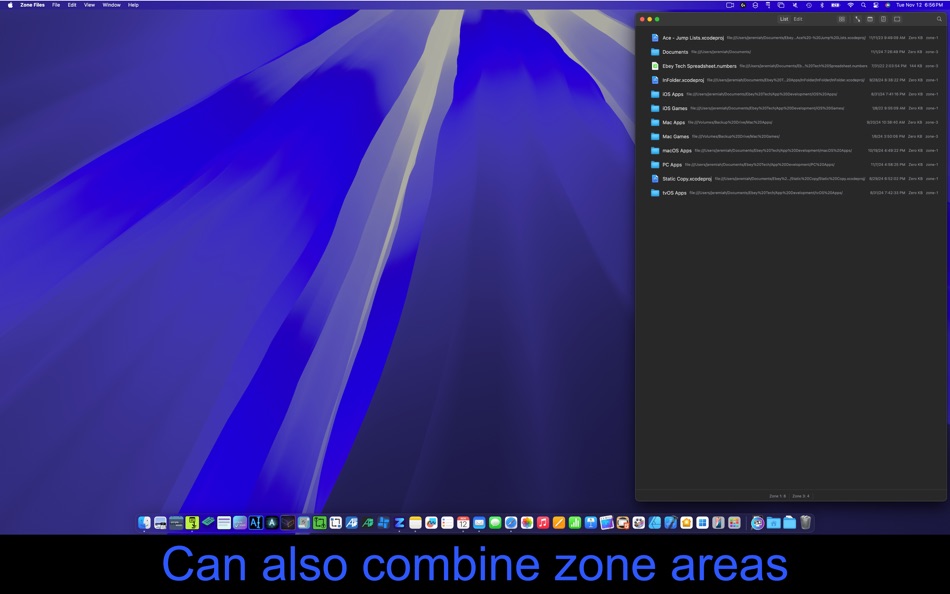
Files and folders can be added to a zone by first placing the window in a zone position and then dragging/dropping content to the app. Additionally using the "Edit" tab will allow users to add content to desired zone without moving the window position. Each zone has a dedicated "Add" button to add files/folders, as well as a "Clear" button to clear that zone's content.
Under the List tab, there are two layouts to choose from, list-view and grid-view. In the toolbar there are also toggle buttons to turn on/off additional properties, like Path, Date, and Size. To search an active zone list's content, click the magnify button and type in appropriate file/folder name you're looking for. Zone content is dynamically updated to include matches. Additionally the search field will remain active while dragging the Zone Files app window to other zone trigger locations.
Files and folders in the list have multiple right-click options, including "Pin" - which will keep the file/folder at the top and persist in the list regardless of which zone position is active. "Move to Zone" - which allows users to switch a file/folder's host zone. "Remove" - which will remove the file/folder from the app, but won't delete the content from the file system.
Instructions for app operation:
1.) Launch app.
2.0) Add files/folders to Zone Files app.
2.1) Option-1: Click on List tab. Position window in one of the screen corners or the center of the screen. Drag/drop content to the app.
2.2) Option-2: Click on Edit tab. Use "Add" button in desired Zone to add Files/Folders to the app. To see newly added content, drag the app window to that zone's position (e.g. bottom right corner).
3.) To load the different user added content, drag the app window to zone areas (upper left/right, bottom left/right, and center). If dragging from one monitor to another, the app should be dropped, then dragged again, so the app registers the monitor change.
4.) Change view layout via the toolbar button to either list-view or grid-view.
5.) Click properties buttons (Path, Date, Size, Zone #) to show desired info.
6.) Double-click a file/folder to launch the content.
螢幕擷取畫面




新功能
- 版本: 1.0
- 發佈日期:
價錢
- 今天: $1.99
- 最小值: $1.99
- 最大值: $1.99
追蹤票價
開發人員
- Ebey Tech LLC
- 平台: iOS 應用程式 (1) macOS 應用程式 (41) Windows 應用程式 (15)
- 清單: 4 + 5
- 點數: 164 + 29 ¡
- 排名: 0
- 評測: 0
- 折扣: 0
- 影片: 0
- RSS: 訂閱
點數
0 ☹️
排名
0 ☹️
清單
0 ☹️
評測
成為第一個評論 🌟
其他資訊
- 版本: 1.0
- 類別 :
macOS 應用程式›生產應用 - OS:
macOS,macOS 14.0 以上版本 - 大小:
1 Mb - 支援的語言 :
English - 內容分級:
4+ - Mac App Store 評分:
0 - 發佈日期:
- 發行日期:
聯絡人
- 個人網站:
 https://ebeytech.com
Zone Files 縮短網址: 已複製!- 🌟 分享
- Mac App Store
你可能還喜歡
-
- Zone
- macOS 應用程式: 生產應用 由: Suganth Sengottuvelappan
- $7.99
- 清單: 0 + 0 排名: 0 評測: 0
- 點數: 0 + 0 版本: 3 You know that feeling when you sit down to finally tackle your to-do list, but somehow end up three YouTube videos deep into "how penguins sleep"? Yeah, we've all been there. You block ⥯
-
- Files Backup&Recovery
- macOS 應用程式: 生產應用 由: 永康 李
- $4.99
- 清單: 0 + 0 排名: 0 評測: 0
- 點數: 0 + 0 版本: 2.7.15 If some files are important to you, to prevent losing them, you can use Files Backup&Recovery to back them up, and when you need them, you can use Files Backup&Recovery to restore ... ⥯
-
- Large Files Finder
- macOS 應用程式: 生產應用 由: Mariia Shumska
- 免費
- 清單: 1 + 0 排名: 0 評測: 0
- 點數: 6 + 0 版本: 1.4.7 Large Files Finder will help you instantly find and delete large files that occupy your hard drive. This tiny, flexible, hard-working tool free ups gigabytes of wasted disk space with ... ⥯
-
- MegaDisk Send files Extension
- macOS 應用程式: 生產應用 由: SSA
- 免費
- 清單: 0 + 0 排名: 0 評測: 0
- 點數: 1 + 0 版本: 1.0 MegaDisk is a fast and secure file transfer system that you can use to quickly upload your data to the cloud and send a link directly to your friends. No more worrying about file size ... ⥯
-
- MenuTab New Files
- macOS 應用程式: 生產應用 由: 颖淑 唐
- $1.99
- 清單: 0 + 0 排名: 0 評測: 0
- 點數: 0 + 0 版本: 1.02 Fast and easy create a new file from status bar.works like new file functionality in windows After app run, you can clicking on the icon a menu is shown the files.very easy. After ... ⥯
-
- Desktop Files Box
- macOS 應用程式: 生產應用 由: 栋梁 周
- * 免費
- 清單: 2 + 1 排名: 0 評測: 0
- 點數: 7 + 0 版本: 1.2.3 This is a small, efficient and time-saving desktop file assistant 1. Multiple labels or windows can be established to map files everywhere to the desktop display. 2. Can support name, ... ⥯
-
- HighTop Files
- macOS 應用程式: 生產應用 由: Ryan Hanson
- * 免費
- 清單: 2 + 1 排名: 0 評測: 0
- 點數: 4 + 0 版本: 1.4 HighTop is the most convenient way to work with favorite local folders and Dropbox. Avoid hunting for Finder windows, digging up a buried Desktop, or loading a browser tab. Simply put, ⥯
-
- SNote - Encrypted Notes, Files
- macOS 應用程式: 生產應用 由: INCOG, LLC
- 免費
- 清單: 1 + 0 排名: 0 評測: 0
- 點數: 4 + 9 (4.3) 版本: 25.12.01 SNote is a Privacy focused, End-to-End Encrypted workspace where you can write, plan, collaborate and get organized - it allows you to take notes, store files, add tasks, manage ... ⥯
-
- FTP Client - Files location
- macOS 應用程式: 生產應用 由: Anders Borum ApS
- 免費
- 清單: 0 + 1 排名: 0 評測: 0
- 點數: 4 + 21 (5.0) 版本: 2025.33 FTP Files puts your server content in the Files app & Finder with minimum setup or hassle. Open and edit with any app at your convenience. The app supports FTP, SFTP and FTPS with ... ⥯
-
- Time Zone Converter and Clock
- macOS 應用程式: 生產應用 由: Anton Skorniakov
- $4.99
- 清單: 1 + 1 排名: 0 評測: 0
- 點數: 0 + 0 版本: 1.8.0 Calculate exact time anywhere in the world across time zones. Use the world clock to see the current time around the world. Please try our free web app with the same functionality at ... ⥯
-
- My Files for Samsung Galaxy
- macOS 應用程式: 生產應用 由: Raymond NG
- * 免費
- 清單: 1 + 0 排名: 0 評測: 0
- 點數: 3 + 0 版本: 2.2.0 * The Easiest, Fastest way to Transfer Files between your Mac and Android Phone or Tablet. * Supports Popular Android Devices such as Samsung, Google, Sony, LG, Motorola, OnePlus, etc. ⥯
-
- Trickster: Recently Used Files
- macOS 應用程式: 生產應用 由: Apparent Software Inc.
- $29.99
- 清單: 0 + 0 排名: 0 評測: 0
- 點數: 4 + 0 版本: 3.9.11 Trickster - Quickly act on relevant recent files, folders, and apps If you work with files at all, Trickster is the ultimate productivity booster for you. What are others saying about ... ⥯
-
- Remote Files Server
- macOS 應用程式: 生產應用 由: GGM41
- 免費
- 清單: 1 + 0 排名: 0 評測: 0
- 點數: 2 + 0 版本: 1.2 Remote Files Server - A server for "Remote Files" IOS Client (Remote Files) Remote Files IOS Client : * Search you Mac using Spotlight from your phone, anywhere, anytime * Access your ... ⥯
-
- PDF to Text : Batch Extract Text from PDF files for Mac OS X
- macOS 應用程式: 生產應用 由: RootRise Technologies Pvt. Ltd.
- 免費
- 清單: 1 + 0 排名: 0 評測: 0
- 點數: 1 + 0 版本: 1.1 PDF to Text is a fantastic utility to batch convert PDF documents into text formats. PDF to Text extracts text contents of PDF document into Plain Text UTF8 and UTF16 format (.txt), ... ⥯