
| Nhà phát triển: | 谦 陈 (9) | ||
| Giá bán: | $3.99 | ||
| Xếp hạng: | 0 | ||
| Đánh giá: | 0 Viết đánh giá | ||
| Danh sách: | 0 + 0 | ||
| Điểm: | 0 + 0 ¡ | ||
| Mac App Store | |||
Mô tả

WHAT IT DOES
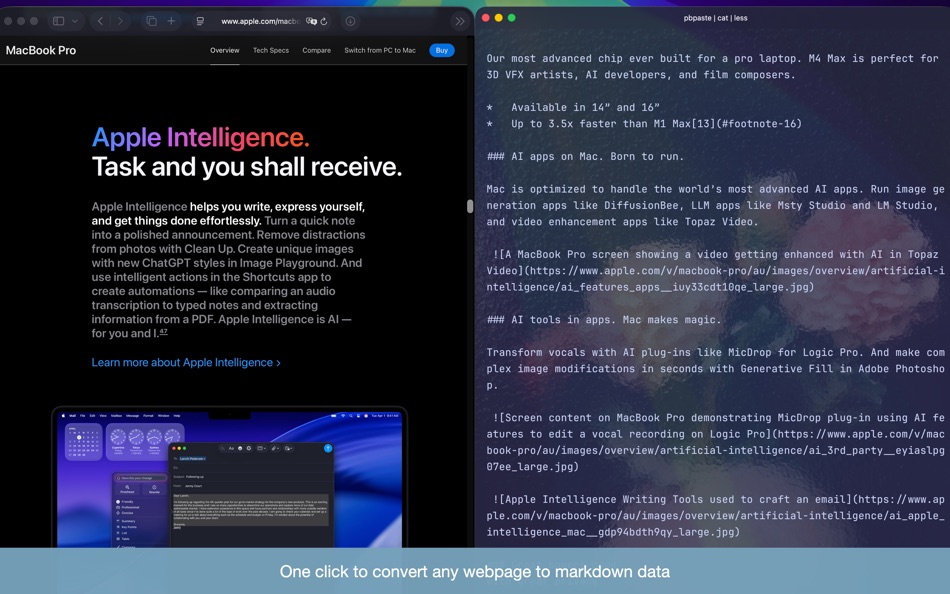
Copy to Markdown extracts the main article content from web pages and converts it to clean, formatted Markdown - perfect for feeding into AI tools, note-taking apps, or documentation workflows.
KEY FEATURES
• One-Click Extraction: Click the toolbar button or press the keyboard shortcut (Command+Shift+M by default) to copy page content as Markdown
• Smart Content Detection: Automatically identifies and extracts the main article, filtering out ads, navigation, and clutter
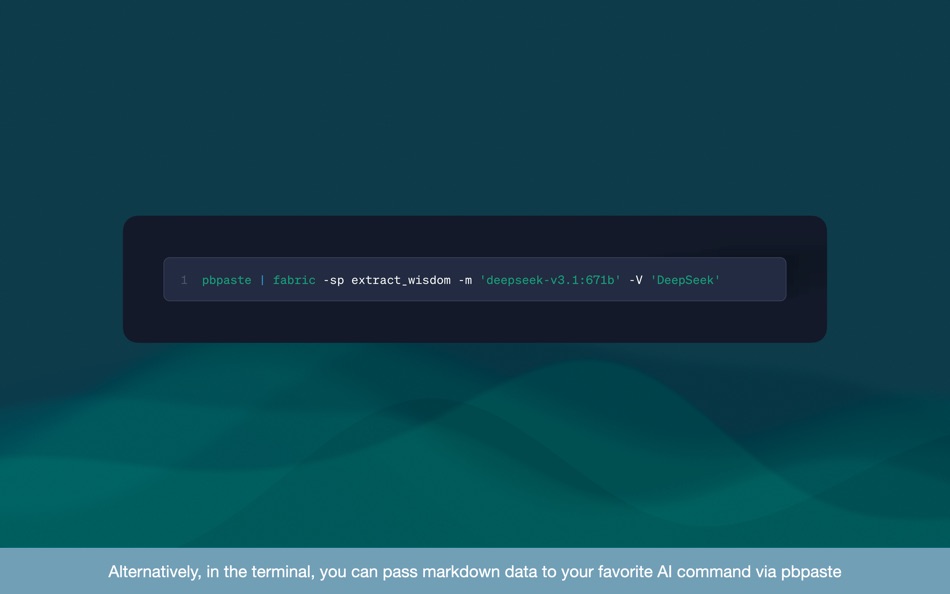
• AI-Ready Output: Markdown format works seamlessly with Claude, DeepSeek and any other AI services
• Handles Complex Pages: Intelligently merges split article sections that some news sites use
• Offline Processing: All extraction happens locally in your browser - no data sent to external servers
USE CASES
• Quickly grab article content for AI analysis or summarization
• Archive web content in plain text format
• Extract documentation for offline reference
• Convert blog posts for import into note-taking apps
• Feed web content into AI assistants without copy-paste formatting issues
PRIVACY
All content extraction and conversion happens locally on your device. No data is transmitted to external servers.
Ảnh chụp màn hình


Tính năng mới
- Phiên bản: 1.0
- Cập nhật:
Giá bán
- Hôm nay: $3.99
- Tối thiểu: $3.99
- Tối đa: $3.99
Theo dõi giá
Nhà phát triển
- 钱 陈
- Nền tảng: iOS Ứng dụng (1) macOS Ứng dụng (8)
- Danh sách: 0 + 0
- Điểm: 0 + 0 ¡
- Xếp hạng: 0
- Đánh giá: 0
- Giảm giá: 0
- Video: 0
- RSS: Đăng ký
Điểm
0 ☹️
Xếp hạng
0 ☹️
Danh sách
0 ☹️
Đánh giá
Hãy là người đầu tiên đánh giá 🌟
Thông tin bổ sung
- Phiên bản: 1.0
- Danh mục:
macOS Ứng dụng›Tiện ích - HĐH:
macOS,macOS 15.0 trở lên - Kích thước:
3 Mb - Ngôn ngữ được hỗ trợ:
English - Xếp hạng nội dung:
4+ - Mac App Store Xêp hạng:
0 - Cập nhật:
- Ngày phát hành:
Danh bạ
 https://design.wordpress.com/copy-to-markdown-safari-web-clipper-extension/Copy to Markdown URL ngắn: Đã sao chép!
- 🌟 Chia sẻ
- Mac App Store
Bạn cũng có thể thích
-
- Copy On Select for Safari
- macOS Ứng dụng: Tiện ích Bởi: Pierre Stanislas
- $1.99
- Danh sách: 0 + 0 Xếp hạng: 0 Đánh giá: 0
- Điểm: 0 + 0 Phiên bản: 1.0 Copy On Select is a powerful and intuitive browser extension designed to streamline your text copying workflow. Say goodbye to tedious right-clicks and context menus. With Copy On ... ⥯
-
- Markdown Panda
- macOS Ứng dụng: Tiện ích Bởi: Tap4Mobile do Brasil
- Miễn phí
- Danh sách: 0 + 0 Xếp hạng: 0 Đánh giá: 0
- Điểm: 2 + 0 Phiên bản: 2.3.0 Markdown Panda - The elegant Markdown viewer for macOS Discover the most beautiful way to read and view Markdown files on macOS. Markdown Panda is the perfect companion for viewing ... ⥯
-
- Markdown Preview - Quick Look
- macOS Ứng dụng: Tiện ích Bởi: Anybox LTD
- $2.99
- Danh sách: 1 + 0 Xếp hạng: 0 Đánh giá: 0
- Điểm: 2 + 0 Phiên bản: 1.8 Markdown Preview provides a Quick Look extension to preview Markdown files in Finder. Before started, you will need to enable Quick Look extension in System Settings. Afterwards you ... ⥯
-
- copy everything
- macOS Ứng dụng: Tiện ích Bởi: ALEVLA SOFTWARE SOLUTIONS S.R.L.
- Miễn phí
- Danh sách: 0 + 0 Xếp hạng: 0 Đánh giá: 0
- Điểm: 0 + 0 Phiên bản: 1.0 copy everything lets you do one simple thing: copy text that is not copiable. And it does this very well. With simple interface and simple control, you can get hold of any type of ... ⥯
- mới
- Copy Stacks
- macOS Ứng dụng: Tiện ích Bởi: Aysha Sehar
- Miễn phí
- Danh sách: 0 + 0 Xếp hạng: 0 Đánh giá: 0
- Điểm: 0 + 0 Phiên bản: 1.0 Copy Stacks is your ultimate clipboard manager, designed to supercharge your productivity. Whether you're a student, writer, coder, or multitasker, Copy Stacks helps you save, ... ⥯
-
- Copy Random Files
- macOS Ứng dụng: Tiện ích Bởi: Chapman Shoop
- Miễn phí
- Danh sách: 0 + 0 Xếp hạng: 0 Đánh giá: 0
- Điểm: 0 + 0 Phiên bản: 1.0 Copy a random sample of files from a source folder to a destination folder. ⥯
-
- Copy Link in Markdown
- macOS Ứng dụng: Tiện ích Bởi: Tongfan Dai
- Miễn phí
- Danh sách: 0 + 0 Xếp hạng: 0 Đánh giá: 0
- Điểm: 0 + 4 (5.0) Phiên bản: 1 The app provides a Safari Extension that lets you copy the link of the webpage you're on in Markdown format simply with a tap. ⥯
-
- Copy History Mark Ⅱ
- macOS Ứng dụng: Tiện ích Bởi: kazutoshi miyasaka
- Miễn phí
- Danh sách: 1 + 0 Xếp hạng: 0 Đánh giá: 0
- Điểm: 2 + 0 Phiên bản: 2.0.6 Functions ・ Searching copy histories with texts at the Menu bar ・ Filtering copy histories with the star-mark ・ Adding a label to a copied item ・ Deleting Items ・ Shortcuts for ... ⥯
-
- Copy & Paste Clipboard: OneTap
- macOS Ứng dụng: Tiện ích Bởi: Alexander Picard
- Miễn phí
- Danh sách: 0 + 1 Xếp hạng: 0 Đánh giá: 0
- Điểm: 4 + 153 (4.7) Phiên bản: 7.1 At OneTap, our mission is to reinvent how we share content and utilize the keyboard on our iOS devices. OneTap Keyboard elevates your iOS experience with innovative OneTap Keyboard ... ⥯
-
- Copy+-Manage clipboard history
- macOS Ứng dụng: Tiện ích Bởi: 万林 彭
- Miễn phí
- Danh sách: 1 + 0 Xếp hạng: 0 Đánh giá: 0
- Điểm: 3 + 0 Phiên bản: 1.2 Automatically save your clipboard history Quickly preview recorded content Double click to copy the history content you selected Quickly search for records with keywords Rename the ... ⥯
-
- Copy URLs and Titles
- macOS Ứng dụng: Tiện ích Bởi: Yoshiko Sato
- $1.99
- Danh sách: 2 + 1 Xếp hạng: 0 Đánh giá: 0
- Điểm: 1 + 1 (5.0) Phiên bản: 2.0.0 This extension copies the URL and title. URLs and titles of multiple tabs can also be retrieved at once. This extension works on Safari. How to use the template setup screen ・Set the ... ⥯
-
- Copy Paster
- macOS Ứng dụng: Tiện ích Bởi: BIG STORY FILMMAKING SERVICE
- * Miễn phí
- Danh sách: 0 + 0 Xếp hạng: 0 Đánh giá: 0
- Điểm: 0 + 0 Phiên bản: 39 Create customized text label for One-Tap-Paste. Works well with AI Prompt, Bot Command and client message reply. Free Feature: 1. Create cross timezone Unix timestamp. 2. JSON export & ⥯
-
- File2:Text Markdown Converter
- macOS Ứng dụng: Tiện ích Bởi: Cleverson
- * Miễn phí
- Danh sách: 0 + 0 Xếp hạng: 0 Đánh giá: 0
- Điểm: 0 + 0 Phiên bản: 1.1.1 Turn any document into clean, portable Markdown or plain text without ever leaving your Mac. Discover File2Text Markdown Converter, your all-in-one solution for transforming documents, ⥯
-
- Enable Copy for Safari
- macOS Ứng dụng: Tiện ích Bởi: Denk Alexandru
- $1.99
- Danh sách: 1 + 1 Xếp hạng: 0 Đánh giá: 0
- Điểm: 2 + 1 (1.0) Phiên bản: 1.4.4 Available on all your devices, on your iPhone, iPad and Mac computer This Safari extension will re-enable copy, paste, text selection and mouse menu on all websites, even if the sites ... ⥯