
| Desenvolvedor: | 龙 金 (15) | ||
| Preço: | * Grátis | ||
| Classificações: | 0 | ||
| Resenhas: | 0 Escrever um comentário | ||
| Comentários: | 0 Postar comentário | ||
| Listas: | 1 + 0 | ||
| Pontos: | 3 + 0 ¡ | ||
| Mac App Store | |||
Descrição

## Key Features
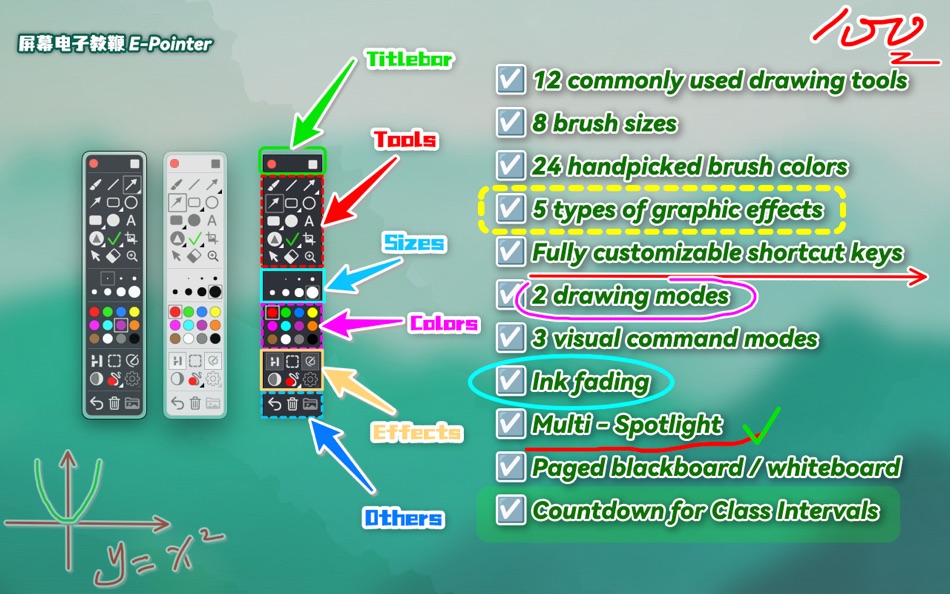
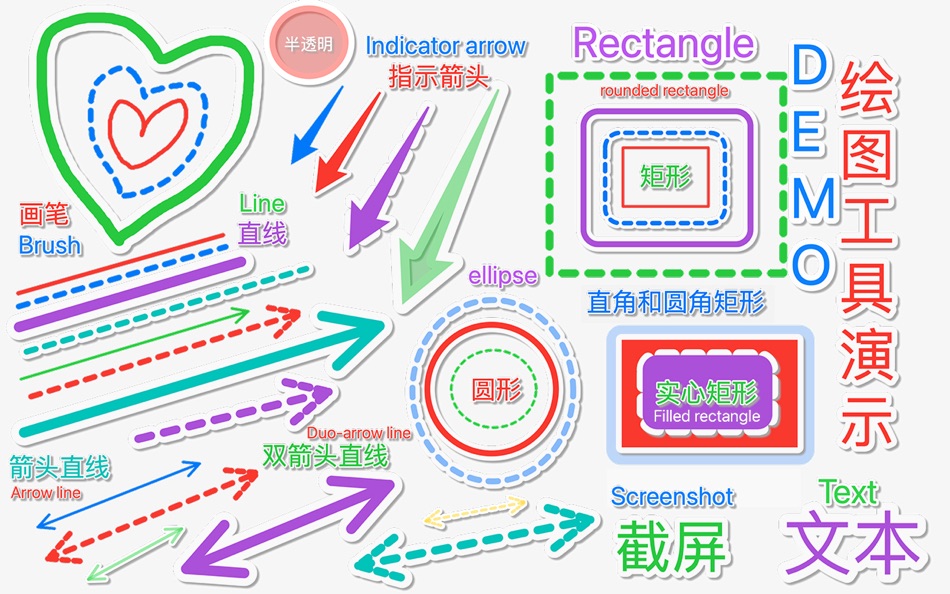
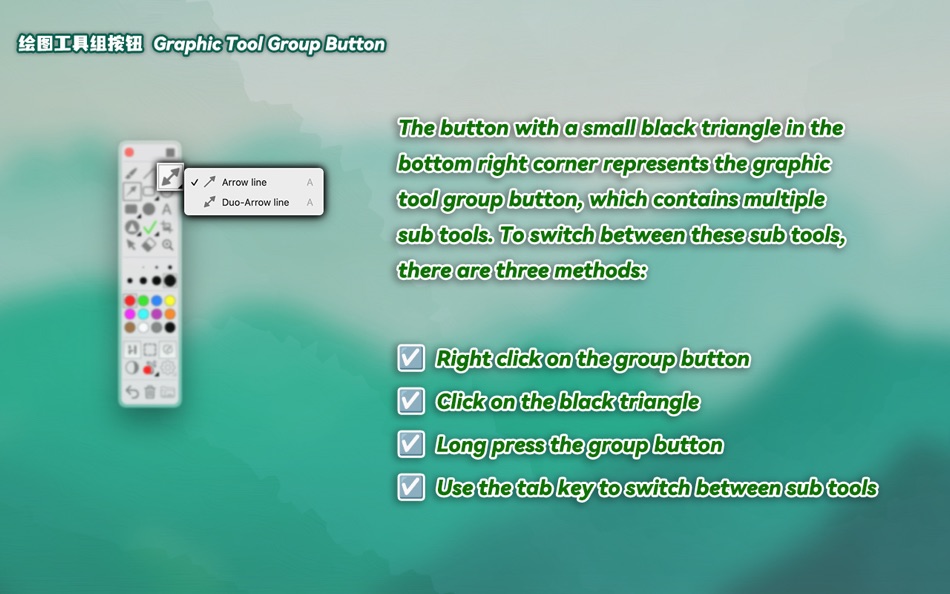
+ 12 Sets of Common Drawing Tools: Including brush (freehand curve), line, arrow (single-direction, double-direction), directional arrow, rectangle (rounded, straight), circle, solid rectangle (rounded, straight), solid circle, text, spotlight (circular, rectangular), preset icons (green checkmark, red cross), screenshot (area screenshot, full-screen screenshot), selection tool, eraser, and magnifying glass. The drawing tools are grouped and integrated, with the same shortcut key used for tools in the same group. You can cycle through sub-tools using the Tab key.
+ 8 Brush Sizes: Ranging from thin to thick, which can be quickly switched using the - and = keys.
+ 24 Carefully Selected Colors: These colors are well-suited for both dark and light modes. It also supports customizing 10 colors with shortcuts, with the default being Command + number keys.
+ 5 Graphic Effects: Shadow, dashed line, outline, semi-transparency, and Ink Fade. Shadow, dashed line, and outline are common graphic effects. Semi-transparency, when used with solid rectangles, can be used for highlighting key text. Ink Fade allows drawn graphics to automatically disappear after a certain period, eliminating the need to "erase the blackboard." The first four effects support exclusive activation: holding down the Option key while clicking an effect button can cancel others and only enable the selected effect.
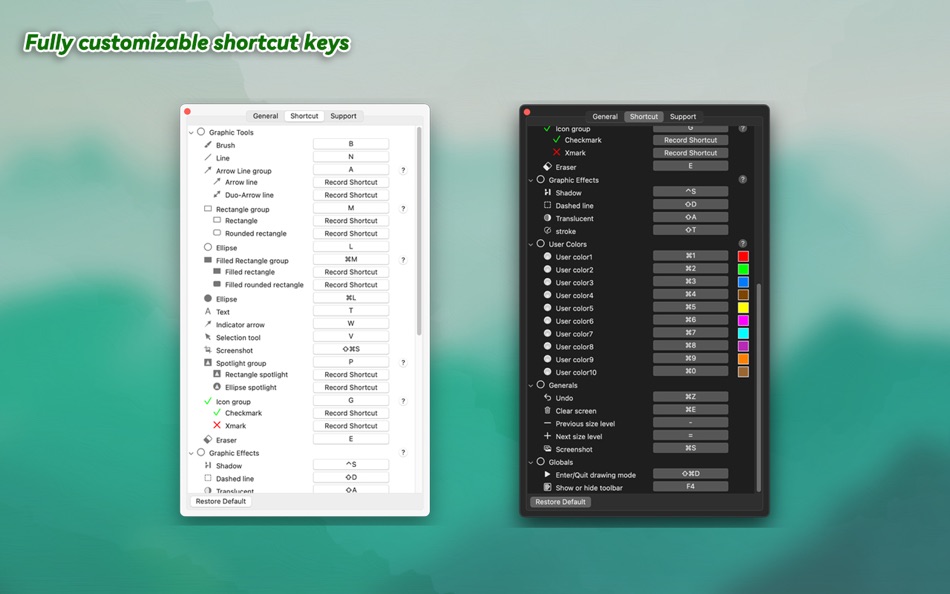
+ Fully Customizable Shortcuts: Including drawing tools, graphic effects, custom colors, and common operations. Almost all operations can be customized with shortcuts.
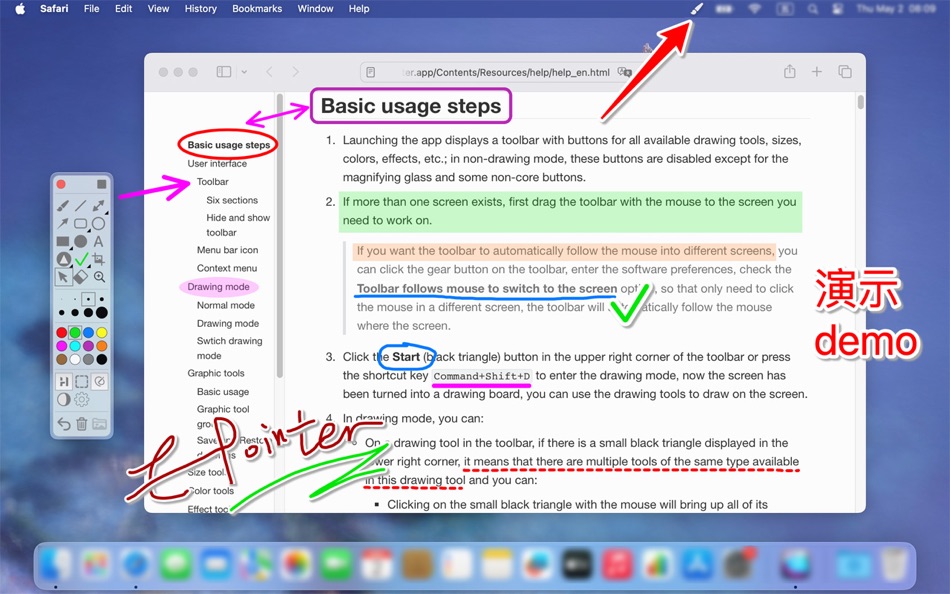
+ 2 Drawing Modes: In addition to the regular screen drawing mode, it also supports a dynamic and flexible dynamic mode. Dynamic mode is typically used for sporadic, small-scale, and temporary drawing. You can draw by holding down the fn key when needed, and release it to continue interacting with other software.
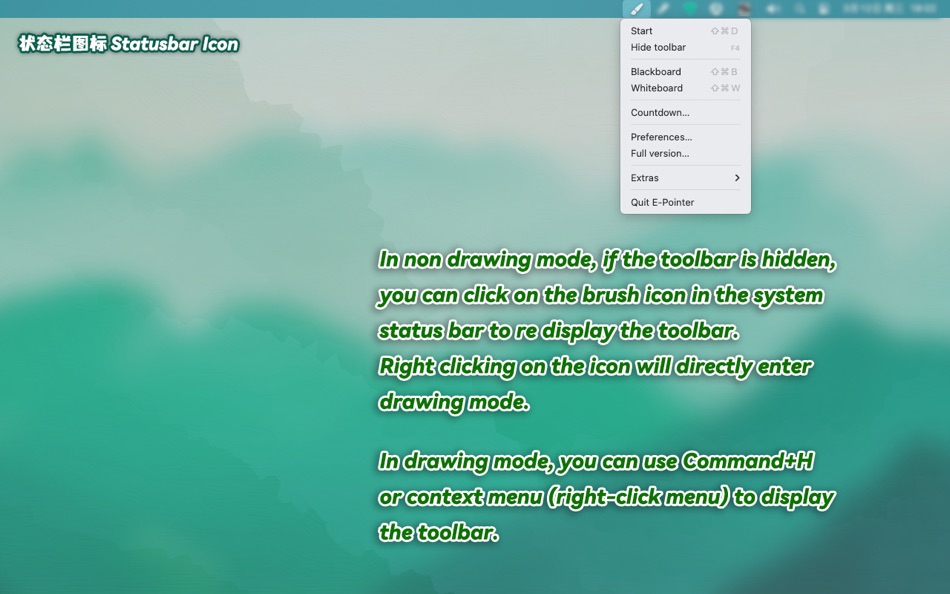
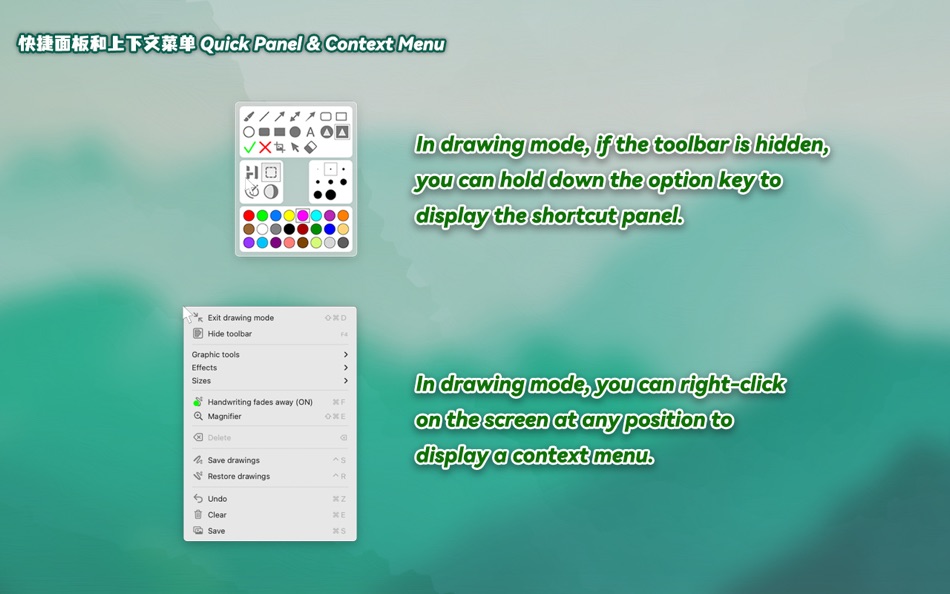
+ 3 Visual Command Modes: In addition to shortcuts, you can access tool commands at any time through the toolbar, quick panel, and context menu. If the shortcut hint option is enabled, the software will automatically display the shortcuts for each tool and operation to help you remember them.
+ Multiple Spotlights: Supports drawing multiple spotlights simultaneously to highlight multiple key areas on the screen. When erasing spotlights with the eraser, clicking the shadow area between spotlights can delete all spotlights at once; otherwise, only the clicked spotlight will be deleted.
+ Paginated Blackboard and Whiteboard: Both blackboard and whiteboard support up to 9 pages each, and will automatically save and load the content you draw on the blackboard.
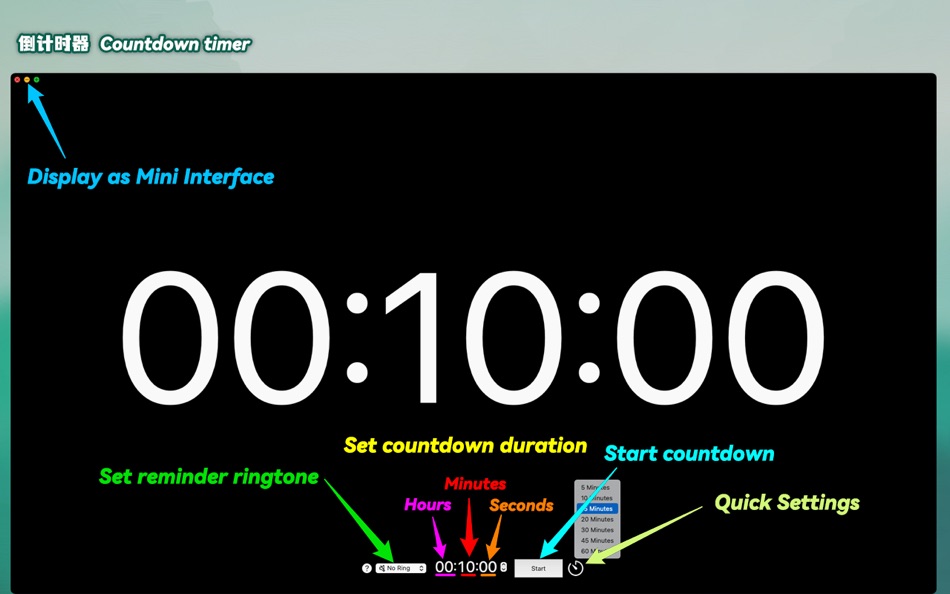
+ Break Timer: Supports customization and quick settings.
## In app purchase
Free trial for 4 days from the first download (no subscription required). After the trial expires, some drawing tools will be disabled and will be released after purchasing or subscribing to the full version.
Terms of Use: https://www.apple.com/legal/internet-services/itunes/dev/stdeula/
Privacy Policy: https://ioeapp.github.io/2018/10/24/privacy-policy/
**NOTE: The first time you run this app for take a screenshot, the system will prompt you to grant the app Screen Recording permission. After you grant permission, you need to restart the app to enable capture.
Ad
Capturas de ecrã


Novidades
- Versão: 5.4
- Atualizado:
- + [New] Added toolbar edge docking support. The toolbox can be docked to the left, top, or right edges of the screen. This feature must be enabled in the app menu located in the status menu in the top-right corner of the system.
+ [Improved] After switching to Selection Tool or Eraser, pressing the Esc key automatically reverts to the previously selected drawing tool.
+ [Improved] When exiting drawing mode with Selection Tool or Eraser active, re-entering drawing mode will automatically restore the last used drawing tool.
+ [Improved] Optimizations for macOS Tahoe.
Histórico de preços
-
* Compras no aplicativo - Hoje: Grátis
- Mínimo: Grátis
- Máximo: Grátis
Monitorizar preços
Ad
Desenvolvedor
- 龙 金
- Plataformas: iOS Apps (4) macOS Apps (11)
- Listas: 2 + 1
- Pontos: 12 + 10 ¡
- Classificações: 0
- Resenhas: 0
- Comentários: 0
- Descontos: 0
- Vídeos: 0
- RSS: Subscrever
Pontos (3)
-

- 103 윤대남
- +1
-
- 1 Zerek Aimurat
- +1
-
- 11 Arthur Nunziata
- +1



Classificações (0)
0 ☹️
Listas (1)
- E-Pointer

Resenhas (0)
Seja o primeiro a comentar 🌟
Comentários (0)
Seja o primeiro a comentar 🌟
Informações adicionais
- Versão: 5.4
- Categoria:
macOS Apps›Utilitários - Sistemas operacionais:
macOS,macOS 13.0 ou superior - Tamanho:
2 Mb - Idioma compatível:
Chinese,English,French,Japanese,Russian,Spanish,Vietnamese - Classificação do conteúdo:
4+ - Mac App Store Avaliação:
0 - Atualizado:
- Data de lançamento:
«E-Pointer». Plataforma: macOS. Categoria: Utilitários. Desenvolvedor: «龙 金». Primeiro lançamento: . Última atualização: . Preço atual: grátis. Este título ainda não recebeu classificações ou comentários no AppAgg. Listas: públicas 1, privadas 0. Pontos rastreados: confirmados 3, indiretos 0. Idiomas disponíveis: Chinese, English, French, Japanese, Russian, Spanish, Vietnamese. AppAgg rastreia histórico de preços, classificações e feedback de usuários para «E-Pointer». Acompanhe futuros descontos e atualizações via RSS. AppAgg não hospeda aplicativos nem distribui software. Todas as marcas registradas, logotipos e capturas de tela pertencem aos seus respectivos proprietários.
E-Pointer URL abreviado: Copiado!- 🌟 Compartilhar
- Mac App Store
Você também pode gostar de
-
- Smart Pointer PRO
- macOS Apps: Utilitários Por: Alexander Utbanov
- Grátis
- Listas: 0 + 0 Classificações: 0 Resenhas: 0
- Pontos: 1 + 0 Comentários: 0 Versão: 1.8.0 Smart Pointer PRO makes your presentations clear, expressive, and effortless. It highlights your cursor with customizable shapes, adds a smooth motion trail, and gives you powerful ... ⥯
-
- Giant Cursor - Large Pointer
- macOS Apps: Utilitários Por: Clement Rousseau
- Grátis
- Listas: 0 + 0 Classificações: 0 Resenhas: 0
- Pontos: 3 + 0 Comentários: 0 Versão: 1.3 Ever struggle to find your cursor on the screen? Giant Cursor makes it easy! With the press of a shortcut, the regular cursor transforms into a giant one for a few seconds, making it ... ⥯
-
- Pointerly
- macOS Apps: Utilitários Por: Luigi Di Muzio
- Grátis
- Listas: 0 + 0 Classificações: 0 Resenhas: 0
- Pontos: 0 + 0 Comentários: 0 Versão: 1.1.0 Pointerly Point. Highlight. Guide your audience. Pointerly is a macOS tool for making presentations, tutorials, and live demos more engaging. Highlight your cursor, dim distractions, ... ⥯
-
- Mouse Jiggler – Mouse Mover
- macOS Apps: Utilitários Por: Bohdan Bilous
- * Grátis
- Listas: 0 + 2 Classificações: 0 Resenhas: 0
- Pontos: 8 + 0 Comentários: 0 Versão: 2.7 Mouse Jiggler - Mouse Mover is a simple utility that generates subtle cursor movements to assist accessibility and interaction needs. It performs smoothly and efficiently without ... ⥯
-
- Folders Factory for Mac OS X
- macOS Apps: Utilitários Por: George Lyakhov
- $2.99
- Listas: 3 + 0 Classificações: 0 Resenhas: 0
- Pontos: 0 + 0 Comentários: 0 Versão: 1.8 Are you fed up with common boring blue folders? With Folders Factory, you can easily change their colour, add pictures, include text, assign textures or even make them look like ... ⥯
-
- Displays
- macOS Apps: Utilitários Por: Jean-Baptiste ZEDDA
- $6.99
- Listas: 0 + 1 Classificações: 0 Resenhas: 0
- Pontos: 0 + 0 Comentários: 0 Versão: 1.3 Warning: retina resolutions not supported on macOS Sierra ** Please read our statement on www.jibapps.com if you'd like to continue using Displays ** Displays is your new toolbox to ... ⥯
-
- myPoint Light S
- macOS Apps: Utilitários Por: Code Race
- $4.99
- Listas: 1 + 1 Classificações: 0 Resenhas: 0
- Pontos: 0 + 0 Comentários: 0 Versão: 2.35 myPoint combines three tools in one - mouse locator, crosshair and mouse halo. Momentary mouse locator is a visual effect active up to a few seconds. It can be an animated or static ... ⥯
-
- Focus & ADHD Reading - Glide
- macOS Apps: Utilitários Por: Applorium Ltd
- $6.99
- Listas: 0 + 3 Classificações: 0 Resenhas: 0
- Pontos: 8 + 0 Comentários: 0 Versão: 3.6 Glide is a focus pointer which dims parts of your screen for better focus and reading experience. You can still interact with everything on your screen while the app is active. Option ... ⥯
-
- Mouse skin effects
- macOS Apps: Utilitários Por: 济南飞鸟文化传媒有限公司
- Grátis
- Listas: 0 + 0 Classificações: 0 Resenhas: 0
- Pontos: 0 + 0 Comentários: 0 Versão: 1.0.2 Unleash your mouse's potential and light up every click with CursorPlus! CursorPlus is a mouse enhancement tool meticulously crafted for macOS users, poised to revolutionize how you ... ⥯
-
- CenterMouse
- macOS Apps: Utilitários Por: Isaac Halvorson
- Grátis
- Listas: 0 + 1 Classificações: 0 Resenhas: 0
- Pontos: 1 + 0 Comentários: 0 Versão: 1.1.1 CenterMouse is a simple macOS utility app. It runs silently in the background, and responds to certain events wake from sleep, exit screensaver, custom keyboard shortcut by moving the ... ⥯
-
- Zone Share:Screen Sharing Tool
- macOS Apps: Utilitários Por: Kevin Schell
- * Grátis
- Listas: 0 + 1 Classificações: 0 Resenhas: 0
- Pontos: 9 + 0 Comentários: 0 Versão: 2.0.7 Zone Share - Screen Sharing for Ultrawide Monitors - is the essential screen sharing solution for macOS ultrawide monitor users, lecturers, remote workers and anyone that needs to ... ⥯
-
- Image Text OCR Photo, PDF Scan
- macOS Apps: Utilitários Por: Pranoy Chowdhury
- * Grátis
- Listas: 0 + 3 Classificações: 0 Resenhas: 0
- Pontos: 4 + 0 Comentários: 0 Versão: 26 All processing is done on the Mac itself and your image/PDF data never leaves your Mac. 100% private. Very simple OCR app. Drag any image/PDF with text into the menu bar icon and it ... ⥯
-
- MakeItHome - Screen extender
- macOS Apps: Utilitários Por: Riccardo Cecchini
- Grátis
- Listas: 0 + 2 Classificações: 0 Resenhas: 0
- Pontos: 5 + 0 Comentários: 0 Versão: 2.0.5 Welcome to MakeItHome: Your Personal Open Source Workspace Revolution MakeItHome transforms your workspace into a personalized sanctuary, where your most-used applications are just a ... ⥯
-
- Wonder Wallpapers - 3D HD etc.
- macOS Apps: Utilitários Por: 小利 薛
- * Grátis
- Listas: 0 + 1 Classificações: 0 Resenhas: 0
- Pontos: 7 + 0 Comentários: 0 Versão: 9.9.3 Welcome to Wonder Wallpapers, a wonderful application that satisfies all your fantasies about Mac desktop wallpapers! We strive to become synonymous with desktop aesthetics for Mac ... ⥯