
| Desenvolvedor: | Bilal Yaqoob (1) | ||
| Preço: | Grátis | ||
| Classificações: | 0 | ||
| Resenhas: | 0 Escrever um comentário | ||
| Listas: | 0 + 0 | ||
| Pontos: | 0 + 0 ¡ | ||
| Mac App Store | |||
Descrição

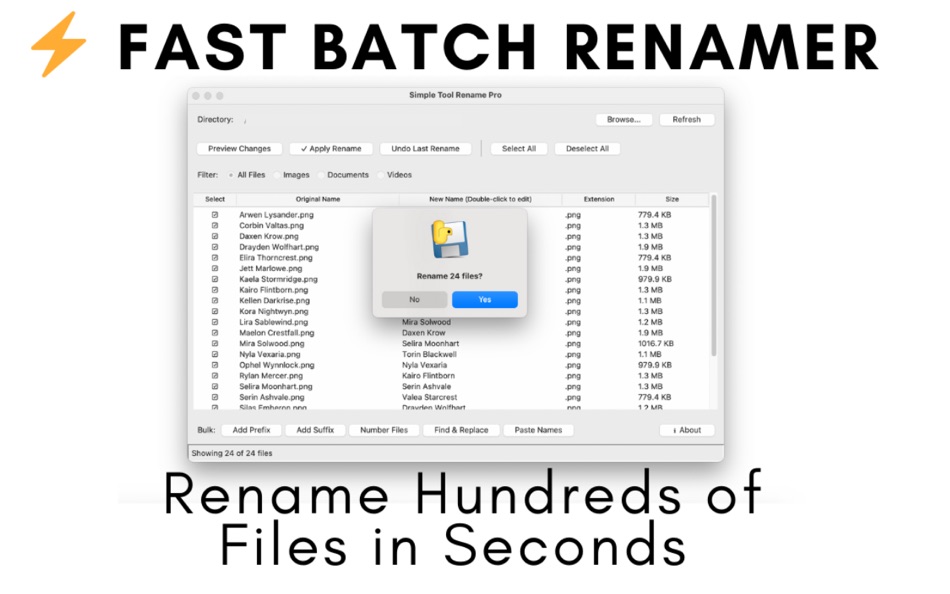
Fast Batch Renamer is the easiest and fastest way to rename multiple files on your Mac. Whether you have 10 files or 10,000 files, rename them all in seconds with powerful bulk operations and an intuitive interface.
WHY FAST BATCH RENAMER?
Stop wasting hours manually renaming files one by one. Fast Batch Renamer saves you time with lightning-fast bulk operations that just work. No complicated setup, no learning curve—just drag, drop, and rename.
UNIQUE EXCEL INTEGRATION
The killer feature no other Mac renamer has: Copy names from Excel or Google Sheets, paste into Fast Batch Renamer, and files are renamed automatically in order. Perfect when clients send you lists or you have organized spreadsheets.
Example: Client sends 50 product names in Excel. You have 50 generic files. Copy → Paste → Done in 30 seconds instead of 2 hours of manual work!
POWERFUL FEATURES
- Drag & Drop Interface - Drop folders, files load instantly
- Add Prefix - Add text to start of filenames (dates, categories, project names)
- Add Suffix - Add text to end before extension (versions, status tags)
- Sequential Numbering - Auto-number with padding (001, 002, 003...)
- Find & Replace - Change text across all files at once
- Paste Names from Excel - Copy from spreadsheets, paste, done! (Unique!)
- Preview Changes - See exactly what will change before applying
- Undo Support - Made a mistake? One click restores everything
- Checkbox Selection - Choose exactly which files to rename
- Smart Filtering - View only Images, Documents, Videos, or all files
- Inline Editing - Double-click any name to edit individually
PERFECT FOR
Photographers - Organize thousands of photos with dates, locations, numbers
Video Editors - Manage clips, renders, project files with consistent naming
Designers - Sort assets, mockups, design files with clean structures
Content Creators - YouTube videos, podcast episodes, social media files
Professionals - Invoices, documents, reports with organized naming
Everyone - If you rename files, this tool saves hours every week
LIGHTNING FAST
- 100 files: Instant
- 1,000 files: 5-10 seconds
- 5,000+ files: Under a minute
Works smoothly even with large folders. No lag, no waiting.
SAFE & RELIABLE
- Preview before applying - No surprises
- Undo last operation - Instant safety net
- File extensions preserved - Never breaks files
- Warns about duplicates - Prevents conflicts
- Hidden files protected - System files untouched
- Works offline - No internet required
- No data collection - Your files stay private
EASY TO USE
1. Drag & drop your folder
2. Choose operation (prefix, suffix, numbers, find & replace, paste names)
3. Preview changes
4. Click Apply Rename
5. Done! Undo if needed.
No tutorials needed. No complicated menus. Just simple, fast renaming.
REAL-WORLD EXAMPLES
Photographer Workflow:
- Import 200 photos from camera
- Add prefix: "2024_Wedding_Smith_"
- Number sequentially: 001, 002, 003...
- Result: 2024_Wedding_Smith_001.jpg through 200.jpg
- Time: 30 seconds
Video Editor Workflow:
- 50 video clips with generic names
- Add prefix: "ClientX_Commercial_"
- Number files: 001-050
- Add suffix: "_raw"
- Result: ClientX_Commercial_001_raw.mp4
- Time: 1 minute
Designer Workflow:
- Copy 30 product names from client's Excel file
- Paste into Fast Batch Renamer
- Files renamed with proper product names instantly
- Time: 15 seconds vs 1 hour manual
SYSTEM REQUIREMENTS
- macOS 10.12 (Sierra) or later
- Works on Intel Macs and Apple Silicon (M1/M2/M3/M4)
- ~60MB disk space
- 4GB RAM minimum
WHAT'S INCLUDED
- Fast Batch Renamer for Mac
- All features unlocked forever
- Lifetime updates included
- Email support
- Complete user guide
- No subscription, no hidden fees
ONE-TIME PURCHASE
Capturas de ecrã



Novidades
- Versão: 1.0
- Atualizado:
Preço
- Hoje: Grátis
- Mínimo: Grátis
- Máximo: Grátis
Monitorizar preços
Desenvolvedor
- Bilal Yaqoob
- Plataformas: macOS Apps (1)
- Listas: 0 + 0
- Pontos: 0 + 0 ¡
- Classificações: 0
- Resenhas: 0
- Descontos: 0
- Vídeos: 0
- RSS: Subscrever
Pontos
0 ☹️
Classificações
0 ☹️
Listas
0 ☹️
Resenhas
Seja o primeiro a comentar 🌟
Informações adicionais
- Versão: 1.0
- Categoria:
macOS Apps›Utilitários - Sistemas operacionais:
macOS,macOS 26.1 ou superior - Tamanho:
2 Mb - Idioma compatível:
English - Classificação do conteúdo:
4+ - Mac App Store Avaliação:
0 - Atualizado:
- Data de lançamento:
Contactos
 https://fastrename.com/index.htmlFast Batch Renamer URL abreviado: Copiado!
- 🌟 Compartilhar
- Mac App Store
Você também pode gostar de
-
- Fast HEIC Conveter
- macOS Apps: Utilitários Por: 论 李
- $0.99
- Listas: 0 + 0 Classificações: 0 Resenhas: 0
- Pontos: 0 + 0 Versão: 1.1 Fast HEIC Converter - Simple & Efficient A lightweight, powerful tool designed to quickly convert HEIC images to popular formats like JPG, PNG, and GIF. Perfect for Mac users who need ... ⥯
-
- Renamer pro
- macOS Apps: Utilitários Por: Rahman Yilmaz
- $9.99
- Listas: 0 + 0 Classificações: 0 Resenhas: 0
- Pontos: 0 + 0 Versão: 1.0 Renamer Pro is a powerful bulk file renaming application for Mac that allows you to build customizable renaming workflows with multiple flexible rules: Numbering: Add sequential ... ⥯
-
- Renamer
- macOS Apps: Utilitários Por: ShaoBing Fu
- $0.99
- Listas: 1 + 0 Classificações: 0 Resenhas: 0
- Pontos: 1 + 0 Versão: 1.1.2 Renamer is a tool app to quickly rename files in batches. The following functions are supported: 1. Add, delete, and replace text 2. Add, delete, and replace extension 3. Case ... ⥯
-
- Fast Shutdown
- macOS Apps: Utilitários Por: Stefan Van Damme
- $1.99
- Listas: 1 + 1 Classificações: 0 Resenhas: 0
- Pontos: 0 + 0 Versão: 1.3 The best and fastest way to shut down your Mac computer. Swipe open your Notification Center and tap Shutdown to effortlessly power down your Mac. But that is just the beginning with ... ⥯
-
- Renamer - Batch file renamer
- macOS Apps: Utilitários Por: Marco Petrucci
- $3.99
- Listas: 0 + 0 Classificações: 0 Resenhas: 0
- Pontos: 0 + 0 Versão: 1.3 Renamer is a professional tool to mass rename multiple files at a time, created to be powerful and at the same time easy to use. With a simple interface users can add multiple filters ... ⥯
-
- Batch Image Toolset
- macOS Apps: Utilitários Por: 刚刚 孔
- $4.99
- Listas: 0 + 0 Classificações: 0 Resenhas: 0
- Pontos: 0 + 0 Versão: 6.1 * Batch rename images. * Batch resize/convert/merge/crop images. * Create Gif Animation. * Batch convert images to PDF format, and support to make PDF album and encrypt with password. ... ⥯
-
- Fast Video Speed for Safari
- macOS Apps: Utilitários Por: Dongwook Cho
- $2.99
- Listas: 1 + 0 Classificações: 0 Resenhas: 0
- Pontos: 4 + 1 (5.0) Versão: 1.0 [Fast Video Speed] is a Safari extension which enables you to change the video play speed on any sites instantly. Your time is valuable. Save time and increase productivity by speeding ⥯
-
- Fast Cast - Screen Mirroring
- macOS Apps: Utilitários Por: 意 田
- Grátis
- Listas: 0 + 0 Classificações: 0 Resenhas: 0
- Pontos: 2 + 0 Versão: 1.3 Fast Cast is an easy-to-use casting app that you can cast your phone screen onto MAC major function 1. Scan the device and cast the screen 2. Support cast without network 3. MAC client ⥯
-
- Fast Reminder for Menubar
- macOS Apps: Utilitários Por: SUMMERBANANA
- $0.99
- Listas: 0 + 0 Classificações: 0 Resenhas: 0
- Pontos: 0 + 0 Versão: 1.0 "Fast Reminder" is a reminder app designed to help you remember important things amidst your busy daily life. This app was developed with ease of use as a priority, without any ... ⥯
-
- Fast File Sharing Web Server
- macOS Apps: Utilitários Por: 静俐 张
- $0.99
- Listas: 0 + 0 Classificações: 0 Resenhas: 0
- Pontos: 1 + 0 Versão: 2.0 Fast File Sharing Web Server is a Mac file sharing software that allows visitors to upload/download unlimited files easily through a Web Browser (Safari, IE, Firefox, Chrome, mobile ... ⥯
-
- Fast Paste
- macOS Apps: Utilitários Por: Dylan Zaoui
- * Grátis
- Listas: 1 + 0 Classificações: 5 (1) Resenhas: 5 (1)
- Pontos: 5 + 0 Versão: 1.1.1 Discover Fast Paste, the tool for mastering copy and paste on macOS and boosting your productivity! Fast Paste features an intelligent history that lets you instantly find every text, ... ⥯
-
- Batch Image
- macOS Apps: Utilitários Por: 春生 熊
- Grátis
- Listas: 1 + 0 Classificações: 0 Resenhas: 0
- Pontos: 3 + 0 Versão: 1.0.3 "Functions and Features" Batch watermark (support text and pictures as watermark, support shadow transparency, custom zoom and position, etc.) Bulk photo frame posters (update pictures ⥯
- -100%
- Batch QR Code Generator
- macOS Apps: Utilitários Por: Vladislava Konovalova
- ▼ Grátis
$0.99-100% - Listas: 1 + 0 Classificações: 0 Resenhas: 0
- Pontos: 3 + 0 Versão: 1.0 Tired of creating QR codes manually, one by one? What if you could generate an entire batch - dozens, hundreds, even thousands In Just One Click? Welcome to Batch QR Code Generator: ... ⥯
- Novo
- Batch Audio Converter Pro
- macOS Apps: Utilitários Por: Timothy Blackman
- $9.99
- Listas: 0 + 0 Classificações: 0 Resenhas: 0
- Pontos: 0 + 0 Versão: 1.0 Convert audio fast. Drag. Drop. Done. Batch Audio Converter Pro is a clean, powerful macOS utility for turning audio and video files into clean WAV, FLAC, AAC, MP3, or AIFF. Built for ... ⥯