
المحفوظات
اختر الاسم الذي سيظهر في قائمة المحفوظات.
تم
| مطوّر البرامج: | 鹤麟 张 (1) | ||
| السعر: | * مجاني | ||
| لتصنيفات: | 0 | ||
| تعليقات: | 0 انشر تعليقًا | ||
| قوائم: | 0 + 0 | ||
| النقاط: | 0 + 0 ¡ | ||
| +1 النقاط | |||
الوصف

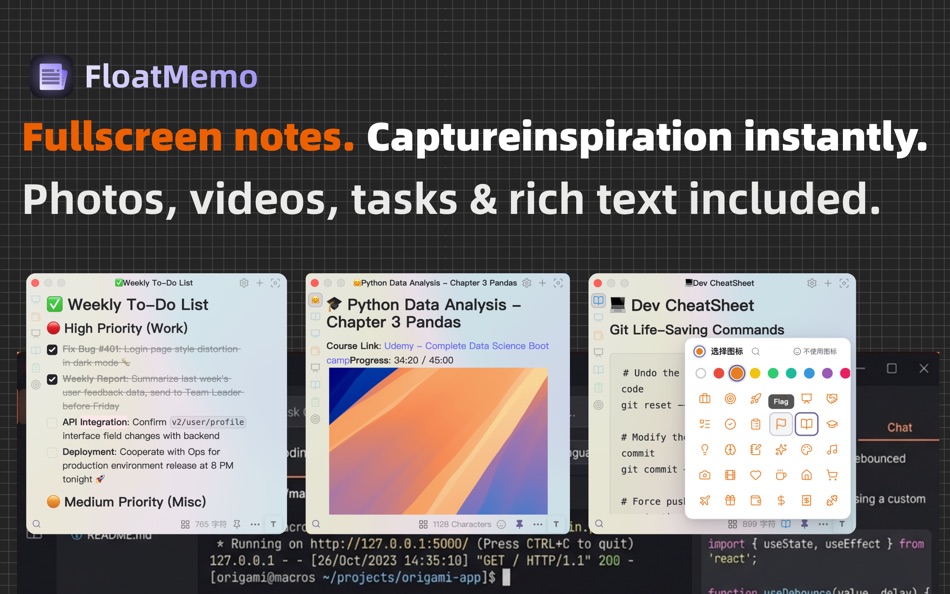
Floating Notes, Zero Friction
Open a rich-text scratchpad from the menu bar without leaving your current window. Supports todos, drag-and-drop images and videos.
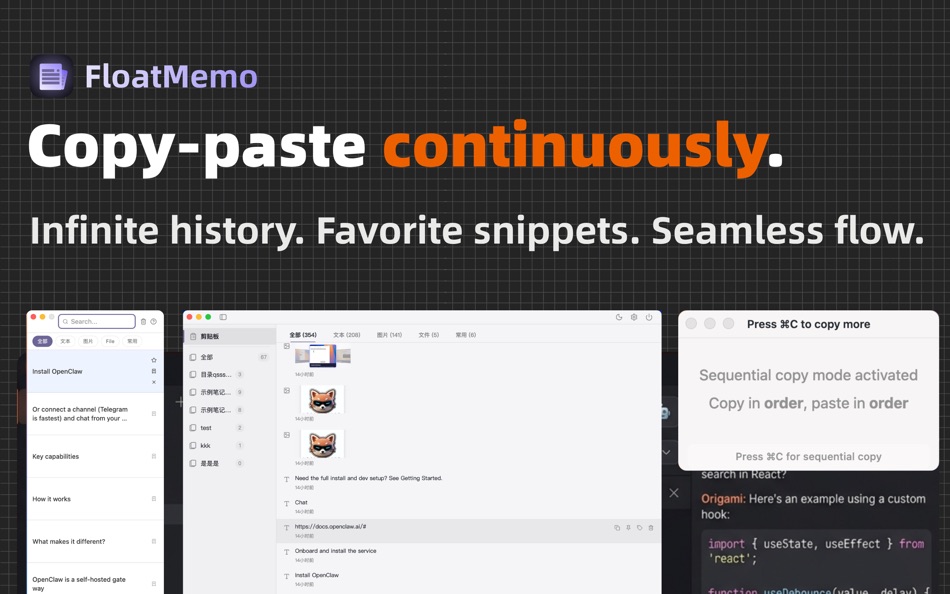
Unlimited Clipboard History
Everything you copy — text, images, links, files — is saved and searchable. Never lose a terminal command, color code, or URL again.
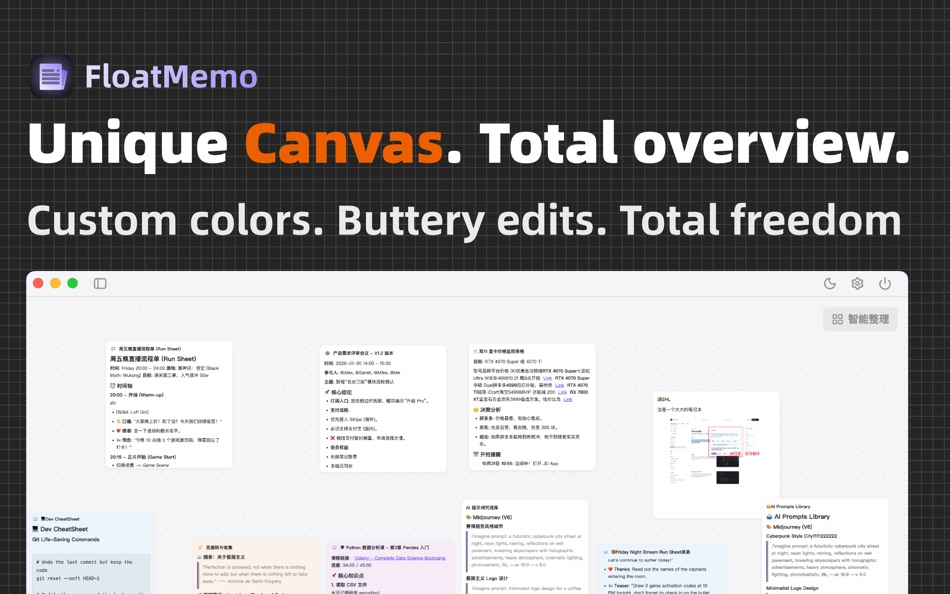
Note canvas
Allows you to spread out all your notes on the canvas for a clear, comprehensive overview, while also enabling you to focus on and edit a specific note.
Zen Mode
A minimal, distraction-free floating window for when you need to focus.
No Subscriptions
One-time purchase. No recurring fees, no hidden costs, no lock-in.
Designed for developers, designers, and writers who live in the menu bar.
FloatMemo: Keep your workflow unbroken.
----
User Privacy:https://leochens.feishu.cn/docx/XFlzdqN1HoWduZxFsKzcjzBZnzg
Terms of Use: https://www.apple.com/legal/internet-services/itunes/dev/stdeula
لقطات

Ad
تاريخ الأسعار
-
* عمليات الشراء داخل التطبيق - السعر الحالي: مجاني
- الحد الأدنى: مجاني
- الحد الأقصى: مجاني
تتبّع الأسعار
الميزات الجديدة
- الإصدار: 1.2.6
- تم التحديث:
- fix: Fully optimized UI display, now more refined, with support for adjusting opacity and frosted glass effects.
New and improved features are as follows:
1. Note canvas feature: Provides an overview to view all notes at a glance.
2. Icon popup: Replaced the original Emoji popup with an icon popup, featuring dozens of different icons that can be paired with various colors for personalized notes.
3. Continuous copy and paste functionality: Added continuous copy and paste features for more orderly workflow integration.
معلومات إضافية
- تاريخ الإصدار:
- الفئة:
macOS تطبيقات›الأدوات المساعدة - نظام التشغيل:
macOS,macOS 10.15 والأحدث - الحجم:
390 Mb - اللغة المعتمدة:
Afrikaans,Amharic,Arabic,Bengali,Bulgarian,Catalan,Chinese,Croatian,Czech,Danish,Dutch,English,Estonian,Finnish,French,German,Greek,Gujarati,Hebrew,Hindi,Hungarian,Indonesian,Italian,Japanese,Kannada,Korean,Latvian,Lithuanian,Malay,Malayalam,Marathi,Norwegian,Persian,Polish,Portuguese,Romanian,Russian,Serbian,Slovak,Slovenian,Spanish,Swahili,Swedish,Tamil,Telugu,Thai,Turkish,Ukrainian,Urdu,Vietnamese - تقييم المحتوى:
4+ - Mac App Store تقييم:
0 - الموقع الإلكتروني:
 https://floatmemo.guantou.site
مطوّر البرامج
- 鹤麟 张
- المنصات: macOS تطبيقات (1)
- قوائم: 0 + 0
- النقاط: 0 + 0 ¡
- لتصنيفات: 0
- تعليقات: 0
- تخفيضات: 0
- أشرطة فيديو: 0
- RSS: اشتراك
قوائم (0)
0 ☹️
- FloatMemo-FloatingNotes
النقاط (0)
0 ☹️
لتصنيفات (0)
0 ☹️
تعليقات (0)
كن أول من يعلق 🌟
«FloatMemo-FloatingNotes». منصة: macOS. الفئة: الأدوات المساعدة. المطور: «鹤麟 张». الإصدار الأول: . التحديث الأخير: . السعر الحالي: مجانا. لم يتلق هذا العنوان تقييمات أو مراجعات بعد على AppAgg. اللغات المتاحة: Afrikaans, Amharic, Arabic, Bengali, Bulgarian, Catalan, Chinese, Croatian, Czech, Danish, Dutch, English, Estonian, Finnish, French, German, Greek, Gujarati, Hebrew, Hindi, Hungarian, Indonesian, Italian, Japanese, Kannada, Korean, Latvian, Lithuanian, Malay, Malayalam, Marathi, Norwegian, Persian, Polish, Portuguese, Romanian, Russian, Serbian, Slovak, Slovenian, Spanish, Swahili, Swedish, Tamil, Telugu, Thai, Turkish, Ukrainian, Urdu, Vietnamese. يتتبع AppAgg سجل الأسعار والتقييمات وتعليقات المستخدمين «FloatMemo-FloatingNotes». متابعة الخصومات والتحديثات القادمة: RSS. لا يستضيف AppAgg التطبيقات أو يوزع البرامج. جميع العلامات التجارية والشعارات ولقطات الشاشة مملوكة لأصحابها.
FloatMemo-FloatingNotes عنوان URL مختصر: تم النسخ!- 🌟 مشاركة
- Mac App Store
مشابهة
-
- Float Translator
- macOS تطبيقات: الأدوات المساعدة بواسطة: 光辉 梁
- * مجاني
- قوائم: 0 0 0
- النقاط: 0 + 0 الإصدار: 1.17.1 Float Translator, designed exclusively for macOS, is a lightweight and minimalist translation app for your menu bar. Here s why you ll love Float Translator: - Supports translation ... ⥯
-
- PinTop - Float Panel
- macOS تطبيقات: الأدوات المساعدة بواسطة: Ahmed AlNaboud
- $5.99
- قوائم: 0 0 0
- النقاط: 0 + 0 الإصدار: 2.0 PinTop - Float Panel Float any PDF or website above your apps. Perfect for studying, referencing, and comparing documents, or browsing while you work all without switching windows. Key ⥯
-
- Sticky Notes: Notepad & Memo
- macOS تطبيقات: الأدوات المساعدة بواسطة: Minham Samuel
- * مجاني
- قوائم: 0 0 0
- النقاط: 4 + 0 الإصدار: 1.2 Sticky Notes: Stay organized & inspired! Sticky Notes is a simple app designed to let you take notes and create memos right on your desktop whenever you need. Whether you re capturing ... ⥯
-
- Duck Float
- macOS تطبيقات: الأدوات المساعدة بواسطة: 俊全 伊
- * مجاني
- قوائم: 0 0 0
- النقاط: 0 + 0 الإصدار: 1.0.6 An app that floats above a full-screen app, supporting file management, quick file access, clipboard management, and web browsing. ⥯
-
- The Document Converter
- macOS تطبيقات: الأدوات المساعدة بواسطة: Float Tech, LLC
- * مجاني
- قوائم: 1 0 0
- النقاط: 3 + 0 الإصدار: 26.1.0 Easily convert your files to nearly any document format! 1. Drag in your input file 2. Choose your output format ( DOCX, PDF, JPG, TXT etc. ) 3. Convert! It will only take a few ... ⥯
-
- Floaty App
- macOS تطبيقات: الأدوات المساعدة بواسطة: Haider Khan
- $6.99
- قوائم: 0 0 0
- النقاط: 0 + 0 الإصدار: 1.0.1 Float lets you watch YouTube videos while you work, it will hover above all your other windows. You can also view recent urls you played, minimize floaty, and resize easily. Be more ... ⥯
-
- DockX - System Status on Dock
- macOS تطبيقات: الأدوات المساعدة بواسطة: 自力 黄
- * مجاني
- قوائم: 1 + 3 4 (1) 0
- النقاط: 9 + 0 الإصدار: 1.1.21 DockX is a magic app that allows you to display any content in the Dock and Menu bar, you can just sneak a peek anytime without opening any app. Whether you want to monitor network ... ⥯
-
- Calendar-Widget
- macOS تطبيقات: الأدوات المساعدة بواسطة: Ebey Tech LLC
- $0.99
- قوائم: 0 + 1 0 0
- النقاط: 11 + 0 الإصدار: 1.0 Great for when you just need to eyeball a calendar. Calendar-Widget is a lightweight app to show a calendar view of a month. Switch to other months by using the Previous/Next buttons. ... ⥯
-
- Minimal Notepad Paper - Jot it
- macOS تطبيقات: الأدوات المساعدة بواسطة: 超 程
- * مجاني
- قوائم: 0 0 0
- النقاط: 1 + 0 الإصدار: 1.2 Minimal Notepad Paper - Jot, The Simple Quick Menu Bar Note Memo Taking App for Mac. Clear mind, clean notes. Your distraction-free notepad, right in your menubar. Jot is a minimal ... ⥯
-
- Network & Battery
- macOS تطبيقات: الأدوات المساعدة بواسطة: 奕才 杨
- $4.99
- قوائم: 1 + 2 0 0
- النقاط: 1 + 0 الإصدار: 13.1.0 Want to see real network speeds, battery health right in Menu Bar? Give this app a try! Many great features and we do not collect any of your informations. Great Features: NETWORK: see ⥯
-
- Fugit
- macOS تطبيقات: الأدوات المساعدة بواسطة: Tom Woodhams
- مجاني
- قوائم: 0 + 1 5 (1) 0
- النقاط: 2 + 0 الإصدار: 1.4.3 It's about time... Fugit is the simply gorgeous, low energy digital desktop clock. Designed to match your Mac desktop and personality. Fugit can float above or behind other windows and ⥯
-
- Clock Suite
- macOS تطبيقات: الأدوات المساعدة بواسطة: Matthew Roberts
- * مجاني
- قوائم: 0 + 1 0 0
- النقاط: 2 + 0 الإصدار: 3.1 A Great Clock Suite for your Mac A Resizable Clock, Timers, Alarms, Stopwatch, and a Dock Clock for your Mac's Dock. All in brilliant color, that works in dark mode and light mode with ⥯
-
- Plock • Pop-up Clock
- macOS تطبيقات: الأدوات المساعدة بواسطة: Nikita Zubkov
- مجاني
- قوائم: 0 + 1 4 (1) 0
- النقاط: 2 + 0 الإصدار: 1.0.2 Plock stands for Pop-up Clock. Pick an interval and get gentle notifications (pop-ups) as the time goes by. Pop-up feature is, of course, optional. The clock may just float on your ... ⥯
-
- TuringShot: Live Screen Effect
- macOS تطبيقات: الأدوات المساعدة بواسطة: Turings Co., Ltd.
- * مجاني
- قوائم: 0 + 1 0 0
- النقاط: 1 + 0 الإصدار: 1.5.2 Born from 10 years of screen recording. Over the last decade, I recorded hundreds of hours of IT tutorials and product demos. I kept running into the same problems again and again: ... ⥯