
| 開發人員: | Sambruce Joseph (9) | ||
| 價錢: | $3.99 | ||
| 排名: | 0 | ||
| 評測: | 0 寫評論 | ||
| 清單: | 0 + 0 | ||
| 點數: | 0 + 0 ¡ | ||
| Mac App Store | |||
描述

Key Features:
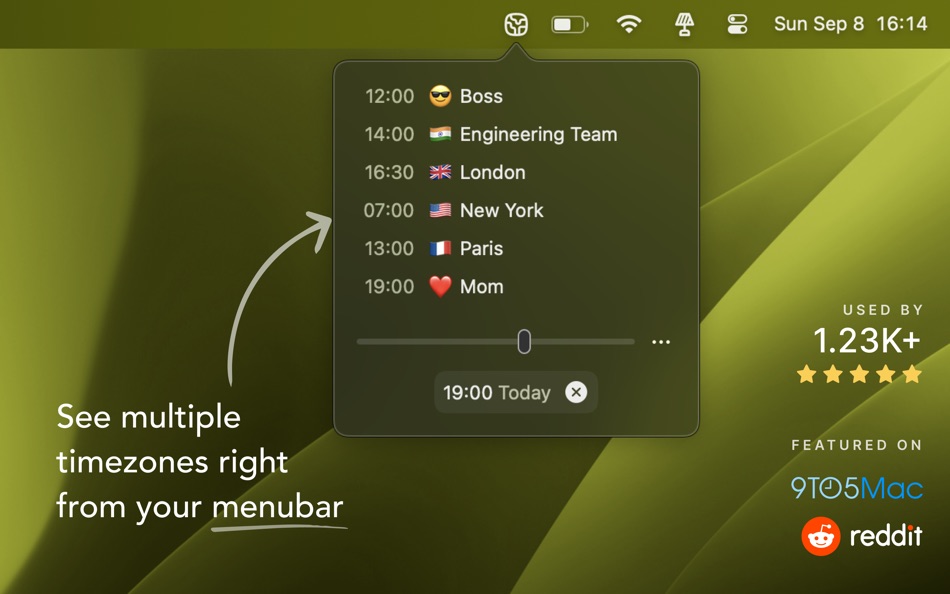
• World Clock: Instantly view the current time in various locations around the globe.
• Time Zone Management: Easily add and organize multiple time zones to stay on top of your global schedule.
• Time Slider: Simply slide to see future and backward times of the day
• Global Time Clock: Keep track of your colleagues’ local times, no matter where they are working from.
• Timezone Flags: Visual indicators help you identify each timezone at a glance, making it simple to distinguish between different regions.
• Quick Access: All your important time zones are just a click away, conveniently accessible from your menubar.
• User-Friendly Interface: A clean, intuitive design ensures you can set up and manage your world clock time zones with ease.
I built Minizones to help me manage my colleagues’ local times since they are working remotely in different time zones. Now, I’m sharing it with you to help make global collaboration easier and more efficient.
Whether you’re coordinating meetings across continents or checking in with friends and family around the world, Minizones is your go-to tool for managing time zones seamlessly.
螢幕擷取畫面


新功能
- 版本: 1.1.4
- 發佈日期:
- + Fixed! The time on the menubar is now updating immediately without any delays (Thanks Tiffany)
Sorry about this bug. It was hard to catch. All good now.
You can pin a time to your menubar again.
價錢
- 今天: $3.99
- 最小值: $3.99
- 最大值: $3.99
追蹤票價
開發人員
- Sambruce Joseph
- 平台: iOS 應用程式 (6) macOS 應用程式 (3)
- 清單: 0 + 0
- 點數: 0 + 10 ¡
- 排名: 0
- 評測: 0
- 折扣: 0
- 影片: 0
- RSS: 訂閱
點數
0 ☹️
排名
0 ☹️
清單
0 ☹️
評測
成為第一個評論 🌟
其他資訊
- 版本: 1.1.4
- 類別 :
macOS 應用程式›公用程式與工具 - OS:
macOS,macOS 13.0 以上版本 - 大小:
462 Kb - 支援的語言 :
English - 內容分級:
4+ - Mac App Store 評分:
0 - 發佈日期:
- 發行日期:
聯絡人
- 個人網站:
 https://minizones.app
Minizones - Time Zone Clocks 縮短網址: 已複製!- 🌟 分享
- Mac App Store
你可能還喜歡
-
- Time Zone Pro
- macOS 應用程式: 公用程式與工具 由: Friendly Studio
- $2.99
- 清單: 0 + 1 排名: 0 評測: 0
- 點數: 1 + 27 (4.9) 版本: 1.0.10 We know how difficult it can be keeping track of lots of different time zones. Add your friends, family, clients or team and never schedule a call over dinner or bath time again! ... ⥯
-
- Savvy Time Zone Converter
- macOS 應用程式: 公用程式與工具 由: Savvy Time LLC
- 免費
- 清單: 0 + 0 排名: 0 評測: 0
- 點數: 0 + 0 版本: 1.10 Plan across time zones without guesswork. Savvy Time lets you compare multiple cities side-by-side, see overlaps, and pick meeting times everyone can make. ⥯
-
- Zones: Time Zone Conversion
- macOS 應用程式: 公用程式與工具 由: Squircle Apps LLP
- 免費
- 清單: 0 + 1 排名: 0 評測: 0
- 點數: 1 + 66 (4.6) 版本: 1.4.1 *Weather Information and Lock Screen Widgets require iOS 16 or more. What time is it in San Francisco when it s 3PM my time? Will they switch to daylight savings next week? Alex told ... ⥯
-
- My Clocks: Emoji Time Zone
- macOS 應用程式: 公用程式與工具 由: Clement Rousseau
- * 免費
- 清單: 0 + 0 排名: 0 評測: 0
- 點數: 0 + 1 (5.0) 版本: 1.2 My Clocks isn t just about timezones it s about your time, your way. Add clocks for the people and places that matter most, customize them with names and emojis, and always know the ... ⥯
- 全新
- Zone Bar
- macOS 應用程式: 公用程式與工具 由: Sindre Sorhus
- $4.00
- 清單: 0 + 0 排名: 0 評測: 0
- 點數: 0 + 0 版本: 1.0.3 Show multiple world clocks in your menu bar. Add clocks for any time zone, give them custom names and emoji, and see them at a glance. The time travel slider lets you check what time ... ⥯
-
- Time Calculator - Work Hours
- macOS 應用程式: 公用程式與工具 由: Oval Software Oy
- 免費
- 清單: 0 + 0 排名: 0 評測: 0
- 點數: 1 + 2,469 (4.7) 版本: 7.2 Time Calculator is the ultimate all-in-one toolkit for managing time, dates, schedules, and more. Whether you re tracking work hours, planning shifts, or converting time formats, this ... ⥯
-
- Time Calc - Time Calculator
- macOS 應用程式: 公用程式與工具 由: Ottorino Bruni
- 免費
- 清單: 0 + 0 排名: 0 評測: 0
- 點數: 1 + 216 (4.5) 版本: 1.0.25 TimeCalc The Simple and Accurate Time Calculator Need to add, subtract or compare times? TimeCalc makes it easy to calculate hours, minutes, and seconds perfect for logging flight ... ⥯
-
- Time Calibrator
- macOS 應用程式: 公用程式與工具 由: Atomtime Suisse S.A.
- 免費
- 清單: 0 + 0 排名: 0 評測: 0
- 點數: 1 + 0 版本: 1.0.4 This app is designed for i-Atomic watches users Welcome to Time Calibrator! Time Calibrator has been specifically designed to deliver accurate time information to people all around the ⥯
-
- Time Lines - World Clock
- macOS 應用程式: 公用程式與工具 由: Mathieu Dutour
- 免費
- 清單: 0 + 0 排名: 0 評測: 0
- 點數: 1 + 8 (4.5) 版本: 1.1.0 Time Lines is a practical app to know WHEN all your friends, colleagues, and family are. With a quick glance, you can check the time of the day anywhere in the world. * Sync across all ⥯
-
- Zone Timer
- macOS 應用程式: 公用程式與工具 由: Takuya Okamoto
- 免費
- 清單: 1 + 1 排名: 0 評測: 0
- 點數: 4 + 0 版本: 1.2 "Zone" is a timer app designed for "focus". * Simple Design * Always stay front window * Flexible time range * Support Dark Mode This app is Good for "Pomodoro Technique" too. If you ... ⥯
-
- Zone Share:Screen Sharing Tool
- macOS 應用程式: 公用程式與工具 由: Kevin Schell
- * 免費
- 清單: 0 + 0 排名: 0 評測: 0
- 點數: 0 + 0 版本: 1.13.26 Zone Share - Screen Sharing for Ultrawide Monitors - is the essential screen sharing solution for macOS ultrawide monitor users. Share only part of your screen in Zoom, Teams, Google ... ⥯
-
- Time’s Up! — Visual Timer
- macOS 應用程式: 公用程式與工具 由: Overdesigned, LLC
- * 免費
- 清單: 0 + 0 排名: 0 評測: 0
- 點數: 2 + 359 (4.6) 版本: 1.10 Time s Up! is a fun, visual timer that you ll actually want to use. Whether it s for you, your kids, or someone else, Time s Up! will make counting down much more engaging. Timers can ... ⥯
-
- Time Up
- macOS 應用程式: 公用程式與工具 由: Rbcafe
- 免費
- 清單: 1 + 0 排名: 0 評測: 0
- 點數: 1 + 0 版本: 1.0.5 Time up is your countdown timer. - Fine tune your times, activity and start. - Manage your times, export import to CSV - Select differents alarms : Voice, Sound, Visual, Flash. ⥯
-
- Time Follows Mouse
- macOS 應用程式: 公用程式與工具 由: Sai Saran Goda
- $0.99
- 清單: 0 + 0 排名: 0 評測: 0
- 點數: 0 + 0 版本: 0.2 Time Follows Mouse is a sleek, lightweight macOS utility that displays the current time right next to your cursor no matter where you move. It s designed for creators, coders, and ... ⥯