
| Concepteur: | 武红 汤 (1) | ||
| Prix: | * Gratuit | ||
| Classements: | 0 | ||
| Avis: | 0 Rédiger un avis | ||
| Listes: | 0 + 0 | ||
| Points: | 0 + 0 ¡ | ||
| Mac App Store | |||
Description

核心功能:
- 海量存储 :支持数万、数十万级的海量超大存储,告别存储焦虑。
- 多格式自动捕获 :实时监控系统剪贴板,支持纯文本、富文本 (HTML/RTF) 及图片内容的自动存储。无论是网页片段、代码片段还是设计素材,均能完美还原。
- 毫秒级全文检索 :内置高性能搜索引擎。支持对历史记录进行关键词检索,即使面对万级数据量,也能瞬间找回所需内容。
- 智能分组与标签 :支持为记录添加自定义分类标签,实现内容的分组管理。通过标签筛选,您可以快速定位特定项目或类型的数据。
- 便捷编辑与收藏 :允许直接修改已存储的历史记录内容,修复复制时的细微错误。支持一键收藏重要记录,防止在历史流动中遗失。
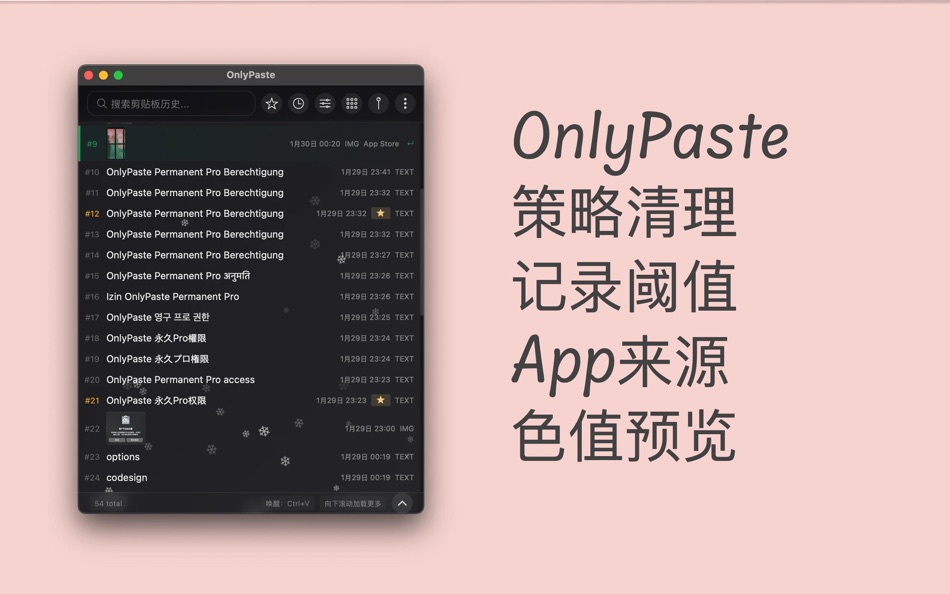
- 进阶清理策略 :提供灵活的数据维护方案。您可以根据时间、记录条数或数据大小设定自动清理策略,在保证历史可追溯的同时,维持系统数据库的轻盈高效。
- 隐私与安全 :OnlyPaste 坚持隐私至上原则。所有剪贴板数据均采用本地存储,不上传云端,不收集个人隐私,确保您的敏感信息安全无虞。
- 支持局域网广播同步
Captures d'écran


Nouveautés
- Version: 2.2.7
- Mis à jour:
- 1、增加工具箱,内置多个常用小工具
2、增加预览时方向键切换功能
3、增加图片OCR提取文字功能
4、增加使用统计仪表盘*
5、修复开机启动配置失败的问题
6、修复多窗口时,没有在活跃窗口弹出的问题
6、修复多个bug
Prix
-
* Achats intégrés - Aujourd’hui: Gratuit
- Minimum: Gratuit
- Maximum: Gratuit
Suivre l'évolution des prix
Concepteur
- 武红 汤
- Plateformes: macOS Applications (1)
- Listes: 0 + 0
- Points: 0 + 0 ¡
- Classements: 0
- Avis: 0
- Remises: 0
- Vidéos: 0
- RSS: S'abonner
Points
0 ☹️
Classements
0 ☹️
Listes
0 ☹️
- OnlyPaste
Avis
Soyez le premier à donner votre avis 🌟
Informations supplémentaires
- Version: 2.2.7
- Catégorie:
macOS Applications›Utilitaires - Systèmes d'exploitation:
macOS,macOS 12.0 ou version ultérieure - Taille:
6 Mb - Classification du contenu:
4+ - Mac App Store Note:
0 - Mis à jour:
- Date de sortie:
OnlyPaste URL courte: Copié!- 🌟 Partager
- Mac App Store
Découvrez également
-
- Paste-On
- macOS Applications: Utilitaires De: Nissou Technologies
- * Gratuit
- Listes: 0 + 0 Classements: 0 Avis: 0
- Points: 1 + 0 Version: 1.5 Paste-On is a powerful macOS application that provides efficient clipboard history management. You can effortlessly store your clipboard history, including text snippets, images, ... ⥯
-
- Paste!
- macOS Applications: Utilitaires De: 方成 印
- $2.99
- Listes: 0 + 0 Classements: 0 Avis: 0
- Points: 0 + 0 Version: 1.0 Paste! The smartest clipboard history manager for your Mac Never lose a copied text again. Paste! quietly saves your last 20 clipboard entries, so you can instantly reuse anything you ... ⥯
-
- Paste Kitten
- macOS Applications: Utilitaires De: Hangzhou Taotiao Technology Co., Ltd
- $0.99
- Listes: 0 + 0 Classements: 0 Avis: 0
- Points: 0 + 0 Version: 1.0.3 - Instant Access Press ⌘ + ⇧ + V from anywhere on your Mac to instantly view and access your clipboard history. It's that simple. - Smart Search Quickly find what you're looking for ... ⥯
-
- Paste Plain Text
- macOS Applications: Utilitaires De: FIPLAB Ltd
- Gratuit
- Listes: 0 + 2 Classements: 0 Avis: 0
- Points: 2 + 0 Version: 1.0.8 Paste Plain Text automatically converts any text that you copy into plain text. You can then easily paste text without any formatting/styling into any app of your choice. The app lives ⥯
-
- Paste Cleaner
- macOS Applications: Utilitaires De: Harry Berends
- $0.99
- Listes: 0 + 0 Classements: 0 Avis: 0
- Points: 0 + 0 Version: 1.0 Paste Cleaner is a tool which can watch your clipboard. If there is formatted text (like RTF or HTML) on the clipboard, then convert it to plain text (i.e. unformatted text) and ... ⥯
-
- ONLY日历- 日历,中国日历,极简日历
- macOS Applications: Utilitaires De: 川 戴
- $0.99
- Listes: 0 + 1 Classements: 0 Avis: 0
- Points: 0 + 0 Version: 1.6.1 【ONLY日历】- 仅仅是一个日历 没有其他功能 功能简介 - 精美页面 精心设计的日历样式 美就一个字 - 状态栏 显示当前日期 可以自定义显示内容 - 农历日历 显示农历日历 24节气 - 法定节假日 清晰显示法定节假日 补班 - 开机自动启动 无需手动启动 ⥯
-
- Paste as Plain Text
- macOS Applications: Utilitaires De: 柱荣 李
- $2.99
- Listes: 0 + 1 Classements: 0 Avis: 0
- Points: 2 + 0 Version: 1.2 This software allows users to say goodbye to messy formatting and enjoy a pure pasting experience, bringing simplicity and efficiency back to the process of copy and paste. This ... ⥯
-
- Paste In & Copy Out
- macOS Applications: Utilitaires De: 思学 高
- Gratuit
- Listes: 0 + 1 Classements: 0 Avis: 0
- Points: 1 + 0 Version: 1.0.0 It is suitable for the scene where you need to copy and paste some duplicate text frequently. It helps you to temporarily store the text for multiple uses Committed to fast operation, ... ⥯
-
- Pure Paste
- macOS Applications: Utilitaires De: Sindre Sorhus
- $4.00
- Listes: 1 + 2 Classements: 0 Avis: 0
- Points: 7 + 0 Version: 1.14.0 How many times have you pasted some text into an email and ended up with a mess of different font sizes? Pure Paste lets you paste as plain text by default. It sits in the menu bar and ⥯
-
- Tomato Paste
- macOS Applications: Utilitaires De: Keita Nonaka
- Gratuit
- Listes: 1 + 0 Classements: 0 Avis: 0
- Points: 4 + 0 Version: 1.3.1 Tired of juggling multiple snippets and losing track of your copied content? Say hello to Tomato Paste, the game-changing clipboard manager that transforms the way you work on your ... ⥯
-
- Plain Paste: Strip Formatting
- macOS Applications: Utilitaires De: Pierre Stanislas
- $2.99
- Listes: 0 + 0 Classements: 0 Avis: 0
- Points: 0 + 0 Version: 1.0 Whether you re copying from websites, documents, or emails, Plain Paste ensures that what you paste is always simple, readable, and free of extra styles. Features: - One-click or ... ⥯
-
- Time to Paste
- macOS Applications: Utilitaires De: Filipe Sa
- $2.99
- Listes: 1 + 2 Classements: 0 Avis: 0
- Points: 15 + 0 Version: 1.2 Paste the current date and/or time anywhere you like, Easily. No copy-paste. Just press Cmd+Option+V anywhere, to generate the time stamp... Then paste it (cmd+v). Or... Just launch ... ⥯
-
- Fast Paste
- macOS Applications: Utilitaires De: Dylan Zaoui
- * Gratuit
- Listes: 0 + 1 Classements: 5 (1) Avis: 5 (1)
- Points: 5 + 0 Version: 1.1.1 Discover Fast Paste, the tool for mastering copy and paste on macOS and boosting your productivity! Fast Paste features an intelligent history that lets you instantly find every text, ... ⥯
-
- Snap Screenshot - Snip & Paste
- macOS Applications: Utilitaires De: 凌云 张
- * Gratuit
- Listes: 0 + 0 Classements: 0 Avis: 0
- Points: 5 + 0 Version: 3.1.3 Let Snap Screenshot - Snip & Paste help you improve your work efficiency! This is a simple but powerful screenshot tool that also allows you to paste the screenshot back to the screen! ⥯