
| Pengembang: | Build to Connect, Inc. (5) | ||
| Harga: | Gratis | ||
| Peringkat: | 0 | ||
| Ulasan: | 0 Menulis review | ||
| Daftar: | 0 + 1 | ||
| Poin: | 4 + 0 ¡ | ||
| Mac App Store | |||
Deskripsi
PDF Professional Suite is a full-featured PDF document expert and one-stop shop for your Adobe Acrobat PDF document needs. This app provides a complete array of functions to help annotate, view, fill form, sign, edit, bookmark, outline, merge, split, compress and convert your PDFs into Word/HTML/TXT/PNG/JPG files. Carry just your PDFs and make your presentations with them under the Presentation Mode, work becomes effortless and more productive with lighter PDFs!
Packed with all the essential PDF tools, PDF Professional for Expert is your last PDF application you would ever need.
Reading
* Reading modes - view PDF files instantly and easily through Multi-tab viewing, full-screen, page-fit, horizontal or vertical orientation, auto-flow
* Presentation - Present your PDFs as PPTs in Slideshow Mode.
* Night mode - Enter Night Mode for long time reading to comfort eyes.
* Outlines - Create and Edit outlines to easily navigate through the whole file
* Bookmarks - Bookmark specific pages or sections in PDFs.
Annotation
* Classic tools - Annotate PDFs with highlight, underline, strikethrough, text box, note, lines, circles, rectangle, freehand writing, images, etc.
* Easy sign - Create multiple signatures for any situations with trackpad, keyboard or images, and sign with just a click.
* Customize stamps - Able to customize stamps comprised of text and image
* Comment instantly - View and respond to annotations in the comments list.
* Link: Add and edit hyperlinks to PDFs - Page Number/URL/Email.
* Enhanced Expert - Support to batch remove and export annotations as PDF, TXT, RTF and etc
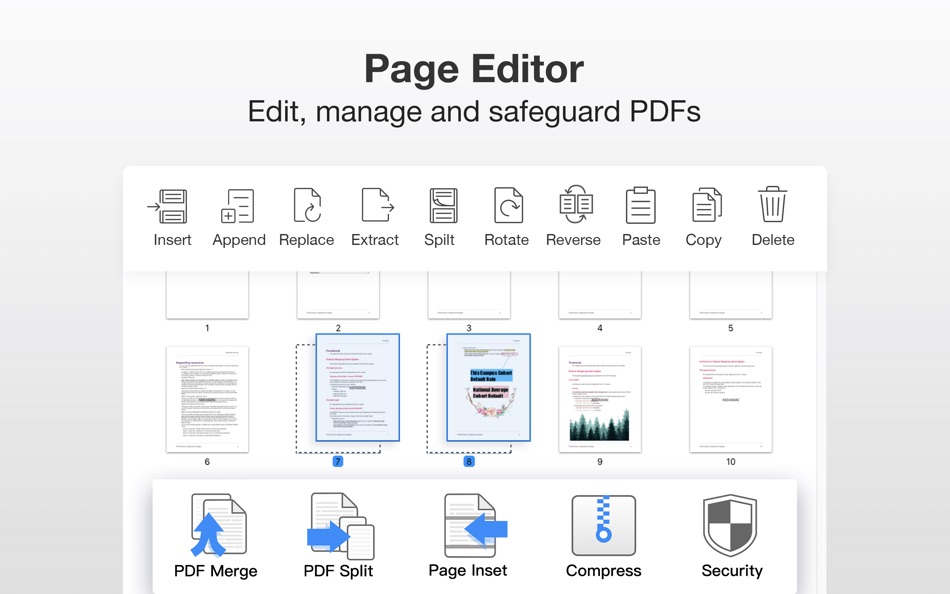
PDF Page Editor
* Merge - combine multiple files into one document
* Split - Split files based on desired number of pages or files, or specific page ranges
* Extract - Extract the desired pages to create a new PDF
* Insert - Insert another file (entire files or specific page ranges) into the existing file
* Rotate, delete, replace, and crop pages
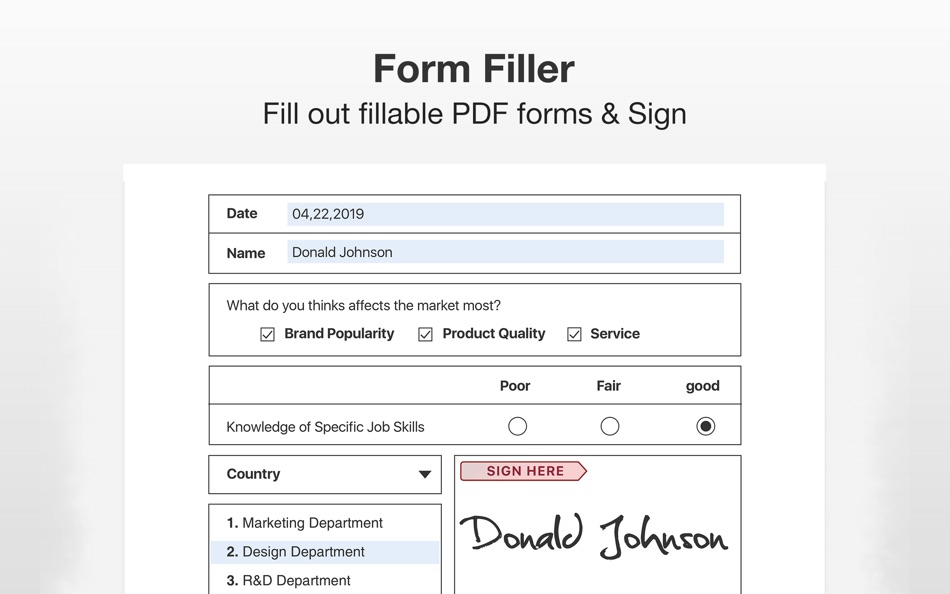
Form-Filling
* Fill out and save - Work with static PDF forms created in Adobe Acrobat.
* Multi-functional Fill - Fill out any PDF forms with interactive fields such as text fields, checkboxes, radio buttons, combo boxes, list boxes and etc.
Page Sizing & Handing
* Booklet - Booklet puts your pages side by side re-sorted for booklet printing, no matter what printer you have.
* Poster - Poster divides large PDF page(s) into multiple smaller Pages.
* Multiple - You can print more than one page of a PDF on a single sheet of paper.
* Print Form Only - Support to Print interactive form fields but doesn't print document contents.
PDF Convertor
* Convert PDFs to iWork, MS Word, Excel, CSV, PPT, RTF, Text, JPG, PNG and HTML
* Support to convert Word, Pages, Docs into PDF in a snap with the original layout after conversion.
* Image to PDF - Directly transform images imported from scanner or iOS device to PDF, or right click on selected images to import them for PDF conversion.
PDF Compressor
* Reduce PDF size to make your documents much lighter
Presentation
* Directly present your PDFs with annotations
* Make presentations out of your PDFs with various animated styles
TTS (Text-to-Speech)
* Let your ears do the reading
* Select the passage or document to be read
Security
* You can also password protect sensitive documents and authorization to edit, copy, modify or print PDFs
Snapshots
* Record and take screenshots of important pages
* Graphic bookmarks are presented using thumbnails
File Sharing
* Upload to Dropbox with one click
* Email PDFs as attachments with one click
* Print PDFs
If you want to thank our never-resting developers, please write a review or recommend PDF Professional for Mac to your friends and teammates.
Should you have any further questions, please feel free to contact us at service@buildconnect.com
Jepretan layar



Yang Baru
- Versi: 2.10.0
- Diperbarui:
- Major update released! You can easily enjoy converting PDF to PPT, Excel, CSV and RTF Offline
・New conversion formats: Support converting PDF to PPT, Excel, CSV, and RTF.
・Optional PDF to Word output layout: Choose to flow text or maintain page layout when converting PDF to Word.
・Support extracting tables.
・Minor bug fixes and performance improvements.
PDF Professional is powered by ComPDFKit. If you want to thank our never-resting developers, please write a review or recommend PDF Professional for Mac to your friends and teammates.
Thank you to all who took the time to write into support@buildtoconnect.com
Harga
- Hari ini: Gratis
- Minimal: Gratis
- Maksimum: Gratis
Pantau harga
Pengembang
- Build to Connect, Inc.
- Platform: iOS Aplikasi (1) macOS Aplikasi (4)
- Daftar: 1 + 1
- Poin: 10 + 371 ¡
- Peringkat: 0
- Ulasan: 0
- Diskon: 0
- Video: 0
- RSS: Berlangganan
Poin
-

- 3,043 Dragon
- +1
-
- 3,074 바람처어럼
- +1
-
- 10,494 Simon Chan
- +1
-
- 1,537 sam
- +1


Peringkat
0 ☹️
Daftar
0 ☹️
Ulasan
Jadilah yang pertama mengulas 🌟
Info tambahan
Kontak
- Situs Web:
 https://www.buildtoconnect.com
PDF Professional-Annotate,Sign URL singkat: Disalin!- 🌟 Bagikan
- Mac App Store
Anda mungkin juga suka
-
- PDF Reader Pro: Convert & Edit
- macOS Aplikasi: Utilitas Oleh: PDF Technologies, Inc.
- * Gratis
- Daftar: 0 + 0 Peringkat: 0 Ulasan: 0
- Poin: 2 + 0 Versi: 5.2.1 PDF Reader Pro, available on Mac, iPad, and iPhone, will fulfill all your document needs across all platforms. Building on solid features such as AI tool, comment, text and image edit, ⥯
-
- PDF Split-Page Number Split
- macOS Aplikasi: Utilitas Oleh: 崴 杨
- * Gratis
- Daftar: 0 + 0 Peringkat: 0 Ulasan: 0
- Poin: 0 + 0 Versi: 1.1.5 "PDF Split" can split PDF files in batches. Support splitting all pages of PDF files and save all pages separately. Support page number input, you can input a certain page or ... ⥯
-
- PDF Protector
- macOS Aplikasi: Utilitas Oleh: Daniel Witt
- $9.99
- Daftar: 0 + 2 Peringkat: 1 (1) Ulasan: 0
- Poin: 0 + 0 Versi: 1.6 PDF Protector is an easy-to-use tool to encrypt or decrypt your PDF documents. Set a password and let PDF Protector encrypt your documents to hinder others from opening it. You can ... ⥯
-
- PDF Metadata Editor
- macOS Aplikasi: Utilitas Oleh: Matusalem Marques
- $3.99
- Daftar: 0 + 0 Peringkat: 0 Ulasan: 0
- Poin: 0 + 0 Versi: 1.11 PDF Metadata Editor lets you gain control of the hidden metadata on your PDF files. Metadata helps your computer find documents for you, both in your system and online. Metadata is ... ⥯
-
- PDF Lock
- macOS Aplikasi: Utilitas Oleh: Joaquin Garcia
- $1.99
- Daftar: 0 + 0 Peringkat: 0 Ulasan: 0
- Poin: 0 + 0 Versi: 1.0.4 PDF Lock: Simple and Secure Protection for Your Documents Instant Protection: PDF Lock offers you a quick and hassle-free way to secure your PDF files. With our intuitive drag-and-drop ⥯
-
- PDF Editor ,PDF Book Reader ®
- macOS Aplikasi: Utilitas Oleh: Milad Fakhr
- Gratis
- Daftar: 0 + 0 Peringkat: 0 Ulasan: 0
- Poin: 1 + 21,993 (4.3) Versi: 8.2 .The Complete PDF App Available for iPhone, iPad, Mac, Apple Watch, Apple Vision Pro & iMessage. Read, Edit, Scan, Create, Archive & Organize PDFs. Powered by Apple Intelligence to ... ⥯
-
- PDF Compressor
- macOS Aplikasi: Utilitas Oleh: HurryApp LTD
- Gratis
- Daftar: 0 + 0 Peringkat: 0 Ulasan: 0
- Poin: 1 + 53 (4.2) Versi: 1.9.3 Introducing the ultimate tool for compressing your PDF documents. With this app, you can easily compress, merge and share your PDF files from anywhere, anytime. ⥯
-
- PDF Pro Editor
- macOS Aplikasi: Utilitas Oleh: Alex Gameli Heyman
- Gratis
- Daftar: 0 + 0 Peringkat: 0 Ulasan: 0
- Poin: 3 + 0 Versi: 1.0.2 Introducing our powerful PDF Editor app that lets you edit, annotate, and manage your PDF documents on-the-go! With a user-friendly interface and a wide range of features, our app is ... ⥯
-
- PDF±
- macOS Aplikasi: Utilitas Oleh: Ruizheng Liu
- $14.99
- Daftar: 0 + 0 Peringkat: 0 Ulasan: 0
- Poin: 0 + 0 Versi: 6.0 SUMMARY 1. PDF± never change your original PDF document. 2. Batch merge multiple PDF files with drag & drop support. 3. Flexible ways to split PDF files: Split to multiple single page ... ⥯
-
- PDF Converter: Reader & Editor
- macOS Aplikasi: Utilitas Oleh: Maham Naeem
- * Gratis
- Daftar: 0 + 0 Peringkat: 0 Ulasan: 0
- Poin: 0 + 0 Versi: 1.8 All-in-One PDF Converter, Reader Easily convert your documents and images with our powerful PDF Converter, Reader app! Supporting a wide range of formats, this app enables seamless ... ⥯
-
- PDF & Doc Image Extractor
- macOS Aplikasi: Utilitas Oleh: 论 李
- $0.99
- Daftar: 0 + 0 Peringkat: 0 Ulasan: 0
- Poin: 0 + 0 Versi: 1.0 Extract images from your PDF, Word, PPT, and Excel files with ease! Simply click or drag a document into the app, wait for the extraction to finish, and select the images you want to ... ⥯
-
- PDF to Image Converter Expert
- macOS Aplikasi: Utilitas Oleh: 路 张
- Gratis
- Daftar: 0 + 1 Peringkat: 0 Ulasan: 0
- Poin: 1 + 0 Versi: 3.1.0 PDF to Image Converter Expert is a program that is developed for converting PDF to image.The program can convert PDF to JPEG, GIF, PNG, BMP, TIFF. It also supports extract images from ... ⥯
-
- PDF Form Filler
- macOS Aplikasi: Utilitas Oleh: 科 姚
- $3.99
- Daftar: 0 + 0 Peringkat: 0 Ulasan: 0
- Poin: 0 + 0 Versi: 3.3 PDF Form Filler is an easy app where you can fill out PDF forms effortlessly. Your PDF is not an interactive PDF form? Don't worry. With PDF Form Filler, you can easily fill out forms ... ⥯
-
- PDF Merge+Split
- macOS Aplikasi: Utilitas Oleh: 群群 刘
- $1.99
- Daftar: 0 + 0 Peringkat: 0 Ulasan: 0
- Poin: 0 + 0 Versi: 1.1.0 PDF Merge+Split: the best tool to merge multiple PDF files into one PDF, split a PDF to multiple PDF files, reorder the pages of a PDF, keep or remove the specified pages of a PDF. KEY ⥯