
| デベロッパー: | SEASOFT LTD. (21) | ||
| 価格: | * フリー | ||
| ランキング: | 0 | ||
| レビュー: | 0 レビューを書く | ||
| リスト: | 0 + 0 | ||
| ポイント: | 0 + 0 ¡ | ||
| Mac App Store | |||
説明

>>>Customize your own hotkey to take screenshots
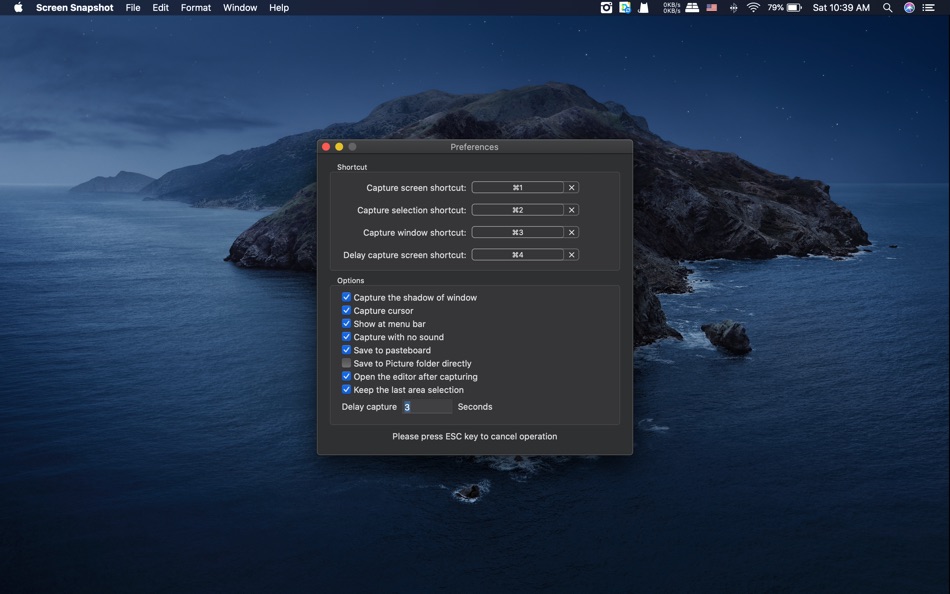
Screen Snapshot has a built-in editing hotkey function. Using this function, you can quickly apply your favorite hotkeys. You can customize four hotkeys for full-screen capture, window capture, selected area capture and delayed capture.
>>>Take full-screen screenshots quickly
Just click your hotkey and you have taken a full-screen screenshot. In full-screen capture mode, you can capture the cursor as needed.
>>>Select an area, snap it
Customizing capture area is very easy to use, just drag and drop to complete. Magic zoom tool helps you make more precise selections, it enlarges the current position to pixels, while providing current size information.
>>>Capture window with shadow
Move the mouse to find the window on the desktop and click to take a snapshot. It can even take snapshots of windows behind other windows. Of course, you can take screenshots of windows without shadow.
>>>Capture pop-up menu is no longer difficult
The delayed capture feature gives you a period of time to pop up the menu. According to your needs, you can set different delay times. This feature is only validate for full-screen capture mode.
>>>Powerful editors
You can edit screenshots instantly when taking them or later using a powerful built-in editor. The editor contains many useful tools, such as text tools, mask tools, line tools, shape tools, etc. Use the text tool to add notes, labels and use the mask tool to hide some privacy areas. Line tools and shape tools help you highlight the key points. Some useful photo filters are also integrated into the editor, including Temperature and Tint. Of course, undo and redo are necessary for every editor.
>>>Snapshot manager for batch operations and reuse
Making tutorial is a complicated work, which requires large amounts of snapshots in advance. Snapshot manager will help you. It saves all screenshots which had taken in the past, you can browse, re-edit, delete and export them.
>>>A variety of output methods can meet different needs
You can save screenshots to Picture folder directly, as well as save to pasteboard. If you want to save to other formats, just click the export button and select the format you want to output. It supports JPEG2000, PNG, PDF, BMP, TIFF formats.
Note
The editor function is not free, you can buy it from the in-app store.
スクリーンショット


価格
-
* アプリ内購入あり - 今日: フリー
- 最小値: フリー
- 最大: フリー
料金のチェック
デベロッパー
- SEASOFT LTD.
- プラットフォーム: macOS アプリ (21)
- リスト: 3 + 0
- ポイント: 10 + 6 ¡
- ランキング: 0
- レビュー: 0
- 割引: 0
- 動画: 0
- RSS: 購読する
ポイント
0 ☹️
ランキング
0 ☹️
リスト
0 ☹️
レビュー
最初のクチコミを書こう 🌟
情報
連絡先
 https://www.imacbits.com/isnapshotScreen Snapshot 短縮 URL: コピーしました!
- 🌟 シェア
- Mac App Store
あなたも好きかも
-
- Screen Guard
- macOS アプリ: ユーティリティ 作者: Life Changing AI LLC
- フリー
- リスト: 0 + 0 ランキング: 0 レビュー: 0
- ポイント: 0 + 0 バージョン: 1.2 Screen Guard keeps your private windows out of sight the moment you start screen mirroring or connect an external monitor or unlock your Mac so you can focus on your presentation ... ⥯
-
- Screen Shader for Safari
- macOS アプリ: ユーティリティ 作者: Alfredo Grassau
- $2.99
- リスト: 0 + 0 ランキング: 0 レビュー: 0
- ポイント: 0 + 2 (5.0) バージョン: 1.0.7 Screen Shader for Safari applies a color tint to any website, making it easier to read, especially at night. Here s what our safari extension offers: Features: · Color tint overlay: ... ⥯
-
- Screen Expander
- macOS アプリ: ユーティリティ 作者: Vitalii Vashchenko
- $6.99
- リスト: 0 + 0 ランキング: 0 レビュー: 0
- ポイント: 0 + 0 バージョン: 1.3.2 Let the display of your MacBook to automatically adjust to the apps you're using. Screen Expander is not a resolution switcher even though it can be used as one. It was designed as a ... ⥯
-
- Screen Replay - 屏幕回放
- macOS アプリ: ユーティリティ 作者: 冰心 李
- $0.99
- リスト: 0 + 0 ランキング: 0 レビュー: 0
- ポイント: 0 + 0 バージョン: 1.0.8 Always On, Always Ready Screen Replay is a revolutionary app that transforms your screen into a powerful memory tool. With a single click, you can rewind and instantly replay the last ... ⥯
-
- Screen Annotation+
- macOS アプリ: ユーティリティ 作者: 金玲 李
- $0.99
- リスト: 0 + 1 ランキング: 0 レビュー: 0
- ポイント: 8 + 0 バージョン: 3.0.2 Screen Annotation+ is a lightweight but powerful screen annotation tool, especially suitable for users who need to frequently perform screen annotation and demonstration. It has the ... ⥯
-
- Screen Mirror
- macOS アプリ: ユーティリティ 作者: 代莉 陈
- $4.99
- リスト: 2 + 1 ランキング: 0 レビュー: 0
- ポイント: 0 + 0 バージョン: 4.0 Screen Mirror is the simplest and easiest way to capture, edit and share your iDevice's screen with friends. Screen Mirror is the most powerful app for mirroring and display your ... ⥯
-
- Screen Brush Ultra
- macOS アプリ: ユーティリティ 作者: 君 许
- * フリー
- リスト: 0 + 1 ランキング: 0 レビュー: 0
- ポイント: 2 + 0 バージョン: 7.1 Screen Brush Ultra is a useful utility which allows you to draw and write directly on your desktop above all of your running application windows. It is a tool which designed for ... ⥯
-
- Screen Recorder - App Recorder
- macOS アプリ: ユーティリティ 作者: 裕涛 兰
- フリー
- リスト: 0 + 1 ランキング: 0 レビュー: 0
- ポイント: 2 + 0 バージョン: 1.0.10 Screen Recorder is a powerful Mac screen recording software that allows you to record any on-screen activity in high definition. Features: - Record system sound - Record screen - ... ⥯
-
- Screen Recorder - RecordX
- macOS アプリ: ユーティリティ 作者: 哲 魏
- フリー
- リスト: 0 + 0 ランキング: 0 レビュー: 0
- ポイント: 2 + 405 (4.5) バージョン: 3.5 Screen Recorder - RecordX is a powerful professional recording application, including high-definition screen recording up to 4K resolution 60 frames, camera recording & voice ... ⥯
-
- Screen Annotation
- macOS アプリ: ユーティリティ 作者: Nguyen Vu
- フリー
- リスト: 1 + 0 ランキング: 0 レビュー: 0
- ポイント: 1 + 0 バージョン: 1.0 Screen Annotation, Drawing Desktop or Presentation Annotation You can draw line, arrow, rectangle, circle on Desktop Screen to help describe you presentation effectively and clearly. ... ⥯
- 新着
- Screen Translate
- macOS アプリ: ユーティリティ 作者: 韩 明洁
- フリー
- リスト: 0 + 0 ランキング: 0 レビュー: 0
- ポイント: 1 + 0 バージョン: 1.0 Screen translate uses macOS's built-in translation interface, supporting mutual translation between up to 19 languages. By capturing the screen image, performing Apple's text ... ⥯
-
- Screen Record-Screen Recorder
- macOS アプリ: ユーティリティ 作者: 仕涛 张
- $4.99
- リスト: 0 + 0 ランキング: 0 レビュー: 0
- ポイント: 0 + 0 バージョン: 3.4.7 Screen Record is a professional screen record software, what you see is what you get. The app can record computer audio and you can record online video and game . It is easy to record ... ⥯
-
- Screen Shade
- macOS アプリ: ユーティリティ 作者: INSPIRING-LIFE TECHNOLOGIES PRIVATE LIMITED
- $1.99
- リスト: 0 + 0 ランキング: 0 レビュー: 0
- ポイント: 0 + 0 バージョン: 2.3 Screen Shade allows you to control the brightness of your screen. This customizable app allows you to place a shade over your screen to reduce the strain on your eyes. Screen Shade ... ⥯
-
- Screen Magnifier
- macOS アプリ: ユーティリティ 作者: Kyrylo Kovalin
- $9.99
- リスト: 0 + 0 ランキング: 0 レビュー: 0
- ポイント: 0 + 0 バージョン: 1.0 Screen Magnifier - See Every Detail, Read Every Word, Focus What Matters Transform your Mac into a powerful magnification and focus tool with Screen Magnifier. Whether you're a ... ⥯