
| Pengembang: | Shiming Chen (1) | ||
| Harga: | Gratis | ||
| Peringkat: | 0 | ||
| Ulasan: | 0 Menulis review | ||
| Daftar: | 0 + 0 | ||
| Poin: | 0 + 0 ¡ | ||
| Mac App Store | |||
Deskripsi

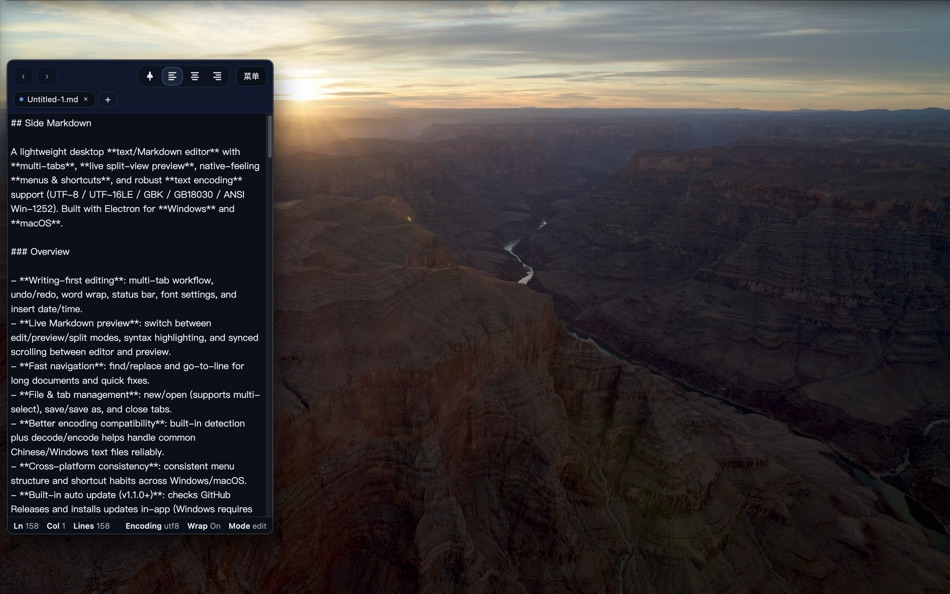
One-click to snap the window to the edge of your screen without covering your main workspace. Jot down notes while browsing materials and capture fragmented ideas in an instant. It also supports real-time preview and automatic table of contents generation, keeping your documents well-structured and organized.
Perfect for programmers drafting technical docs, students organizing study notes, and professionals archiving inspiration.
Ad
Jepretan layar


Yang Baru
- Versi: 1.0
- Diperbarui:
Harga
- Hari ini: Gratis
- Minimal: Gratis
- Maksimum: Gratis
Pantau harga
Ad
Pengembang
- Shiming Chen
- Platform: macOS Aplikasi (1)
- Daftar: 0 + 0
- Poin: 0 + 0 ¡
- Peringkat: 0
- Ulasan: 0
- Diskon: 0
- Video: 0
- RSS: Berlangganan
Poin
0 ☹️
Peringkat
0 ☹️
Daftar
0 ☹️
- Side Markdown
Ulasan
Jadilah yang pertama mengulas 🌟
Info tambahan
- Versi: 1.0
- Kategori:
macOS Aplikasi›Utilitas - OS:
macOS,macOS 10.15 dan yang lebih tinggi - Ukuran:
126 Mb - Bahasa yang didukung:
Afrikaans,Amharic,Arabic,Bengali,Bulgarian,Catalan,Chinese,Croatian,Czech,Danish,Dutch,English,Estonian,Finnish,French,German,Greek,Gujarati,Hebrew,Hindi,Hungarian,Indonesian,Italian,Japanese,Kannada,Korean,Latvian,Lithuanian,Malay,Malayalam,Marathi,Norwegian,Persian,Polish,Portuguese,Romanian,Russian,Serbian,Slovak,Slovenian,Spanish,Swahili,Swedish,Tamil,Telugu,Thai,Turkish,Ukrainian,Urdu,Vietnamese - Rating Konten:
4+ - Mac App Store Peringkat:
0 - Diperbarui:
- Tanggal rilis:
Side Markdown URL singkat: Disalin!- 🌟 Bagikan
- Mac App Store
Anda mungkin juga suka
-
- Markdown Panda
- macOS Aplikasi: Utilitas Oleh: Tap4Mobile do Brasil
- Gratis
- Daftar: 0 + 0 Peringkat: 0 Ulasan: 0
- Poin: 2 + 0 Versi: 2.3.0 Markdown Panda - The elegant Markdown viewer for macOS Discover the most beautiful way to read and view Markdown files on macOS. Markdown Panda is the perfect companion for viewing ... ⥯
-
- Markdown Preview - Quick Look
- macOS Aplikasi: Utilitas Oleh: Anybox LTD
- $2.99
- Daftar: 1 + 0 Peringkat: 0 Ulasan: 0
- Poin: 2 + 0 Versi: 2.1 Markdown Preview provides a Quick Look extension to preview Markdown files in Finder. Before started, you will need to enable Quick Look extension in System Settings. Afterwards you ... ⥯
- Baru
- Markdown Lens
- macOS Aplikasi: Utilitas Oleh: John Decker
- * Gratis
- Daftar: 0 + 0 Peringkat: 0 Ulasan: 0
- Poin: 1 + 0 Versi: 1.01 Markdown Lens is a fast, native Markdown viewer for macOS. Simply double-click any .md file to see it beautifully rendered with full GitHub Flavored Markdown support. POWERFUL ... ⥯
- Baru
- Markdown Reader
- macOS Aplikasi: Utilitas Oleh: 凌凌 刘
- $1.99
- Daftar: 0 + 0 Peringkat: 0 Ulasan: 0
- Poin: 0 + 0 Versi: 1.1.1 Markdown Reader 是一款简洁优雅的 Markdown 文档阅读器 专为开发者和技术人员设计。 主要特性 多格式支持 - 支持 .md、.markdown、.txt 格式文档 - 代码高亮显示 阅读技术文档更轻松 智能目录导航 - 自动生成文档目录结构 - 点击标题快速跳转定位 - 可拖动调整目录宽度 多标签页管理 - 同时打开多个文档 - ... ⥯
-
- ID Side for Safari
- macOS Aplikasi: Utilitas Oleh: ID Side
- Gratis
- Daftar: 1 + 0 Peringkat: 0 Ulasan: 0
- Poin: 1 + 0 Versi: 2.1.5 How does it work? Following installation, an ID side icon is pinned on the left side of your Computer's search bar, at the top of the screen. When clicking on the plugin icon, a login ... ⥯
-
- Copy to Markdown
- macOS Aplikasi: Utilitas Oleh: 谦 陈
- $3.99
- Daftar: 0 + 0 Peringkat: 0 Ulasan: 0
- Poin: 0 + 0 Versi: 1.0 Instantly extract clean content from any webpage and copy it as Markdown with a single click. WHAT IT DOES Copy to Markdown extracts the main article content from web pages and ... ⥯
-
- File2:Text Markdown Converter
- macOS Aplikasi: Utilitas Oleh: Cleverson
- * Gratis
- Daftar: 0 + 0 Peringkat: 0 Ulasan: 0
- Poin: 0 + 0 Versi: 1.1.1 Turn any document into clean, portable Markdown or plain text without ever leaving your Mac. Discover File2Text Markdown Converter, your all-in-one solution for transforming documents, ⥯
- Baru
- MD Editor - Simple & Convert
- macOS Aplikasi: Utilitas Oleh: hirokazu murabe
- Gratis
- Daftar: 0 + 0 Peringkat: 0 Ulasan: 0
- Poin: 0 + 0 Versi: 1.0 The SIMPLEST Markdown editor. Create beautiful documents in minutes. Why Choose This App? Just 3 Steps to Perfect Documents 1. Type your text 2. See live preview 3. Export to PDF - ... ⥯
-
- LowHumming
- macOS Aplikasi: Utilitas Oleh: 晓枋 陈
- Gratis
- Daftar: 0 + 0 Peringkat: 0 Ulasan: 0
- Poin: 0 + 0 Versi: 1.0.23 - markdown 编辑器 - 比传统markdown而已更加方便的 list - 支持把rss订阅也加入到文稿列表中 ⥯
-
- Tabs Saver for Safari
- macOS Aplikasi: Utilitas Oleh: Denk Alexandru
- * Gratis
- Daftar: 1 + 2 Peringkat: 0 Ulasan: 0
- Poin: 11 + 0 Versi: 4.2.1 Featured by Apple in 3 stories: Standout Safari Extensions, Super Safari Extensions, and Browse Better If you want to save your browsing session for later or you have too many tabs ... ⥯
-
- LLM Response Formatter
- macOS Aplikasi: Utilitas Oleh: Kirill Nikulin
- Gratis
- Daftar: 0 + 0 Peringkat: 0 Ulasan: 0
- Poin: 0 + 0 Versi: 1.1.0 LLM Response Formatter is a powerful macOS utility designed to clean and convert AI-generated text from any language model. Formatting Options: Remove Markdown headings, bold, italic, ... ⥯
-
- WorkCanvas
- macOS Aplikasi: Utilitas Oleh: Lawrence Tsui
- $4.99
- Daftar: 0 + 0 Peringkat: 0 Ulasan: 0
- Poin: 0 + 0 Versi: 1.0.1 WorkCanvas is a calm canvas for everything you touch at work tickets, code and standup notes in one place on your Mac. Instead of scattered notes and half-remembered context, every ... ⥯
-
- Text Case
- macOS Aplikasi: Utilitas Oleh: Christopher R Hannah
- Gratis
- Daftar: 0 + 4 Peringkat: 0 Ulasan: 0
- Poin: 7 + 0 Versi: 2023.3 Text Case is a text transformation utility, that can be as powerful as you make it, and accessible throughout iOS. Flows These are customisable combinations of formats, that can be put ⥯
-
- Tabs to Links
- macOS Aplikasi: Utilitas Oleh: Benjamin Mayo
- $3.99
- Daftar: 3 + 4 Peringkat: 0 Ulasan: 0
- Poin: 0 + 0 Versi: 1.2.4 Make a list of links from your open tabs in Safari, instantly. Take your browser window of research straight into an email to send to a friend, create footnotes for your paper, or drop ⥯