
| Nhà phát triển: | christopher reed (5) | ||
| Giá bán: | $2.99 | ||
| Xếp hạng: | 0 | ||
| Đánh giá: | 0 Viết đánh giá | ||
| Bình luận: | 0 Đăng bình luận | ||
| Danh sách: | 0 + 0 | ||
| Điểm: | 0 + 0 ¡ | ||
| Mac App Store | |||
Mô tả

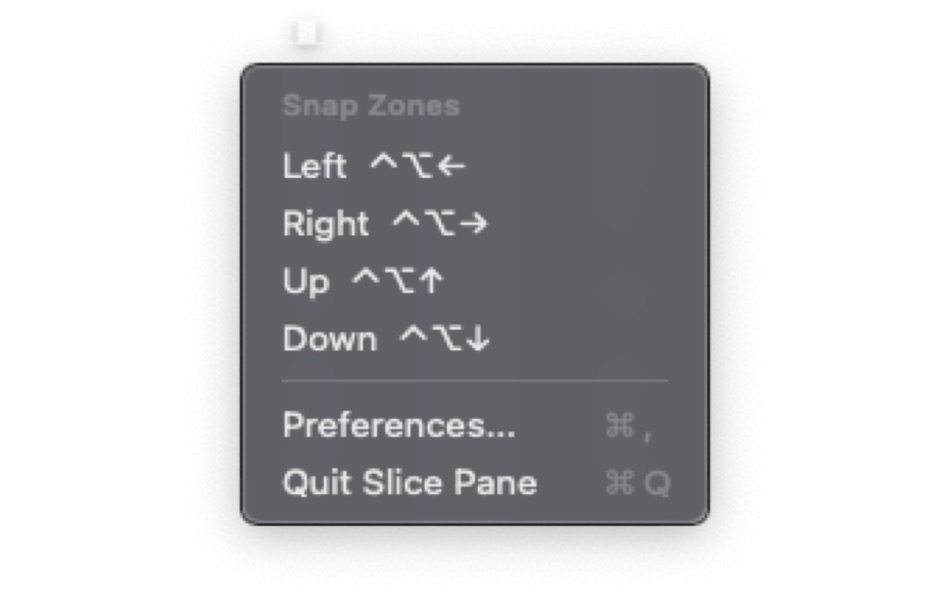
• Ctrl+Option+Left — Left half → Left third → Left two-thirds
• Ctrl+Option+Right — Right half → Right third → Right two-thirds
• Ctrl+Option+Up — Top half → Fullscreen
• Ctrl+Option+Down — Bottom half → Center → Center third
POWER SHORTCUTS (enable in Preferences)
• Ctrl+Option+U — Top-left quarter → Top-left sixth → Top-center sixth
• Ctrl+Option+I — Top-right quarter → Top-right sixth
• Ctrl+Option+J — Bottom-left quarter → Bottom-left sixth → Bottom-center sixth
• Ctrl+Option+K — Bottom-right quarter → Bottom-right sixth
CHEAT SHEET
Hold Ctrl+Option for half a second without pressing another key and a visual overlay appears showing all available snap zones with their shortcuts. Release to dismiss.
CUSTOM GRID LAYOUTS
Create your own grid layouts with any number of rows and columns. Define custom regions and assign hotkeys to them independently.
Slice Pane lives in your menu bar and uses minimal resources. No dock icon, no clutter.Press Ctrl+Option and an arrow key to snap any window into position. Press the same key again to cycle through sizes — left arrow goes from half, to third, to two-thirds and back. Eight keys cover all 21 snap positions, so there's nothing to memorize.SlicePane is a lightweight window manager that lets you organize your screen with keyboard shortcuts.
Ad
Ảnh chụp màn hình


Tính năng mới
- Phiên bản: 1.1
- Cập nhật:
- Better use and workflow and a help page to assist new users with changes and adoption
Lịch sử giá
- Hôm nay: $2.99
- Tối thiểu: $2.99
- Tối đa: $2.99
Theo dõi giá
Nhà phát triển
- christopher reed
- Nền tảng: iOS Ứng dụng (3) macOS Ứng dụng (2)
- Danh sách: 0 + 0
- Điểm: 0 + 1 ¡
- Xếp hạng: 0
- Đánh giá: 0
- Bình luận: 0
- Giảm giá: 0
- Video: 0
- RSS: Đăng ký
Điểm (0)
0 ☹️
Xếp hạng (0)
0 ☹️
Danh sách (0)
0 ☹️
- SlicePane
Đánh giá (0)
Hãy là người đầu tiên đánh giá 🌟
Thông tin bổ sung
- Phiên bản: 1.1
- Danh mục:
macOS Ứng dụng›Tiện ích - HĐH:
macOS,macOS 13.0 trở lên - Kích thước:
2 Mb - Ngôn ngữ được hỗ trợ:
English - Xếp hạng nội dung:
4+ - Mac App Store Xêp hạng:
0 - Cập nhật:
- Ngày phát hành:
«SlicePane». Nền tảng: macOS. Thể loại: Tiện ích. Nhà phát triển: «christopher reed». Bản phát hành đầu tiên: . Cập nhật lần cuối: . Giá hiện tại: $2.99. Giá thấp nhất được ghi nhận: $2.99. Giá cao nhất được ghi nhận: $2.99. Tiêu đề này chưa nhận được xếp hạng hoặc đánh giá trên AppAgg. Ngôn ngữ có sẵn: English. AppAgg theo dõi lịch sử giá, xếp hạng và phản hồi của người dùng cho «SlicePane». Theo dõi ưu đãi và cập nhật trong tương lai qua RSS. AppAgg không lưu trữ ứng dụng hoặc phân phối phần mềm. Tất cả các nhãn hiệu, logo và ảnh chụp màn hình đều thuộc về chủ sở hữu tương ứng.
Bình luận (0)
Hãy là người đầu tiên nhận xét 🌟
SlicePane URL ngắn: Đã sao chép!- 🌟 Chia sẻ
- Mac App Store
Ad
Bạn cũng có thể thích
-
- Pane- window control tool
- macOS Ứng dụng: Tiện ích Bởi: 宁波上官科技有限公司
- Miễn phí
- Danh sách: 0 + 0 Xếp hạng: 0 Đánh giá: 0
- Điểm: 3 + 0 Bình luận: 0 Phiên bản: 1.1.0 [Native Support for Apple M Series and Intel Chips] Pane is a window management software that makes moving windows, resizing windows, placing multiple windows side-by-side, or ... ⥯
-
- Sprite Slice
- macOS Ứng dụng: Tiện ích Bởi: xiao dong zhou
- $0.99
- Danh sách: 0 + 1 Xếp hạng: 0 Đánh giá: 0
- Điểm: 1 + 0 Bình luận: 0 Phiên bản: 1.0 Sprite Slice can quickly cut the tile map into separate pictures and export them as JPG or PNG. The import format supports JPG, JPEG, PNG. Simply set the pixel size, padding, and ... ⥯
-
- HomeControl Menu for HomeKit
- macOS Ứng dụng: Tiện ích Bởi: Pedro Jose Pereira Vieito
- * Miễn phí
- Danh sách: 2 + 3 Xếp hạng: 5 (1) Đánh giá: 0
- Điểm: 15 + 0 Bình luận: 0 Phiên bản: 2.15.1 HomeControl is the ultimate HomeKit companion on macOS. Manage and automate your smart home directly from the menu bar: check your home status, trigger scenes, adjust devices, or ... ⥯
-
- Commander One: File Manager
- macOS Ứng dụng: Tiện ích Bởi: Electronic Team, Inc.
- * Miễn phí
- Danh sách: 2 + 2 Xếp hạng: 0 Đánh giá: 0
- Điểm: 7 + 0 Bình luận: 0 Phiên bản: 3.17.2 A high level of file management can be reached with the updated version of Commander One v3.0. Commander One is a free file manager created in Swift, has a dual-pane interface that ... ⥯
-
- DCommander
- macOS Ứng dụng: Tiện ích Bởi: DevStorm
- $3.99
- Danh sách: 0 + 2 Xếp hạng: 0 Đánh giá: 0
- Điểm: 5 + 0 Bình luận: 0 Phiên bản: 2.9.0 DISCOUNTED DUE TO RELEASE OF DCOMMANDER 3 DCommander is a two-pane file manager that gives you full control over your computer's filesystem. Optimized for quick access and ... ⥯
- -100%
- Captain's Deck
- macOS Ứng dụng: Tiện ích Bởi: ATHANASIOS CHONIAS
- ▼ * Miễn phí
$17.99-100% - Danh sách: 0 + 1 Xếp hạng: 0 Đánh giá: 0
- Điểm: 7 + 0 Bình luận: 0 Phiên bản: 1.3.0 Captain's Deck is a dual-pane file manager for power users. Navigate with Vim keys, connect to SFTP/S3/cloud storage, browse archives, track Git changes, and sync folders all from one ... ⥯
-
- Disk Manager-manage all disks
- macOS Ứng dụng: Tiện ích Bởi: 刚刚 孔
- $4.99
- Danh sách: 1 + 1 Xếp hạng: 0 Đánh giá: 0
- Điểm: 1 + 0 Bình luận: 0 Phiên bản: 5.8 Import disk content to database, browse and search disk content offline anywhere anytime. [ How to use it: ] 1. Add or drag disks/folders to the left disk list pane of App 2. After ... ⥯
-
- Nimble Commander
- macOS Ứng dụng: Tiện ích Bởi: Michael Kazakov
- Miễn phí
- Danh sách: 1 + 1 Xếp hạng: 0 Đánh giá: 0
- Điểm: 3 + 0 Bình luận: 0 Phiên bản: 1.8.0 Nimble Commander is a dual-pane file manager designed exclusively for Mac users. Optimized for efficiency, it delivers blazing-fast performance and instant user interface feedback. ... ⥯
-
- Text Comparator Wizard
- macOS Ứng dụng: Tiện ích Bởi: UMIT KAS
- Miễn phí
- Danh sách: 0 + 0 Xếp hạng: 0 Đánh giá: 0
- Điểm: 1 + 0 Bình luận: 0 Phiên bản: 0.1 Headline: The Most Magical Way to Compare Text. Stop hunting for changes manually. Whether you are a developer debugging code, a writer proofing drafts, or a student comparing notes, ... ⥯
-
- Handy Calculator for Mac OS X
- macOS Ứng dụng: Tiện ích Bởi: Alice Dev Team
- Miễn phí
- Danh sách: 0 + 1 Xếp hạng: 0 Đánh giá: 0
- Điểm: 1 + 0 Bình luận: 0 Phiên bản: 2.3.2 Handy Calculator: nothing unneeded just functional, convenient and stylish! IN BRIEF: Single-color Apple-style that won t strain your eyes Becomes nearly invisible when inactive! Basic ⥯
-
- Virtual Machines House
- macOS Ứng dụng: Tiện ích Bởi: Senthilkumar Eswaran
- Miễn phí
- Danh sách: 1 + 0 Xếp hạng: 0 Đánh giá: 0
- Điểm: 1 + 0 Bình luận: 0 Phiên bản: 1.5.3 This app facilitates creating and managing virtual machines. On Apple Silicon systems, both Mac and Linux virtual machines are supported. On Intel systems, only Linux virtual machines ... ⥯
-
- Deckard
- macOS Ứng dụng: Tiện ích Bởi: Elliot Lockerman
- $2.99
- Danh sách: 0 + 0 Xếp hạng: 0 Đánh giá: 0
- Điểm: 0 + 0 Bình luận: 0 Phiên bản: 1.3 Organize your pictures and free up space! All on your own computer - no cloud or servers needed. Deckard searches a folder (and all subfolders) for groups of images that look similar. ... ⥯
-
- OmniFile Pro
- macOS Ứng dụng: Tiện ích Bởi: ERLEND JOHNSRUD VAAGE
- Miễn phí
- Danh sách: 0 + 0 Xếp hạng: 0 Đánh giá: 0
- Điểm: 1 + 0 Bình luận: 0 Phiên bản: 2.0 OmniFile is a powerful, intuitive, and secure file transfer client designed for macOS professionals. Experience seamless file management with an advanced dual-pane interface, multiple ... ⥯
-
- Explore Folder Sizes
- macOS Ứng dụng: Tiện ích Bởi: Verenes LLC
- * Miễn phí
- Danh sách: 0 + 0 Xếp hạng: 0 Đánh giá: 0
- Điểm: 0 + 0 Bình luận: 0 Phiên bản: 1.0.3 Explore Folder Sizes is a professional dual-pane file manager designed specifically for macOS users who need to efficiently manage and analyze their file systems. KEY FEATURES ... ⥯