
| Nhà phát triển: | Erik Wegener (28) | ||
| Giá bán: | Miễn phí | ||
| Xếp hạng: | 0 | ||
| Đánh giá: | 0 Viết đánh giá | ||
| Danh sách: | 2 + 0 | ||
| Điểm: | 4 + 0 ¡ | ||
| Mac App Store | |||
Mô tả

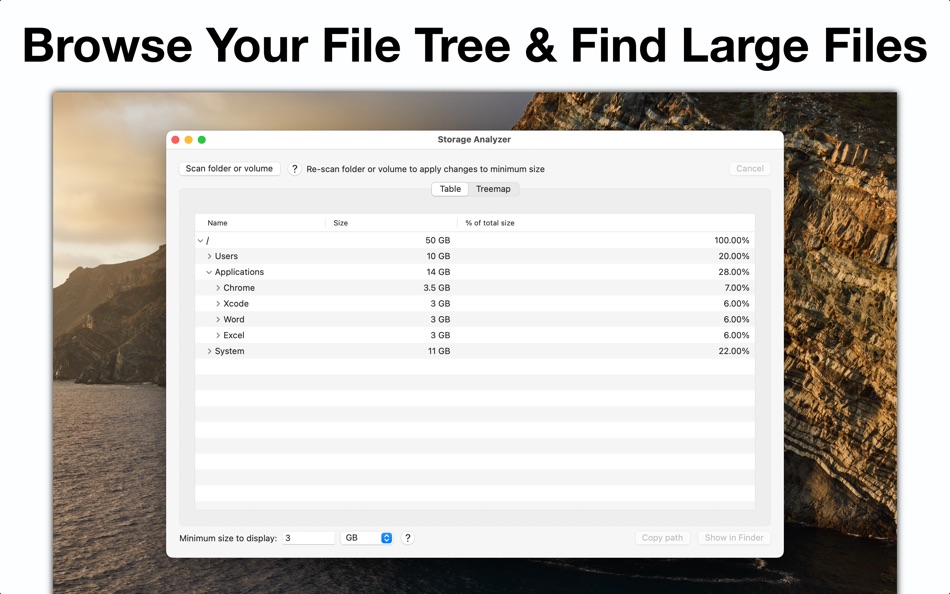
Storage Analyzer includes an option to only show files and folders that meet a minimum size threshold. This lets you find the largest files and folders more easily.
Please note: At the moment Storage Analyzer does not let you delete any files and folders directly in the app.
Ảnh chụp màn hình

Tính năng mới
- Phiên bản: 1.2.3
- Cập nhật:
- • Storage Analyzer has been rebuilt with the latest macOS technology for better speed, stability, and performance.
Giá bán
- Hôm nay: Miễn phí
- Tối thiểu: Miễn phí
- Tối đa: Miễn phí
Theo dõi giá
Nhà phát triển
- Erik Wegener
- Nền tảng: iOS Ứng dụng (5) iOS Trò chơi (4) macOS Ứng dụng (18) macOS Trò chơi (1)
- Danh sách: 7 + 1
- Điểm: 58 + 3,491 ¡
- Xếp hạng: 0
- Đánh giá: 0
- Giảm giá: 0
- Video: 0
- RSS: Đăng ký
Điểm
-

- 2,952 Dragon
- +1
-
- 549 expat4i
- +1
-
- 10,411 Simon Chan
- +1
-
- 1 fusions luma
- +1


Xếp hạng
0 ☹️
Danh sách
Đánh giá
Hãy là người đầu tiên đánh giá 🌟
Thông tin bổ sung
- Phiên bản: 1.2.3
- Danh mục:
macOS Ứng dụng›Tiện ích - HĐH:
macOS,macOS 10.15 trở lên - Kích thước:
616 Kb - Ngôn ngữ được hỗ trợ:
English - Xếp hạng nội dung:
4+ - Mac App Store Xêp hạng:
0 - Cập nhật:
- Ngày phát hành:
Storage Analyzer URL ngắn: Đã sao chép!- 🌟 Chia sẻ
- Mac App Store
Bạn cũng có thể thích
- mới
- Storage Cleaner Pro.
- macOS Ứng dụng: Tiện ích Bởi: Cederic Schmid
- * Miễn phí
- Danh sách: 0 + 0 Xếp hạng: 0 Đánh giá: 0
- Điểm: 0 + 0 Phiên bản: 1.0 Storage Cleaner Pro helps you scan, visualize, and free up space on macOS with ease. Analyze folders, find large or old files, and see exactly what s taking up storage; all in a clean, ⥯
-
- Storage Performance
- macOS Ứng dụng: Tiện ích Bởi: James Moriarty
- Miễn phí
- Danh sách: 0 + 0 Xếp hạng: 0 Đánh giá: 0
- Điểm: 0 + 0 Phiên bản: 1.3 Storage Performance lets you examine how your devices are connected and test performance against their theoritical limits. Useful for investigating USB device speed issues with ... ⥯
-
- Storage Statusbar
- macOS Ứng dụng: Tiện ích Bởi: Dogukan Sahil
- Miễn phí
- Danh sách: 1 + 1 Xếp hạng: 0 Đánh giá: 0
- Điểm: 19 + 0 Phiên bản: 2.5 Storage Statusbar is a feature-rich macOS application designed to provide you with comprehensive monitoring and management of your disk space. With its convenient status bar ... ⥯
-
- Storage Info
- macOS Ứng dụng: Tiện ích Bởi: AVV Systems
- $1.99
- Danh sách: 0 + 0 Xếp hạng: 0 Đánh giá: 0
- Điểm: 0 + 0 Phiên bản: 1.0 Need a quick and easy way to check your Mac s storage? Storage Info displays real-time available space for both internal and external drives, so you always know how much storage you ... ⥯
-
- Storage Inspector
- macOS Ứng dụng: Tiện ích Bởi: Weida Fan
- Miễn phí
- Danh sách: 1 + 0 Xếp hạng: 0 Đánh giá: 0
- Điểm: 0 + 0 Phiên bản: 1.0 Inspect contents of a folder, by the size of its children. Your privacy is protected, nothing will be collected or stored on any device (not even yours). ⥯
-
- Disk Space Analyzer: Inspector
- macOS Ứng dụng: Tiện ích Bởi: Nektony LLC
- * Miễn phí
- Danh sách: 1 + 0 Xếp hạng: 0 Đánh giá: 0
- Điểm: 11 + 0 Phiên bản: 6.0 The best storage analyzer for Mac. Running out of disk space? Need to know what is taking the most space in your storage? Analyze your storage usage with Disk Space Analyzer. Disk ... ⥯
-
- Disk Analyzer Pro
- macOS Ứng dụng: Tiện ích Bởi: Shrishail Rana
- $5.99
- Danh sách: 0 + 0 Xếp hạng: 0 Đánh giá: 0
- Điểm: 3 + 0 Phiên bản: 4.6.0 50% Discount for limited time Fast and Easy Disk Space Analyzer and Disk Cleanup App NOW GET YOUR SPACE BACK JUST BY ONE CLICK >>>>> GET RID OF LARGE AND OBSOLETE FILES >>>>> FIND AND ... ⥯
-
- Disk & Folder Analyzer
- macOS Ứng dụng: Tiện ích Bởi: Cem Sungu
- Miễn phí
- Danh sách: 0 + 0 Xếp hạng: 0 Đánh giá: 0
- Điểm: 0 + 0 Phiên bản: 1.2 (2) "Disk & Folder Analyzer is your ultimate solution for managing disk space and optimizing storage on your device. With its intuitive interface and powerful scanning capabilities, you ... ⥯
-
- Targitas Analyzer
- macOS Ứng dụng: Tiện ích Bởi: Parta Networks
- Miễn phí
- Danh sách: 0 + 0 Xếp hạng: 0 Đánh giá: 0
- Điểm: 0 + 0 Phiên bản: 1.8 Targitas Analyzer Smarter Monitoring for Your Devices & Users! Targitas Analyzer is a powerful and user-friendly tool designed to help you monitor edge device station and track user ... ⥯
-
- S4N: WiFi Analyzer & Scanner
- macOS Ứng dụng: Tiện ích Bởi: Wlodzimierz Grzywacz
- * $6.99
- Danh sách: 2 + 0 Xếp hạng: 5 (1) Đánh giá: 4 (1)
- Điểm: 8 + 0 Phiên bản: 1.38 S4N - The best Wi-Fi Analyzer. Base features: 1. Supports 802.11a/b/g/n/ac/ax/be standards. 2. Supports 2.4, 5, 6 GHz frequencies. 3. Information about Wi-Fi networks in table such as: ⥯
-
- NetSpot: WiFi Analyzer
- macOS Ứng dụng: Tiện ích Bởi: Etwok Inc
- * Miễn phí
- Danh sách: 1 + 2 Xếp hạng: 0 Đánh giá: 0
- Điểm: 7 + 0 Phiên bản: 5.1 NetSpot is best known for its versatile toolset in real-time analysis of WiFi networks. Its tools include the Wi-Fi Inspector, great wireless visualizations within WiFi Site Surveys of ⥯
-
- WiFi Tools & Analyzer
- macOS Ứng dụng: Tiện ích Bởi: Tamara Dudarenko
- $2.49
- Danh sách: 1 + 0 Xếp hạng: 0 Đánh giá: 0
- Điểm: 14 + 43 (4.5) Phiên bản: 2.1 WiFi Tools & Analyzer is a powerful set of network tools. Helps to quickly detecting any computer network problems with WiFi and mobile (cellular) connection. App find, ping and ... ⥯
-
- Smart Storage Manager
- macOS Ứng dụng: Tiện ích Bởi: CluBees Tech
- $1.99
- Danh sách: 1 + 0 Xếp hạng: 0 Đánh giá: 0
- Điểm: 6 + 0 Phiên bản: 1.2 Smart Storage Manager is the go-to file system space analyzer to free up space on your Mac - you can check the storage space and free up some space by deleting or managing unwanted ... ⥯
-
- Network Analyzer Master: Loopa
- macOS Ứng dụng: Tiện ích Bởi: Master Network Tools s.r.o.
- Miễn phí
- Danh sách: 2 + 1 Xếp hạng: 0 Đánh giá: 0
- Điểm: 4 + 391 (3.5) Phiên bản: 4.0.5 Network Analyzer will provide you with a detailed analysis of your home network along with network and cell information. NETWORK INFORMATION Connection status You get main network info ⥯