
描述

Timer makes time management on your Mac simple and reliable. Whether you’re studying, working, training, or running experiments, it gives you the right tools to measure, organize, and be reminded at just the right moment. Its clean and intuitive interface makes every feature easy to access, while behind the scenes it offers the accuracy and flexibility professionals need.
Accurate measurement
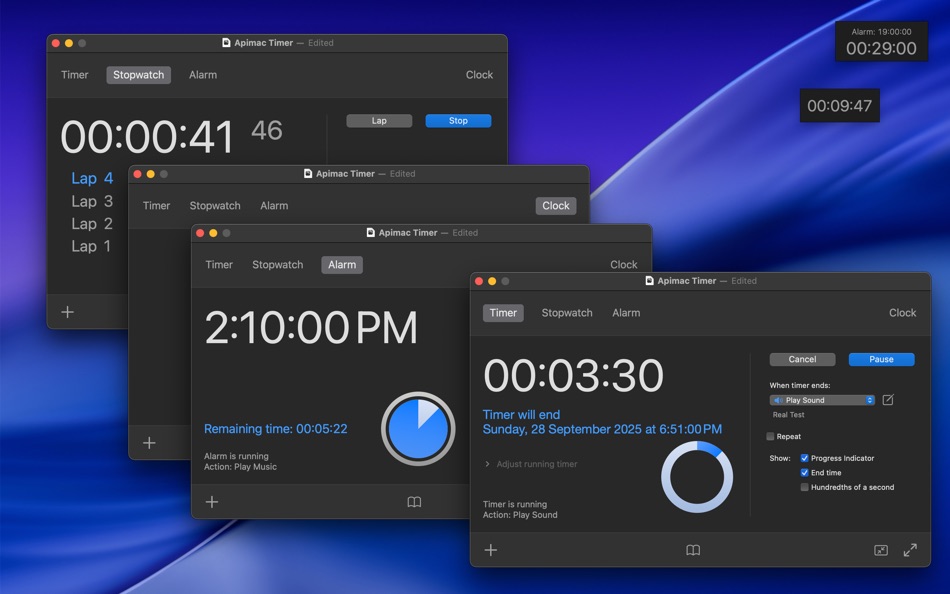
When precision really matters, you can rely on Timer. The stopwatch tracks time down to hundredths of a second and supports lap times, so you never lose track of even the smallest details. Timers can repeat automatically, helping you structure study sessions, workouts, or recurring tasks, and both stopwatch and timers remain accurate even if the system clock changes — due to time zones, daylight saving, or manual adjustments.
Flexible notifications and actions
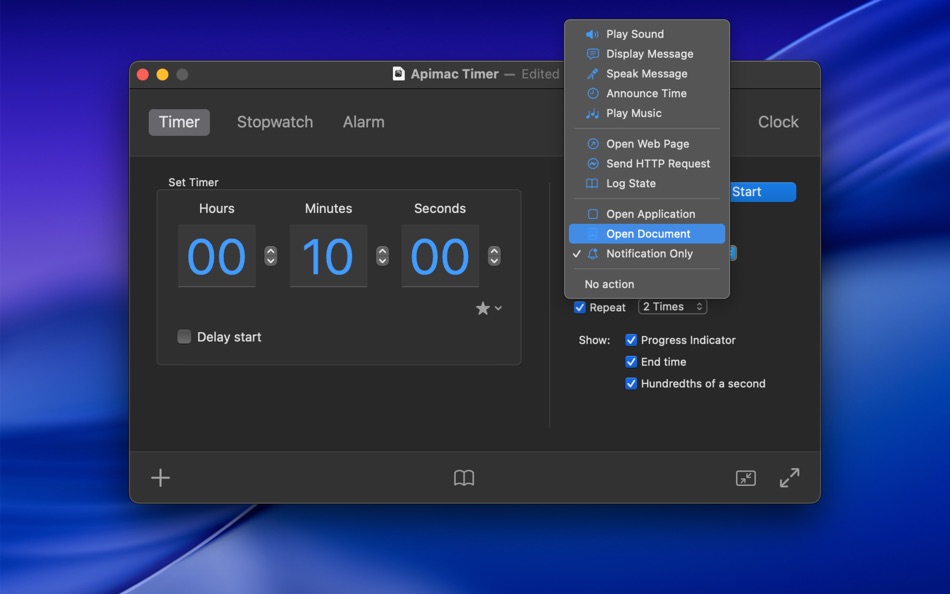
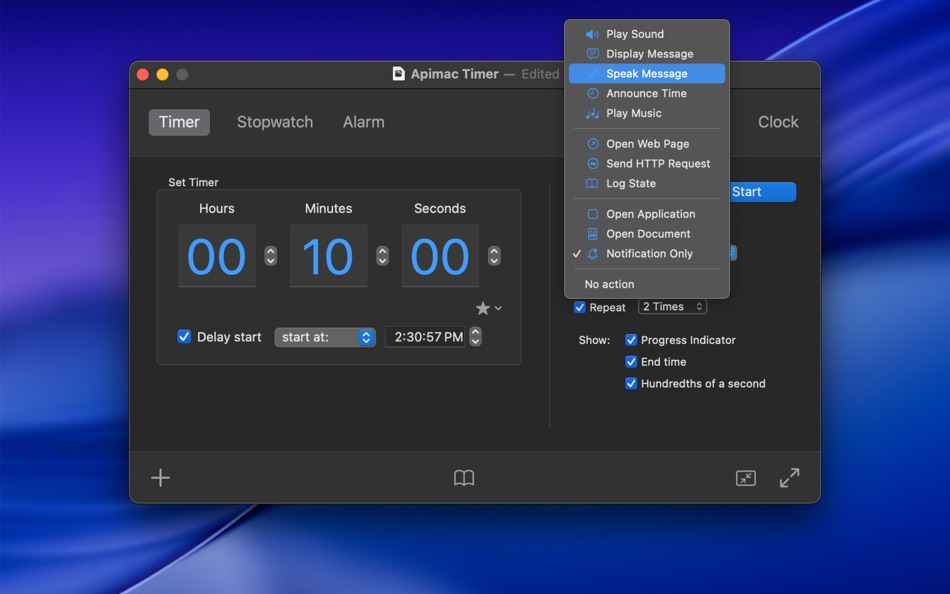
At the end of a timer or alarm, you choose what happens. Play music, display or speak a message, announce the current time, open apps or documents, launch web pages, send an HTTP request, or simply receive a discreet notification. You can adjust the volume of sounds, repeat them multiple times, or let Timer surprise you with a different sound each time. And thanks to its built-in safety fallback, if an action cannot be executed, you’ll still hear a clear alert — so you’ll never miss an important signal.
Quick and convenient
Starting a timer takes just one click thanks to the favorites, suggested, and recent menu. Pick from ready-made presets like 1, 5, or 10 minutes, quickly reuse recent intervals, or save your own favorites to launch them instantly. For those who want to keep a history, the improved logging system records the current state whenever you need it, with professional localization and clear formatting.
Feature highlights
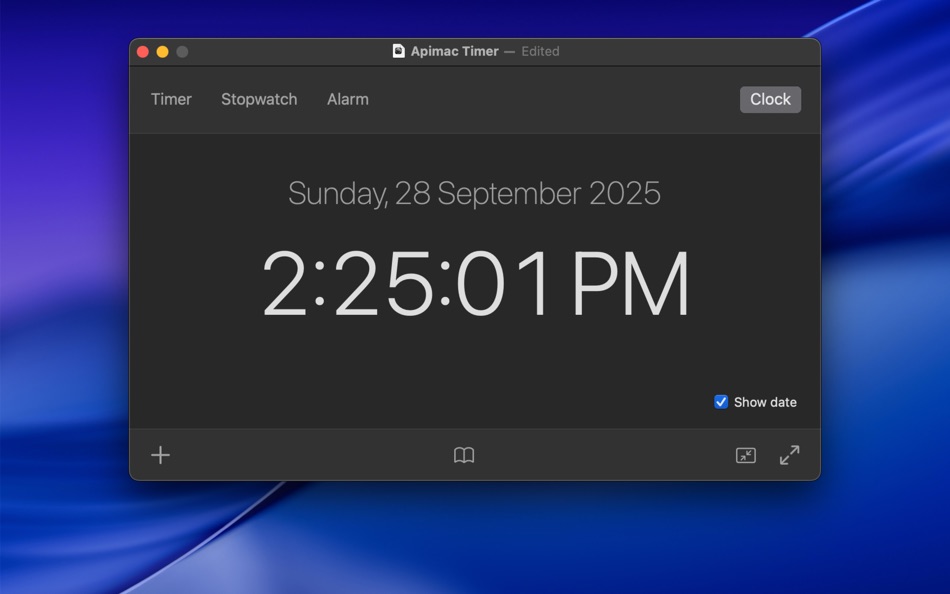
• Professional stopwatch, alarm clock, and countdown timer for Mac
• Clean and intuitive interface
• Hundredth-of-a-second accuracy with lap times
• Repeating timers for recurring actions
• Fully customizable notifications and sounds
• Safety fallback to ensure you never miss an alert
• Favorites, suggested, and recent menu for quick timers
• Logging system to keep a reliable history of your sessions
• Flexible end-of-time actions: play music, show or speak a message, announce the time, open apps or documents, launch web pages, send HTTP requests, or trigger a simple notification
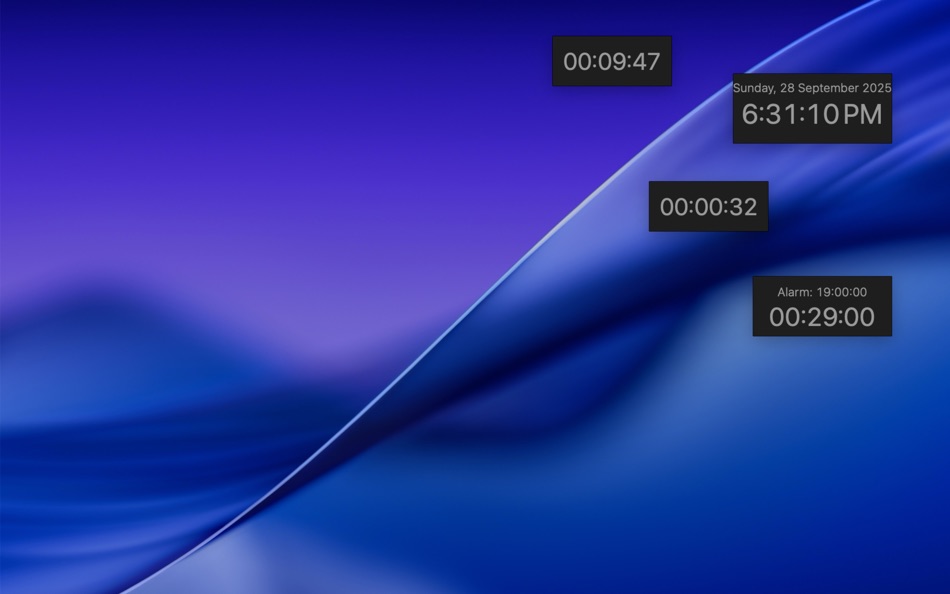
• Advanced conveniences: full-screen mode, iconized windows, multiple timers in parallel
• Multilingual support, automatically following your Mac’s language (English, German, Spanish, French, Italian, Japanese, Korean, Portuguese, Russian, Simplified Chinese)
Subscriptions and Purchases
With the purchase you unlock all the app’s core features:
• Create and run timers (with scheduling, repeating options, live adjustments, and detailed logging)
• Use the Stopwatch with Lap and Recent Lap functions
• Set and activate fully customizable alarms with advanced end-of-time actions
In addition, subscribers benefit from continuous improvements, new features, and regular updates delivered to the app over time.
Plans available:
• Monthly subscription: 1-week free trial, then automatically renews at the monthly price
• Annual subscription: 2-week free trial, then automatically renews at the annual price
• Lifetime purchase: one-time payment with unlimited access to all features
Subscriptions renew automatically unless cancelled at least 24 hours before the end of the period. You can manage or cancel your subscription anytime in your App Store account settings.
Privacy Policy: https://www.apimac.com/about/privacy/
Terms of Use (EULA): https://www.apple.com/legal/internet-services/itunes/dev/stdeula/
Ad
螢幕擷取畫面



新功能
- 版本: 26
- 發佈日期:
- Completely redesigned
Timer has been fully rewritten to take advantage of the latest macOS technologies, bringing stronger security, improved performance, and support for many more languages.
Smarter alarms and sounds
Set the exact volume of each alert with a clear, dedicated control, decide how many times it should repeat, or let Timer keep things fresh with a different sound every time.
New timer options
Timers are now more flexible than ever. You can schedule them to start at a precise time, adjust them while they’re running by adding or removing seconds or minutes, and even repeat them automatically to suit recurring activities.
More flexible actions
At the end of a timer or alarm, Timer gives you complete freedom. You can play music, show or speak a message, announce the time, open apps or documents, launch a web page, send an HTTP request, log the current state, or simply send a notification — all with the reassurance of a safety fallback that guarantees you’ll never miss an alert.
Real Test
With the new “Real Test” option you can simulate exactly what will happen at the end of a timer or alarm, so there are no surprises when it really matters.
Improved Full Screen mode
Full Screen mode has been enhanced with new themes, color choices, transparency, and custom messages, making it perfect for classrooms, labs, and presentations.
Enhanced logging
The Log Now feature keeps a clear and complete record of your sessions, with data saved in a professionally localized format.
Discreet notifications
If you prefer a quieter approach, the new “Notification only” option delivers alerts directly to the macOS Notification Center without sounds or pop-ups.
Security and stability
Every feature follows the latest macOS guidelines, ensuring safer, more predictable, and more reliable behavior.
價格歷史
-
* 應用內購買 - 今天: 免費
- 最小值: 免費
- 最大值: $4.99
追蹤票價
Ad
開發人員
點數 (7)
-

- 111 Arman S
- +1
-
- 2,344 Kras-s-savchiK
- +1
-
- 9,774 Pui Hang Choi
- +1
-
- 23 Dmitry
- +1
-
- 11,036 Simon Chan
- +1
-
- 190 Attila Szucs
- +1


排名 (0)
0 ☹️
清單 (0)
0 ☹️
- Timer
評測 (0)
成為第一個評論 🌟
註釋 (0)
成為第一個發表評論的人 🌟
其他資訊
聯絡人
 http://www.apimac.com/mac/timer/
 «Timer». 平台: macOS. 類別: 公用程式與工具. 開發商: «Apimac». 首次發布: . 最後更新: . 目前價格: 免費. 此項目尚未在 AppAgg 上獲得評分或評論。 追蹤點: 已確認: 7, 間接: 0. 可用語言: Chinese, English, French, German, Italian, Japanese, Korean, Portuguese, Russian, Spanish. AppAgg 會追蹤 «Timer»的價格歷史、評分和用戶回饋。 關注未來折扣和更新: RSS. AppAgg 不託管應用程式或分發軟體。 所有商標、標誌和螢幕截圖均屬於其各自所有者。
Timer 縮短網址: 已複製!- 🌟 分享
- Mac App Store
你可能還喜歡
-
- Timer Squirrel
- macOS 應用程式: 公用程式與工具 由: Danny Bolick
- $0.99
- 清單: 0 + 0 排名: 0 評測: 0
- 點數: 0 + 0 註釋: 0 版本: 1.0 Timer Squirrel lives in your menu bar, ready whenever you need a quick countdown. SET TIMERS IN SECONDS Type naturally: "20 minutes", "1 hour 30 min", "90 seconds" One-click presets: ... ⥯
-
- Timer easy
- macOS 應用程式: 公用程式與工具 由: Vladimir Stepanchikov
- 免費
- 清單: 0 + 0 排名: 0 評測: 0
- 點數: 0 + 0 註釋: 0 版本: 1.0 A simple timer that reminds you with a beep about short breaks. Work with intervals boosts your efficiency and helps you keep a work-life balance. ⥯
-
- Just a Timer
- macOS 應用程式: 公用程式與工具 由: 64 Characters
- $9.99
- 清單: 0 + 1 排名: 0 評測: 0
- 點數: 4 + 0 註釋: 0 版本: 1.3.1 Simple countdown timer. Start on Return, cancel on Escape, pause and resume on Space key. Continues countdown after accidental app relaunch as if nothing has happened. Allows custom ... ⥯
-
- Top Bar Timer for Mac OS X
- macOS 應用程式: 公用程式與工具 由: Martin Nash
- 免費
- 清單: 0 + 0 排名: 0 評測: 0
- 點數: 3 + 0 註釋: 0 版本: 3 A powerful timer that lives in your status bar. Select a timer from the menu, and get to work. Create unlimited timers with in-app purchase. ⥯
-
- Chrono - Menu Bar Timer
- macOS 應用程式: 公用程式與工具 由: Henri Bredt
- $1.99
- 清單: 2 + 0 排名: 0 評測: 0
- 點數: 5 + 0 註釋: 0 版本: 1.2.1 Chrono makes creating timers easy and fast! Simply execute a custom defined global shortcut or use the menu to start a new countdown timer. Great for time boxing to boost your ... ⥯
-
- Pomodoro Timer - Productivity
- macOS 應用程式: 公用程式與工具 由: Hyungmo Kang
- * 免費
- 清單: 0 + 0 排名: 0 評測: 0
- 點數: 1 + 0 註釋: 0 版本: 1.0.4 "Big change comes from small focuses. Transform your habits daily and move closer to success." [The Perfect Study Partner] 45 minutes of focus, 10 minutes of rest! Many successful ... ⥯
-
- Peachy Timer - Menu Bar Timer
- macOS 應用程式: 公用程式與工具 由: Ilya Razuvaev
- * 免費
- 清單: 0 + 0 排名: 0 評測: 0
- 點數: 0 + 0 註釋: 0 版本: 1.0.2 Create timers instantly with a simple drag gesture. Peachy Timer lives in your menu bar and lets you set timers faster than ever before. Just drag down from the peach icon the further ... ⥯
-
- Simple Overlay Timer
- macOS 應用程式: 公用程式與工具 由: KOHEI KAWAGUCHI
- $1.99
- 清單: 0 + 0 排名: 0 評測: 0
- 點數: 0 + 0 註釋: 0 版本: 1.1.8.2 Simple Overlay Timer is a lightweight yet powerful time-management tool designed to help you stay on track, no matter what you re working on. Whether you re coding, designing, gaming, ... ⥯
-
- Good Timer
- macOS 應用程式: 公用程式與工具 由: Jon Colverson
- $3.99
- 清單: 0 + 0 排名: 0 評測: 0
- 點數: 0 + 0 註釋: 0 版本: 1.2.0 Good Timer is the simple, beautiful, and reliable countdown timer app that's designed to look right at home on your Mac. If you want a stopwatch instead of a countdown timer then see ... ⥯
-
- HourGlass: Music Sleep Timer
- macOS 應用程式: 公用程式與工具 由: Alexander Stoimenov
- $1.99
- 清單: 0 + 0 排名: 0 評測: 0
- 點數: 0 + 0 註釋: 0 版本: 1.3 Would you like to fall asleep listening to music? This app offers a solution, simply start the timer, fall asleep to your favorite tracks, and Music Sleep Timer will automatically ... ⥯
-
- Simple Stopwatch and Timer
- macOS 應用程式: 公用程式與工具 由: Dito Technologies LLC
- $0.99
- 清單: 0 + 0 排名: 0 評測: 0
- 點數: 0 + 0 註釋: 0 版本: 1.0 Just a simple stopwatch and timer. Create an unlimited number of stopwatches and timers to keep track of your busy life and name them to stay organized. All conveniently located out of ⥯
-
- Events Timer
- macOS 應用程式: 公用程式與工具 由: lior cohen
- $3.99
- 清單: 0 + 0 排名: 0 評測: 0
- 點數: 0 + 0 註釋: 0 版本: 1.0 An easy to use and highly customisable timer app. Features: - easy setting of the desirable time. - easy saving capability, make "buttons" for reuse. - hidden sidebar controller. - two ⥯
-
- Luxafor Pomodoro Timer
- macOS 應用程式: 公用程式與工具 由: Greynut LTD
- 免費
- 清單: 0 + 0 排名: 0 評測: 0
- 點數: 0 + 0 註釋: 0 版本: 1.0.0 Luxafor Pomodoro Timer is a sophisticated way to keep yourself focused for periods of work sprints and breaks. Tailor the colors and patterns to your unique needs with the help of the ... ⥯
-
- AirTimer-4-in-1 Timer
- macOS 應用程式: 公用程式與工具 由: Guangzhou Hui light wisdom see technology Co., LTD
- * 免費
- 清單: 0 + 0 排名: 0 評測: 0
- 點數: 0 + 0 註釋: 0 版本: 1.6 4-in-1 Desktop Timer One app, four modes: Clock Always-on desktop time Count Up Track focus sessions Stopwatch Millisecond precision Countdown Quick presets + custom time 27 Themes ... ⥯