
| مطوّر البرامج: | GerSpatial (3) | ||
| السعر: | $14.99 | ||
| لتصنيفات: | 0 | ||
| المراجعات: | 0 أكتب مراجعة | ||
| تعليقات: | 0 انشر تعليقًا | ||
| قوائم: | 0 + 0 | ||
| النقاط: | 0 + 0 ¡ | ||
| Mac App Store | |||
الوصف

The AAG CloudWatcher hardware ships with Windows software: CloudWatcher reproduces the main elements of its interface, and can interoperate with it in a Master/Remote architecture. But it also provides additional features.
It can interface to an external Sky Quality Meter: these SQM devices are made by Unihedron and are the standard for measuring sky darkness. CloudWatcher can interface directly to the model SQM-LE (ethernet-connected) or, via a new GerSpatial app in development (SQM Toolbox), to other models as well.
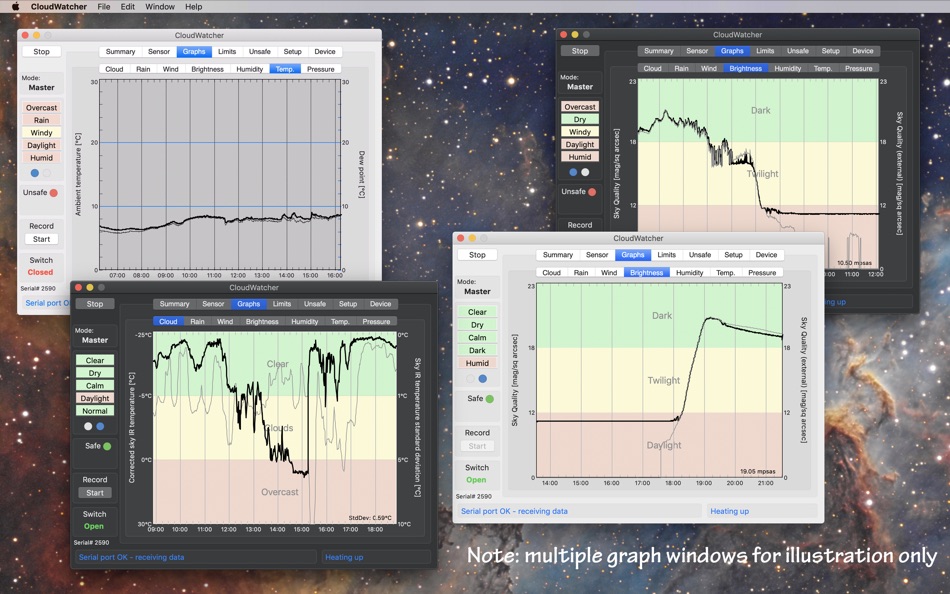
The latest version of the AAG CloudWatcher hardware also includes a light meter with very similar performance to the standard SQM system. CloudWatcher can display this or an external SQM, or both together on a two-trace plot for comparison.
In fact many of the standard plots have two traces, where the second trace provides related information (such as standard deviation of the sky temperature, which is useful for detecting thin, high level cloud, wind gust in addition to windspeed and dew point on the humidity graph).
CloudWatcher’s graphs are labelled with the axis variables and units and the horizontal time axis always uses natural round units.
An important feature of CloudWatcher is that it can interoperate with the Windows software provided with the AAG CloudWatcher device. The Transfer file allowing Master or Remote operation is compatible in both directions. It also generates a ClarityII (Boltwood) file
CloudWatcher is compatible with all existing versions of the AAG CloudWatcher firmware.
Ad
لقطات


الميزات الجديدة
- الإصدار: 4.0
- تم التحديث:
- Major new features in version 4.0:
- Added support for Dark Mode.
- Some major changes in the internal operations which makes the communications with the AAG CloudWatcher device very robust, with effectively no lost data.
- Added measurement of sensitive darkness level in magnitudes per square arc-sec (MPSAS) for those CloudWatcher models which support it.
- A new Summary tab has been added which gives a practical, colour-coded view of all environmental parameters at once. This view also provides a wide range of textural descriptions of conditions and gives the Bortle class of the associated sky quality measurement (from either or both the built-in Sky Quality sensor or a connected SQM device).
- Added an SQM parameter to the Clarity II format, with the mechanism to fill it with (a) built-in measurements, (b) measurement from a direct TCP/IP connection to a SQM-LE, (c) measurements from a file transfer (eg from SQM-Toolbox), (d) no SQM data. Note that the new TheSkyX ClarityII X2 plugin, by Rodolphe Pineau, is able to read this new parameter.
- Updated the sky temperature correction function to include the parameters K6 and K7, which existed in the Windows version for a long time. This is apparent in all the relevant interfaces, and particularly so in the “Edit” window, where the updated equations are now shown.
- Added a new graph tab to display atmospheric pressure, for those models which support it.
- Implemented an SQM Master/Remote architecture (which includes files generated by another GerSpatial app, SQM Toolbox) to harmonise SQM-LE access. In future, using SQM Toolbox, this will also allow USB models to contribute to CloudWatcher data.
- Added ability to select graph trace thickness.
- The External SQM measurement, if it exists, is included on the Summary tab, together with a description of the Bortle class of the measurement.
Minor or GUI improvements in version 4.0:
- Increased the size of the window to accommodate the extra features.
- Many improvements to the GUI.
- Added an additional section of the Limits tab to enable definition of textual descriptions of humidity conditions.
- The various transfer files are automatically enabled without using the associated checkbox. The checkbox remains functional in order to disable the transfer if necessary.
- Changed some of the default names for various conditions (e.g. “Bright” is now “Daylight”; “Light” is now “Twilight”)
- Slightly changed the default colours for graphs - these are only apparent after pressing “Reset”, which reverts to the defaults.
- Added dark red, in addition to bold, to the text in selected buttons on the Unsafe tab, to aid visibility.
- Relabelled the Find button in the Setup>Comms tab, to reflect its actual function: refreshing the list of serial ports.
- Added option to select rain Sensor type in the Settings->Device tab : this then determines the default calibration settings for the Rain Sensor.
- Enabled a choice of source for the ambient temperature measurement, for models which offer the appropriate sensors.
- Added the means to select parameters for both the main and secondary trace in the Brightness graph.
- Added the selection of LDR or Built-in SQM for the Brightness Limits tab.
- Removed AppleScript handlers for providing various data (changes in the Apple ecosystem mean they no longer work, and this cannot be resolved in the short-term).
تاريخ الأسعار
- اليوم: $14.99
- الحد الأدنى: $10.99
- الحد الأقصى: $14.99
تتبّع الأسعار
Ad
مطوّر البرامج
- GerSpatial
- المنصات: macOS تطبيقات (3)
- قوائم: 0 + 0
- النقاط: 0 + 0 ¡
- لتصنيفات: 0
- المراجعات: 0
- تعليقات: 0
- تخفيضات: 0
- أشرطة فيديو: 0
- RSS: اشتراك
النقاط (0)
0 ☹️
لتصنيفات (0)
0 ☹️
قوائم (0)
0 ☹️
- CloudWatcher
المراجعات (0)
كن الأول لمراجعة هذا المنتج 🌟
تعليقات (0)
كن أول من يعلق 🌟
معلومات إضافية
- الإصدار: 4.0
- الفئة:
macOS تطبيقات›الطقس - نظام التشغيل:
macOS,macOS 10.14 والأحدث - الحجم:
23 Mb - اللغة المعتمدة:
English - تقييم المحتوى:
4+ - Mac App Store تقييم:
0 - تم التحديث:
- تاريخ الإصدار:
«CloudWatcher». منصة: macOS. الفئة: الطقس. المطور: «GerSpatial». الإصدار الأول: . التحديث الأخير: . السعر الحالي: $14.99. أدنى سعر مسجل: $10.99 (). أعلى سعر مسجل: $14.99 (). لم يتلق هذا العنوان تقييمات أو مراجعات بعد على AppAgg. اللغات المتاحة: English. يتتبع AppAgg سجل الأسعار والتقييمات وتعليقات المستخدمين «CloudWatcher». متابعة الخصومات والتحديثات القادمة: RSS. لا يستضيف AppAgg التطبيقات أو يوزع البرامج. جميع العلامات التجارية والشعارات ولقطات الشاشة مملوكة لأصحابها.
CloudWatcher عنوان URL مختصر: تم النسخ!- 🌟 مشاركة
- Mac App Store
قد يعجبك ايضا
-
- Sunny: Weather Forecasts
- macOS تطبيقات: الطقس بواسطة: Condor Digital
- * مجاني
- قوائم: 1 + 0 لتصنيفات: 0 المراجعات: 0
- النقاط: 8 + 0 تعليقات: 0 الإصدار: 1.5.2 Sunny is a personal weather dashboard for following weekly weather forecasts and seasonal climate patterns. Offering easy access to world-class data, beautiful visuals, and a highly ... ⥯
-
- Forecast Bar - Weather + Radar
- macOS تطبيقات: الطقس بواسطة: Higher Bar, LLC
- * مجاني
- قوائم: 1 + 1 لتصنيفات: 0 المراجعات: 0
- النقاط: 5 + 0 تعليقات: 0 الإصدار: 5.8.10 Best New App by Apple Top Rated Mac App by Macworld Featured by Lifehacker Forecast Bar offers hyper accurate, hyper local live weather and forecasts right in your menu bar or as a ... ⥯
-
- Weather Forecast App: Menu bar
- macOS تطبيقات: الطقس بواسطة: Maxima Apps
- * مجاني
- قوائم: 0 + 0 لتصنيفات: 0 المراجعات: 0
- النقاط: 4 + 0 تعليقات: 0 الإصدار: 1.4 Looking for a perfect weather app that gives you accurate live-time weather readings? INTRODUCING THE Weather Forecast App: Menu bar. Weather desktop - The forecast app is a free ... ⥯
-
- Hurricane Track - NOAA Doppler
- macOS تطبيقات: الطقس بواسطة: Mach Software Design
- $5.99
- قوائم: 0 + 0 لتصنيفات: 0 المراجعات: 0
- النقاط: 0 + 0 تعليقات: 0 الإصدار: 3.7.1 **Universal binary ready for Apple Silicon processors!** Hurricane Track 3.0 is the most advanced, modern, and easiest to use Hurricane Tracking, Radar, and Local Weather application. ... ⥯
-
- Wx
- macOS تطبيقات: الطقس بواسطة: Craig Hunter
- $14.99
- قوائم: 0 + 0 لتصنيفات: 0 المراجعات: 0
- النقاط: 1 + 0 تعليقات: 0 الإصدار: 7.2.1 The venerable U.S. weather app Wx, named a Mac Gem by Macworld magazine, has been reinvented! Wx displays current conditions, forecasts, warnings, and radar for U.S. locations using ... ⥯
-
- PredictWind Offshore Weather
- macOS تطبيقات: الطقس بواسطة: PredictWind Limited
- مجاني
- قوائم: 0 + 0 لتصنيفات: 0 المراجعات: 0
- النقاط: 1 + 0 تعليقات: 0 الإصدار: 7.6.4 The Offshore App allows you to seamlessly download multiple GRIB files for your coastal and offshore passages. Quickly download and view GRIB files, weather routes, GMDSS maps and text ⥯
-
- Weather Dock
- macOS تطبيقات: الطقس بواسطة: Aleksandr Stepanischev
- * مجاني
- قوائم: 0 + 0 لتصنيفات: 0 المراجعات: 0
- النقاط: 1 + 0 تعليقات: 0 الإصدار: 2.9 Weather Dock Live Forecast in Your Mac s Menu Bar Weather Dock brings accurate, real-time weather updates right to your Mac's menu bar. Instantly check temperature, precipitation, ... ⥯
-
- QWeather Pro
- macOS تطبيقات: الطقس بواسطة: Hefeng Internet Technology (Beijing) Co., Ltd.
- $9.99
- قوائم: 0 + 0 لتصنيفات: 0 المراجعات: 0
- النقاط: 0 + 0 تعليقات: 0 الإصدار: 3.5.11 QWeather Pro for macOS ~ a visual, smart weather APP with no ads! ~ Please note: QWeather Pro for macOS is a one-time purchase and available in macOS only. If you need to use the Pro ... ⥯
-
- Weather-Display
- macOS تطبيقات: الطقس بواسطة: Brian Hamilton
- $30.99
- قوائم: 0 + 0 لتصنيفات: 0 المراجعات: 0
- النقاط: 0 + 0 تعليقات: 0 الإصدار: 414.2 Software to work with a range of electronic personal weather stations, either directly (USB) or via API data or via WIFI. Graphs, logs, displays your data and can send your data to ... ⥯
-
- SkyStatus
- macOS تطبيقات: الطقس بواسطة: Emiel Bloemendaal
- $0.99
- قوائم: 0 + 0 لتصنيفات: 0 المراجعات: 0
- النقاط: 0 + 0 تعليقات: 0 الإصدار: 1.5 SKYSTATUS REAL-TIME WEATHER IN YOUR MENU BAR SkyStatus brings accurate, hyperlocal weather straight to your Mac s menu bar no windows to manage, no widgets to dig through, and ... ⥯