
| デベロッパー: | GerSpatial (3) | ||
| 価格: | $14.99 | ||
| ランキング: | 0 | ||
| レビュー: | 0 レビューを書く | ||
| コメント: | 0 コメントを投稿する | ||
| リスト: | 0 + 0 | ||
| ポイント: | 0 + 0 ¡ | ||
| Mac App Store | |||
説明

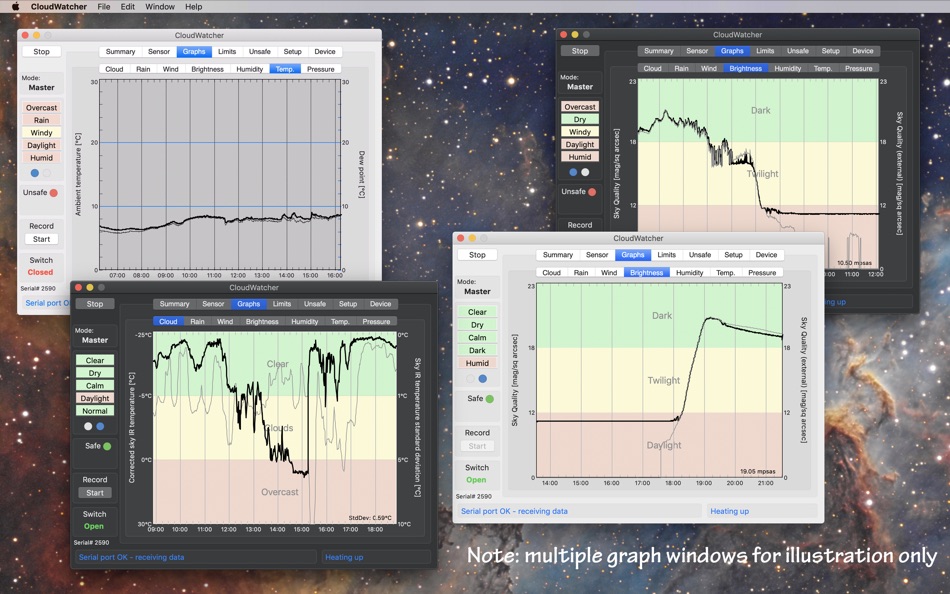
The AAG CloudWatcher hardware ships with Windows software: CloudWatcher reproduces the main elements of its interface, and can interoperate with it in a Master/Remote architecture. But it also provides additional features.
It can interface to an external Sky Quality Meter: these SQM devices are made by Unihedron and are the standard for measuring sky darkness. CloudWatcher can interface directly to the model SQM-LE (ethernet-connected) or, via a new GerSpatial app in development (SQM Toolbox), to other models as well.
The latest version of the AAG CloudWatcher hardware also includes a light meter with very similar performance to the standard SQM system. CloudWatcher can display this or an external SQM, or both together on a two-trace plot for comparison.
In fact many of the standard plots have two traces, where the second trace provides related information (such as standard deviation of the sky temperature, which is useful for detecting thin, high level cloud, wind gust in addition to windspeed and dew point on the humidity graph).
CloudWatcher’s graphs are labelled with the axis variables and units and the horizontal time axis always uses natural round units.
An important feature of CloudWatcher is that it can interoperate with the Windows software provided with the AAG CloudWatcher device. The Transfer file allowing Master or Remote operation is compatible in both directions. It also generates a ClarityII (Boltwood) file
CloudWatcher is compatible with all existing versions of the AAG CloudWatcher firmware.
Ad
スクリーンショット


新機能
- バージョン: 4.0
- アップデート:
- Major new features in version 4.0:
- Added support for Dark Mode.
- Some major changes in the internal operations which makes the communications with the AAG CloudWatcher device very robust, with effectively no lost data.
- Added measurement of sensitive darkness level in magnitudes per square arc-sec (MPSAS) for those CloudWatcher models which support it.
- A new Summary tab has been added which gives a practical, colour-coded view of all environmental parameters at once. This view also provides a wide range of textural descriptions of conditions and gives the Bortle class of the associated sky quality measurement (from either or both the built-in Sky Quality sensor or a connected SQM device).
- Added an SQM parameter to the Clarity II format, with the mechanism to fill it with (a) built-in measurements, (b) measurement from a direct TCP/IP connection to a SQM-LE, (c) measurements from a file transfer (eg from SQM-Toolbox), (d) no SQM data. Note that the new TheSkyX ClarityII X2 plugin, by Rodolphe Pineau, is able to read this new parameter.
- Updated the sky temperature correction function to include the parameters K6 and K7, which existed in the Windows version for a long time. This is apparent in all the relevant interfaces, and particularly so in the “Edit” window, where the updated equations are now shown.
- Added a new graph tab to display atmospheric pressure, for those models which support it.
- Implemented an SQM Master/Remote architecture (which includes files generated by another GerSpatial app, SQM Toolbox) to harmonise SQM-LE access. In future, using SQM Toolbox, this will also allow USB models to contribute to CloudWatcher data.
- Added ability to select graph trace thickness.
- The External SQM measurement, if it exists, is included on the Summary tab, together with a description of the Bortle class of the measurement.
Minor or GUI improvements in version 4.0:
- Increased the size of the window to accommodate the extra features.
- Many improvements to the GUI.
- Added an additional section of the Limits tab to enable definition of textual descriptions of humidity conditions.
- The various transfer files are automatically enabled without using the associated checkbox. The checkbox remains functional in order to disable the transfer if necessary.
- Changed some of the default names for various conditions (e.g. “Bright” is now “Daylight”; “Light” is now “Twilight”)
- Slightly changed the default colours for graphs - these are only apparent after pressing “Reset”, which reverts to the defaults.
- Added dark red, in addition to bold, to the text in selected buttons on the Unsafe tab, to aid visibility.
- Relabelled the Find button in the Setup>Comms tab, to reflect its actual function: refreshing the list of serial ports.
- Added option to select rain Sensor type in the Settings->Device tab : this then determines the default calibration settings for the Rain Sensor.
- Enabled a choice of source for the ambient temperature measurement, for models which offer the appropriate sensors.
- Added the means to select parameters for both the main and secondary trace in the Brightness graph.
- Added the selection of LDR or Built-in SQM for the Brightness Limits tab.
- Removed AppleScript handlers for providing various data (changes in the Apple ecosystem mean they no longer work, and this cannot be resolved in the short-term).
価格履歴
- 今日: $14.99
- 最小値: $10.99
- 最大: $14.99
料金のチェック
デベロッパー
- GerSpatial
- プラットフォーム: macOS アプリ (3)
- リスト: 0 + 0
- ポイント: 0 + 0 ¡
- ランキング: 0
- レビュー: 0
- コメント: 0
- 割引: 0
- 動画: 0
- RSS: 購読する
ポイント (0)
0 ☹️
ランキング (0)
0 ☹️
リスト (0)
0 ☹️
- CloudWatcher
レビュー (0)
最初のクチコミを書こう 🌟
情報
«CloudWatcher». プラットフォーム: macOS. カテゴリ: 天気. 開発者: «GerSpatial». 最初のリリース: . 最終更新日: . 現在の価格: $14.99. 記録された最低価格: $10.99 (). 記録された最高価格: $14.99 (). このタイトルはまだ AppAgg で評価やレビューを受けていません。 利用可能な言語: English. AppAgg は «CloudWatcher»の価格履歴、評価、ユーザーフィードバックを追跡します。 今後の値下げと更新をフォロー: RSS で確認できます. AppAgg はアプリケーションをホストしたり、ソフトウェアを配布したりしません。 すべての商標、ロゴ、スクリーンショットはそれぞれの所有者に帰属します。
コメント (0)
最初にコメントしてください 🌟
CloudWatcher 短縮 URL: コピーしました!- 🌟 シェア
- Mac App Store
Ad
類似
-
- Sunny: Weather Forecasts
- macOS アプリ: 天気 作者: Condor Digital
- * フリー
- リスト: 1 + 0 ランキング: 0 レビュー: 0
- ポイント: 8 + 0 コメント: 0 バージョン: 1.5.2 Sunny is a personal weather dashboard for following weekly weather forecasts and seasonal climate patterns. Offering easy access to world-class data, beautiful visuals, and a highly ... ⥯
-
- Forecast Bar - Weather + Radar
- macOS アプリ: 天気 作者: Higher Bar, LLC
- * フリー
- リスト: 1 + 1 ランキング: 0 レビュー: 0
- ポイント: 5 + 0 コメント: 0 バージョン: 5.8.10 Best New App by Apple Top Rated Mac App by Macworld Featured by Lifehacker Forecast Bar offers hyper accurate, hyper local live weather and forecasts right in your menu bar or as a ... ⥯
-
- Weather Forecast App: Menu bar
- macOS アプリ: 天気 作者: Maxima Apps
- * フリー
- リスト: 0 + 0 ランキング: 0 レビュー: 0
- ポイント: 4 + 0 コメント: 0 バージョン: 1.4 Looking for a perfect weather app that gives you accurate live-time weather readings? INTRODUCING THE Weather Forecast App: Menu bar. Weather desktop - The forecast app is a free ... ⥯
-
- Hurricane Track - NOAA Doppler
- macOS アプリ: 天気 作者: Mach Software Design
- $5.99
- リスト: 0 + 0 ランキング: 0 レビュー: 0
- ポイント: 0 + 0 コメント: 0 バージョン: 3.7.1 **Universal binary ready for Apple Silicon processors!** Hurricane Track 3.0 is the most advanced, modern, and easiest to use Hurricane Tracking, Radar, and Local Weather application. ... ⥯
-
- Wx
- macOS アプリ: 天気 作者: Craig Hunter
- $14.99
- リスト: 0 + 0 ランキング: 0 レビュー: 0
- ポイント: 1 + 0 コメント: 0 バージョン: 7.2.1 The venerable U.S. weather app Wx, named a Mac Gem by Macworld magazine, has been reinvented! Wx displays current conditions, forecasts, warnings, and radar for U.S. locations using ... ⥯
-
- PredictWind Offshore Weather
- macOS アプリ: 天気 作者: PredictWind Limited
- フリー
- リスト: 0 + 0 ランキング: 0 レビュー: 0
- ポイント: 1 + 0 コメント: 0 バージョン: 7.6.4 The Offshore App allows you to seamlessly download multiple GRIB files for your coastal and offshore passages. Quickly download and view GRIB files, weather routes, GMDSS maps and text ⥯
-
- Weather Dock
- macOS アプリ: 天気 作者: Aleksandr Stepanischev
- * フリー
- リスト: 0 + 0 ランキング: 0 レビュー: 0
- ポイント: 1 + 0 コメント: 0 バージョン: 2.9 Weather Dock Live Forecast in Your Mac s Menu Bar Weather Dock brings accurate, real-time weather updates right to your Mac's menu bar. Instantly check temperature, precipitation, ... ⥯
-
- QWeather Pro
- macOS アプリ: 天気 作者: Hefeng Internet Technology (Beijing) Co., Ltd.
- $9.99
- リスト: 0 + 0 ランキング: 0 レビュー: 0
- ポイント: 0 + 0 コメント: 0 バージョン: 3.5.11 QWeather Pro for macOS ~ a visual, smart weather APP with no ads! ~ Please note: QWeather Pro for macOS is a one-time purchase and available in macOS only. If you need to use the Pro ... ⥯
-
- Weather-Display
- macOS アプリ: 天気 作者: Brian Hamilton
- $30.99
- リスト: 0 + 0 ランキング: 0 レビュー: 0
- ポイント: 0 + 0 コメント: 0 バージョン: 414.3 Software to work with a range of electronic personal weather stations, either directly (USB) or via API data or via WIFI. Graphs, logs, displays your data and can send your data to ... ⥯
-
- SkyStatus
- macOS アプリ: 天気 作者: Emiel Bloemendaal
- $0.99
- リスト: 0 + 0 ランキング: 0 レビュー: 0
- ポイント: 0 + 0 コメント: 0 バージョン: 1.5 SKYSTATUS REAL-TIME WEATHER IN YOUR MENU BAR SkyStatus brings accurate, hyperlocal weather straight to your Mac s menu bar no windows to manage, no widgets to dig through, and ... ⥯