
Bookmark
| Pengembang: | Hankinsoft Development Inc (40) | ||
| Harga: | * Gratis | ||
| Skor: | 890 Perak | ||
| Peringkat: | 0 | ||
| Komentar: | 0 Kirimkan komentar | ||
| Daftar: | 0 0 | ||
| Poin: | 0 | ||
| +1 Poin | |||
Ringkasan
Access Client by SQLPro adalah aplikasi buatan Hankinsoft Development Inc di kategori Alat pengembang.
Rilis , masih cukup segar.
Masuknya gratis, tapi toko di dalamnya tetap buka.
Microsoft Store sudah jadi bawaan Windows, jadi bisa dipasang dalam beberapa klik.
Skor AppAgg-nya 890. Perak, dan itu sama sekali tidak buruk.
Rating usia “EVERYONE”, jadi aman juga untuk anak-anak.
Cuma bisa satu bahasa, dan itu bukan bahasa Indonesia.
Belum ada yang menilainya di AppAgg. Kesempatanmu jadi yang pertama ada sekarang.
Pengembang ini punya 2 game dan 37 aplikasi lagi di AppAgg. Layak dilihat.
Omong-omong, pengembang ini sedang punya 2 diskon.
Mau jadi yang pertama tahu soal pembaruan dan aplikasi baru? Ikuti pengembang atau berlangganan lewat Umpan RSS. Notifikasi push dikirim lewat aplikasi AppAgg Alerts untuk Android dan iOS.
Platform lain 0
 | Access Client by SQLProWindows Store890 PerakWindowsPembelian Dalam Aplikasi | Gratis |
Saat ini hanya ada di toko ini.
Riwayat harga 0
- Harga saat ini: Gratis
- Minimum: Gratis
- Maksimum: Gratis
Feed Anda sendiri di beranda
Jepretan layar 5
Deskripsi
OPENS EVERY ACCESS FILE
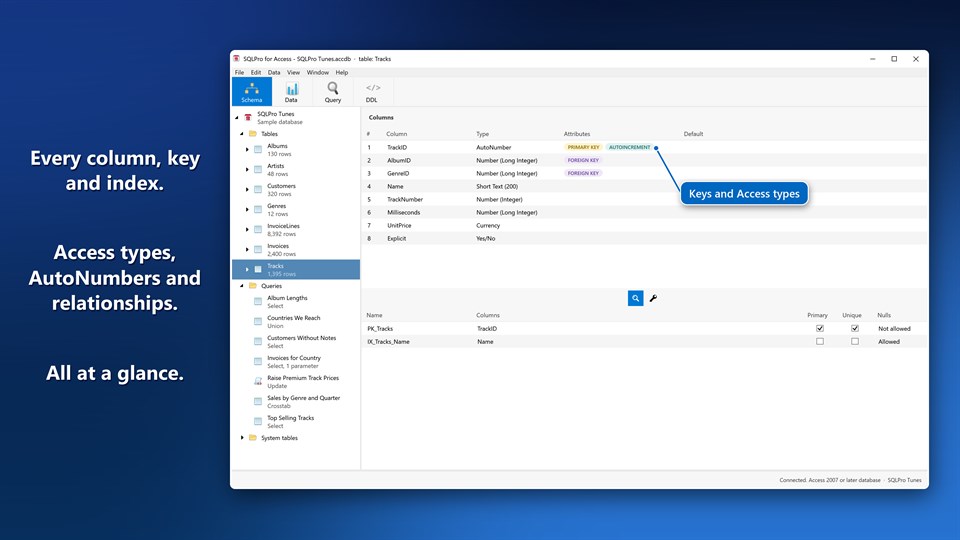
Access 97 through Microsoft 365: .accdb, .mdb, .accde and .mde files, including password-protected databases. Tables show their row counts and Access field types (Short Text, Long Text, Number, Currency, Date/Time, Yes/No, AutoNumber, attachments and multi-value fields), with primary keys, indexes, relationships and linked tables.
REAL ACCESS SQL
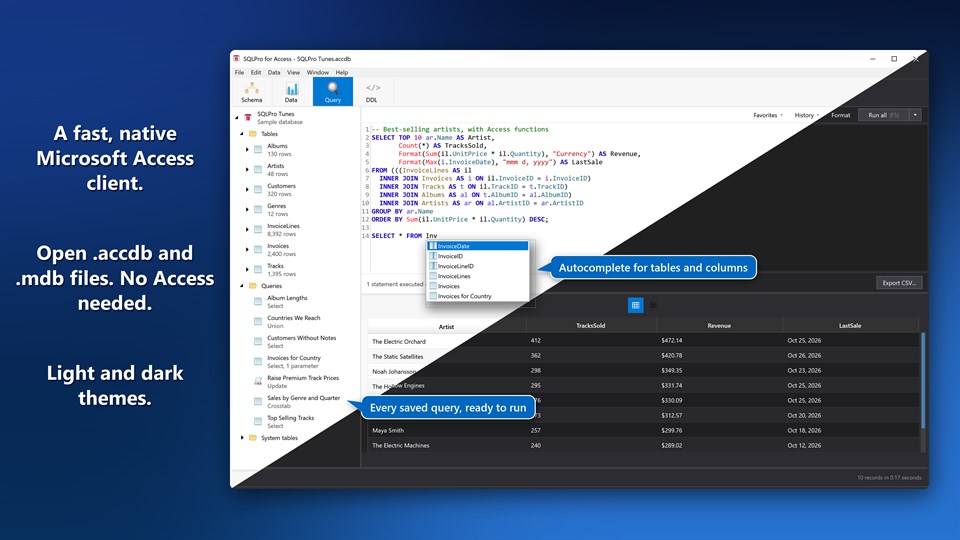
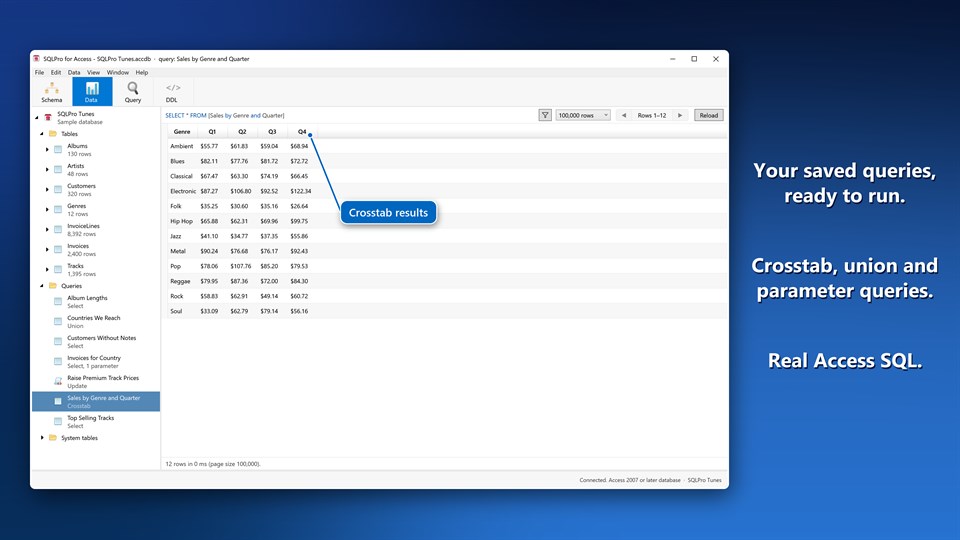
Queries run in Access's own dialect: crosstab queries with TRANSFORM and PIVOT, PARAMETERS with a prompt for each value, * and ? wildcards, #date# literals, TOP, DISTINCTROW, and the VBA functions Access queries use, such as IIf, Nz, Format, DateDiff, DatePart and Mid. Results are checked against Microsoft's own database engine.
EVERY SAVED QUERY
Saved select, union, crosstab, parameter and action queries appear in the sidebar with their type. Run one, or edit its SQL and save it back to the database.
BROWSE AND EDIT DATA
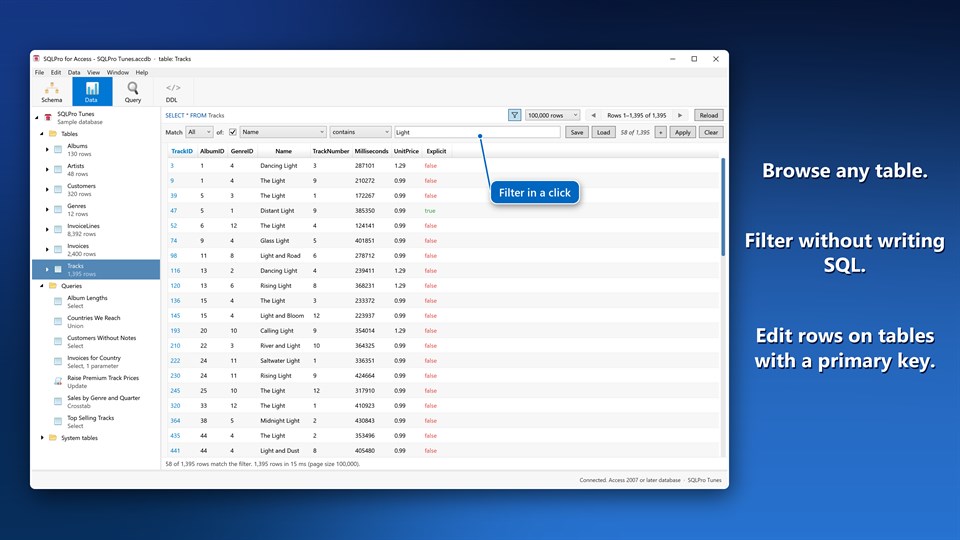
Page through any table and filter it without writing SQL. Edit cells, add rows and delete rows right in the grid, then review the SQL before it runs. Run INSERT, UPDATE, DELETE and CREATE TABLE statements, or create a new empty database. Changes use Microsoft's free Access Database Engine; SQLPro offers to install it the first time you edit.
A GREAT SQL EDITOR
Access-aware syntax highlighting, autocomplete for tables and columns, multi-statement execution, query history and favorites, and keyboard shortcuts you can change. Run the whole script, the statement under your cursor, or just the selection.
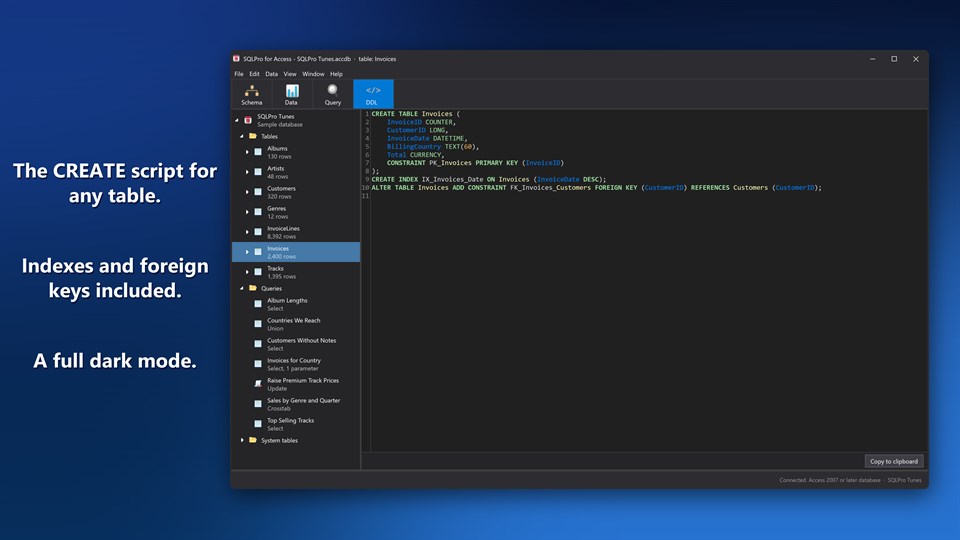
SCRIPT AS CREATE
Generate a CREATE TABLE script for any table, with its primary key, indexes and relationships.
TRY IT FREE
The download is free. Open any Access file, browse and filter its tables and edit data at no cost; query results appear after a short wait. SQLPro Premium, a subscription or a one-time lifetime purchase, removes the wait. A sample music-store database is included, with no wait at all.
QUICK ANSWERS
- Do I need Microsoft Access or Office? No. SQLPro reads .accdb and .mdb files itself.
- Which files open? .accdb, .mdb, .accde and .mde, from Access 97 to Microsoft 365.
- Which PCs? Windows 10 and Windows 11, on Intel, AMD and ARM (x64, x86 and ARM64).
- Where does my data go? Nowhere. Your databases stay on your PC; SQLPro has no cloud sync and never sends your data or queries anywhere.
- Can I change data and queries? Yes: edit rows, run SQL that changes data, and save changes to saved queries.
LIGHT AND DARK THEMES
A native Windows app with full light and dark themes.
Part of the SQLPro family of database clients from Hankinsoft.
Dari developer
Daftar 0
-
 Access Client by SQLPro
Poin 0
-

- +1 Poin

Peringkat 0
-
- Rating Anda
Pengembang 40
- Hankinsoft Development Inc
- Pengikut: 0
- Platform: Android Aplikasi (6) Android Game (1) iOS Aplikasi (11) iOS Game (1) macOS Aplikasi (9) Windows Aplikasi (12)
- Diskon: 2
- Daftar: 5 3
- Poin: 28
- Peringkat: 0
- Komentar: 0
- Video: 4
- RSS: Berlangganan
Yang Baru
- Versi: PC
- Terakhir diperbarui:
- What's new in 2026.106
- Paste no longer fails when the Windows clipboard can't be read.
- Saved queries can now be edited and saved back to the database, for every kind of query: select, union, crosstab, parameter and action. Plus the new look from the last update: one database per window with Schema, Data, Query and DDL views, a new app icon and a sample database to explore.
Info tambahan
- Tanggal rilis:
- Kategori:
Aplikasi Windows›Alat pengembang - OS:
PC - Ukuran:
325 Mb - Bahasa yang didukung:
Inggris - Rating Konten:
EVERYONE - Windows Store Rating: ¡
0 - Situs Web:
 http://hankinsoft.com/
Skor AppAgg
Perkiraan Skor AppAgg untuk
Access Client by SQLPro
Pengembang: Hankinsoft Development Inc
Skor yang lebih tinggi biasanya menunjukkan indikator yang lebih kuat di AppAgg.
Berdasarkan: popularitas · rating pengguna · kebaruan · promo · data toko · aktivitas komunitas
Dihitung ulang setiap hari dari data AppAgg terbaru.
Komentar 0 ¡
Bagikan
Access Client by SQLPro URL singkat: Disalin!- Windows Store

