
북마크
이 북마크의 제목을 입력하세요.
북마크가 저장되었습니다
| 개발자: | Hankinsoft Development Inc (40) | ||
| 가격: | * 무료 | ||
| 종합 점수: | 890 실버 | ||
| 순위: | 0 | ||
| 댓글: | 0 댓글 게시 | ||
| 목록: | 0 0 | ||
| 포인트: | 0 | ||
| +1 포인트 | |||
요약
Access Client by SQLPro: Hankinsoft Development Inc에서 만든 ‘개발자 도구’ 카테고리의 앱이에요.
에 출시됐어요. 아직 꽤 따끈따끈해요.
입장은 무료지만, 안에 상점이 열려 있어요.
Microsoft Store는 Windows에 기본으로 들어 있어서 클릭 몇 번이면 설치돼요.
AppAgg 점수는 890. 실버 등급, 이 정도면 꽤 괜찮아요.
연령 등급은 ‘EVERYONE’, 아이들에게도 괜찮아요.
지원 언어는 딱 하나, 그런데 한국어는 아니에요.
AppAgg에서는 아직 아무도 평가하지 않았어요. 첫 번째가 될 기회는 바로 지금이에요.
이 개발자의 게임 2개와 앱 37개가 AppAgg에 더 있어요. 한번 둘러보세요.
참고로, 이 개발자는 지금 할인 2건 진행 중이에요.
업데이트와 새 앱 소식을 가장 먼저 받고 싶나요? 개발자를 팔로우하거나 RSS 피드를 구독하세요. 푸시 알림은 Android와 iOS용 AppAgg Alerts 앱으로 받을 수 있어요.
광고
다른 플랫폼 0
가격 기록 0
- 현재 가격: 무료
- 최소: 무료
- 최대: 무료
홈 화면의 나만의 피드
“신규 및 업데이트” 피드의 플랫폼을 선택하면 홈 화면에 필요한 앱과 게임만 표시됩니다.
스크린샷 5
설명

OPENS EVERY ACCESS FILE
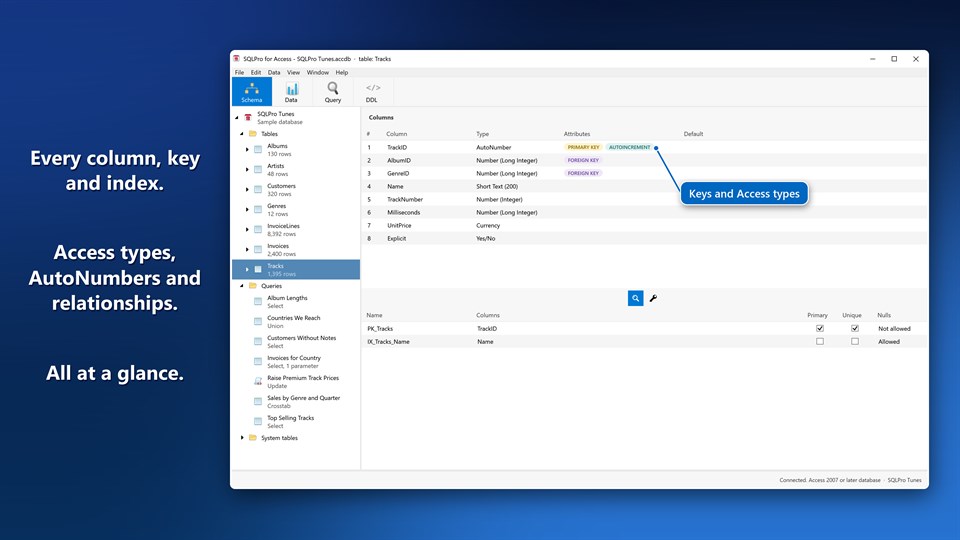
Access 97 through Microsoft 365: .accdb, .mdb, .accde and .mde files, including password-protected databases. Tables show their row counts and Access field types (Short Text, Long Text, Number, Currency, Date/Time, Yes/No, AutoNumber, attachments and multi-value fields), with primary keys, indexes, relationships and linked tables.
REAL ACCESS SQL
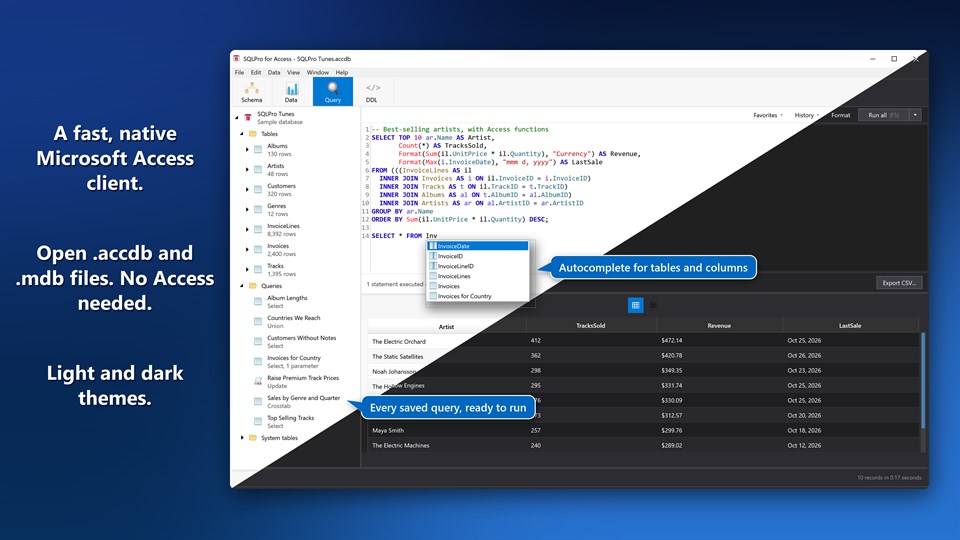
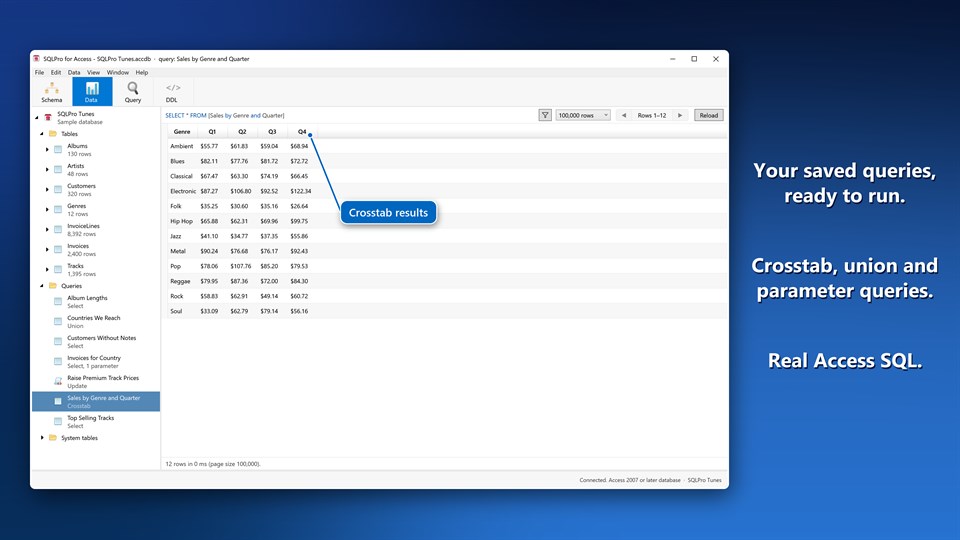
Queries run in Access's own dialect: crosstab queries with TRANSFORM and PIVOT, PARAMETERS with a prompt for each value, * and ? wildcards, #date# literals, TOP, DISTINCTROW, and the VBA functions Access queries use, such as IIf, Nz, Format, DateDiff, DatePart and Mid. Results are checked against Microsoft's own database engine.
EVERY SAVED QUERY
Saved select, union, crosstab, parameter and action queries appear in the sidebar with their type. Run one, or edit its SQL and save it back to the database.
BROWSE AND EDIT DATA
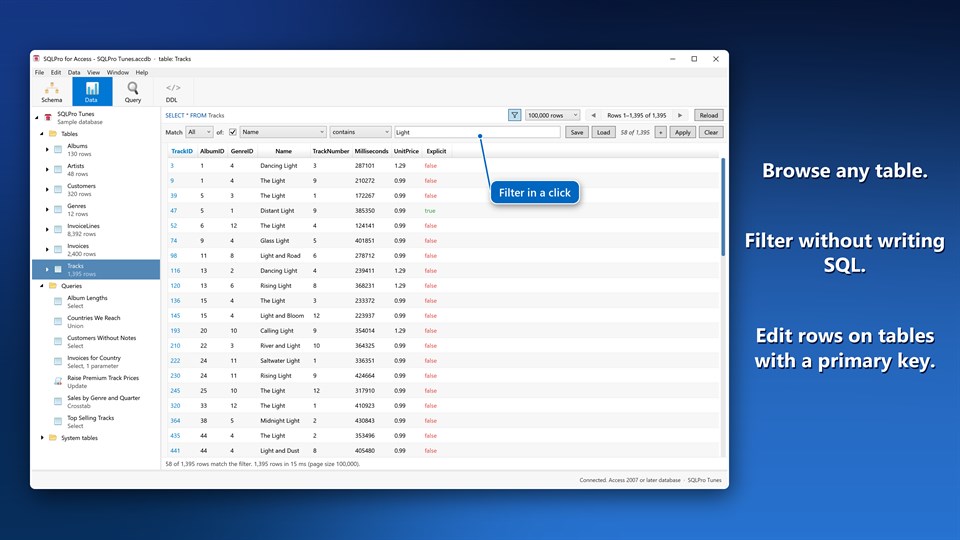
Page through any table and filter it without writing SQL. Edit cells, add rows and delete rows right in the grid, then review the SQL before it runs. Run INSERT, UPDATE, DELETE and CREATE TABLE statements, or create a new empty database. Changes use Microsoft's free Access Database Engine; SQLPro offers to install it the first time you edit.
A GREAT SQL EDITOR
Access-aware syntax highlighting, autocomplete for tables and columns, multi-statement execution, query history and favorites, and keyboard shortcuts you can change. Run the whole script, the statement under your cursor, or just the selection.
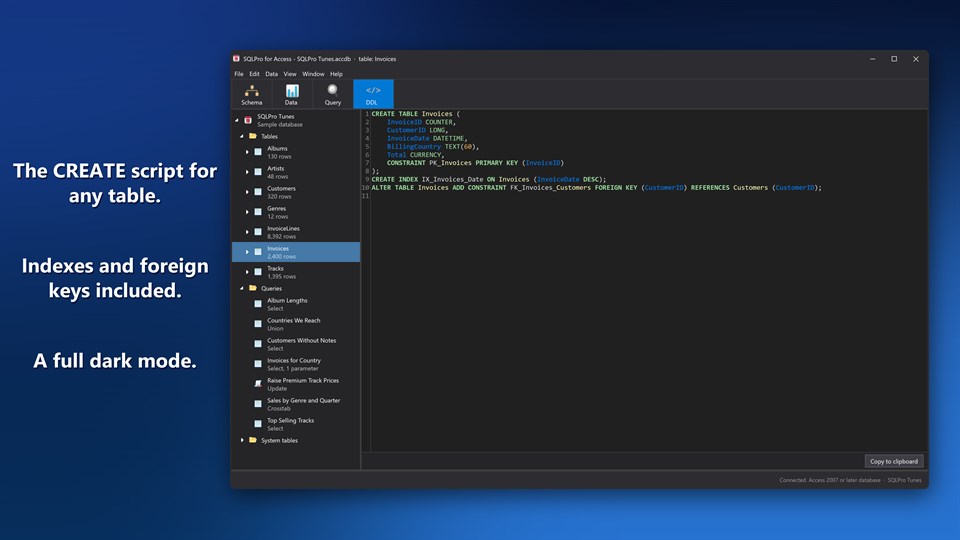
SCRIPT AS CREATE
Generate a CREATE TABLE script for any table, with its primary key, indexes and relationships.
TRY IT FREE
The download is free. Open any Access file, browse and filter its tables and edit data at no cost; query results appear after a short wait. SQLPro Premium, a subscription or a one-time lifetime purchase, removes the wait. A sample music-store database is included, with no wait at all.
QUICK ANSWERS
- Do I need Microsoft Access or Office? No. SQLPro reads .accdb and .mdb files itself.
- Which files open? .accdb, .mdb, .accde and .mde, from Access 97 to Microsoft 365.
- Which PCs? Windows 10 and Windows 11, on Intel, AMD and ARM (x64, x86 and ARM64).
- Where does my data go? Nowhere. Your databases stay on your PC; SQLPro has no cloud sync and never sends your data or queries anywhere.
- Can I change data and queries? Yes: edit rows, run SQL that changes data, and save changes to saved queries.
LIGHT AND DARK THEMES
A native Windows app with full light and dark themes.
Part of the SQLPro family of database clients from Hankinsoft.
개발자 소식
개발자이신가요?
페이지 맨 위에 소식을 올리면 팔로워에게 이메일로 전달됩니다. YouTube 동영상을 추가하면 “동영상” 블록 맨 앞에 표시됩니다.
목록 0
-
 Access Client by SQLPro
포인트 0
-

- +1 포인트

순위 0
-
- 내 평점
개발자 40
새로운 기능
- 버전: PC
- 마지막 업데이트:
- What's new in 2026.106
- Paste no longer fails when the Windows clipboard can't be read.
버전 기록
- Saved queries can now be edited and saved back to the database, for every kind of query: select, union, crosstab, parameter and action. Plus the new look from the last update: one database per window with Schema, Data, Query and DDL views, a new app icon and a sample database to explore.
추가 정보
 http://hankinsoft.com/
AppAgg 점수
890
AppAgg 예상 점수:
Access Client by SQLPro
개발자: Hankinsoft Development Inc
890 실버
점수가 높을수록 대체로 AppAgg의 여러 지표에서 좋은 결과를 보인다는 뜻입니다.
기준: 인기 · 사용자 평점 · 최신성 · 할인 · 스토어 데이터 · 커뮤니티 활동
최신 AppAgg 데이터를 바탕으로 매일 다시 계산됩니다.
웹사이트용 배지:  복사됨!
댓글 0 ¡
가장 먼저 댓글을 남겨주세요
공유하기
Access Client by SQLPro 단축 URL: 복사됨!- Windows Store


