
บุ๊กมาร์ก
| ผู้พัฒนา: | Hankinsoft Development Inc (40) | ||
| ราคา: | * ฟรี | ||
| คะแนน: | 890 เงิน | ||
| การจัดอันดับ: | 0 | ||
| ความคิดเห็น: | 0 โพสต์ความคิดเห็น | ||
| รายการ: | 0 0 | ||
| แต้ม: | 0 | ||
| +1 แต้ม | |||
สรุป
Access Client by SQLPro เป็นแอปในหมวด “เครื่องมือสำหรับนักพัฒนา” จาก Hankinsoft Development Inc
ออกเมื่อ ยังสดใหม่อยู่เลย
เข้าฟรี แต่ร้านค้าข้างในเปิดอยู่นะ
Microsoft Store มีมาในตัว Windows อยู่แล้ว ติดตั้งได้ในไม่กี่คลิก
คะแนน AppAgg คือ 890 ระดับ “เงิน” ถือว่าไม่เลวเลย
จัดเรต “EVERYONE” เหมาะกับเด็ก ๆ ด้วย
รองรับแค่ภาษาเดียว และไม่ใช่ภาษาไทย
ยังไม่มีใครบน AppAgg ให้คะแนนเลย โอกาสเป็นคนแรกอยู่ตรงนี้แล้ว
ผู้พัฒนารายนี้มีเกมอื่นอีก 2 เกม และแอปอีก 37 แอปบน AppAgg ลองไปดูกัน
อีกอย่าง ตอนนี้ผู้พัฒนารายนี้มี ดีลลดราคา 2 รายการ ด้วยนะ
อยากรู้เรื่องอัปเดตและแอปใหม่ก่อนใครไหม? ติดตาม ผู้พัฒนา หรือกดติดตาม ฟีด RSS ได้เลย การแจ้งเตือนแบบพุชส่งผ่านแอป AppAgg Alerts สำหรับ Android และ iOS
แพลตฟอร์มอื่น 0
ประวัติราคา 0
- ราคาปัจจุบัน: ฟรี
- ต่ำสุด: ฟรี
- สูงสุด: ฟรี
ฟีดของคุณเองบนหน้าแรก
ภาพหน้าจอ 5
คำอธิบาย

OPENS EVERY ACCESS FILE
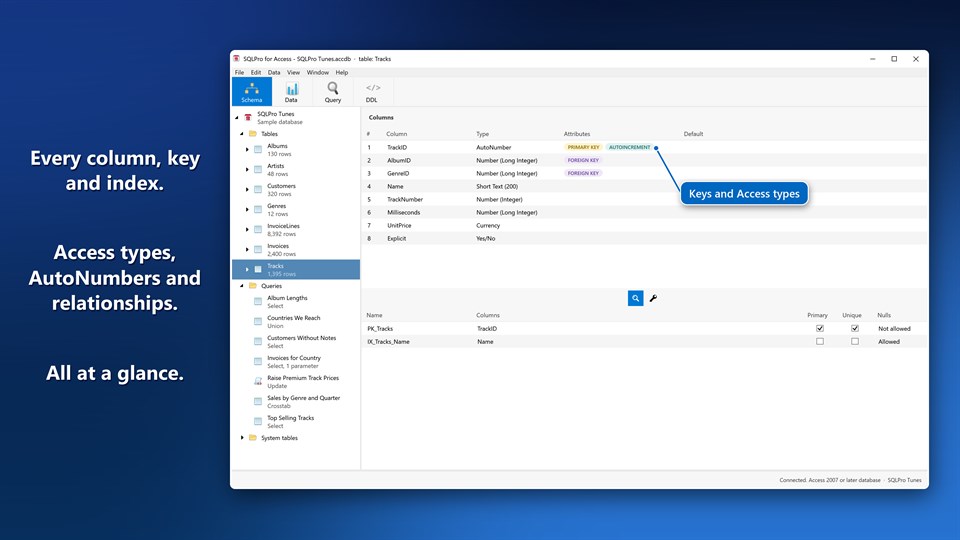
Access 97 through Microsoft 365: .accdb, .mdb, .accde and .mde files, including password-protected databases. Tables show their row counts and Access field types (Short Text, Long Text, Number, Currency, Date/Time, Yes/No, AutoNumber, attachments and multi-value fields), with primary keys, indexes, relationships and linked tables.
REAL ACCESS SQL
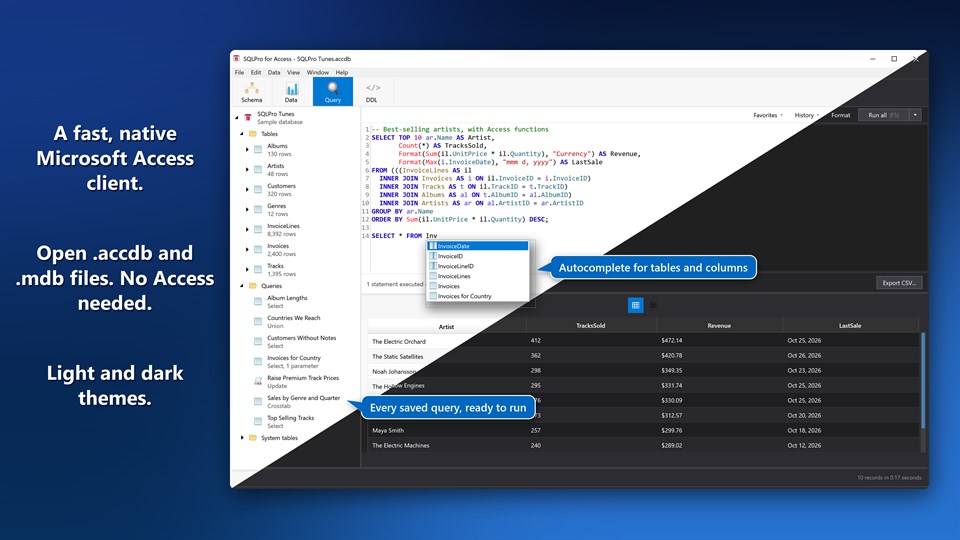
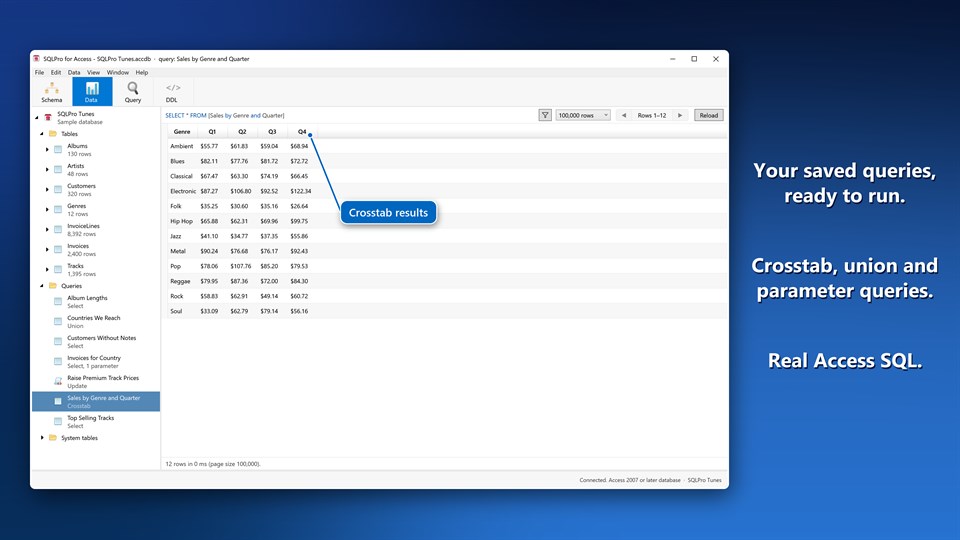
Queries run in Access's own dialect: crosstab queries with TRANSFORM and PIVOT, PARAMETERS with a prompt for each value, * and ? wildcards, #date# literals, TOP, DISTINCTROW, and the VBA functions Access queries use, such as IIf, Nz, Format, DateDiff, DatePart and Mid. Results are checked against Microsoft's own database engine.
EVERY SAVED QUERY
Saved select, union, crosstab, parameter and action queries appear in the sidebar with their type. Run one, or edit its SQL and save it back to the database.
BROWSE AND EDIT DATA
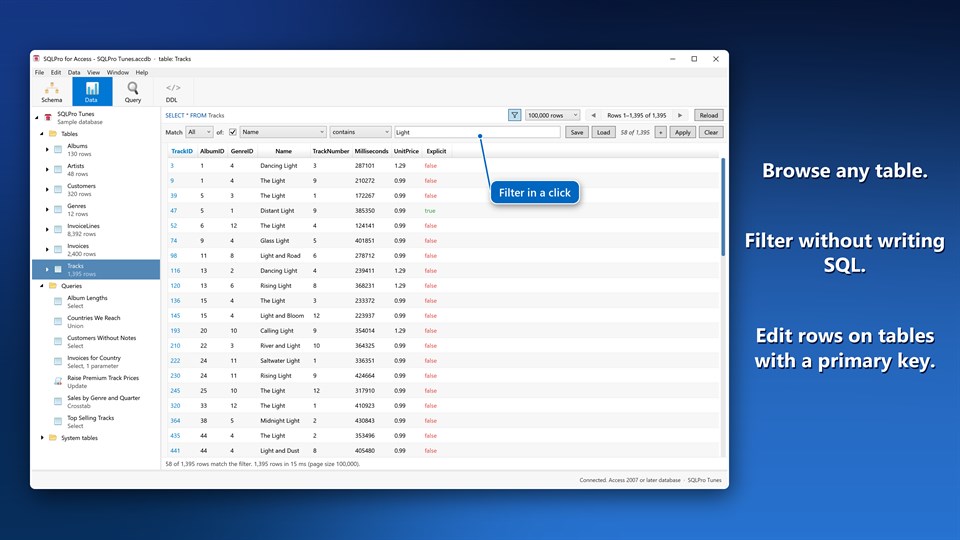
Page through any table and filter it without writing SQL. Edit cells, add rows and delete rows right in the grid, then review the SQL before it runs. Run INSERT, UPDATE, DELETE and CREATE TABLE statements, or create a new empty database. Changes use Microsoft's free Access Database Engine; SQLPro offers to install it the first time you edit.
A GREAT SQL EDITOR
Access-aware syntax highlighting, autocomplete for tables and columns, multi-statement execution, query history and favorites, and keyboard shortcuts you can change. Run the whole script, the statement under your cursor, or just the selection.
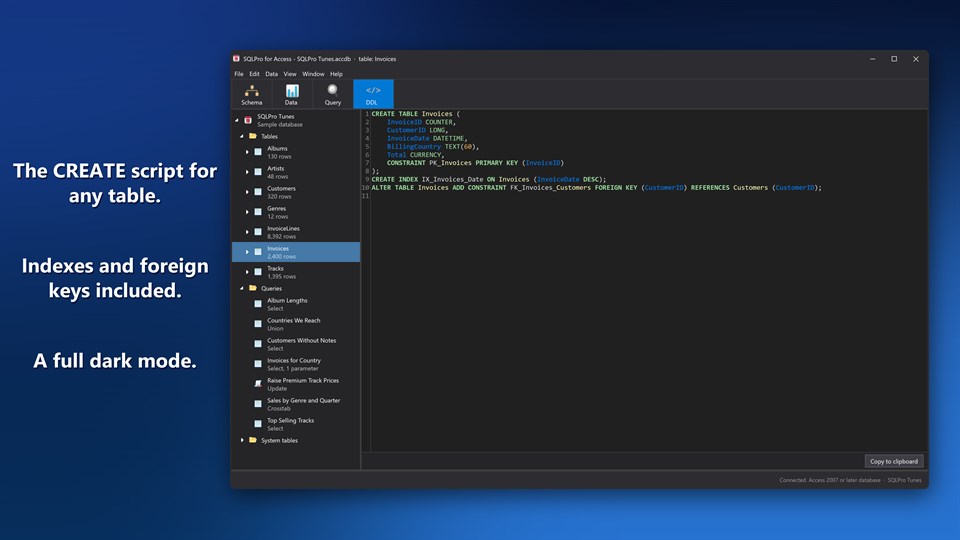
SCRIPT AS CREATE
Generate a CREATE TABLE script for any table, with its primary key, indexes and relationships.
TRY IT FREE
The download is free. Open any Access file, browse and filter its tables and edit data at no cost; query results appear after a short wait. SQLPro Premium, a subscription or a one-time lifetime purchase, removes the wait. A sample music-store database is included, with no wait at all.
QUICK ANSWERS
- Do I need Microsoft Access or Office? No. SQLPro reads .accdb and .mdb files itself.
- Which files open? .accdb, .mdb, .accde and .mde, from Access 97 to Microsoft 365.
- Which PCs? Windows 10 and Windows 11, on Intel, AMD and ARM (x64, x86 and ARM64).
- Where does my data go? Nowhere. Your databases stay on your PC; SQLPro has no cloud sync and never sends your data or queries anywhere.
- Can I change data and queries? Yes: edit rows, run SQL that changes data, and save changes to saved queries.
LIGHT AND DARK THEMES
A native Windows app with full light and dark themes.
Part of the SQLPro family of database clients from Hankinsoft.
จากนักพัฒนา
รายการ 0
-
 Access Client by SQLPro
แต้ม 0
-

- +1 แต้ม

การจัดอันดับ 0
-
- คะแนนของคุณ
ผู้พัฒนา 40
- Hankinsoft Development Inc
- ผู้ติดตาม: 0
- แพลตฟอร์ม: Android แอป (6) Android เกม (1) iOS แอป (11) iOS เกม (1) macOS แอป (9) Windows แอป (12)
- ลดราคา: 2
- รายการ: 5 3
- แต้ม: 28
- การจัดอันดับ: 0
- ความคิดเห็น: 0
- วิดีโอ: 4
- RSS: ติดตาม
มีอะไรใหม่
- เวอร์ชัน: PC
- อัปเดตล่าสุด:
- What's new in 2026.106
- Paste no longer fails when the Windows clipboard can't be read.
- Saved queries can now be edited and saved back to the database, for every kind of query: select, union, crosstab, parameter and action. Plus the new look from the last update: one database per window with Schema, Data, Query and DDL views, a new app icon and a sample database to explore.
ข้อมูลเพิ่มเติม
- วันที่วางจำหน่าย:
- หมวดหมู่:
แอปสำหรับ Windows›เครื่องมือสำหรับนักพัฒนา - ระบบปฏิบัติการ:
PC - ขนาด:
325 Mb - ภาษาที่รองรับ:
อังกฤษ - การจัดประเภทเนื้อหา:
EVERYONE - Windows Store คะแนน: ¡
0 - เว็บไซต์:
 http://hankinsoft.com/
คะแนน AppAgg
คะแนน AppAgg โดยประมาณของ
Access Client by SQLPro
ผู้พัฒนา: Hankinsoft Development Inc
คะแนนที่สูงขึ้นมักสะท้อนตัวชี้วัดที่ดีกว่าบน AppAgg
อิงจาก: ความนิยม · คะแนนจากผู้ใช้ · ความสดใหม่ · ดีล · ข้อมูลร้านค้า · กิจกรรมชุมชน
คำนวณใหม่ทุกวันจากข้อมูล AppAgg ล่าสุด
ความคิดเห็น 0 ¡
แชร์
Access Client by SQLPro URL แบบสั้น: คัดลอกแล้ว!- Windows Store

