
Σελιδοδείκτες
| Προγραμματιστής: | ShenTu QingChun (1) | ||
| Τιμή: | Δωρεάν | ||
| Βαθμολογία: | 570 Χάλκινο | ||
| Κατατάξεις: | 0 | ||
| Σχόλια: | 0 Δημοσίευση σχολίου | ||
| Λίστες: | 0 0 | ||
| Πόντοι: | 0 | ||
| +1 Πόντος | |||
Σύνοψη
Γνώρισε το AutoAllow, μια εφαρμογή από ShenTu QingChun στην κατηγορία «Εργαλεία προγραμματισμού».
Κυκλοφόρησε , ακόμα αρκετά φρέσκια.
Δωρεάν, χωρίς διαφημίσεις, χωρίς αγορές μέσα στην εφαρμογή. Μόνο εσύ και η εφαρμογή.
Το Microsoft Store είναι ενσωματωμένο στα Windows, οπότε η εγκατάσταση γίνεται με δυο κλικ.
Η Βαθμολογία AppAgg είναι 570. Προς το παρόν «Χάλκινο», με πολλά περιθώρια να ανέβει.
Μόνο 14 megabyte, χωράει ακόμα και σε γεμάτο δίσκο.
Ηλικιακή κατάταξη «EVERYONE»: ταιριάζει και σε παιδιά.
Ξέρει 9 γλώσσες, αλλά ελληνικά δεν έμαθε ακόμα.
Κανείς στο AppAgg δεν την έχει βαθμολογήσει ακόμα. Η ευκαιρία σου να γίνεις ο πρώτος είναι τώρα.
Είναι η μοναδική εφαρμογή του προγραμματιστή στο AppAgg. Προς το παρόν.
Μάθε πρώτος για ενημερώσεις και νέες εφαρμογές. Ακολούθησε τον προγραμματιστή ή κάνε εγγραφή στη ροή RSS. Οι ειδοποιήσεις push έρχονται μέσω της εφαρμογής AppAgg Alerts για Android και iOS.
Στιγμιότυπα οθόνης 1
Άλλες πλατφόρμες 0
Ιστορικό τιμών 0
- Τρέχουσα τιμή: Δωρεάν
- Ελάχιστο: Δωρεάν
- Μέγιστο: Δωρεάν
Η δική σας ροή στην αρχική σελίδα
Περιγραφή

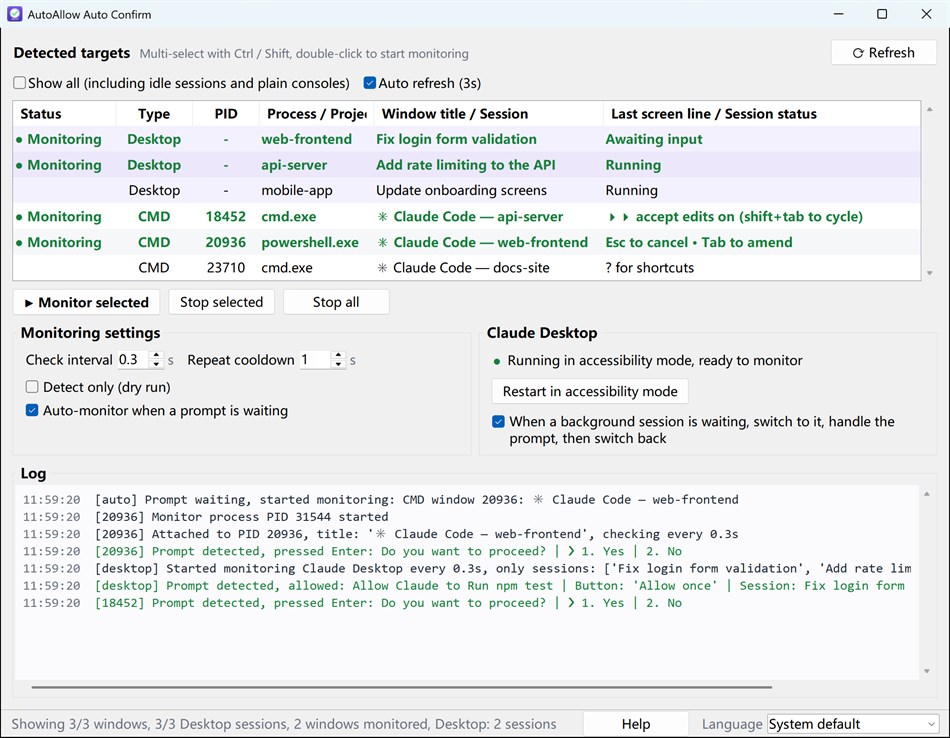
Pick the Claude Code console windows or Claude Desktop sessions you trust, and AutoAllow confirms their permission prompts for you: it presses Enter on the "Do you want to proceed?" prompt in the console, and clicks "Allow once" in Claude Desktop. Windows and sessions you did not select are never touched.
If you turn on automatic monitoring of waiting prompts (off by default), AutoAllow also confirms prompts in sessions you did not select; it asks you to confirm before turning this on.
Everything runs locally on your computer. AutoAllow makes no network connections and collects no data.
Important: approving a prompt lets the assistant run the requested command or action. Only monitor sessions whose work you trust, and use "Detect only" mode first if you want to see what would be approved.
AutoAllow is an independent tool and is not affiliated with or endorsed by Anthropic. Claude is a trademark of Anthropic.
What's new in 1.0.3:
• Claude Desktop split view: with two sessions open side by side, each prompt is matched to the right session
• Console windows: more confirmation prompts are recognized, such as the three-option prompts for editing or creating files (Yes / Yes, allow for this session / No)
• Larger text for easier reading; the detected-targets list now has a vertical scroll bar
• Only one copy runs per computer; opening it again shows the existing window
• Changing the display language takes effect immediately, no restart needed
• Lighter: all console windows share one monitor process, and the installed size dropped from 81 MB to 27 MB
• Fixed an occasional error while locating confirmation prompts
Από τον προγραμματιστή
Προγραμματιστής
- ShenTu QingChun
- Ακόλουθοι: 0
- Πλατφόρμες: Windows Εφαρμογές (1)
- Προσφορές: 0
- Λίστες: 0 0
- Πόντοι: 0
- Κατατάξεις: 0
- Σχόλια: 0
- Βίντεο: 0
- RSS: Εγγραφή
Λίστες 0
-
 AutoAllow
Πόντοι 0
-

- +1 Πόντος

Κατατάξεις 0
-
- Η βαθμολογία σας
Τι νέο υπάρχει
- Έκδοση: PC
- Τελευταία ενημέρωση:
- What's new in 1.0.3:
• Claude Desktop split view: with two sessions open side by side, each prompt is matched to the right session
• Console windows: more confirmation prompts are recognized, such as the three-option prompts for editing or creating files (Yes / Yes, allow for this session / No)
• Larger text for easier reading; the detected-targets list now has a vertical scroll bar
• Only one copy runs per computer; opening it again shows the existing window
• Changing the display language takes effect immediately, no restart needed
• Lighter: all console windows share one monitor process, and the installed size dropped from 81 MB to 27 MB
• Fixed an occasional error while locating confirmation prompts
- First release.
Πρόσθετες πληροφορίες
- Ημερομηνία κυκλοφορίας:
- Κατηγορία:
Εφαρμογές για Windows›Εργαλεία προγραμματισμού - Λειτουργικό σύστημα:
PC - Μέγεθος:
14 Mb - Υποστηριζόμενες γλώσσες:
Αγγλικά,Γαλλικά,Γερμανικά,Ιαπωνικά,Ισπανικά,Κινεζικά,Κορεατικά,Πορτογαλικά,Ρωσικά - Αξιολόγηση περιεχομένου:
EVERYONE - Windows Store Βαθμολογία: ¡
0 - Ιστοσελίδα:
 https://bkminer.github.io/AutoAllow
Σχόλια 0 ¡
Βαθμολογία AppAgg
Εκτιμώμενη βαθμολογία AppAgg για
AutoAllow
Προγραμματιστής: ShenTu QingChun
Η υψηλότερη βαθμολογία συνήθως αντανακλά ισχυρότερους δείκτες στο AppAgg.
Βασισμένο σε: δημοτικότητα · αξιολογήσεις χρηστών · επικαιρότητα · προσφορές · δεδομένα καταστημάτων · δραστηριότητα κοινότητας
Υπολογίζεται εκ νέου καθημερινά με βάση τα πιο πρόσφατα δεδομένα του AppAgg.
AutoAllow Σύντομο URL: Αντιγράφηκε!- Windows Store

