
Marcadores
| Desarrollador: | ShenTu QingChun (1) | ||
| Precio: | Gratis | ||
| Puntuación: | 570 Bronce | ||
| Clasificaciones: | 0 | ||
| Comentarios: | 0 Publicar comentario | ||
| Listas: | 0 0 | ||
| Puntos: | 0 | ||
| +1 Punto | |||
Resumen
Te presentamos AutoAllow, una app de ShenTu QingChun de la categoría «Herramientas de desarrollo».
Salió , todavía está bastante fresca.
Gratis: sin anuncios ni compras integradas. Solo tú y la app.
La Microsoft Store viene integrada en Windows, así que se instala en un par de clics.
Su Puntuación de AppAgg es 570. De momento, nivel Bronce, con mucho margen para crecer.
Solo 14 megabytes. Cabe hasta en un disco lleno a reventar.
Clasificación «EVERYONE»: sirve también para los más pequeños.
Habla 9 idiomas, español incluido.
Nadie en AppAgg la ha valorado todavía. Ahora te toca a ti romper el hielo.
Es la única app del desarrollador en AppAgg. Por ahora.
¿Quieres enterarte antes que nadie de actualizaciones y apps nuevas? Sigue al desarrollador o suscríbete al canal RSS. Las notificaciones push llegan con la app AppAgg Alerts para Android y iOS.
Capturas de pantalla 1
Otras plataformas 0
Historial de precios 0
- Precio actual: Gratis
- Mínimo: Gratis
- Máximo: Gratis
Tu propio feed en la página de inicio
Descripción

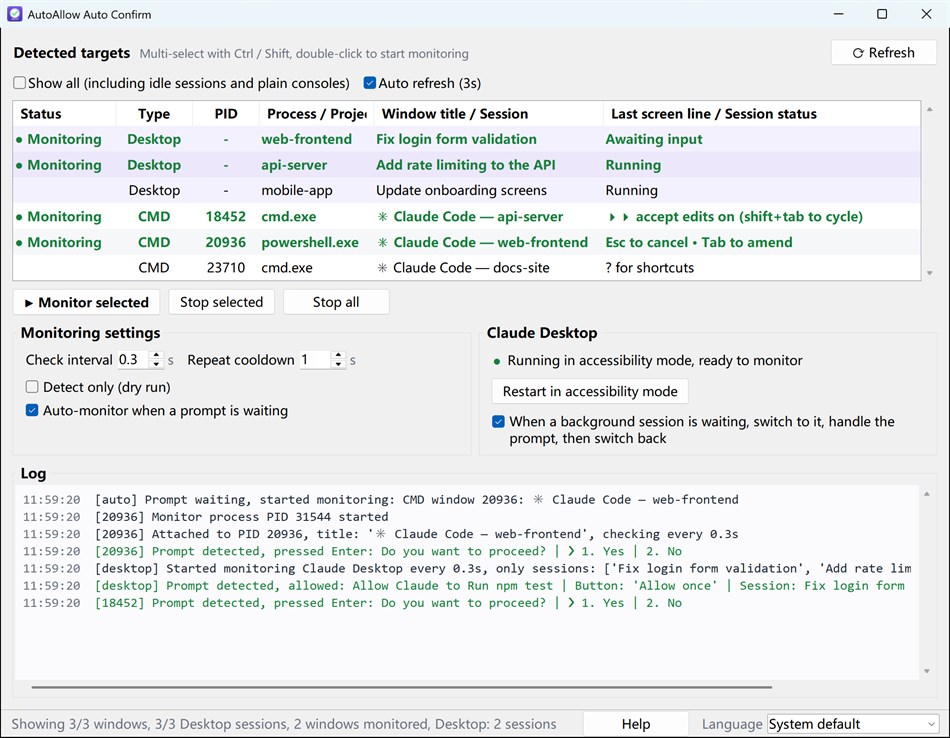
Pick the Claude Code console windows or Claude Desktop sessions you trust, and AutoAllow confirms their permission prompts for you: it presses Enter on the "Do you want to proceed?" prompt in the console, and clicks "Allow once" in Claude Desktop. Windows and sessions you did not select are never touched.
If you turn on automatic monitoring of waiting prompts (off by default), AutoAllow also confirms prompts in sessions you did not select; it asks you to confirm before turning this on.
Everything runs locally on your computer. AutoAllow makes no network connections and collects no data.
Important: approving a prompt lets the assistant run the requested command or action. Only monitor sessions whose work you trust, and use "Detect only" mode first if you want to see what would be approved.
AutoAllow is an independent tool and is not affiliated with or endorsed by Anthropic. Claude is a trademark of Anthropic.
What's new in 1.0.3:
• Claude Desktop split view: with two sessions open side by side, each prompt is matched to the right session
• Console windows: more confirmation prompts are recognized, such as the three-option prompts for editing or creating files (Yes / Yes, allow for this session / No)
• Larger text for easier reading; the detected-targets list now has a vertical scroll bar
• Only one copy runs per computer; opening it again shows the existing window
• Changing the display language takes effect immediately, no restart needed
• Lighter: all console windows share one monitor process, and the installed size dropped from 81 MB to 27 MB
• Fixed an occasional error while locating confirmation prompts
Del desarrollador
Desarrollador
- ShenTu QingChun
- Seguidores: 0
- Plataformas: Windows Aplicaciones (1)
- Ofertas: 0
- Listas: 0 0
- Puntos: 0
- Clasificaciones: 0
- Comentarios: 0
- Vídeos: 0
- RSS: Suscribirse
Listas 0
-
 AutoAllow
Puntos 0
-

- +1 Punto

Clasificaciones 0
-
- Tu valoración
Novedades
- Versión: PC
- Última actualización:
- What's new in 1.0.3:
• Claude Desktop split view: with two sessions open side by side, each prompt is matched to the right session
• Console windows: more confirmation prompts are recognized, such as the three-option prompts for editing or creating files (Yes / Yes, allow for this session / No)
• Larger text for easier reading; the detected-targets list now has a vertical scroll bar
• Only one copy runs per computer; opening it again shows the existing window
• Changing the display language takes effect immediately, no restart needed
• Lighter: all console windows share one monitor process, and the installed size dropped from 81 MB to 27 MB
• Fixed an occasional error while locating confirmation prompts
- First release.
Información adicional
- Fecha de lanzamiento:
- Categoría:
Aplicaciones para Windows›Herramientas de desarrollo - Sistemas operativos:
PC - Tamaño:
14 Mb - Idiomas admitidos:
Español,Alemán,Chino,Coreano,Francés,Inglés,Japonés,Portugués,Ruso - Clasificación de contenido:
EVERYONE - Windows Store Valoración: ¡
0 - Sitio web:
 https://bkminer.github.io/AutoAllow
Comentarios 0 ¡
Puntuación de AppAgg
Puntuación estimada de AppAgg para
AutoAllow
Desarrollador: ShenTu QingChun
Una puntuación más alta suele reflejar mejores resultados en los indicadores de AppAgg.
Basado en: popularidad · valoraciones de usuarios · actualidad · ofertas · datos de tiendas · actividad de la comunidad
Se recalcula a diario con datos actualizados de AppAgg.
AutoAllow URL corta: Copiado!- Windows Store

