
Marque-pages
| Développeur: | ShenTu QingChun (1) | ||
| Prix: | Gratuit | ||
| Score: | 570 Bronze | ||
| Classements: | 0 | ||
| Commentaires: | 0 Publier un commentaire | ||
| Listes: | 0 0 | ||
| Points: | 0 | ||
| +1 Point | |||
Résumé
Découvrez AutoAllow, une application signée ShenTu QingChun dans la catégorie « Outils de développement ».
Sortie , elle est encore toute fraîche.
Gratuite : ni pub, ni achats intégrés. Juste vous et l’application.
Le Microsoft Store est intégré à Windows, ça s’installe en deux clics.
Son Score AppAgg est de 570. Niveau Bronze pour l’instant, avec plein de marge pour grimper.
Seulement 14 mégaoctets. Ça tiendra même sur un disque plein à craquer.
Classification « EVERYONE » : ça convient aussi aux enfants.
Parle 9 langues, dont le français.
Personne ne l’a encore notée sur AppAgg. À vous d’ouvrir le bal !
C’est la seule application de ce développeur sur AppAgg. Pour l’instant.
Envie de connaître les mises à jour et les nouvelles apps avant tout le monde ? Suivez le développeur ou abonnez-vous au Flux RSS. Les notifications push arrivent via l’app AppAgg Alerts pour Android et iOS.
Captures d'écran 1
Autres plateformes 0
Historique des prix 0
- Prix actuel : Gratuit
- Minimum: Gratuit
- Maximum: Gratuit
Votre propre fil sur la page d’accueil
Description

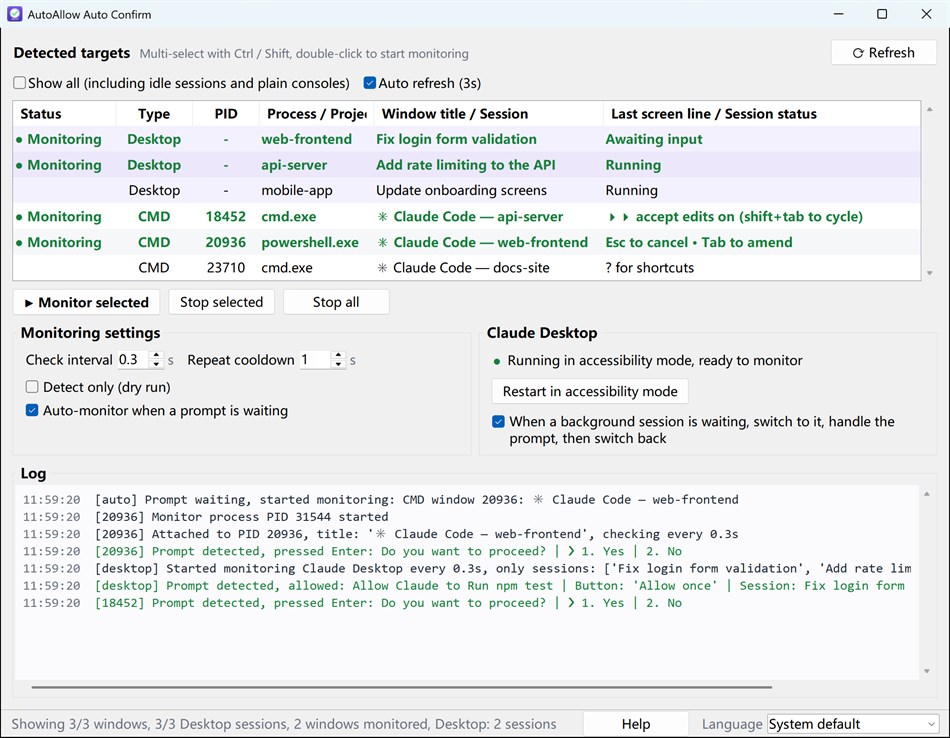
Pick the Claude Code console windows or Claude Desktop sessions you trust, and AutoAllow confirms their permission prompts for you: it presses Enter on the "Do you want to proceed?" prompt in the console, and clicks "Allow once" in Claude Desktop. Windows and sessions you did not select are never touched.
If you turn on automatic monitoring of waiting prompts (off by default), AutoAllow also confirms prompts in sessions you did not select; it asks you to confirm before turning this on.
Everything runs locally on your computer. AutoAllow makes no network connections and collects no data.
Important: approving a prompt lets the assistant run the requested command or action. Only monitor sessions whose work you trust, and use "Detect only" mode first if you want to see what would be approved.
AutoAllow is an independent tool and is not affiliated with or endorsed by Anthropic. Claude is a trademark of Anthropic.
What's new in 1.0.3:
• Claude Desktop split view: with two sessions open side by side, each prompt is matched to the right session
• Console windows: more confirmation prompts are recognized, such as the three-option prompts for editing or creating files (Yes / Yes, allow for this session / No)
• Larger text for easier reading; the detected-targets list now has a vertical scroll bar
• Only one copy runs per computer; opening it again shows the existing window
• Changing the display language takes effect immediately, no restart needed
• Lighter: all console windows share one monitor process, and the installed size dropped from 81 MB to 27 MB
• Fixed an occasional error while locating confirmation prompts
Du développeur
Développeur
- ShenTu QingChun
- Abonnés: 0
- Plateformes: Windows Applications (1)
- Promotions: 0
- Listes: 0 0
- Points: 0
- Classements: 0
- Commentaires: 0
- Vidéos: 0
- RSS: S'abonner
Listes 0
-
 AutoAllow
Points 0
-

- +1 Point

Classements 0
-
- Votre note
Nouveautés
- Version: PC
- Dernière mise à jour:
- What's new in 1.0.3:
• Claude Desktop split view: with two sessions open side by side, each prompt is matched to the right session
• Console windows: more confirmation prompts are recognized, such as the three-option prompts for editing or creating files (Yes / Yes, allow for this session / No)
• Larger text for easier reading; the detected-targets list now has a vertical scroll bar
• Only one copy runs per computer; opening it again shows the existing window
• Changing the display language takes effect immediately, no restart needed
• Lighter: all console windows share one monitor process, and the installed size dropped from 81 MB to 27 MB
• Fixed an occasional error while locating confirmation prompts
- First release.
Informations supplémentaires
- Date de sortie:
- Catégorie:
Applications pour Windows›Outils de développement - Systèmes d'exploitation:
PC - Taille:
14 Mb - Langues prises en charge:
Français,Allemand,Anglais,Chinois,Coréen,Espagnol,Japonais,Portugais,Russe - Classification du contenu:
EVERYONE - Windows Store Note: ¡
0 - Site Web:
 https://bkminer.github.io/AutoAllow
Commentaires 0 ¡
Score AppAgg
Score AppAgg estimé pour
AutoAllow
Développeur: ShenTu QingChun
Un score plus élevé reflète généralement de meilleurs résultats selon les indicateurs d’AppAgg.
Basé sur : popularité · notes des utilisateurs · actualité · promos · données des boutiques · activité de la communauté
Recalculé chaque jour à partir des données AppAgg les plus récentes.
AutoAllow URL courte: Copié!- Windows Store

