
북마크
이 북마크의 제목을 입력하세요.
북마크가 저장되었습니다
| 개발자: | ShenTu QingChun (1) | ||
| 가격: | 무료 | ||
| 종합 점수: | 570 브론즈 | ||
| 순위: | 0 | ||
| 댓글: | 0 댓글 게시 | ||
| 목록: | 0 0 | ||
| 포인트: | 0 | ||
| +1 포인트 | |||
요약
소개합니다. ShenTu QingChun에서 만든 ‘개발자 도구’ 카테고리 앱, AutoAllow.
에 출시됐어요. 아직 꽤 따끈따끈해요.
무료. 광고도 인앱 구매도 없어요. 앱에만 집중하면 돼요.
Microsoft Store는 Windows에 기본으로 들어 있어서 클릭 몇 번이면 설치돼요.
AppAgg 점수는 570. 지금은 브론즈 등급이지만, 성장할 여지가 충분해요.
겨우 14메가바이트. 꽉 찬 드라이브에도 쏙 들어가요.
연령 등급은 ‘EVERYONE’, 아이들에게도 괜찮아요.
9개 언어를 지원하고, 한국어도 있어요.
AppAgg에서는 아직 아무도 평가하지 않았어요. 첫 번째가 될 기회는 바로 지금이에요.
AppAgg에 있는 이 개발자의 유일한 앱이에요. 아직까지는요.
업데이트와 새 앱 소식을 가장 먼저 받고 싶나요? 개발자를 팔로우하거나 RSS 피드를 구독하세요. 푸시 알림은 Android와 iOS용 AppAgg Alerts 앱으로 받을 수 있어요.
광고
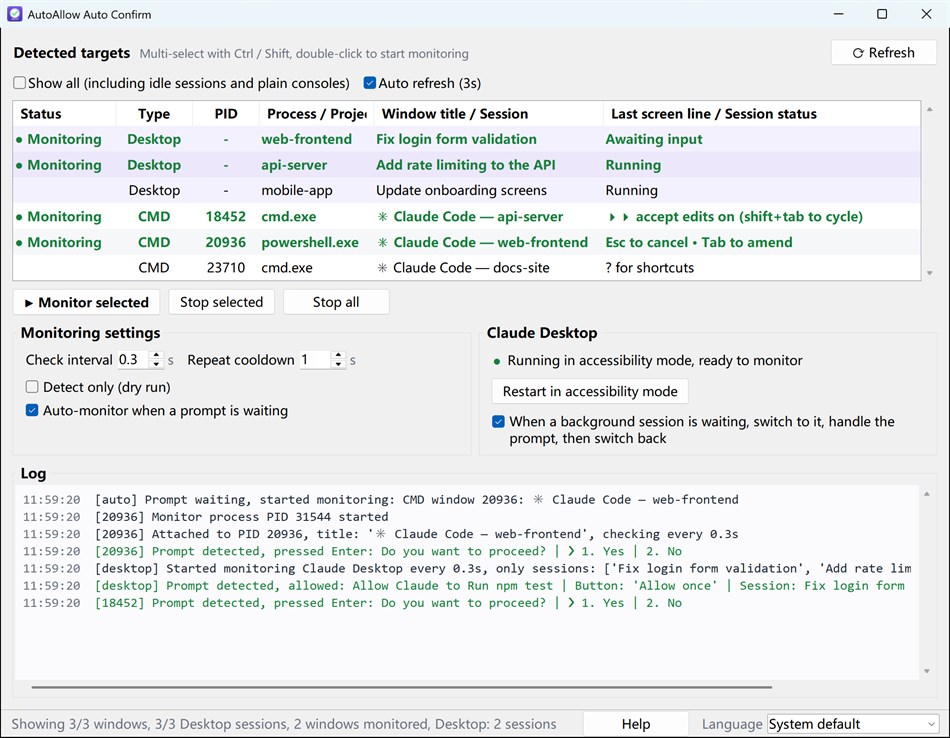
스크린샷 1
다른 플랫폼 0
가격 기록 0
- 현재 가격: 무료
- 최소: 무료
- 최대: 무료
홈 화면의 나만의 피드
“신규 및 업데이트” 피드의 플랫폼을 선택하면 홈 화면에 필요한 앱과 게임만 표시됩니다.
설명

Pick the Claude Code console windows or Claude Desktop sessions you trust, and AutoAllow confirms their permission prompts for you: it presses Enter on the "Do you want to proceed?" prompt in the console, and clicks "Allow once" in Claude Desktop. Windows and sessions you did not select are never touched.
If you turn on automatic monitoring of waiting prompts (off by default), AutoAllow also confirms prompts in sessions you did not select; it asks you to confirm before turning this on.
Everything runs locally on your computer. AutoAllow makes no network connections and collects no data.
Important: approving a prompt lets the assistant run the requested command or action. Only monitor sessions whose work you trust, and use "Detect only" mode first if you want to see what would be approved.
AutoAllow is an independent tool and is not affiliated with or endorsed by Anthropic. Claude is a trademark of Anthropic.
What's new in 1.0.3:
• Claude Desktop split view: with two sessions open side by side, each prompt is matched to the right session
• Console windows: more confirmation prompts are recognized, such as the three-option prompts for editing or creating files (Yes / Yes, allow for this session / No)
• Larger text for easier reading; the detected-targets list now has a vertical scroll bar
• Only one copy runs per computer; opening it again shows the existing window
• Changing the display language takes effect immediately, no restart needed
• Lighter: all console windows share one monitor process, and the installed size dropped from 81 MB to 27 MB
• Fixed an occasional error while locating confirmation prompts
개발자 소식
개발자이신가요?
페이지 맨 위에 소식을 올리면 팔로워에게 이메일로 전달됩니다. YouTube 동영상을 추가하면 “동영상” 블록 맨 앞에 표시됩니다.
개발자
- ShenTu QingChun
- 팔로워: 0
- 플랫폼: Windows 앱 (1)
- 할인: 0
- 목록: 0 0
- 포인트: 0
- 순위: 0
- 댓글: 0
- 동영상: 0
- RSS: 구독
목록 0
-
 AutoAllow
포인트 0
-

- +1 포인트

순위 0
-
- 내 평점
새로운 기능
- 버전: PC
- 마지막 업데이트:
- What's new in 1.0.3:
• Claude Desktop split view: with two sessions open side by side, each prompt is matched to the right session
• Console windows: more confirmation prompts are recognized, such as the three-option prompts for editing or creating files (Yes / Yes, allow for this session / No)
• Larger text for easier reading; the detected-targets list now has a vertical scroll bar
• Only one copy runs per computer; opening it again shows the existing window
• Changing the display language takes effect immediately, no restart needed
• Lighter: all console windows share one monitor process, and the installed size dropped from 81 MB to 27 MB
• Fixed an occasional error while locating confirmation prompts
버전 기록
- First release.
추가 정보
 https://bkminer.github.io/AutoAllow
댓글 0 ¡
가장 먼저 댓글을 남겨주세요
AppAgg 점수
570
AppAgg 예상 점수:
AutoAllow
개발자: ShenTu QingChun
570 브론즈
점수가 높을수록 대체로 AppAgg의 여러 지표에서 좋은 결과를 보인다는 뜻입니다.
기준: 인기 · 사용자 평점 · 최신성 · 할인 · 스토어 데이터 · 커뮤니티 활동
최신 AppAgg 데이터를 바탕으로 매일 다시 계산됩니다.
웹사이트용 배지:  복사됨!
AutoAllow 단축 URL: 복사됨!- Windows Store


