
書籤
為此書籤設定標題。
書籤已儲存
| 開發者: | ShenTu QingChun (1) | ||
| 價格: | 免費 | ||
| 評分: | 570 青銅 | ||
| 排名: | 0 | ||
| 留言: | 0 發表留言 | ||
| 清單: | 0 0 | ||
| 點數: | 0 | ||
| +1 點 | |||
摘要
來認識一下 AutoAllow,ShenTu QingChun 打造的應用程式,歸在「開發人員工具」分類。
推出,還相當新鮮。
免費,沒有廣告,也沒有內購。只有你和這個 App。
Microsoft Store 內建在 Windows 裡,點幾下就裝好了。
AppAgg 評分 570,目前是青銅級,還有很大的進步空間。
只有 14 MB,硬碟塞爆了也裝得下。
年齡分級為「EVERYONE」,小朋友也適合。
支援 9 種語言,中文也在其中。
AppAgg 上還沒有人給它評分。現在就來搶頭香吧。
這是這位開發者在 AppAgg 上唯一的 App。至少目前是。
想搶先知道更新和新應用程式?追蹤開發者或訂閱RSS 訂閱來源。推播通知會透過 AppAgg Alerts App 傳送,支援 Android 和 iOS。
廣告
螢幕擷取畫面 1
其他平台 0
價格紀錄 0
- 目前價格: 免費
- 最小值: 免費
- 最大值: 免費
首頁專屬動態
為「最新與更新」選擇平台,首頁就只會顯示你需要的 App 和遊戲。
描述

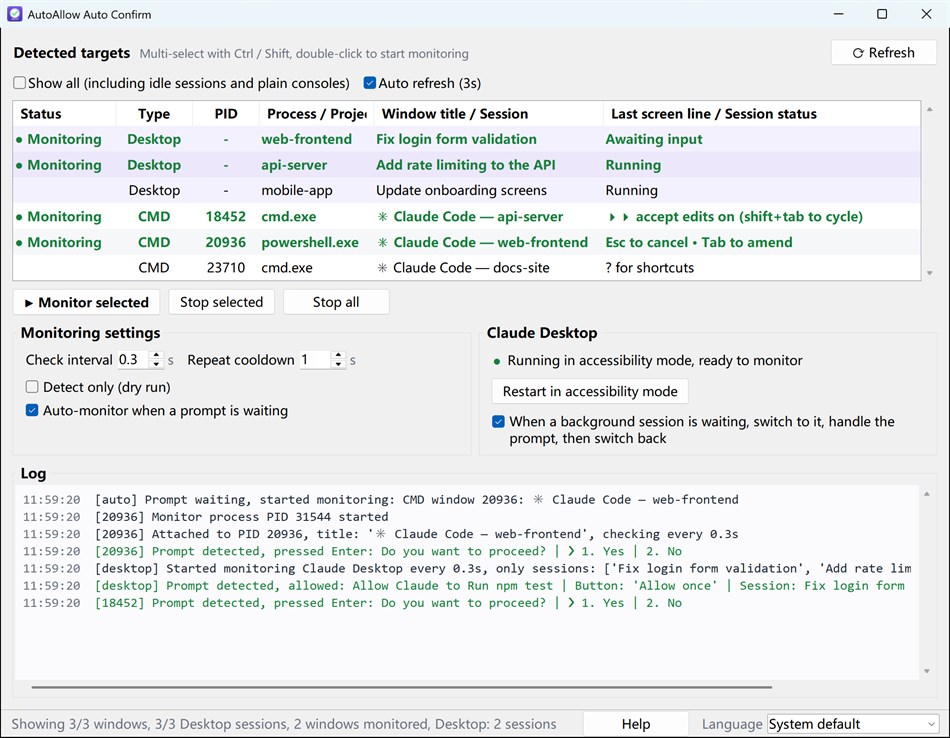
Pick the Claude Code console windows or Claude Desktop sessions you trust, and AutoAllow confirms their permission prompts for you: it presses Enter on the "Do you want to proceed?" prompt in the console, and clicks "Allow once" in Claude Desktop. Windows and sessions you did not select are never touched.
If you turn on automatic monitoring of waiting prompts (off by default), AutoAllow also confirms prompts in sessions you did not select; it asks you to confirm before turning this on.
Everything runs locally on your computer. AutoAllow makes no network connections and collects no data.
Important: approving a prompt lets the assistant run the requested command or action. Only monitor sessions whose work you trust, and use "Detect only" mode first if you want to see what would be approved.
AutoAllow is an independent tool and is not affiliated with or endorsed by Anthropic. Claude is a trademark of Anthropic.
What's new in 1.0.3:
• Claude Desktop split view: with two sessions open side by side, each prompt is matched to the right session
• Console windows: more confirmation prompts are recognized, such as the three-option prompts for editing or creating files (Yes / Yes, allow for this session / No)
• Larger text for easier reading; the detected-targets list now has a vertical scroll bar
• Only one copy runs per computer; opening it again shows the existing window
• Changing the display language takes effect immediately, no restart needed
• Lighter: all console windows share one monitor process, and the installed size dropped from 81 MB to 27 MB
• Fixed an occasional error while locating confirmation prompts
來自開發者
你是開發者嗎?
在頁面頂部發布消息,追蹤者會透過電子郵件收到。新增你的 YouTube 影片,它們會排在「影片」區塊最前面。
開發者
- ShenTu QingChun
- 追蹤者: 0
- 平台: Windows 應用程式 (1)
- 折扣: 0
- 清單: 0 0
- 點數: 0
- 排名: 0
- 留言: 0
- 影片: 0
- RSS: 訂閱
清單 0
-
 AutoAllow
點數 0
-

- +1 點

排名 0
-
- 您的評分
新功能
- 版本: PC
- 最後更新:
- What's new in 1.0.3:
• Claude Desktop split view: with two sessions open side by side, each prompt is matched to the right session
• Console windows: more confirmation prompts are recognized, such as the three-option prompts for editing or creating files (Yes / Yes, allow for this session / No)
• Larger text for easier reading; the detected-targets list now has a vertical scroll bar
• Only one copy runs per computer; opening it again shows the existing window
• Changing the display language takes effect immediately, no restart needed
• Lighter: all console windows share one monitor process, and the installed size dropped from 81 MB to 27 MB
• Fixed an occasional error while locating confirmation prompts
版本紀錄
- First release.
其他資訊
 https://bkminer.github.io/AutoAllow
留言 0 ¡
搶先留下第一則留言
AppAgg 評分
570
AppAgg 預估評分:
AutoAllow
開發者: ShenTu QingChun
570 青銅
評分越高,通常代表其在 AppAgg 上的各項指標表現越好。
基於: 人氣 · 使用者評分 · 新鮮度 · 優惠 · 商店資料 · 社群活躍度
根據最新 AppAgg 資料每日重新計算。
網站徽章:  已複製!
AutoAllow 短網址: 已複製!- Windows Store

