
Marcadores
| Desarrollador: | Lucky Panda (23) | ||
| Precio: | $2.99 | ||
| Puntuación: | 610 Plata | ||
| Clasificaciones: | 0 | ||
| Comentarios: | 0 Publicar comentario | ||
| Listas: | 0 0 | ||
| Puntos: | 0 | ||
| +1 Punto | |||
Resumen
Te presentamos Batch WebP Converter, una app de Lucky Panda de la categoría «Herramientas de desarrollo».
Salió , todavía está bastante fresca.
$2.99, y ni una sola oferta en AppAgg hasta ahora. Hueso duro de roer.
La Microsoft Store viene integrada en Windows, así que se instala en un par de clics.
Su Puntuación de AppAgg es 610. Nivel Plata, y eso no está nada mal.
Clasificación «EVERYONE»: sirve también para los más pequeños.
Habla un solo idioma, y no es el español.
Por aquí, silencio total (ni valoraciones ni comentarios). Rompe el silencio.
El desarrollador tiene 2 juegos y 20 apps más en AppAgg. Vale la pena echar un vistazo.
¿Quieres enterarte antes que nadie de ofertas, actualizaciones y apps nuevas? Crea una alerta de precio, sigue al desarrollador o suscríbete al canal RSS. Las notificaciones push llegan con la app AppAgg Alerts para Android y iOS.
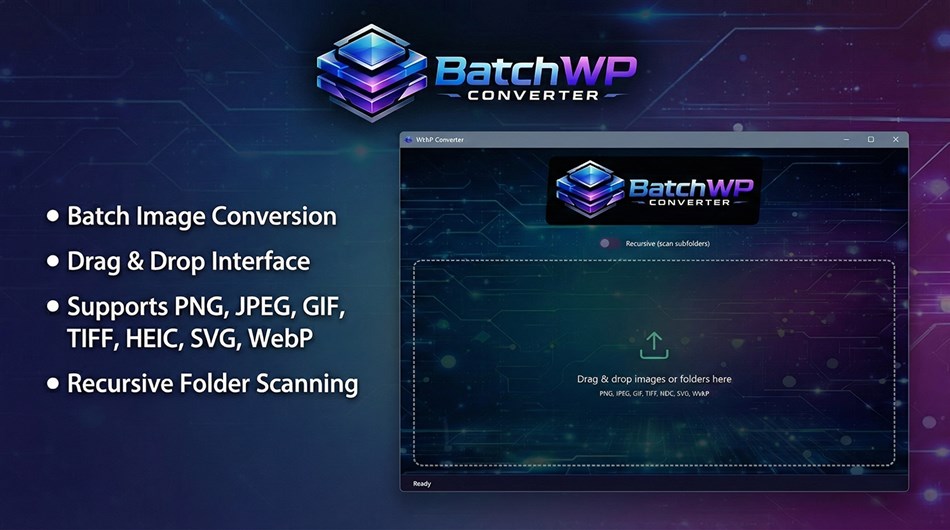
Capturas de pantalla 1
Otras plataformas 0
Historial de precios 0
- Precio actual: $2.99
- Mínimo: $2.99
- Máximo: $2.99
Tu propio feed en la página de inicio
Vídeo 1
Descripción

WebP is the modern image format built by Google that delivers significantly smaller file sizes compared to PNG and JPEG while maintaining excellent visual quality. Most websites and platforms now prefer WebP because it loads faster, uses less bandwidth, and improves page speed scores. Batch WebP Converter makes it effortless to adopt this format across all your images at once.
WHO IS THIS FOR?
Web Developers and Front-End Engineers
If you build websites, you already know that image optimization is one of the biggest wins for page load performance. Batch WebP Converter lets you drag in an entire project folder, recursively scan every subdirectory, and convert every PNG, JPEG, GIF, TIFF, and SVG into optimized WebP files. Download them individually or grab everything as a single ZIP file that preserves your original folder structure. Drop the converted images straight into your project and watch your Lighthouse scores climb.
Bloggers and Content Creators
Every blog post, newsletter, and social media asset benefits from smaller image files. Faster loading pages mean lower bounce rates and better SEO rankings. Instead of converting images one at a time through a web tool, drop your entire batch of photos into the app and convert them all at once. The app shows you exactly how much space you saved on each file and across your entire batch, so you can see the impact immediately.
Photographers and Visual Artists
Working with large collections of high-resolution photos? Batch WebP Converter handles JPEG, PNG, TIFF, and even HEIC files from iPhones and modern cameras. Convert entire photo shoots to WebP for faster sharing, smaller portfolio uploads, or more efficient archival storage. The app uses smart compression with separate handling for photos and transparent images, so your work looks great at a fraction of the original file size.
E-Commerce and Product Managers
Product images are the backbone of online stores. Hundreds or thousands of product photos in PNG or JPEG format add up to massive storage and bandwidth costs. Convert your entire product image library to WebP in one batch and reduce your hosting costs while giving your customers a faster shopping experience. The ZIP download feature makes it easy to convert everything and re-upload in bulk.
Graphic Designers and UI/UX Designers
Export your designs from Figma, Photoshop, Sketch, or Illustrator and batch convert them to web-ready WebP files. The app intelligently detects images with transparency and applies optimized alpha channel compression, so your icons, UI elements, and graphics with transparent backgrounds stay crisp and clean. You can also convert any file to PNG on demand if you need a lossless option for specific assets.
Email Marketers
Smaller images mean emails that load instantly in every inbox. Convert your email campaign graphics to WebP before uploading them to your email service provider. The savings percentage display helps you verify that every image is fully optimized before you hit send.
Students and Educators
Need to compress images for a presentation, assignment, or course materials? Drop everything in, convert, and download. No learning curve, no complex settings to configure. Great for reducing file sizes before uploading to Google Drive, OneDrive, or any LMS platform.
SUPPORTED IMAGE FORMATS
The app accepts a wide range of input image formats:
- PNG (including transparent PNGs)
- JPEG and JPG
- GIF
- TIFF and TIF
- HEIC and HEIF (iPhone and modern camera photos)
- SVG (vector graphics rasterized to WebP)
- WebP (recompress existing WebP files for further savings)
Output formats include WebP (primary) and PNG (available on demand for any converted file). Every file can be individually downloaded as WebP or PNG, giving you flexibility depending on where the image will be used.
KEY FEATURES
Drag and Drop Batch Processing
Drop individual image files or entire folders directly into the app. The app scans everything, filters for supported image formats, and begins converting automatically. No buttons to click, no settings to hunt for. Just drop and go.
Recursive Folder Scanning
Toggle recursive mode to scan every subfolder inside the directories you drop. This is perfect for project directories with deeply nested image folders. The original folder hierarchy is preserved when you download everything as a ZIP file.
Real-Time Progress and Savings Display
Watch each file convert in real time with animated progress bars and color-coded status indicators. After conversion, the app displays the original file size, the converted file size, and the exact percentage of space saved. A running total shows your cumulative savings across the entire batch.
Smart Compression
The converter uses intelligent settings optimized for both quality and file size. Photographic images get photo-optimized compression, while images with transparency receive specialized alpha channel handling with icon-optimized presets. This means you get the best possible quality-to-size ratio without needing to manually adjust settings for different image types.
Individual and Bulk Downloads
Download converted files one at a time using the WebP or PNG buttons next to each file, or download everything at once as a ZIP archive. Individual files are saved directly to your Downloads folder with automatic file naming that avoids overwriting existing files. The ZIP download preserves your original folder structure, making it easy to drop converted files back into your project.
Thumbnail Previews
Every file in your queue gets a thumbnail preview generated from the actual image, so you can visually confirm which files are being processed without guessing from filenames alone.
Automatic Duplicate Detection
Drop the same folder twice by accident? The app automatically skips files that are already in the queue, so you never end up with duplicate conversions wasting your time.
WHAT MAKES THIS APP DIFFERENT?
Completely Offline and Private
Unlike web-based image converters, Batch WebP Converter runs entirely on your computer. Your images are never uploaded to any server, never processed in the cloud, and never stored anywhere outside your machine. This makes it safe for confidential work, proprietary designs, client photos, and anything else you would not want leaving your device.
No Watermarks, No Limits
There are no watermarks added to your converted images. There are no daily conversion limits. There is no premium tier that unlocks "full quality" output. Every conversion runs at full quality with optimized settings. Convert ten images or ten thousand.
No Account Required
Open the app and start converting. There is no sign-up form, no email verification, no login screen. The app is ready the moment you launch it.
Clean, Focused Interface
The app has a dark-themed interface designed to keep the focus on your files. The drop zone is front and center. Your files appear in a clean scrollable list with all the information you need: filename, size, progress, savings, and download buttons. No ads, no banners, no distractions.
TECHNICAL DETAILS
Batch WebP Converter is built with Electron and uses Sharp (powered by libvips), one of the fastest image processing libraries available. Sharp handles format detection, color space management, and compression at native speed, which means conversions are fast even on large batches of high-resolution images.
WebP compression settings are tuned for an optimal balance of quality and file size: quality level 76 with effort level 6 and smart subsampling enabled. Images with alpha transparency get dedicated alpha quality settings (quality 85) with icon-optimized presets to keep edges sharp. PNG output uses maximum compression (level 9) with palette quantization for the smallest possible file sizes.
The app window is resizable with a default size of 950 by 700 pixels.
WHAT THIS APP DOES NOT DO
Batch WebP Converter is an image format converter and optimizer. It is intentionally focused and does not try to be a full image editor. Here is what it does not include:
- No image editing tools (no cropping, resizing, rotating, or filters)
- No custom quality sliders (settings are pre-optimized for the best results)
- No metadata preservation (EXIF data and camera info may not carry over)
- No video conversion (images only)
- No cloud storage integration
- No command-line interface (GUI only)
This keeps the app lightweight, fast, and simple. If you need a batch image format converter that just works, this is it.
COMMON QUESTIONS
Does WebP work everywhere?
WebP is supported by all major browsers including Chrome, Firefox, Safari, Edge, and Opera. It is also supported by WordPress, Shopify, Squarespace, and most modern CMS platforms.
Will I lose image quality?
WebP is a lossy format by default, similar to JPEG. The compression settings in this app are tuned to minimize visible quality loss while maximizing file size savings. Most users see 40-80% smaller files with no noticeable difference in visual quality.
Can I convert WebP back to PNG?
Yes. The app includes a PNG download button for every converted file. You can download any image as PNG on demand.
Does it handle transparent images?
Yes. PNG and other images with alpha transparency are detected automatically and converted with dedicated transparency-aware compression settings.
How do I convert an entire folder?
Drag the folder into the app. If you want to include subfolders, enable the Recursive toggle at the top of the interface before dropping the folder.
Where are my converted files saved?
All files are saved to your system Downloads folder.
Del desarrollador
Listas 0
-
 Batch WebP Converter
Puntos 0
-

- +1 Punto

Clasificaciones 0
-
- Tu valoración
Desarrollador 23
- Lucky Panda
- Seguidores: 0
- Plataformas: Windows Aplicaciones (21) Windows Juegos (1) Steam Juegos (1)
- Ofertas: 0
- Listas: 0 1
- Puntos: 6
- Clasificaciones: 0
- Comentarios: 0
- Vídeos: 21
- RSS: Suscribirse
Novedades
- Versión: PC
- Última actualización:
- Fixed a bug where the background and logo were not showing up
Información adicional
- Fecha de lanzamiento:
- Categoría:
Aplicaciones para Windows›Herramientas de desarrollo - Sistemas operativos:
PC - Tamaño:
116 Mb - Idiomas admitidos:
Inglés - Clasificación de contenido:
EVERYONE - Windows Store Valoración: ¡
0
 https://luckypandawebsites.com/support/batch-webp-converter/
Puntuación de AppAgg
Puntuación estimada de AppAgg para
Batch WebP Converter
Desarrollador: Lucky Panda
Una puntuación más alta suele reflejar mejores resultados en los indicadores de AppAgg.
Basado en: popularidad · valoraciones de usuarios · actualidad · ofertas · datos de tiendas · actividad de la comunidad
Se recalcula a diario con datos actualizados de AppAgg.
Comentarios 0 ¡
Compartir
Batch WebP Converter URL corta: Copiado!- Windows Store

