
บุ๊กมาร์ก
| ผู้พัฒนา: | mindigest (3) | ||
| ราคา: | * ฟรี ใหม่ | ||
| คะแนน: | 1,110 เงิน | ||
| การจัดอันดับ: | 0 | ||
| ความคิดเห็น: | 0 โพสต์ความคิดเห็น | ||
| รายการ: | 0 0 | ||
| แต้ม: | 0 | ||
| +1 แต้ม | |||
สรุป
Beaver Compare เป็นแอปในหมวด “เครื่องมือสำหรับนักพัฒนา” จาก mindigest
มาใหม่ ออกเมื่อ คุณได้เป็นหนึ่งในคนกลุ่มแรก
เข้าฟรี แต่ร้านค้าข้างในเปิดอยู่นะ
Microsoft Store มีมาในตัว Windows อยู่แล้ว ติดตั้งได้ในไม่กี่คลิก
คะแนน AppAgg คือ 1,110 ระดับ “เงิน” ถือว่าไม่เลวเลย
จัดเรต “EVERYONE” เหมาะกับเด็ก ๆ ด้วย
รองรับ 2 ภาษา แต่ยังไม่มีภาษาไทย
ยังไม่มีใครบน AppAgg ให้คะแนนเลย โอกาสเป็นคนแรกอยู่ตรงนี้แล้ว
ผู้พัฒนารายนี้มีแอปอื่นบน AppAgg อีก 2 แอป ลองไปดูกัน
อยากรู้เรื่องอัปเดตและแอปใหม่ก่อนใครไหม? ติดตาม ผู้พัฒนา หรือกดติดตาม ฟีด RSS ได้เลย การแจ้งเตือนแบบพุชส่งผ่านแอป AppAgg Alerts สำหรับ Android และ iOS
แพลตฟอร์มอื่น 0
ประวัติราคา 0
- ราคาปัจจุบัน: ฟรี
- ต่ำสุด: ฟรี
- สูงสุด: ฟรี
ฟีดของคุณเองบนหน้าแรก
ภาพหน้าจอ 7
คำอธิบาย

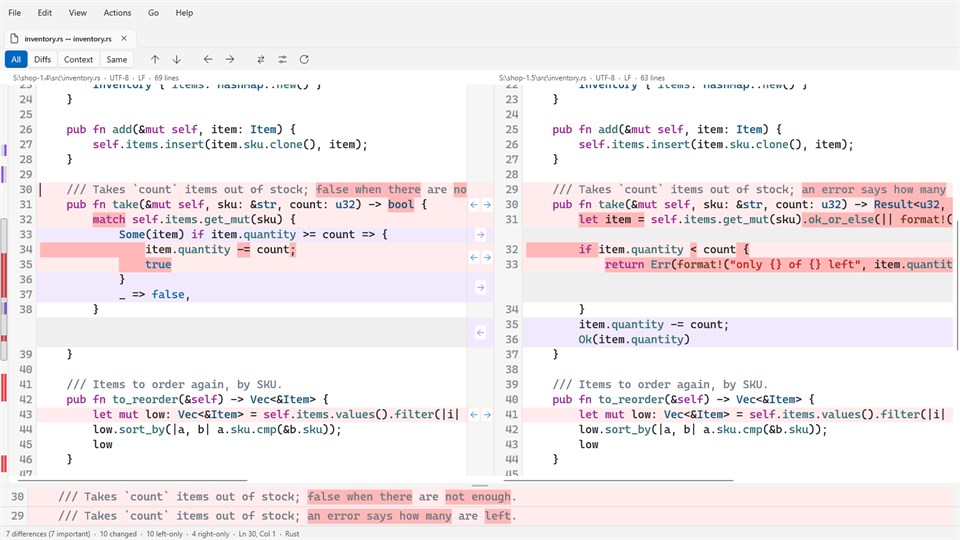
Beaver Compare puts two versions of your work side by side: text files, whole folders, CSV tables, images and binary files. It shows every difference down to the character, lets you copy changes from one side to the other, and merges three versions into one.
TEXT
• Lines line up side by side, and the characters that changed inside each line are marked. A detail pane shows long lines in full.
• Edit either side, copy changes across with one click, undo, and save in the file's own encoding, byte order mark and line endings.
• Syntax highlighting for 26 languages, from C, C#, Java, Python, Rust and Go to JSON, XML, YAML and Markdown.
• Comparison rules: ignore case, white space, line endings or comments; mark text as unimportant with regular expressions.
• Find, go to line, word wrap, and views that show only the differences, with or without context.
• Opens files with millions of lines and stays smooth while you scroll.
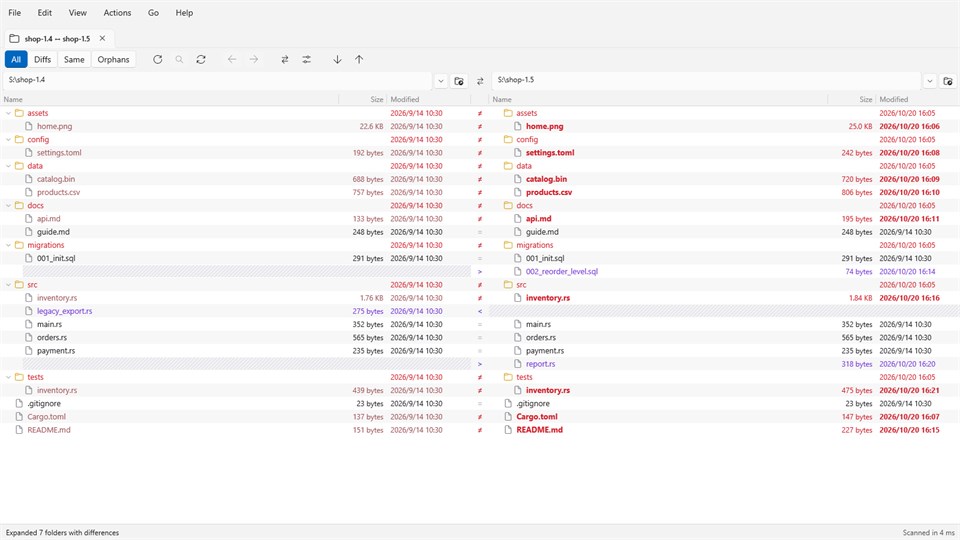
FOLDERS
• Compare by size and modification time, or by content. Filter by name, and keep your options as presets.
• Copy, move, rename and delete right in the comparison. Deleted files go to the Recycle Bin.
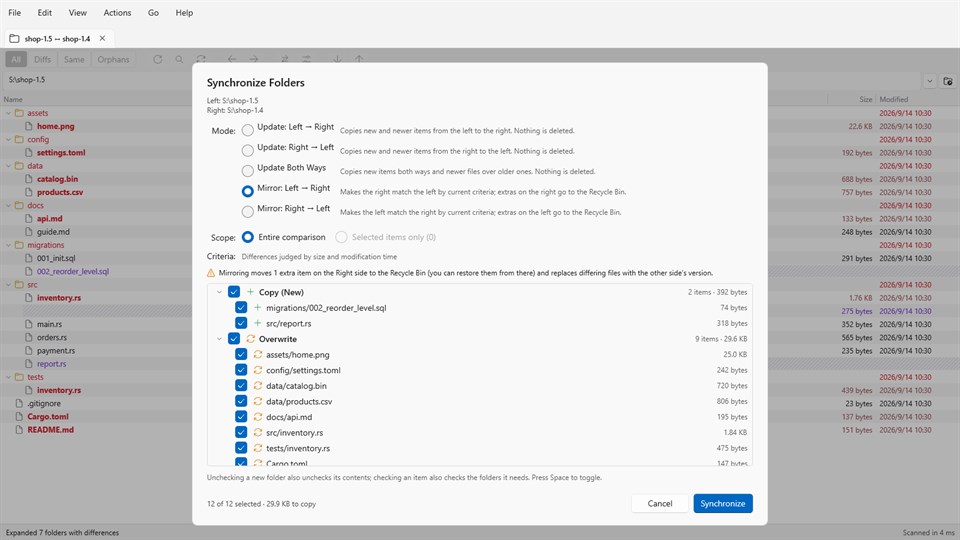
• Synchronize with a preview: update one way, update both ways, or mirror. Only the plan you previewed runs, and every step checks the files again before it touches them.
MERGE
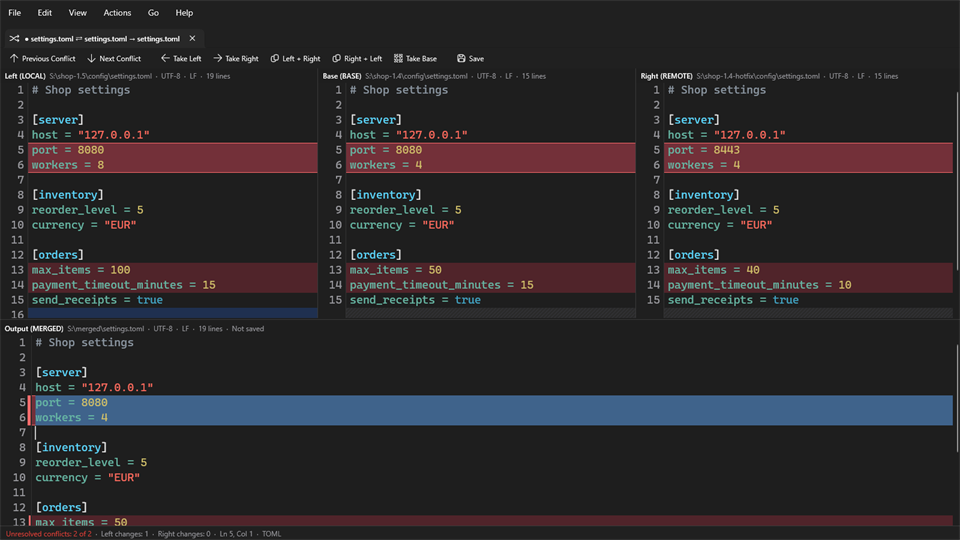
• Three-way merge: your version, their version and the common base, above a result you can edit. Changes that do not conflict are merged for you; step through the conflicts and take left, right, both or the base.
• Works as git difftool and git mergetool. The bvc command opens comparisons and merges from the command line and tells git whether the merge was finished.
MORE COMPARISONS
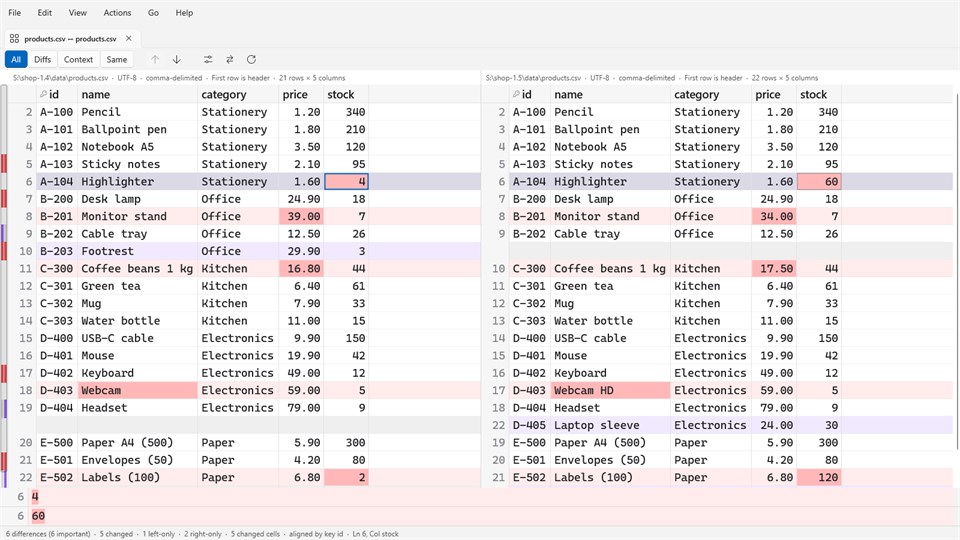
• Tables: CSV and TSV files cell by cell, with rows matched by key columns, ignored columns and a numeric tolerance.
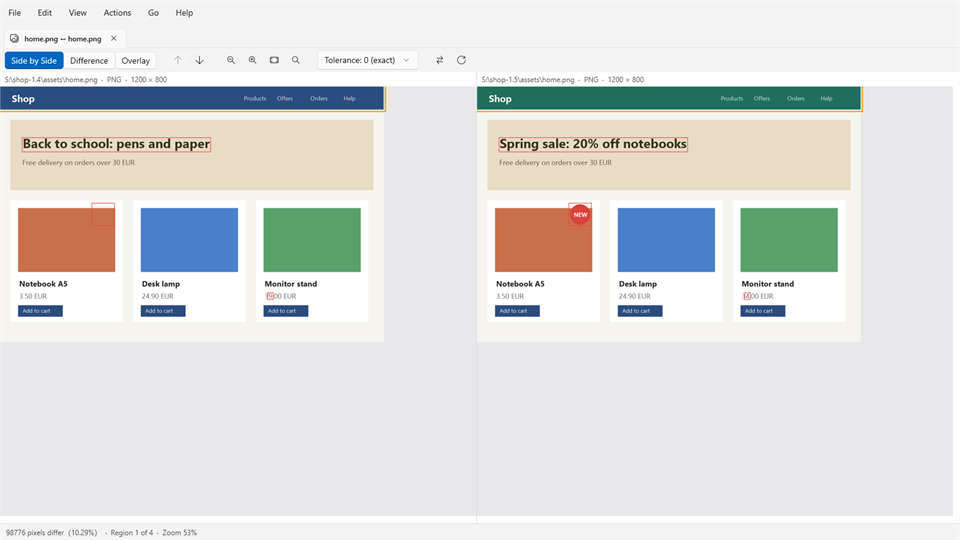
• Images: side by side, as a difference image or as an overlay, with a colour tolerance.
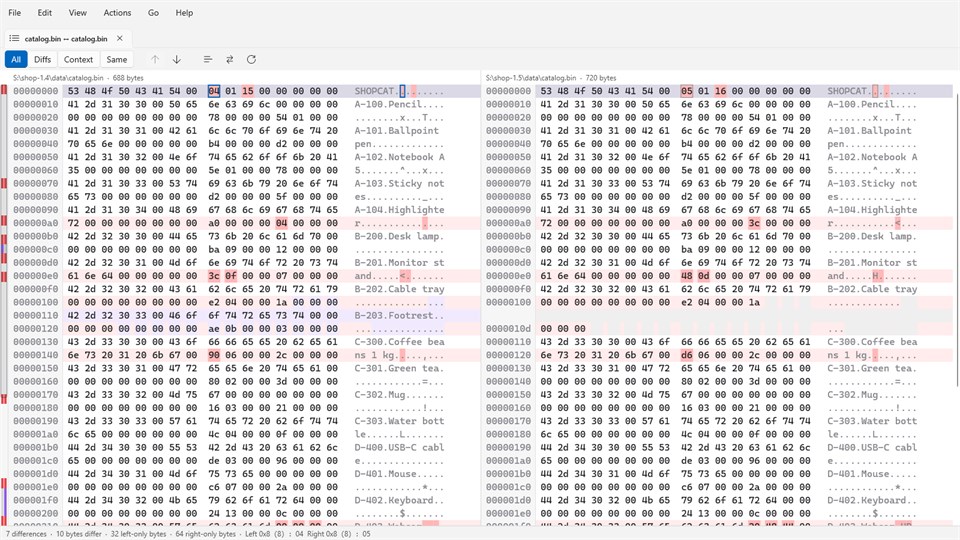
• Binary files: a hexadecimal comparison that lines up inserted and deleted bytes.
• HTML reports of text and folder comparisons.
AT HOME IN WINDOWS
• Compare from the File Explorer context menu: two selected items at once, or pick a left side first and compare it with something else.
• Files that change on disk are reloaded on their own.
• Tabs, saved sessions, dark and light themes, English and Simplified Chinese.
YOUR FILES STAY ON YOUR PC
No account and no analytics. Beaver Compare never uploads your files. It goes online only to download your license when you activate it with an activation code.
TRY IT FREE, BUY IT ONCE
Every feature is free for 30 days from the first launch. After that, Beaver Compare stays useful for viewing: you can still open comparisons, see the differences and export reports, while saving and file operations need a license. It is a one-time purchase, not a subscription. Licenses are sold on our website; one license is for one person on up to 2 computers, Mac or Windows.
จากนักพัฒนา
รายการ 0
-
 Beaver Compare
แต้ม 0
-

- +1 แต้ม

การจัดอันดับ 0
-
- คะแนนของคุณ
ผู้พัฒนา 3
- mindigest
- ผู้ติดตาม: 0
- แพลตฟอร์ม: Windows แอป (3)
- ลดราคา: 0
- รายการ: 0 0
- แต้ม: 0
- การจัดอันดับ: 0
- ความคิดเห็น: 0
- วิดีโอ: 0
- RSS: ติดตาม
มีอะไรใหม่
- เวอร์ชัน: PC
- อัปเดตล่าสุด:
ข้อมูลเพิ่มเติม
- วันที่วางจำหน่าย:
- หมวดหมู่:
แอปสำหรับ Windows›เครื่องมือสำหรับนักพัฒนา - ระบบปฏิบัติการ:
PC - ขนาด:
106 Mb - ภาษาที่รองรับ:
จีน,อังกฤษ - การจัดประเภทเนื้อหา:
EVERYONE - Windows Store คะแนน: ¡
0 - เว็บไซต์:
 https://www.mindigest.com/compare
คะแนน AppAgg
คะแนน AppAgg โดยประมาณของ
Beaver Compare
ผู้พัฒนา: mindigest
คะแนนที่สูงขึ้นมักสะท้อนตัวชี้วัดที่ดีกว่าบน AppAgg
อิงจาก: ความนิยม · คะแนนจากผู้ใช้ · ความสดใหม่ · ดีล · ข้อมูลร้านค้า · กิจกรรมชุมชน
คำนวณใหม่ทุกวันจากข้อมูล AppAgg ล่าสุด
ความคิดเห็น 0 ¡
แชร์
Beaver Compare URL แบบสั้น: คัดลอกแล้ว!- Windows Store

