
Yer imleri
Bu yer imi için bir başlık seçin.
Yer imi kaydedildi
| Geliştirici: | Imergene (1) | ||
| Fiyat: | Ücretsiz Yeni | ||
| Skor: | 820 Gümüş | ||
| Sıralamalar: | 0 | ||
| Yorumlar: | 0 Yorum gönder | ||
| Listeler: | 0 + 0 | ||
| Puanlar: | 0 + 0 ¡ | ||
| +1 Puanlar | |||
Ekran görüntüleri
Reklâm
Açıklama

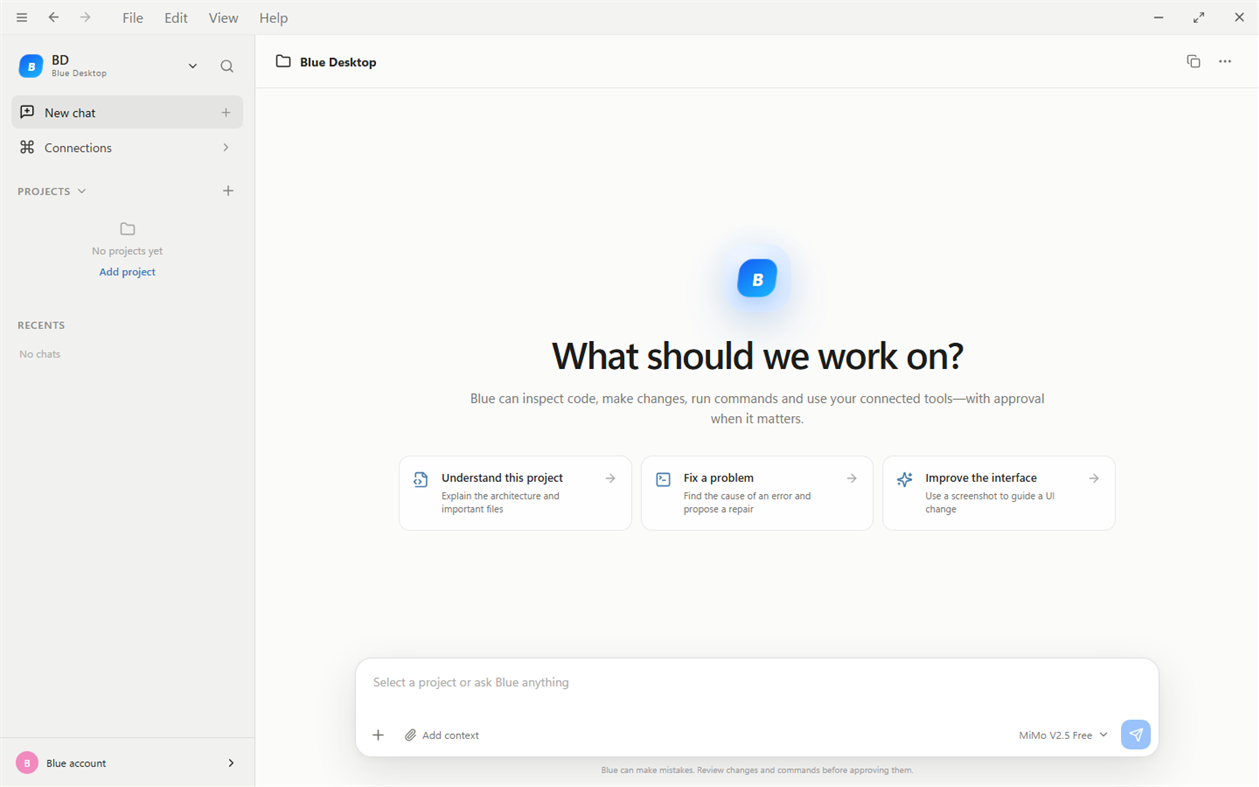
Whether you are learning programming, building a startup product or maintaining an existing application, Blue brings project conversations, AI-assisted coding, connected tools and live task activity into one desktop workspace. Choose your model, open your project, and tell Blue what you want to accomplish.
WHAT IS NEW IN VERSION 0.1.29
Work on two projects at the same time, with background tasks continuing when you switch projects. Compact sidebar statuses show working, queued, completed and attention-needed tasks. Project sessions, approvals and rollback remain isolated, while tasks in the same or overlapping folders queue safely. The setup wizard also supports signing in with your OpenCode account to use available workspace models.
UNDERSTAND YOUR CODEBASE
Ask Blue to scan an opened project, explain its architecture, identify important files, trace how modules connect, or help investigate a bug. Blue can inspect the local files in your selected project and show its tool activity in the conversation. Project-aware chats keep coding questions separate from general chat, which intentionally does not have local project tools.
WRITE, DEBUG AND IMPROVE CODE
Describe a feature, a failing workflow or a change you need. Blue can edit source files and run project commands when the action is permitted. Follow the work live, inspect the results and review generated code before relying on it. Use Blue for practical software-development tasks such as explaining unfamiliar code, planning a refactor, investigating errors, improving existing components and preparing changes for your project.
CONTINUE PROJECT CONVERSATIONS
Saved project chats make it easier to return to previous work. Improved context handling helps Blue recognize the selected project and continue a stopped task in the same chat. Memory is bounded, and older content may be summarized. Eligible paid users have a larger context allowance than free users; this is not unlimited storage or perfect recall.
DELEGATE INDEPENDENT WORK
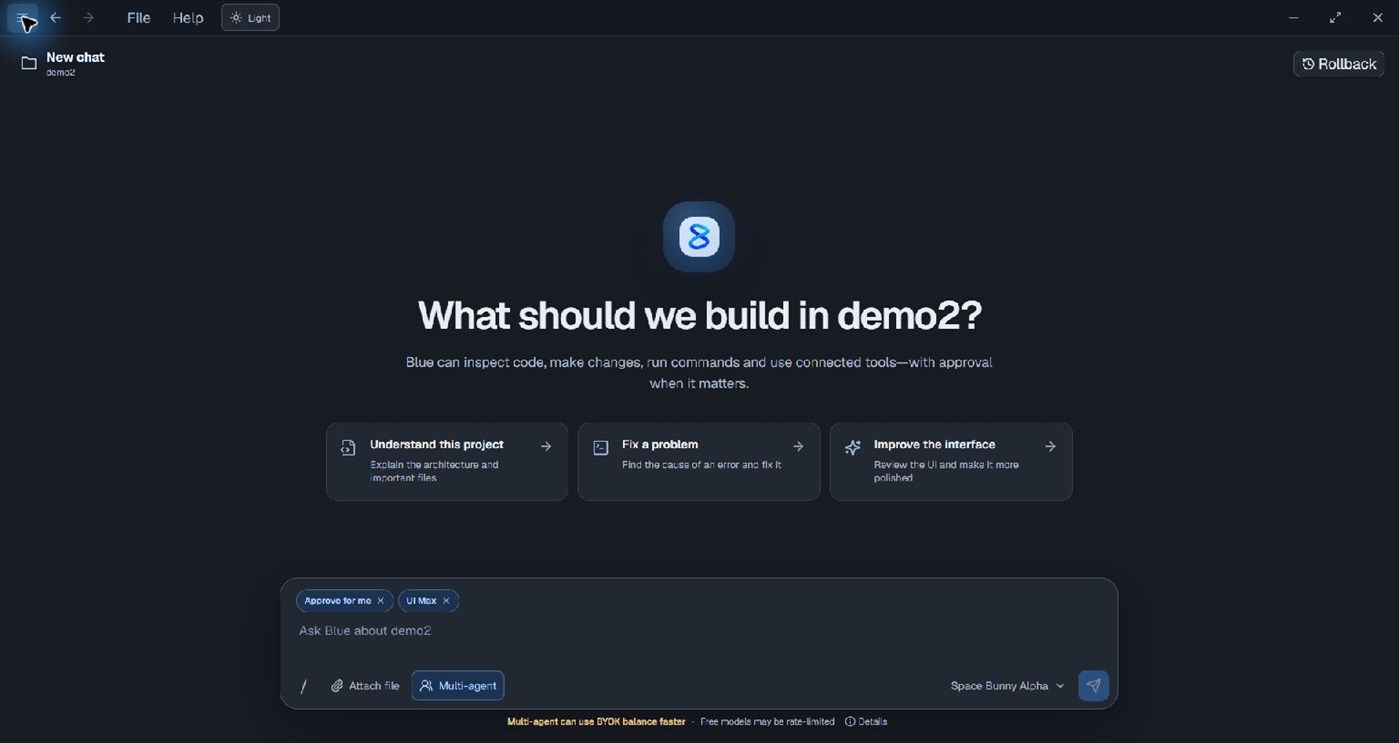
Eligible Blue subscription and Blue Pro PAYG users can enable Multi-agent in a project chat when using a supported Blue or OpenRouter model. Multi-agent is unavailable with OpenCode connections. Blue may delegate independent tasks to parallel agents when appropriate. Follow agent names and working/completed status, select an agent to open its live work panel, and revisit completed work. The number of agents and whether work is delegated depend on the task. Parallel agents make additional model requests and can use credits or API balance faster.
KEEP PERMISSIONS UNDER YOUR CONTROL
Review permission requests through the manual approval cards. Choose Reject, Always allow or Allow once for the requested action, and respond to questions when Blue needs clarification. The Approve for me selection control is temporarily unavailable in this release. Blue does not promise unrestricted access or that every command is safe.
CHOOSE HOW YOUR AI USAGE IS BILLED
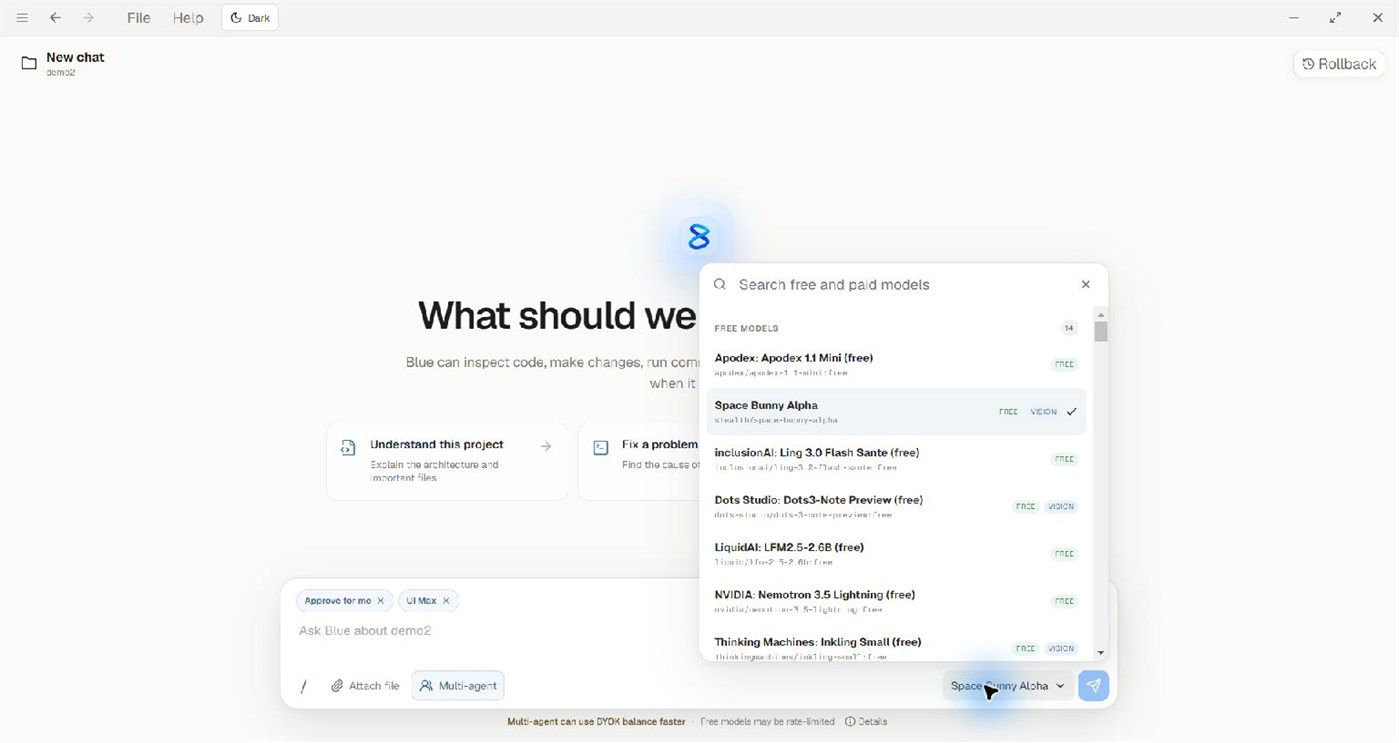
Use eligible Blue models, bring your own OpenRouter API key, or sign in with your OpenCode account or use a supported OpenCode Zen API key. Blue automatically selects the corresponding coding engine. The setup flow supports the corresponding provider sign-in or API-key connection. Locally stored API keys are encrypted by Windows. BYOK model requests are billed by the selected provider rather than deducted from Blue Credits. For Blue-billed usage, clearer account information separates available credits, temporary holds and reported costs when the backend provides them. Unknown values are not presented as zero. Model prices, availability, balances and external limits can vary.
CONNECT CODING AND CREATIVE TOOLS
Optional MCP connections bring GitHub, Canva, Vercel, Supabase and React Bits workflows into Blue. GitHub MCP is free and supports authorized read/write tools. Vercel and Canva require eligible paid Blue access. Each connected service uses its own account authorization, permissions and quotas, and protected external actions may require approval. Supported Canva workflows can show design previews and an editable design link when the connected account allows them. Blender-aware workflows also support creative project work.
STAY INFORMED WITHOUT LOSING FOCUS
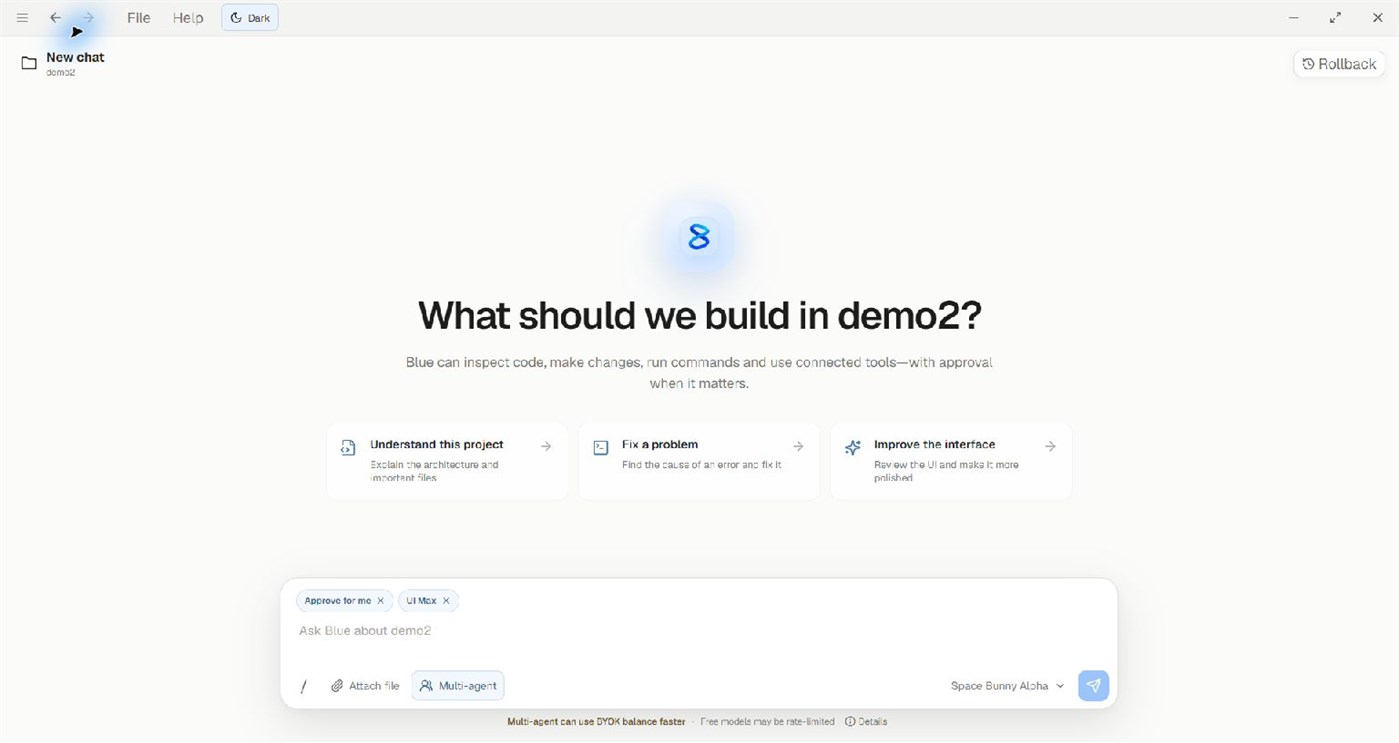
Watch command/tool activity and final answers as they arrive. Optional desktop notifications alert you when Blue needs permission or input, completes a task, or encounters an actionable failure. Switch between light and dark themes from the top bar. In a long conversation, use the down-arrow control to return to the latest activity. Notification delivery depends on your Windows settings.
REVIEW AND RESTORE SUPPORTED CHANGES
Blue creates local file checkpoints for supported project work. Open the Rollback panel to inspect available checkpoints and restore supported changes. File restoration requires a checkpoint; older tasks without one cannot restore files. Review project changes and keep your normal version-control and backup practices.
A WINDOWS APP THAT KEEPS IMPROVING
Microsoft Store manages updates for the Store-installed app. Blue includes update notices and What’s new support when verified published-release metadata is available. This desktop listing does not install or update the separate VS Code extension.
BEFORE YOU START
Local project tools require an opened project chat. Some capabilities require an eligible paid plan, model balance or external service account. Connections are optional for core use. AI output can be incorrect, and service outages, quotas or rate limits may occur. Always review generated code, commands and important results.
Diğer platformlar (0)
| Blue DesktopWindows StoreBuradasınız | Ücretsiz |
Şu anda yalnızca bu mağazada.
Fiyat Geçmişi
- Güncel fiyat: Ücretsiz
- En az: Ücretsiz
- En fazla: Ücretsiz
Fiyatları takip et E-posta veya anlık bildirimle indirim uyarıları almak için bir listeye ekleyin
Listeler (0)
0
- Blue Desktop
Puanlar (0)
0
Sıralamalar (0)
0
Yorumlar (0) ¡
İlk yorum yapan siz olun
Geliştirici
- Imergene
- Takipçiler: 0
- Platformlar: Windows Uygulamalar (1)
- İndirimler: 0
- Listeler: 0 + 0
- Puanlar: 0 + 0 ¡
- Sıralamalar: 0
- Yorumlar: 0
- Video: 0
- RSS: Abone ol
Yenilikler
- Sürüm: PC
- Son güncelleme:
- Version 0.1.29
• Work on two projects at the same time; background tasks continue when switching projects.
• Compact sidebar statuses show working, queued, completed and attention-needed tasks.
• Separate project sessions, approvals and rollback; tasks in the same or overlapping folders queue safely.
• Sign in with your OpenCode account in the setup wizard to use available workspace models, with improved connection handling.
Ek Bilgi
- Çıkış tarihi:
- Kategori:
Windows uygulamaları›Geliştirici araçları - İşletim Sistemleri:
PC - Boyut:
484 Mb - Desteklenen diller:
English - İçerik Derecelendirmesi:
TEEN - Windows Store Puan: ¡
0 - Web sitesi:
 https://blue-by-imergene.vercel.app/
AppAgg Skoru
820
Tahmini AppAgg skoru:
Blue Desktop
Geliştirici: Imergene
820 Gümüş
Daha yüksek skorlar genellikle AppAgg’deki göstergelerin daha güçlü olduğunu belirtir.
Şunlara göre: popülerlik · kullanıcı puanları · güncellik · fırsatlar · mağaza verileri · topluluk etkinliği
Güncel AppAgg verileriyle her gün yeniden hesaplanır.
Web sitesi için rozet:  Kopyalandı!
Özet
Blue Desktop Kısa URL: Kopyalandı!- Windows Store
AppAgg üzerinden Imergene tarafından geliştirilen “Blue Desktop” uygulamasını takip edebilirsiniz. Platform: Windows. Kategori: Geliştirici araçları. AppAgg skoru: 820 (Gümüş). Uygulamanın AppAgg puanları — onaylı: 0; dolaylı: 0. Uygulamanın yer aldığı herkese açık liste sayısı: 0. Uygulamayı özel listelerine kaydeden kullanıcı sayısı: 0. AppAgg kullanıcıları uygulamayı henüz değerlendirmedi. Onaylı puanlar, oturum açmış AppAgg kullanıcılarının mağazaya geçişlerini kaydeder. Dolaylı puanlar mağaza verilerine dayanır. İki sayaç, uygulamanın veya oyunun yer aldığı herkese açık listelerin sayısını ve onu özel listelerine kaydeden kullanıcıların sayısını gösterir. Uygulama ilk kez tarihinde yayımlandı. Uygulamanın son güncellemesi: . Uygulama şu anda ücretsizdir. Uygulama şu dilleri destekler: English. Fiyat geçmişini inceleyin, uygulamayı bir listeye ekleyin veya geliştiriciyi takip edin. Uygulamayla ilgili yeni fırsatları ve güncellemeleri RSS akışı üzerinden takip edin. AppAgg bu uygulamayı barındırmaz veya dağıtmaz. Uygulamayla ilgili tüm ticari markalar, logolar ve ekran görüntüleri ilgili sahiplerine aittir.
Şunları da beğenebilirsiniz
Son tartışmalar
 UygulamaNauticPlayer This app is absolute cinema. Honestly, it’s one of the best media players I’ve ever tried, and I’m s...
  Manuel16
  UygulamaScreen Beings - Desktop Pet & Study Companion This is my app so I’m a little bias but as someone from the ADHD community that teaches ADHD and neu...
  Tarelle Irwin6
  UygulamaAadi vault good it ia a encrypter and good you my work on office
  Aditya Rai5
  UygulamaTyping 365 | Daily Typing Trainer The best typing app ever. With Typing 365 you don’t have to force yourself for couple minutes traini...
  Ahmad Mozaffar5
  UygulamaZefir Calendar — Calendar in the Taskbar excelente app! Superando todas as espectativas!
  Diógenes Magnus5
  UygulamaLockinRa LockinRa 리뷰 LockinRa는 작업 관리, 집중력 도구, AI 코칭을 하나의 데스크톱 앱으로 통합한 무료 Windows 생산성 프로그램입니다. 클라우드 동기화 없이 로컬 ...
  abhilok reddy6
  UygulamaCN Vault I Love this app CN Vault is a user-friendly app that helps keep your passwords safe and secure. If y...
  Marjuk Amin5
