
북마크
이 북마크의 제목을 입력하세요.
북마크가 저장되었습니다
스크린샷
광고
설명

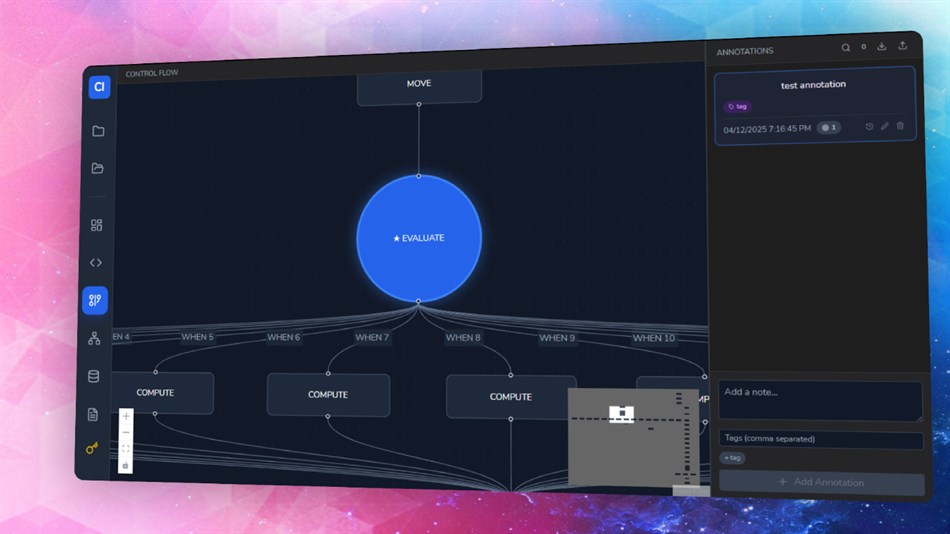
The editor highlights COBOL syntax and copybook regions with precision. The control flow graph turns nested IF blocks, PERFORM loops, and procedural branches into a readable diagram that updates as you explore the code. When you click a node, the view jumps to the exact line in the source. When you click the source, the graph highlights the matching node. Nothing feels disconnected.
Variable usage is tracked with semantic accuracy. You can see where a variable is defined, modified, or read, and jump across the file with a single click. This makes impact analysis quick, especially in older systems that grew over decades.
You can attach business logic notes directly to graph nodes. These notes stay in a JSON file next to your code so teams can share them in version control. It turns tribal knowledge into actual documentation tied to real code paths.
The dependency view helps you understand COPY usage across the project. It displays programs and copybooks as a visual network, so spotting risky dependencies becomes simple.
COBOLFlow Analyzer is built with Go and React for speed and a smooth desktop experience. It is designed for developers, analysts, and modernization teams who need to understand legacy COBOL systems without wrestling with outdated tools.
다른 플랫폼
| COBOLFlow AnalyzerWindows Store570 브론즈현재 페이지인앱 구매 | 무료 |
현재 이 스토어에서만 이용할 수 있습니다.
가격 내역
- 현재 가격: 무료
- 최소: 무료
- 최대: 무료
목록 0
0
- COBOLFlow Analyzer
포인트 0
0
순위 0
-

- 내 평점

댓글 0 ¡
가장 먼저 댓글을 남겨주세요
새로운 기능
- 버전: PC
- 마지막 업데이트:
- COBOLFlow Analyzer now loads large COBOL projects faster, handles nested IF structures with better accuracy, and syncs code and graph views with no delay. The control flow graph got a cleaner layout so long procedures are easier to read. Variable tracking is more precise, especially when arithmetic verbs mix reads and writes. COPY resolution is smoother, and cross-file jumps open instantly. The dependency graph is more stable on big projects. Annotations now save more reliably and stay in sync with node selection.
추가 정보
 https://remoteskills.io
AppAgg 점수
570
AppAgg 예상 점수:
COBOLFlow Analyzer
개발자: AskDesk
570 브론즈
점수가 높을수록 대체로 AppAgg의 여러 지표에서 좋은 결과를 보인다는 뜻입니다.
기준: 인기 · 사용자 평점 · 최신성 · 할인 · 스토어 데이터 · 커뮤니티 활동
최신 AppAgg 데이터를 바탕으로 매일 다시 계산됩니다.
웹사이트용 배지:  복사됨!
복사됨!
요약
COBOLFlow Analyzer 단축 URL: 복사됨!- Windows Store
AppAgg에서 앱 ‘COBOLFlow Analyzer’의 정보를 확인할 수 있습니다. 개발자: AskDesk. 플랫폼: Windows. 카테고리: 개발자 도구. AppAgg 점수: 570 (브론즈). 이 앱의 AppAgg 포인트: 확인된 포인트 0, 간접 포인트 0. 이 앱이 포함된 공개 목록: 0개. 비공개 목록에 저장한 사용자: 0명. AppAgg 사용자가 아직 이 앱에 별점을 남기지 않았습니다. 확인된 포인트는 로그인한 AppAgg 사용자가 스토어로 이동한 기록을 반영합니다. 간접 포인트는 스토어 데이터를 바탕으로 합니다. 두 숫자는 공개 목록 수와 비공개 목록에 저장한 사용자 수를 나타냅니다. 이 앱의 최초 출시일은 입니다. 이 앱의 마지막 업데이트 날짜는 입니다. 이 앱은 현재 무료로 이용할 수 있습니다. 이 앱은 다음 언어를 지원합니다: English. 가격 기록을 확인하거나 앱을 목록에 추가하고 개발자를 팔로우할 수 있습니다. 이 앱의 향후 할인과 업데이트는 RSS 피드에서 확인할 수 있습니다. AppAgg는 이 앱을 호스팅하거나 배포하지 않습니다. 이 앱과 관련된 모든 상표, 로고 및 스크린샷은 각 소유자에게 귀속됩니다.
이런 앱은 어떠세요?
최근 대화
 앱LocalDub – Real-Time Game Dubbing Hello Kırtay Interactive, I am using LocalDub - Real-Time Game Dubbing. I would like to know if Hind...
  rashid game5
  앱NauticPlayer This app is absolute cinema. Honestly, it’s one of the best media players I’ve ever tried, and I’m s...
  Manuel16
  앱Screen Beings This is my app so I’m a little bias but as someone from the ADHD community that teaches ADHD and neu...
  Tarelle Irwin6
  앱Aadi vault good it ia a encrypter and good you my work on office
  Aditya Rai5
  앱Typing 365 | Daily Typing Trainer The best typing app ever. With Typing 365 you don’t have to force yourself for couple minutes traini...
  Ahmad Mozaffar5
  앱Zefir Calendar — Calendar in the Taskbar excelente app! Superando todas as espectativas!
  Diógenes Magnus5
  앱LockinRa LockinRa 리뷰 LockinRa는 작업 관리, 집중력 도구, AI 코칭을 하나의 데스크톱 앱으로 통합한 무료 Windows 생산성 프로그램입니다. 클라우드 동기화 없이 로컬 ...
  abhilok reddy6
  앱CN Vault I Love this app CN Vault is a user-friendly app that helps keep your passwords safe and secure. If y...
  Marjuk Amin5
