
Bladwijzers
| Ontwikkelaar: | Anton Horbatiuk (2) | ||
| Prijs: | $2.99 | ||
| Score: | 670 Zilver | ||
| Ranglijsten: | 0 | ||
| Reacties: | 0 Plaats reactie | ||
| Lijsten: | 0 0 | ||
| Punten: | 0 | ||
| +1 Punt | |||
Samenvatting
Maak kennis met Code Vault – offline code snippets manager, een app van Anton Horbatiuk in de categorie “Ontwikkelhulpprogramma's”.
Pas uitgekomen, dus nog lekker vers.
$2.99, en tot nu toe nog geen enkele korting op AppAgg. Een harde noot om te kraken.
De Microsoft Store zit ingebouwd in Windows, dus installeren doe je in een paar klikken.
De AppAgg-score is 670. Zilver, en dat is helemaal niet slecht.
Leeftijdsclassificatie “EVERYONE”, dus ook prima voor kinderen.
Kent 2 talen, maar Nederlands zit er nog niet bij.
Gebruikt? Jouw recensie zou hier de eerste zijn.
De ontwikkelaar heeft nog 1 andere app op AppAgg. Neem gerust een kijkje.
Wil je als eerste horen over aanbiedingen, updates en nieuwe apps? Stel een prijsalarm in, volg de ontwikkelaar of abonneer je op de RSS-feed. Pushmeldingen komen binnen via de app AppAgg Alerts voor Android en iOS.
Andere platforms 0
 | Code Vault – offline code snippets managerWindows Store670 ZilverWindows | $2.99 |
Nu alleen in deze store.
Prijsgeschiedenis 0
- Huidige prijs: $2.99
- Minimum: $2.99
- Maximum: $2.99
Je eigen feed op de startpagina
Screenshots 4
Beschrijving
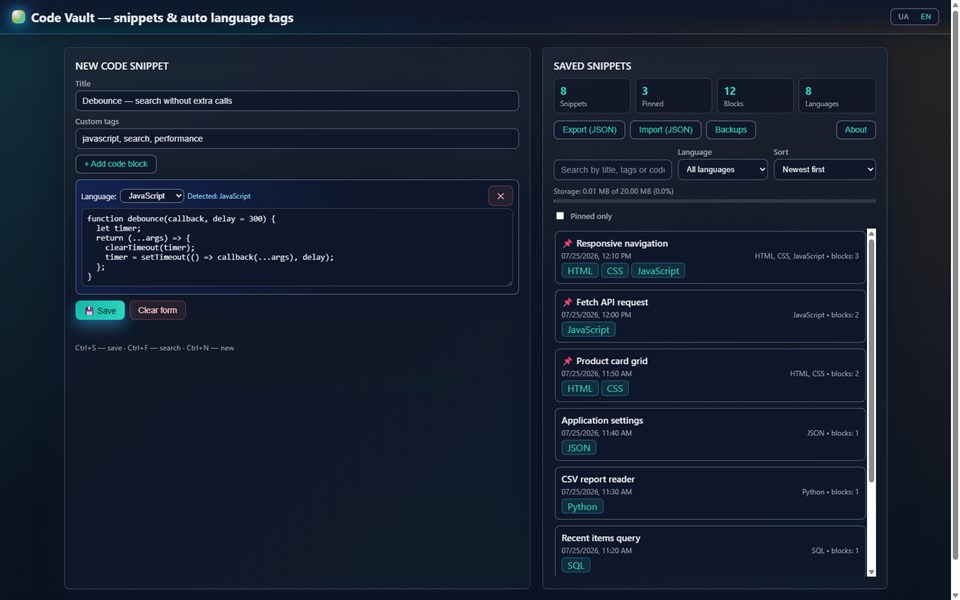
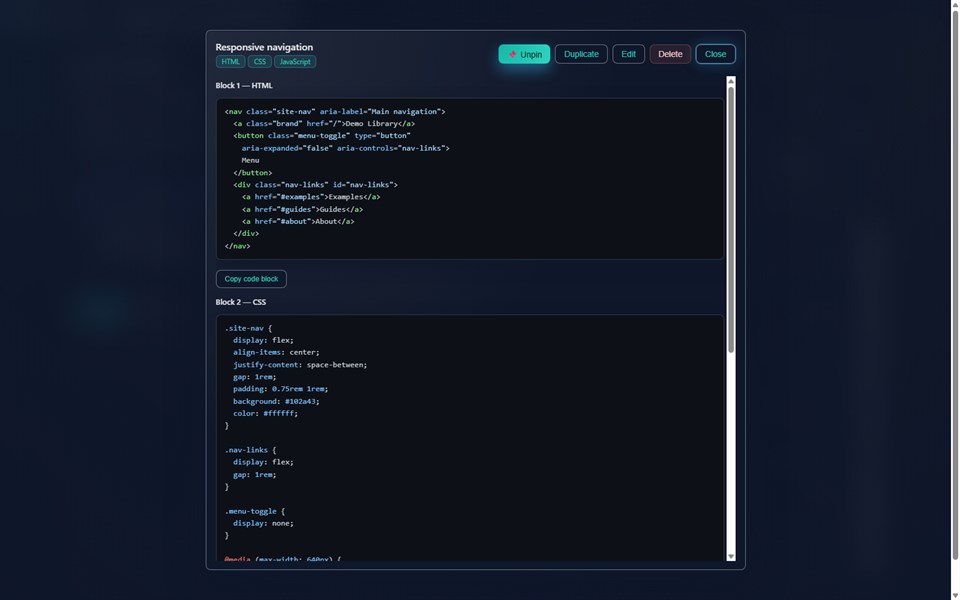
Keep reusable code in one place with multiple blocks per snippet, local syntax highlighting, automatic detection for 22 programming and markup languages, and manual language selection. Organize snippets with custom tags, filter by language or pinned status, search titles, tags, and code using multiple words, and sort or duplicate entries for faster reuse.
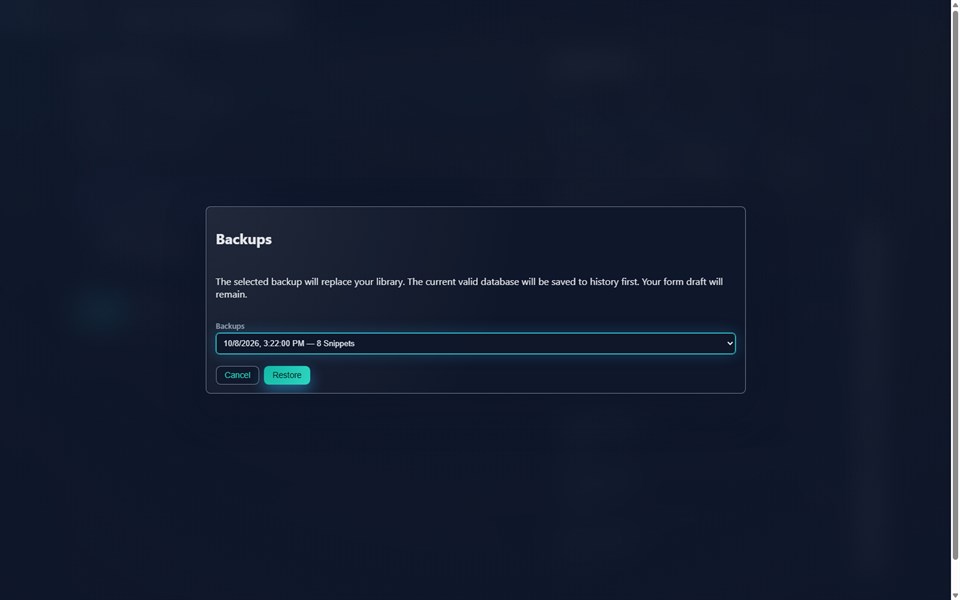
Pick up where you left off: unfinished forms are saved locally as drafts and restored after restarting the app. Undo the last deletion during the current session, or restore an earlier library state from a history of up to 10 local backups. If the primary database is missing or damaged, Code Vault can load a valid backup when one is available.
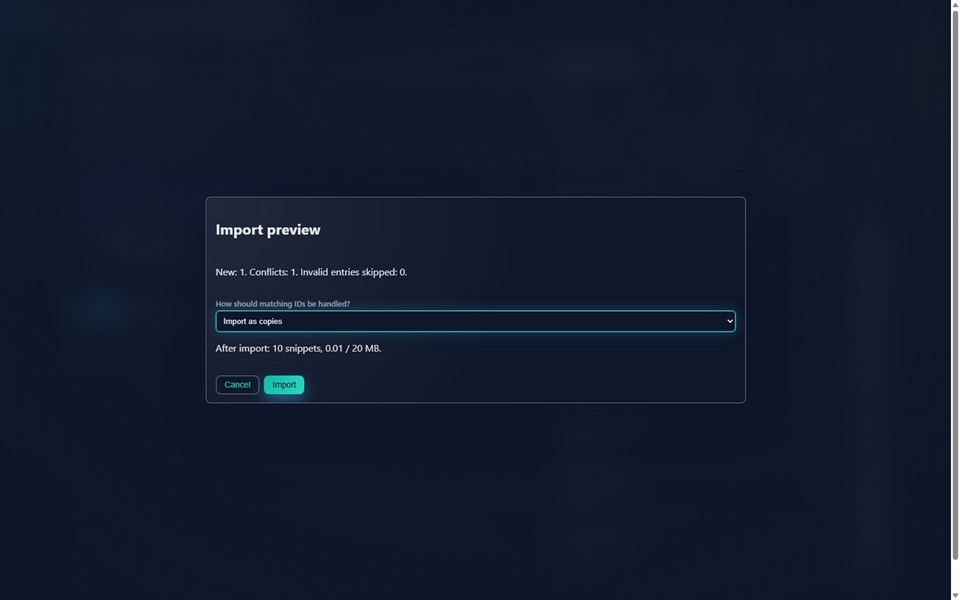
Preview JSON imports before changing your library. Review new entries, conflicts, skipped data, and the resulting database size. Keep existing entries, replace them, or import conflicting entries as copies. Export your library to a portable JSON file whenever needed.
Work faster with Ctrl+S to save, Ctrl+F to search, Ctrl+N to start a new snippet, and keyboard navigation. Soft neon focus highlights active fields, and the app remembers your window size and position. Larger libraries are displayed in pages of 100 entries.
Your library is stored in Documents\CodeVault\Data\snippets.json. The same folder holds a previous database copy, backup history, and your form draft. These JSON files are not encrypted by Code Vault. If Windows synchronizes Documents with OneDrive, they may be copied according to your system settings; Code Vault does not connect to OneDrive directly. A storage meter tracks the 20 MiB database limit.
Available in Ukrainian and English. Core features work without an internet connection or account. No advertising, telemetry, analytics, or tracking.
Van de ontwikkelaar
Lijsten 0
-
 Code Vault – offline code snippets manager
Punten 0
-

- +1 Punt

Ranglijsten 0
-
- Jouw beoordeling
Ontwikkelaar 2
- Anton Horbatiuk
- Volgers: 0
- Platforms: Windows Apps (2)
- Aanbiedingen: 0
- Lijsten: 0 0
- Punten: 0
- Ranglijsten: 0
- Reacties: 0
- Video’s: 0
- RSS: Abonneren
Wat is er nieuw?
- Versie: PC
- Laatst bijgewerkt:
- Code Vault 1.2.1
- Autosaved local drafts restore your unfinished form after restarting the app.
- Backup history keeps up to 10 previous library snapshots, with a picker for restoring an earlier state.
- JSON import preview shows new entries, conflicts, skipped data, and the resulting database size. Keep existing entries, replace them, or import conflicts as copies.
- Undo the last snippet deletion during the current session.
- Search using multiple words, filter pinned snippets, and browse larger libraries in pages of 100 entries.
- Use Ctrl+S to save, Ctrl+F to search, Ctrl+N for a new snippet, and improved keyboard navigation.
- Soft neon focus highlights input fields and selections. Window size and position are remembered.
- Improved save handling and recovery from valid local backups when the primary database is missing or damaged.
- Visual improvements: refreshed icons, clearer navigation, an improved search layout, and fixes to the app icon appearance in Windows.
Aanvullende informatie
- Releasedatum:
- Categorie:
Windows-apps›Ontwikkelhulpprogramma's - Besturingssysteem:
PC - Grootte:
144 Mb - Ondersteunde talen:
Engels,Oekraïens - Inhoudsclassificatie:
EVERYONE - Windows Store Beoordeling: ¡
0 - Website:
 https://teacher.cv.ua/codevault
AppAgg-score
Geschatte AppAgg-score voor
Code Vault – offline code snippets manager
Ontwikkelaar: Anton Horbatiuk
Een hogere score betekent meestal betere resultaten voor de factoren die AppAgg beoordeelt.
Gebaseerd op: populariteit · gebruikersbeoordelingen · actualiteit · aanbiedingen · winkelgegevens · community-activiteit
Wordt dagelijks opnieuw berekend met actuele AppAgg-gegevens.
Reacties 0 ¡
Delen
Code Vault – offline code snippets manager Korte URL: Gekopieerd!- Windows Store

