
บุ๊กมาร์ก
| ผู้พัฒนา: | Anton Horbatiuk (2) | ||
| ราคา: | $2.99 | ||
| คะแนน: | 670 เงิน | ||
| การจัดอันดับ: | 0 | ||
| ความคิดเห็น: | 0 โพสต์ความคิดเห็น | ||
| รายการ: | 0 0 | ||
| แต้ม: | 0 | ||
| +1 แต้ม | |||
สรุป
มาทำความรู้จัก Code Vault – offline code snippets manager แอปในหมวด “เครื่องมือสำหรับนักพัฒนา” จาก Anton Horbatiuk
ออกเมื่อ ยังสดใหม่อยู่เลย
$2.99 และยังไม่เคยลดราคาเลยสักครั้งบน AppAgg ของแข็งจริง ๆ
Microsoft Store มีมาในตัว Windows อยู่แล้ว ติดตั้งได้ในไม่กี่คลิก
คะแนน AppAgg คือ 670 ระดับ “เงิน” ถือว่าไม่เลวเลย
จัดเรต “EVERYONE” เหมาะกับเด็ก ๆ ด้วย
รองรับ 2 ภาษา แต่ยังไม่มีภาษาไทย
เคยใช้แล้วเหรอ? รีวิวของคุณจะเป็นรีวิวแรกที่นี่
ผู้พัฒนารายนี้มีแอปอื่นบน AppAgg อีก 1 แอป ลองไปดูกัน
อยากรู้เรื่องลดราคา อัปเดต และแอปใหม่ก่อนใครไหม? ตั้งการแจ้งเตือนราคา ติดตาม ผู้พัฒนา หรือกดติดตาม ฟีด RSS ได้เลย การแจ้งเตือนแบบพุชส่งผ่านแอป AppAgg Alerts สำหรับ Android และ iOS
แพลตฟอร์มอื่น 0
ประวัติราคา 0
- ราคาปัจจุบัน: $2.99
- ต่ำสุด: $2.99
- สูงสุด: $2.99
ฟีดของคุณเองบนหน้าแรก
ภาพหน้าจอ 4
คำอธิบาย

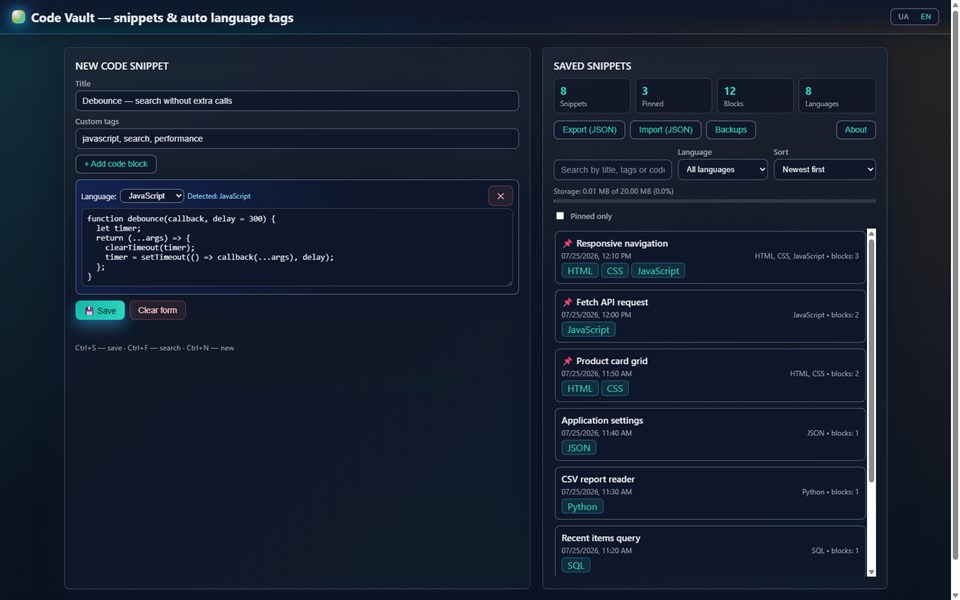
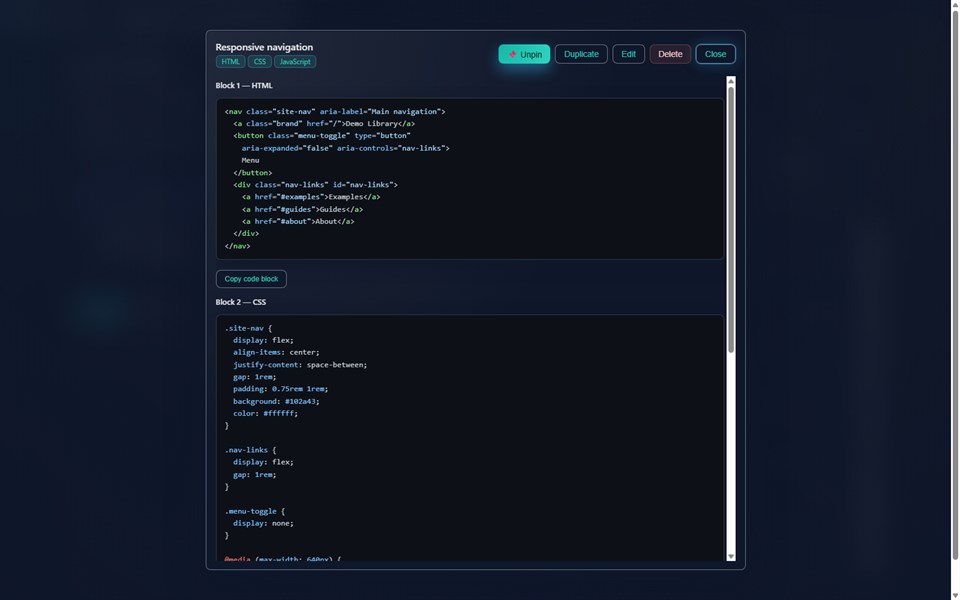
Keep reusable code in one place with multiple blocks per snippet, local syntax highlighting, automatic detection for 22 programming and markup languages, and manual language selection. Organize snippets with custom tags, filter by language or pinned status, search titles, tags, and code using multiple words, and sort or duplicate entries for faster reuse.
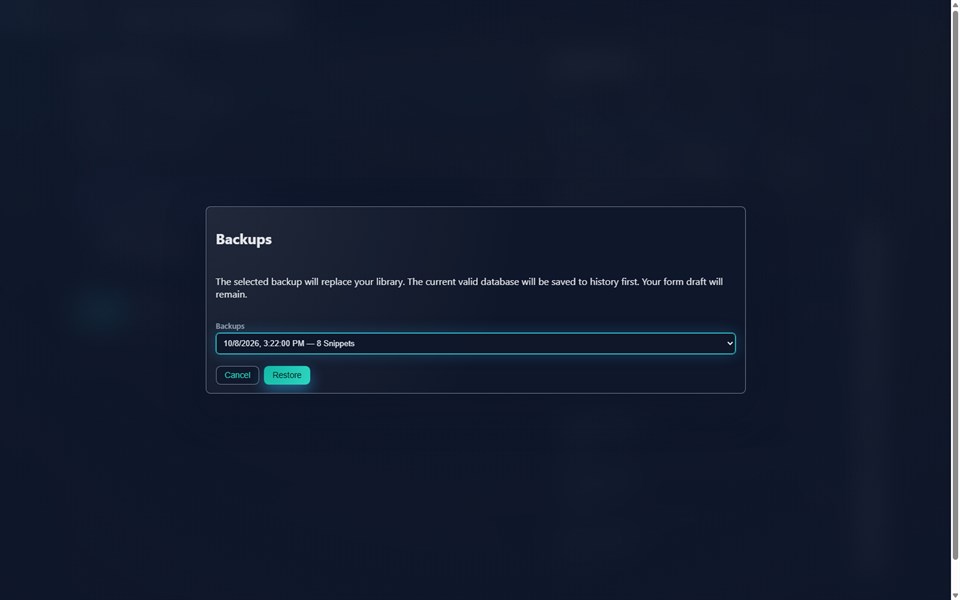
Pick up where you left off: unfinished forms are saved locally as drafts and restored after restarting the app. Undo the last deletion during the current session, or restore an earlier library state from a history of up to 10 local backups. If the primary database is missing or damaged, Code Vault can load a valid backup when one is available.
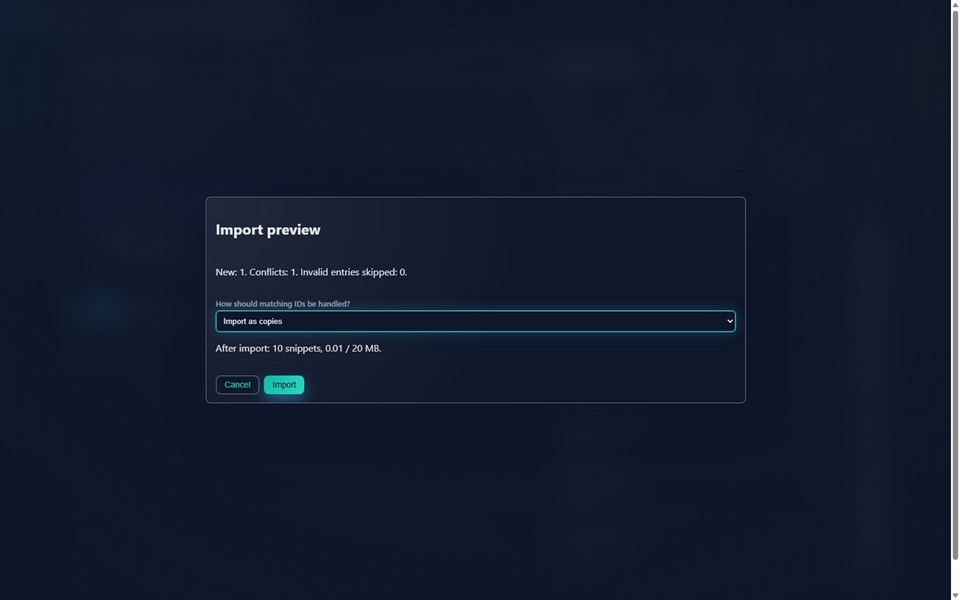
Preview JSON imports before changing your library. Review new entries, conflicts, skipped data, and the resulting database size. Keep existing entries, replace them, or import conflicting entries as copies. Export your library to a portable JSON file whenever needed.
Work faster with Ctrl+S to save, Ctrl+F to search, Ctrl+N to start a new snippet, and keyboard navigation. Soft neon focus highlights active fields, and the app remembers your window size and position. Larger libraries are displayed in pages of 100 entries.
Your library is stored in Documents\CodeVault\Data\snippets.json. The same folder holds a previous database copy, backup history, and your form draft. These JSON files are not encrypted by Code Vault. If Windows synchronizes Documents with OneDrive, they may be copied according to your system settings; Code Vault does not connect to OneDrive directly. A storage meter tracks the 20 MiB database limit.
Available in Ukrainian and English. Core features work without an internet connection or account. No advertising, telemetry, analytics, or tracking.
จากนักพัฒนา
รายการ 0
-
 Code Vault – offline code snippets manager
แต้ม 0
-

- +1 แต้ม

การจัดอันดับ 0
-
- คะแนนของคุณ
ผู้พัฒนา 2
- Anton Horbatiuk
- ผู้ติดตาม: 0
- แพลตฟอร์ม: Windows แอป (2)
- ลดราคา: 0
- รายการ: 0 0
- แต้ม: 0
- การจัดอันดับ: 0
- ความคิดเห็น: 0
- วิดีโอ: 0
- RSS: ติดตาม
มีอะไรใหม่
- เวอร์ชัน: PC
- อัปเดตล่าสุด:
- Code Vault 1.2.1
- Autosaved local drafts restore your unfinished form after restarting the app.
- Backup history keeps up to 10 previous library snapshots, with a picker for restoring an earlier state.
- JSON import preview shows new entries, conflicts, skipped data, and the resulting database size. Keep existing entries, replace them, or import conflicts as copies.
- Undo the last snippet deletion during the current session.
- Search using multiple words, filter pinned snippets, and browse larger libraries in pages of 100 entries.
- Use Ctrl+S to save, Ctrl+F to search, Ctrl+N for a new snippet, and improved keyboard navigation.
- Soft neon focus highlights input fields and selections. Window size and position are remembered.
- Improved save handling and recovery from valid local backups when the primary database is missing or damaged.
- Visual improvements: refreshed icons, clearer navigation, an improved search layout, and fixes to the app icon appearance in Windows.
ข้อมูลเพิ่มเติม
- วันที่วางจำหน่าย:
- หมวดหมู่:
แอปสำหรับ Windows›เครื่องมือสำหรับนักพัฒนา - ระบบปฏิบัติการ:
PC - ขนาด:
144 Mb - ภาษาที่รองรับ:
ยูเครน,อังกฤษ - การจัดประเภทเนื้อหา:
EVERYONE - Windows Store คะแนน: ¡
0 - เว็บไซต์:
 https://teacher.cv.ua/codevault
คะแนน AppAgg
คะแนน AppAgg โดยประมาณของ
Code Vault – offline code snippets manager
ผู้พัฒนา: Anton Horbatiuk
คะแนนที่สูงขึ้นมักสะท้อนตัวชี้วัดที่ดีกว่าบน AppAgg
อิงจาก: ความนิยม · คะแนนจากผู้ใช้ · ความสดใหม่ · ดีล · ข้อมูลร้านค้า · กิจกรรมชุมชน
คำนวณใหม่ทุกวันจากข้อมูล AppAgg ล่าสุด
ความคิดเห็น 0 ¡
แชร์
Code Vault – offline code snippets manager URL แบบสั้น: คัดลอกแล้ว!- Windows Store

