
Đã lưu
Chọn tên sẽ hiển thị trong menu Đã lưu của bạn.
Làm xong!
| Nhà phát triển: | FixQuotes (2) | ||
| Giá bán: | Miễn phí | ||
| Đánh giá: | 1,160 Bạc | ||
| Xếp hạng: | 0 | ||
| Bình luận: | 0 Đăng bình luận | ||
| Danh sách: | 0 + 0 | ||
| Điểm: | 0 + 0 ¡ | ||
| +1 Điểm | |||
Mô tả

Built for developers, testers, analysts, and support teams who work with large, messy, minified, or deeply nested files every day. Open an API payload, a minified bundle, a huge log export, or a config file and start working in seconds.
Works locally with JSON, JSONC, JSON Lines / NDJSON, TOML, YAML, XML, RSS, Atom, CSV, Markdown, JavaScript, TypeScript, CSS, and HTML.
🚀 OPEN IT AND START READING
• Multi-file tabs with drag and drop, file associations, Explorer context menu, and command-line opening
• Paste & Prettify (Ctrl+N) detects the format of whatever is on your clipboard
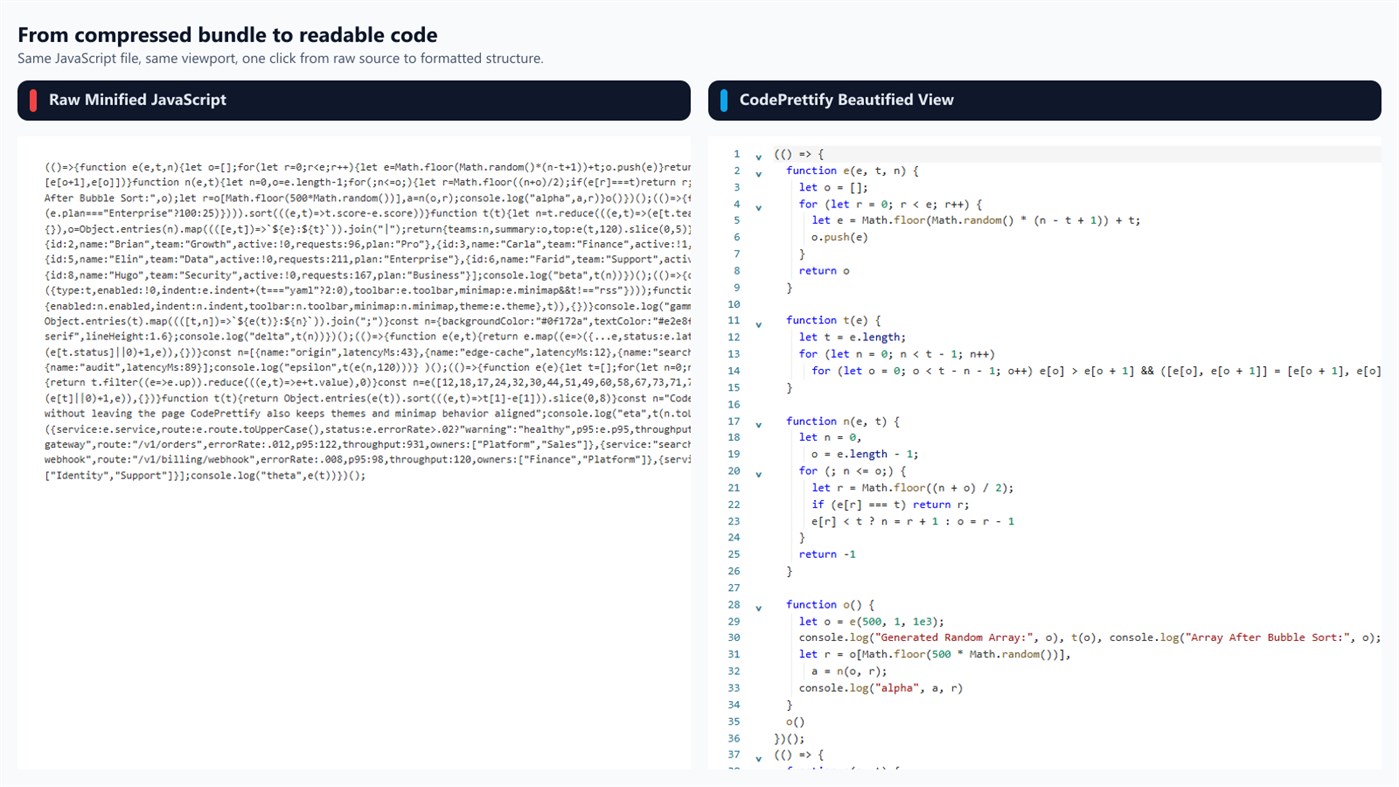
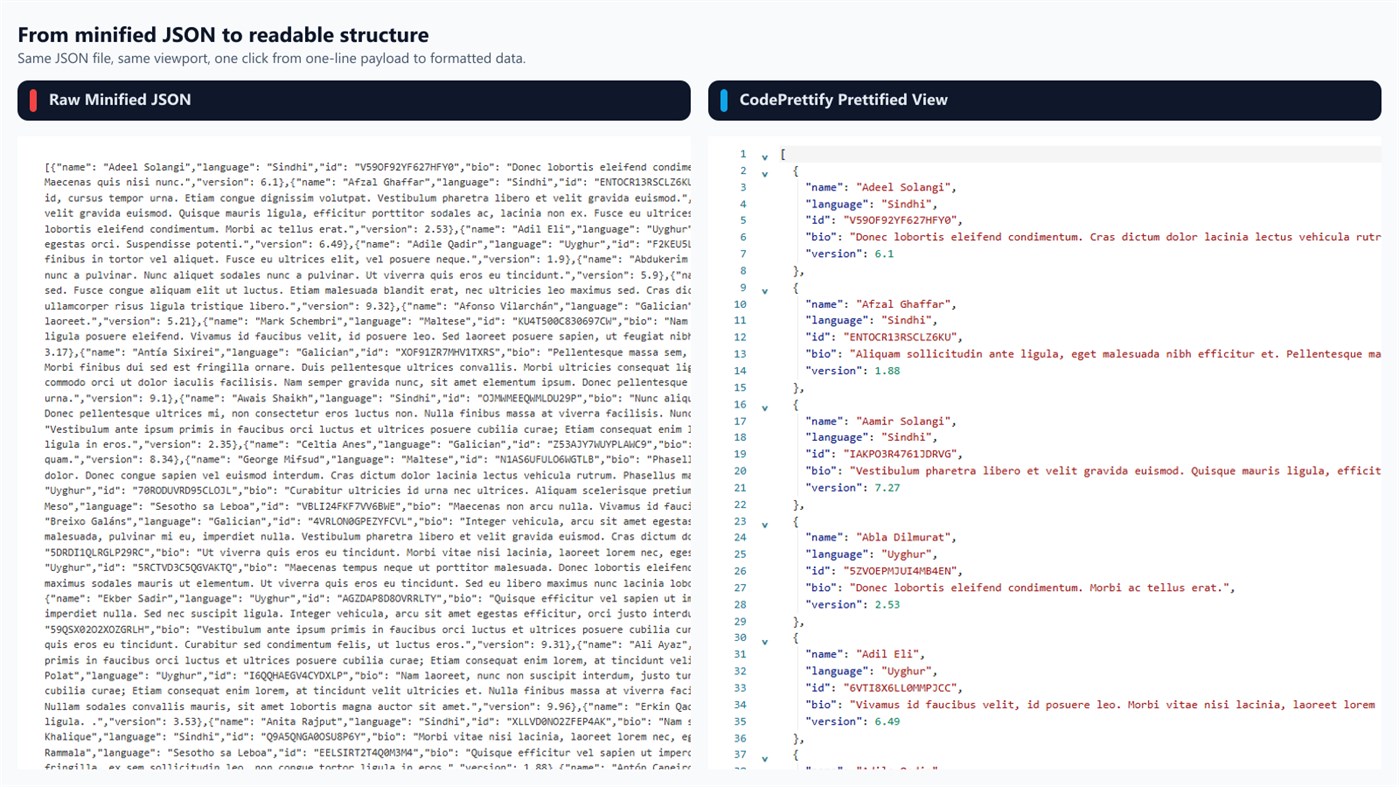
• Automatic minification detection formats dense files instantly
• Raw, Prettified, Rendered, and Table representations with a clear toggle — no reload
• Session restore brings back your window, tabs, and active tab, even after a crash
• A file watcher reloads a tab when the file changes on disk and follows renames
📄 FORMATS & CONVERSION
• JSON, JSONC, JSON Lines / NDJSON, TOML, YAML, XML, RSS, Atom, CSV, Markdown, JavaScript, TypeScript, CSS, and HTML
• Convert the open document to JSON, YAML, or TOML and save the result
• Only target formats the document can actually be serialized into are offered
🧩 JSON TO CODE GENERATOR
• Turn a JSON sample into TypeScript, Zod, C#, Java, Kotlin, Python/Pydantic, Go, Rust, Swift, Dart, or JSON Schema
• Reads every record in a sample array to tell required, optional, and nullable fields apart
• Builds nested models, safe identifiers, and exact JSON field-name mappings
• Set the root type name plus namespace or package, then copy, export, or open as a document
• Generation runs entirely on the device
🩹 JSON REPAIR & TRANSFORM
• Recovers Markdown fences, comments, single quotes, unquoted keys, Python/JavaScript literals, missing commas and brackets, trailing commas, and raw control characters
• Every change appears in a confidence-rated repair report before you use the result
• Optional salvage mode for JSON Lines never discards invalid records silently
• Build an ordered pipeline — filter, sort, pick fields, and more — with a live preview
• The source document is never modified
🗺️ DIAGRAM GENERATOR
• Turn JSON, JSON Lines, YAML, TOML, XML/RSS, and CSV into a zoomable map of connected field cards
• Search across cards and fields with match highlighting and one-keystroke jumps between hits
• Limit the scene to two, three, or four levels, or collapse and expand every branch at once
• Export as SVG, PNG, or a Mermaid class diagram for wikis and issue trackers
🔐 SECURITY SCAN
• Finds likely cloud and API keys, tokens, JWTs, private-key blocks, credential-bearing URLs, and connection strings — locally
• Secret findings are masked and sorted by severity, and every finding links to its source line
• Extracts API routes, endpoints, paths, and file references hidden inside script bundles
• Heuristic assistance rather than a security guarantee
🔎 VALIDATION & DIAGNOSTICS
• Line-accurate validation for JSON, JSONC, JSON Lines, TOML, JavaScript, TypeScript, CSS, multi-document YAML, XML, and HTML
• JSON Schema Validator checks the document against a pasted schema on-device, with a JSON path and line link for every violation
• Flags duplicate JSON keys, mixed indentation, long lines, suspicious timestamps, and feed problems with quick-fix guidance
• Statistics for size, lines, characters, JSON depth, JavaScript declarations, CSS rules, and XML element, attribute, and namespace counts
📊 TABLE VIEW
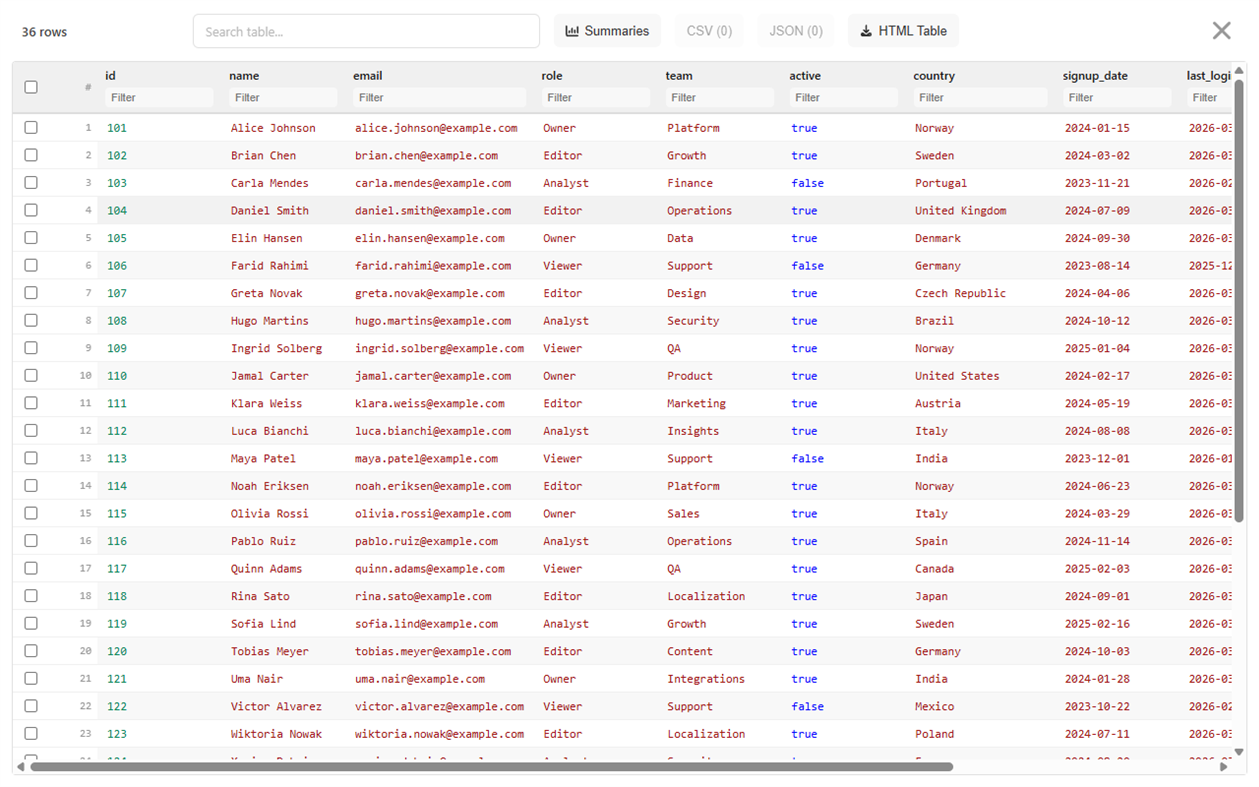
• JSON arrays, CSV, RSS/Atom, repeating XML, and tabular HTML become sortable, searchable tables
• Per-column filters, drag-and-drop column reordering, and summaries such as dominant type, unique values, and empty counts
• Select rows and export the selection as CSV or JSON in the current column and sort order
• Export the filtered, sorted table as HTML
• Virtualized rendering keeps large tables responsive
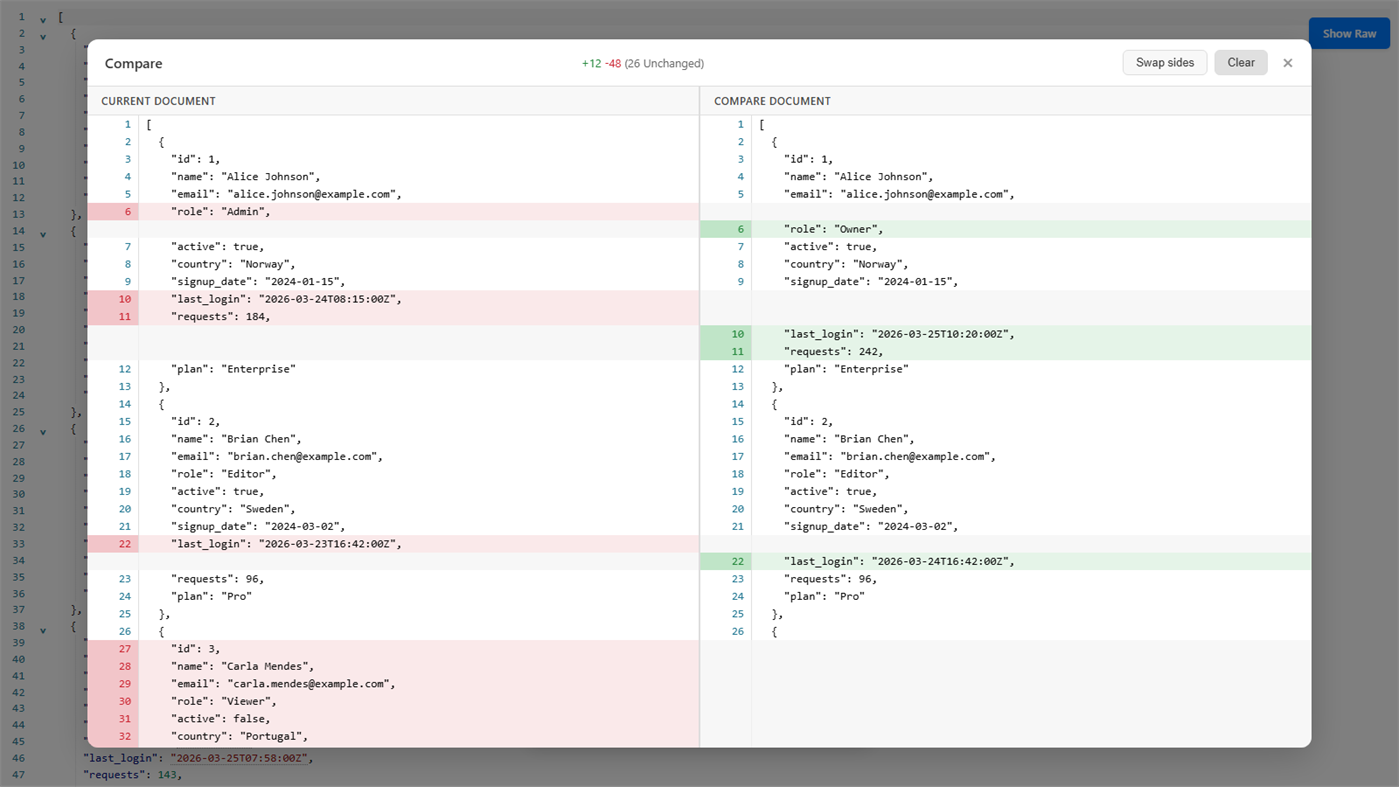
🧬 COMPARE & DIFF (Ctrl+Alt+D)
• Full-screen split view with synchronized scrolling, line stats, and swap sides
• Semantic mode compares the data structure itself, so reformatting or reordering keys is not reported as noise
• Text mode adds Ignore whitespace plus Previous and Next difference buttons
• Compare two files, or the current document against your clipboard
🛠️ DATA CONVERTER
• SHA-256, SHA-384, and SHA-512 hashes and HMAC with hex or Base64 output
• Unix seconds, Unix milliseconds, and ISO 8601 conversion with UTC and local results
• UUID v4, UUID v7, and ULID generation in batches of up to 100
• Base64 and URL encoding and decoding, all offline
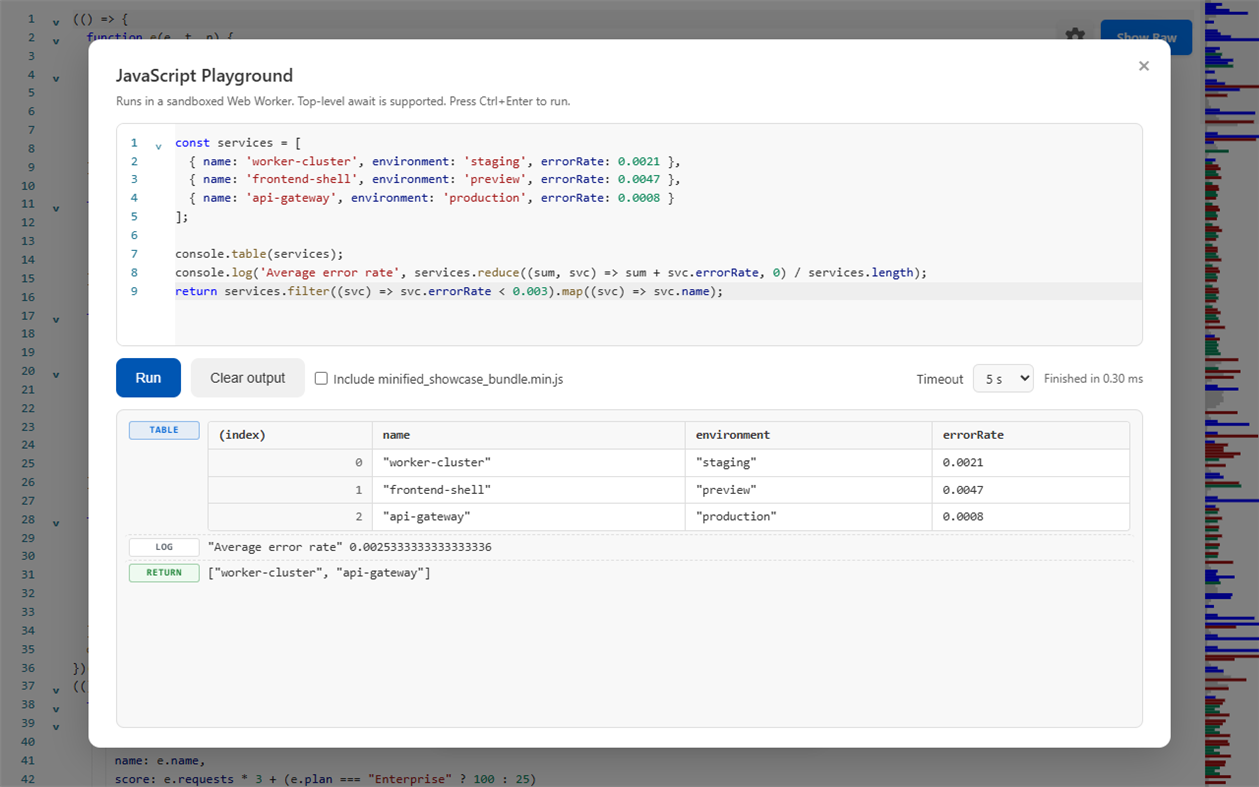
🧪 JAVASCRIPT PLAYGROUND (Ctrl+Alt+P)
• Sandboxed Web Worker with configurable 1 / 5 / 15 second timeouts and top-level await
• Captures console.log, info, warn, error, debug, and renders console.table as a real table
• JSON and JSON Lines documents arrive as a ready-made json variable
• Include the current file to call its top-level functions, with a safe-definitions mode that skips side effects
• Autocomplete, error stacks, and autosaved sessions
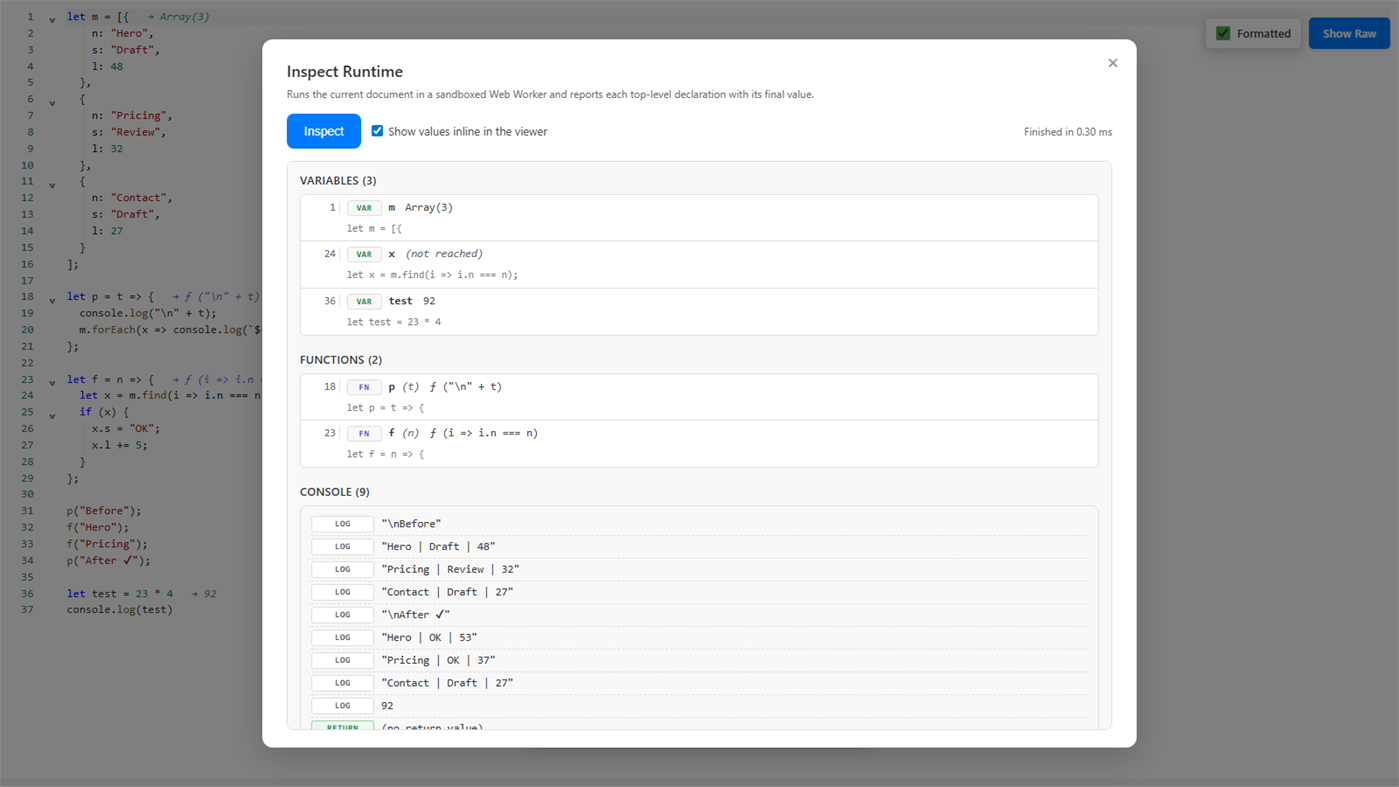
🧭 INSPECT RUNTIME (Ctrl+Alt+I)
• Runs a JavaScript file once and lists every top-level declaration with its captured value
• Inline value annotations in the viewer, hover details, and jump-to-line
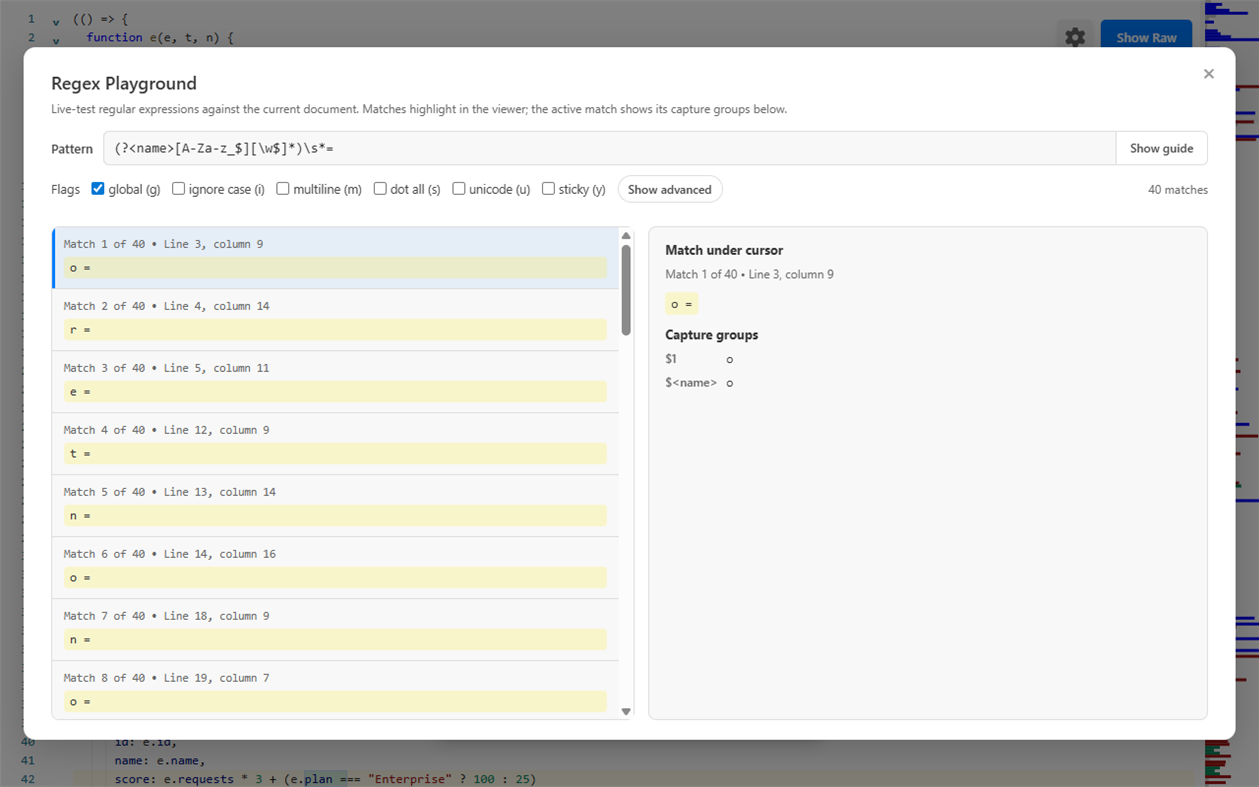
🔎 REGEX PLAYGROUND (Ctrl+Alt+R)
• Live match highlighting in the viewer with capture groups and named groups
• Replacement preview, saved named patterns, recent history, and pass/fail test cases
• Copy ready-made snippets for JavaScript, C#, and PowerShell
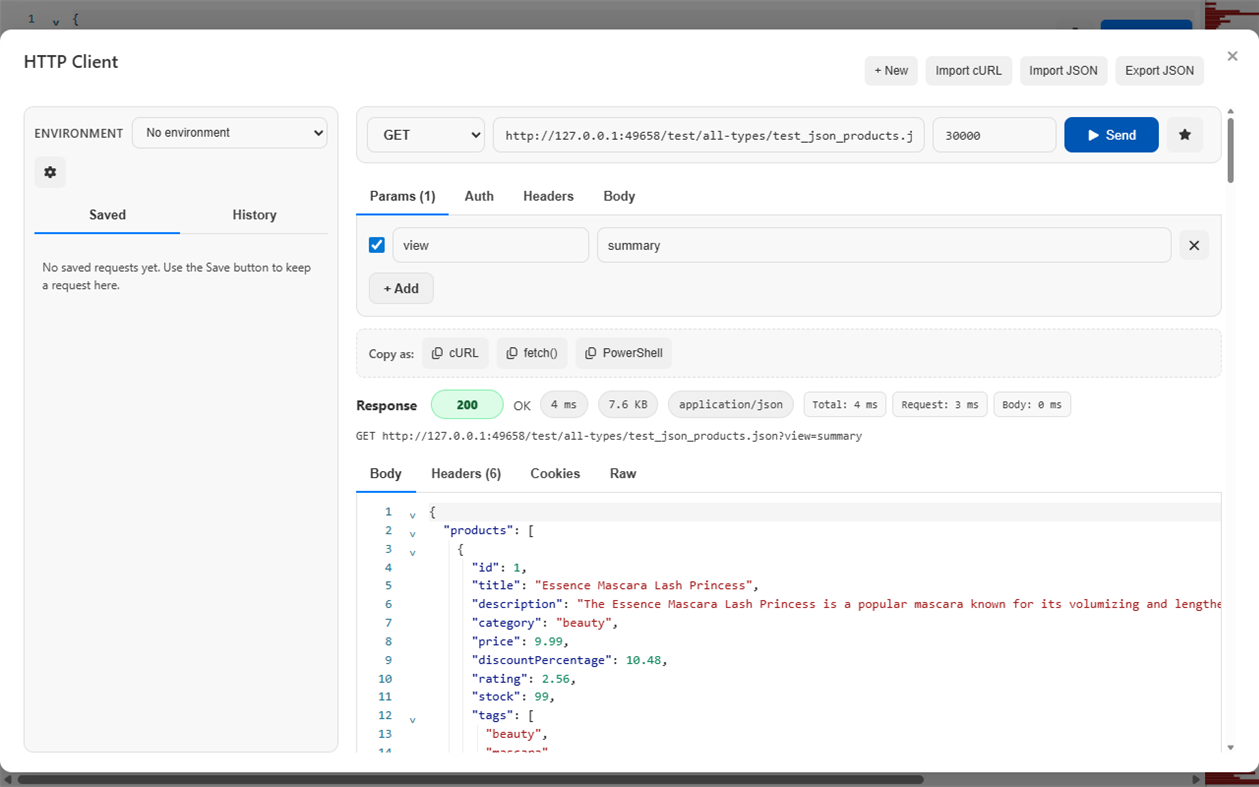
🌐 HTTP CLIENT
• Postman-style requests with Params, Auth, Headers, and Body tabs (JSON, raw, form-urlencoded, multipart, GraphQL)
• Saved requests, history, environments, and {{variable}} interpolation with secret masking
• Response body, headers, cookies, and raw view plus status, size, and timing breakdown
• Import cURL and copy requests as cURL, fetch(), or PowerShell Invoke-RestMethod
• Clear explanations for timeout, cancellation, DNS, certificate, and offline errors
🔍 SEARCH & NAVIGATION
• Command Palette (Ctrl+Shift+P) to fuzzy-find and run any action
• Floating search with live result count and regex support via /pattern/flags
• Go to Line (Ctrl+G), code folding, Document Navigator, and a syntax-aware minimap
📤 COPY & EXPORT
• Copy original, formatted, or minified content with feedback naming exactly what was copied
• Export CSV with spreadsheet-safe quoting, HTML tables, and PNG images of the viewport or full file
• Download the open document converted to JSON, YAML, or TOML
🪟 BUILT FOR WINDOWS
• Save and Save As preserve the original encoding, BOM, and line endings, with atomic writes
• Detects UTF-8/BOM, UTF-16, UTF-32, and legacy encodings, and lets you reopen with an explicit encoding from the status bar
• Convert line endings between Windows (CRLF), Unix (LF), and Mac (CR) from the status bar
• Files of 64 MiB and larger open in a read-only paged native viewer that stays responsive, with paged search and Go to line
• Native File, Edit, View, and Tools menus, zoom, and Windows Recent Documents integration
🔒 PRIVACY & SECURITY
• Formatting, validation, repair, conversion, code generation, diagramming, schema checks, security scanning, and playgrounds all run on your machine
• No telemetry and no upload of your files
• The HTTP Client only contacts the URLs you explicitly send requests to, and CodePrettify never proxies them
• Playground and Inspect Runtime execute in a sandbox with networking, page DOM, and file-system access disabled
• Safe for sensitive files, tokens, internal systems, logs, and production data
⚙️ CUSTOMIZATION
• Light, Dark, and System themes
• 14 interface languages: English, Norwegian, Swedish, Danish, German, French, Spanish, Italian, Portuguese, Russian, Chinese, Japanese, Korean, and Vietnamese
• Adjustable font size, indent size, line numbers, word wrap, minimap, and toolbar
• Per-file-type defaults and restored per-file view state
⌨️ KEYBOARD SHORTCUTS
• Ctrl+N — Paste & Prettify
• Ctrl+O — Open file
• Ctrl+B — Raw / Pretty
• Ctrl+F — Search
• Ctrl+G — Go to Line
• Ctrl+Alt+C — Copy
• Ctrl+Alt+D — Compare / Diff
• Ctrl+Alt+P — JavaScript Playground
• Ctrl+Alt+R — Regex Playground
• Ctrl+Alt+I — Inspect Runtime
• Ctrl+Alt+T — Toggle toolbar
• Ctrl+Shift+P — Command Palette
⚡ BUILT FOR PERFORMANCE
CodePrettify is engineered for large, complex, minified, and structured files. Native preprocessing, cached document processing, virtualized tables, a rebuilt minimap, and optimized startup paths keep the app responsive where traditional editors start to struggle.
Complete user manual: https://prettify.cloud/manual.html
Quảng cáo
Ảnh chụp màn hình
Lịch sử giá
- Giá hiện tại: Miễn phí
- Tối thiểu: Miễn phí
- Tối đa: Miễn phí
Theo dõi giá Thêm vào danh sách để nhận thông báo giảm giá qua email hoặc thông báo đẩy
Đánh giá AppAgg
1,160
Đánh giá AppAgg ước tính cho
CodePrettify
Nhà phát triển: FixQuotes
1,160 Bạc
Đánh giá cao hơn thường cho thấy tín hiệu mạnh hơn trên AppAgg.
Dựa trên: độ phổ biến · đánh giá của người dùng · độ mới · ưu đãi · dữ liệu cửa hàng · hoạt động cộng đồng
Được tính lại hằng ngày từ dữ liệu AppAgg mới nhất.
URL ngắn: Đã sao chép!
Tính năng mới
- Phiên bản: PC
- Cập nhật lần cuối:
Thông tin bổ sung
- Ngày phát hành:
- Danh mục:
Windows Ứng dụng›Công cụ cho nhà phát triển - HĐH:
PC - Kích thước:
99 Mb - Ngôn ngữ được hỗ trợ:
Chinese,Danish,English,French,German,Italian,Japanese,Korean,Norwegian,Portuguese,Russian,Spanish,Swedish,Vietnamese - Xếp hạng nội dung:
EVERYONE - Windows Store Xêp hạng:
0 - Trang web:
 https://prettify.cloud/
Nhà phát triển
- FixQuotes
- Người theo dõi: 0
- Nền tảng: Windows Ứng dụng (2)
- Giảm giá: 0
- Danh sách: 0 + 0
- Điểm: 0 + 0 ¡
- Xếp hạng: 0
- Bình luận: 0
- Video: 0
- RSS: Đăng ký
Danh sách (0)
0
- CodePrettify
Điểm (0)
0
Xếp hạng (0)
0
Bình luận (0)
Hãy là người đầu tiên nhận xét
Tóm tắt
CodePrettify URL ngắn: Đã sao chép!- Chia sẻ
- Windows Store
«CodePrettify». Nền tảng: Windows. Thể loại: Công cụ cho nhà phát triển. Nhà phát triển: «FixQuotes». Bản phát hành đầu tiên: . Cập nhật lần cuối: . Giá hiện tại: miễn phí. Tiêu đề này chưa nhận được xếp hạng hoặc đánh giá trên AppAgg. Ngôn ngữ có sẵn: Chinese, Danish, English, French, German, Italian, Japanese, Korean, Norwegian, Portuguese, Russian, Spanish, Swedish, Vietnamese. AppAgg theo dõi lịch sử giá, xếp hạng và phản hồi của người dùng cho «CodePrettify». AppAgg không lưu trữ ứng dụng hoặc phân phối phần mềm. Tất cả các nhãn hiệu, logo và ảnh chụp màn hình đều thuộc về chủ sở hữu tương ứng. Theo dõi ưu đãi và cập nhật trong tương lai qua RSS
Tương tự
-
- #Code
- Windows Ứng dụng: Công cụ cho nhà phát triển Bởi: Shahul Hameed
- * Miễn phí
- Danh sách: 0 + 1 0 0
- Điểm: 1 + 283 10K · Vàng Phiên bản: PC #Code is an online compiler that that lets you compile and execute code snippets on your Windows 10 device. As of now, #Code supports over 12 programming languages and is a ...
-
- Code Graph
- Windows Ứng dụng: Công cụ cho nhà phát triển Bởi: 淹死的鱼ysdy44
- Miễn phí
- Danh sách: 0 + 1 0 0
- Điểm: 2 + 0 630 · Bạc Phiên bản: PC Code Graph is a reference relationship visualizer that finds all the .csproj (C# project) files in a folder and draws the reference relationships between them.
-
- Code Tree Indexer
- Windows Ứng dụng: Công cụ cho nhà phát triển Bởi: ptl1998naganodevall
- $1.59
- Danh sách: 0 0 0
- Điểm: 0 + 0 590 · Đồng Phiên bản: PC Code Tree Indexer is a desktop developer tool that scans a project folder and turns source code into structured code maps. It helps developers, reviewers, and AI-assisted coding ...
- mới
- Code::Blocks
- Windows Ứng dụng: Công cụ cho nhà phát triển Bởi: Martin Halle
- Miễn phí
- Danh sách: 0 0 0
- Điểm: 0 + 48 3K · Vàng Phiên bản: PC Code::Blocks The Open-Source IDE for C, C++, and Fortran Code::Blocks is a powerful, open-source Integrated Development Environment (IDE) designed for flexibility, performance, and ...
-
- Code to Prompt
- Windows Ứng dụng: Công cụ cho nhà phát triển Bởi: Vossel
- * Miễn phí
- Danh sách: 0 0 0
- Điểm: 0 + 0 780 · Bạc Phiên bản: PC Code to Prompt is a Windows utility that consolidates an entire codebase into a single, structured text file ready to paste into ChatGPT, Claude, Gemini, or any large language model. ...
-
- Code Reader+
- Windows Ứng dụng: Công cụ cho nhà phát triển Bởi: CodeRobin Ltd
- $5.99
- Danh sách: 0 0 0
- Điểm: 0 + 0 1K · Bạc Phiên bản: PC Do you Read Source Code? Are you a Developer, Project Manager or Programming Learner? Want to read source code with your Surface/Tablet while travelling underground or 30000 ft above? ...
-
- Visual Studio Code
- Windows Ứng dụng: Công cụ cho nhà phát triển Bởi: Microsoft Corporation
- Miễn phí
- Danh sách: 0 + 3 0 0
- Điểm: 1 + 8,457 12K · Vàng Phiên bản: PC Visual Studio Code is a free, lightweight, and extensible code editor for building web, desktop, and mobile applications, using any programming language and framework. Visual Studio ...
-
- Chicote Code
- Windows Ứng dụng: Công cụ cho nhà phát triển Bởi: RENANT BERNABE DESENVOLVIMENTO DE SOFTWARE LTDA
- Miễn phí
- Danh sách: 0 0 0
- Điểm: 0 + 0 590 · Đồng Phiên bản: PC Chicote Code is a transparent desktop overlay that triggers playful whip animations on top of your screen driven by Twitch Channel Points redemptions, Claude Code hooks, or any ...
-
- Serris Code Editor
- Windows Ứng dụng: Công cụ cho nhà phát triển Bởi: Seeriis
- Miễn phí
- Danh sách: 1 0 0
- Điểm: 3 + 41 2K · Vàng Phiên bản: PC Serris Code Editor is a open source code editor for UWP (compatible with Windows 10 S, ARM, Desktop and Hololens) and available for free with no ads in the Microsoft Store ! The editor
-
- Visual FoxPro Code Converter
- Windows Ứng dụng: Công cụ cho nhà phát triển Bởi: .com Solutions Inc.
- $19.49
- Danh sách: 0 0 0
- Điểm: 1 + 0 670 · Bạc Phiên bản: PC The Visual FoxPro Code Converter converts/migrates/translates the contents of Visual FoxPro .PRG files into LiveCode or Servoy JavaScript code. Scripts can be selected and converted ...
- mới
- Cuvel Code Editor
- Windows Ứng dụng: Công cụ cho nhà phát triển Bởi: CUVEL
- * Miễn phí
- Danh sách: 0 0 0
- Điểm: 0 + 0 590 · Đồng Phiên bản: PC Cuvel Code Editor is a lightweight code and text editor for Windows. Edit multiple files in tabs, browse project folders in a tree, and navigate long documents with a minimap. It ...
-
- JSON to Code
- Windows Ứng dụng: Công cụ cho nhà phát triển Bởi: CronBlocks
- Miễn phí
- Danh sách: 0 + 1 0 0
- Điểm: 2 + 0 930 · Bạc Phiên bản: PC A simple app to convert an object represented in JSON to various code elements including C representation through structures, and class representations in Java, C#, C++ and Python.
-
- Screenshot to Code
- Windows Ứng dụng: Công cụ cho nhà phát triển Bởi: 韵华软件
- * Miễn phí
- Danh sách: 0 0 0
- Điểm: 0 + 0 1K · Bạc Phiên bản: PC "Screenshot to Code": The Intelligent AI Tool for Transforming Design Images into Code Overview: "Screenshot to Code" offers designers and front-end developers a revolutionary solution
- mới
- ATM AI Code Portable Deployer
- Windows Ứng dụng: Công cụ cho nhà phát triển Bởi: ATM AI
- $10.49
- Danh sách: 0 0 0
- Điểm: 0 + 0 1K · Bạc Phiên bản: PC The ultimate tool for one-click deployment of AI APIs for Claude Code Portable. It supports one-click switching and deployment of AI models including Xiaomi MiMo, ZHIPU GLM5.2, ...

