
書籤
為此書籤設定標題。
書籤已儲存
| 開發者: | Dhiva-Labs (9) | ||
| 價格: | 免費 全新 | ||
| 評分: | 710 白銀 | ||
| 排名: | 0 | ||
| 留言: | 0 發表留言 | ||
| 清單: | 0 0 | ||
| 點數: | 0 | ||
| +1 點 | |||
摘要
來認識一下 CrossShell,Dhiva-Labs 打造的應用程式,歸在「開發人員工具」分類。
新上架:推出,你是第一批使用者。
免費,沒有廣告,也沒有內購。只有你和這個 App。
Microsoft Store 內建在 Windows 裡,點幾下就裝好了。
AppAgg 評分 710。白銀級,已經相當不錯了。
只有 16 MB,硬碟塞爆了也裝得下。
年齡分級為「EVERYONE」,小朋友也適合。
只會一種語言,而且不是中文。
AppAgg 上還沒有人給它評分。現在就來搶頭香吧。
這位開發者在 AppAgg 上還有 8 款 App,值得逛逛。
想搶先知道更新和新應用程式?追蹤開發者或訂閱RSS 訂閱來源。推播通知會透過 AppAgg Alerts App 傳送,支援 Android 和 iOS。
廣告
其他平台 0
價格紀錄 0
- 目前價格: 免費
- 最小值: 免費
- 最大值: 免費
首頁專屬動態
為「最新與更新」選擇平台,首頁就只會顯示你需要的 App 和遊戲。
螢幕擷取畫面 5
描述

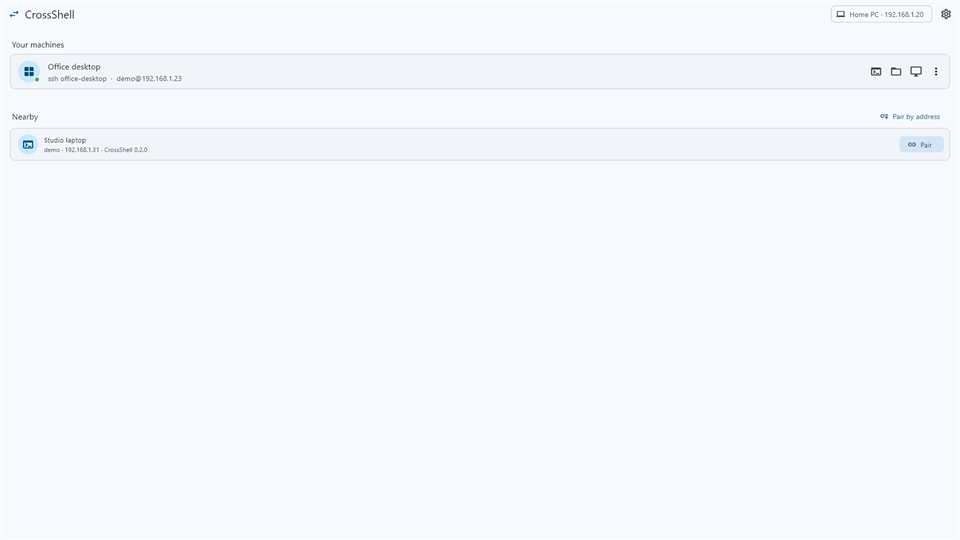
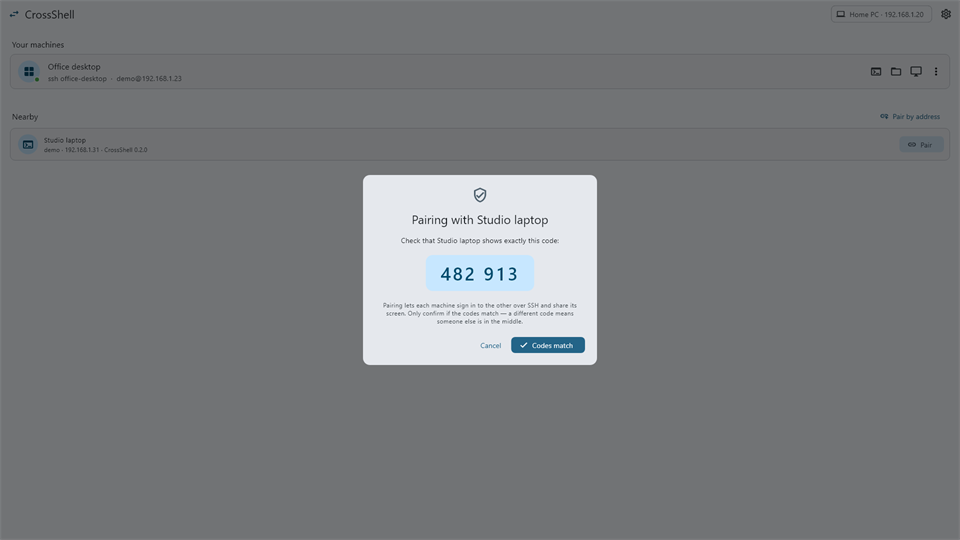
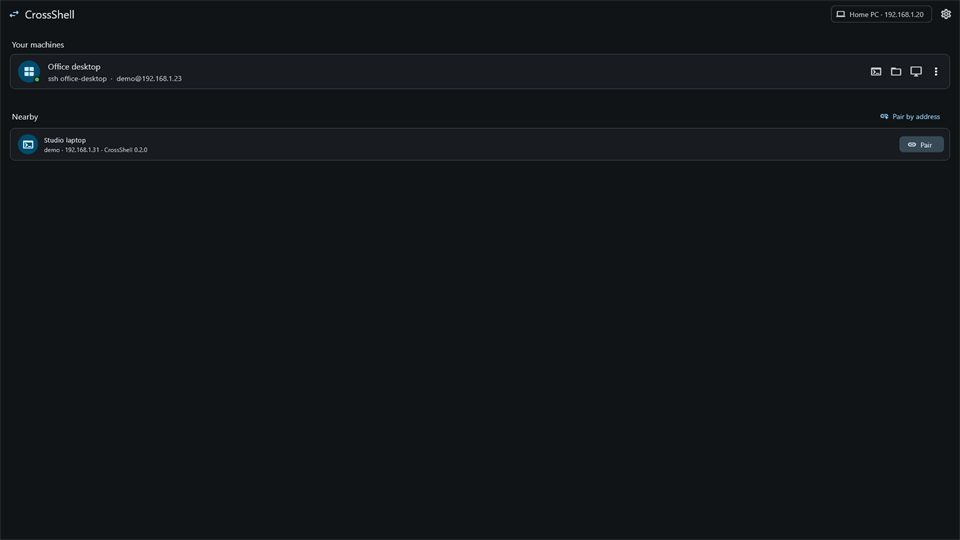
CrossShell connects your own computers on the same local network: Windows to Windows, or Windows to Linux. Pair two PCs once, by checking that both screens show the same 6-digit code, and each can then reach the other over SSH.
WHAT YOU CAN DO
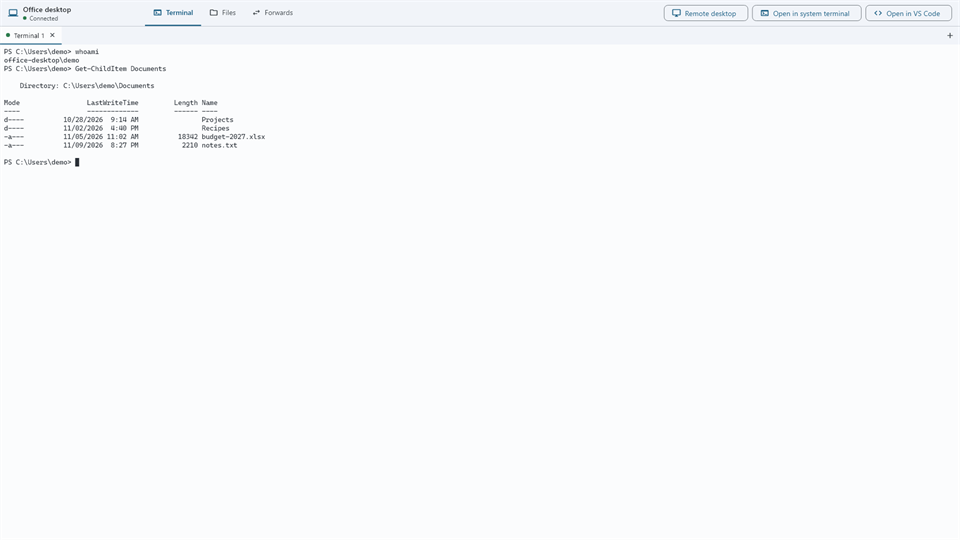
• SSH both ways: a terminal on the other PC, in tabs, and "ssh " from any terminal, VS Code Remote-SSH, git or rsync
• Files: a two-pane file manager to copy, rename and delete files on either PC (SFTP)
• Port forwards: reach a port on the other PC from this one, or the other way round
• Remote view and control: see the other PC's screen and use its mouse and keyboard, or view only, with clipboard text shared both ways
UNATTENDED ACCESS, ONLY FOR PAIRED PCs
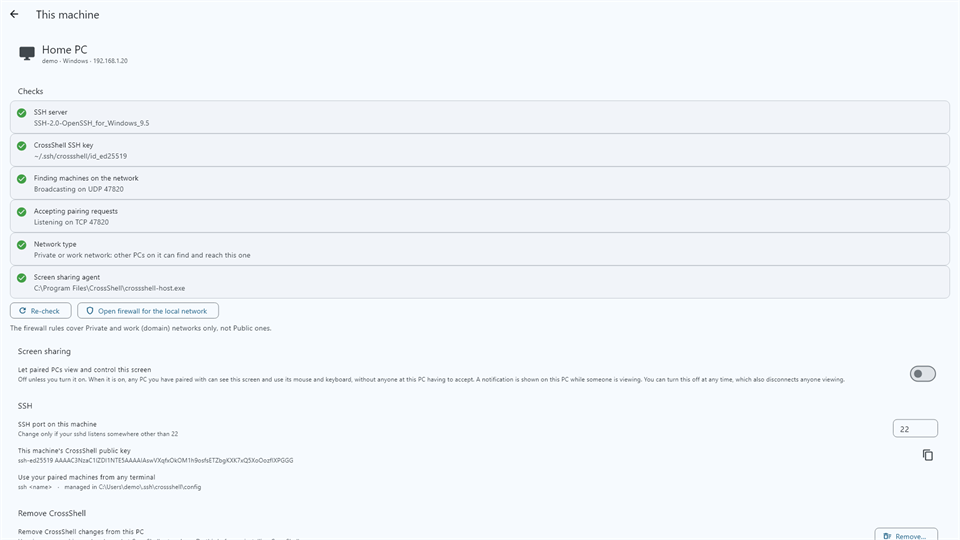
Screen sharing is off until you turn it on under This machine. When it is on, a PC you have paired with can view and control this screen without anyone at this PC accepting each time. While someone is viewing, this PC shows a notification ("Your screen is being viewed and controlled from ..."), and CrossShell shows a banner with a button to disconnect them. Turning screen sharing off stops it at once.
WHAT IT CHANGES ON YOUR PC
Setting up the SSH server takes one administrator prompt and:
• installs and starts Windows' OpenSSH Server optional feature (the sshd service, set to start automatically)
• adds three firewall rules, "CrossShell SSH", "CrossShell Discovery" and "CrossShell Pairing", for the local subnet on Private and work networks only
• can set OpenSSH's default shell to PowerShell, if no default shell was set
Pairing adds the other PC's key to your SSH authorized keys (for administrators, to Windows' administrators_authorized_keys, with an administrator prompt) and adds an Include line and a crossshell folder to your ~/.ssh. Starting screen sharing from the other PC creates a scheduled task, "CrossShellHost", that runs the sharing agent in your desktop session.
"Remove CrossShell changes from this PC" on the This machine page undoes all of this before you uninstall: it unpairs every PC, deletes the scheduled task, the firewall rules and the keys CrossShell added, removes CrossShell's SSH files and settings lines, and puts the default shell back if CrossShell set it. It leaves the OpenSSH Server feature installed, as you may use it for other things; you can remove it in Settings, System, Optional features.
PRIVATE BY DESIGN
• Local network only. No account, no cloud service, no telemetry. To connect across the internet, put both PCs on a VPN and pair by address.
• Everything between paired PCs (terminal, files, screen, keyboard, mouse, clipboard) goes through SSH, with keys exchanged when you pair.
• While open, CrossShell announces itself on the local network every 3 seconds so your other PCs can find it: the computer name, user name and a random ID, unencrypted, readable by other devices on that network.
LIMITS
• Windows' secure desktop (UAC prompts, the lock screen, the sign-in screen) can't be shown or controlled remotely; the viewer says so until it goes away.
• Windows that run as administrator can only be controlled when the sharing agent itself runs with administrator rights.
• Pairing and discovery need both PCs on the same network, set to Private (not Public) on Windows.
• The built-in terminal does not support input methods (IME) or dead keys; use "Open in system terminal" for those.
來自開發者
你是開發者嗎?
在頁面頂部發布消息,追蹤者會透過電子郵件收到。新增你的 YouTube 影片,它們會排在「影片」區塊最前面。
清單 0
-
 CrossShell
點數 0
-

- +1 點

排名 0
-
- 您的評分
開發者 9
- Dhiva-Labs
- 追蹤者: 0
- 平台: Windows 應用程式 (9)
- 折扣: 0
- 清單: 0 0
- 點數: 0
- 排名: 0
- 留言: 0
- 影片: 0
- RSS: 訂閱
新功能
- 版本: PC
- 最後更新:
- First Microsoft Store release.
• Screen sharing is now off until you turn it on, with a plain explanation of what it allows.
• New "Remove CrossShell changes from this PC" action.
• Firewall rules now apply to Private and work networks only, and CrossShell tells you when your network is set to Public.
• A notification on the shared PC while it is being viewed.
其他資訊
 https://github.com/Dhiva-Labs/CrossShell
AppAgg 評分
710
AppAgg 預估評分:
CrossShell
開發者: Dhiva-Labs
710 白銀
評分越高,通常代表其在 AppAgg 上的各項指標表現越好。
基於: 人氣 · 使用者評分 · 新鮮度 · 優惠 · 商店資料 · 社群活躍度
根據最新 AppAgg 資料每日重新計算。
網站徽章:  已複製!
留言 0 ¡
搶先留下第一則留言
分享
CrossShell 短網址: 已複製!- Windows Store

