
الإشارات المرجعية
| المطوّر: | OPO Add Dreams (9) | ||
| السعر: | ▼ $1.59 | ||
| الدرجة: | 590 برونز | ||
| الترتيب: | 0 | ||
| تعليقات: | 0 انشر تعليقًا | ||
| قوائم: | 0 0 | ||
| النقاط: | 0 | ||
| +1 نقطة | |||
ملخص
CustomIconFileCreator تطبيق من OPO Add Dreams ضمن فئة «أدوات المطور».
$1.59 بدلًا من $3.99. لم يكن بهذا الرخص على AppAgg من قبل، وقد راجعنا سجل الأسعار كاملًا.
يعمل حتى على HoloLens، Windows في الواقع المختلط.
صدر ، وما زال حديثًا نسبيًا.
يوجد حتى إصدار لـWindows Mobile. تحية من الماضي.
يتوفر إصدار حتى لـSurface Hub، لقاعات الاجتماعات الكبيرة.
درجة AppAgg هي 590. برونز حاليًا، والقادم أفضل.
التصنيف العمري «EVERYONE»، أي أنه مناسب للأطفال أيضًا.
يتحدث لغة واحدة فقط، وليست العربية.
لم يقيّمه أحد على AppAgg بعد. فرصتك لتكون الأول الآن.
لدى هذا المطوّر على AppAgg 2 لعبتان و6 تطبيقات أخرى. ألقِ نظرة.
بالمناسبة، لدى هذا المطوّر 2 عرضان الآن.
تريد أن تعرف بالخصومات والتحديثات والتطبيقات الجديدة أولًا؟ فعّل تنبيه السعر أو تابع المطور أو اشترك في موجز RSS. تصلك الإشعارات عبر تطبيق AppAgg Alerts لنظامي Android وiOS.
لقطات الشاشة 2
منصات أخرى 0
سجل الأسعار 1
- السعر الحالي: $1.59
$3.99-60% - الحد الأدنى: ▼ $1.59
- الحد الأقصى: $3.99
خلاصتك الخاصة في الصفحة الرئيسية
الوصف

■Overview
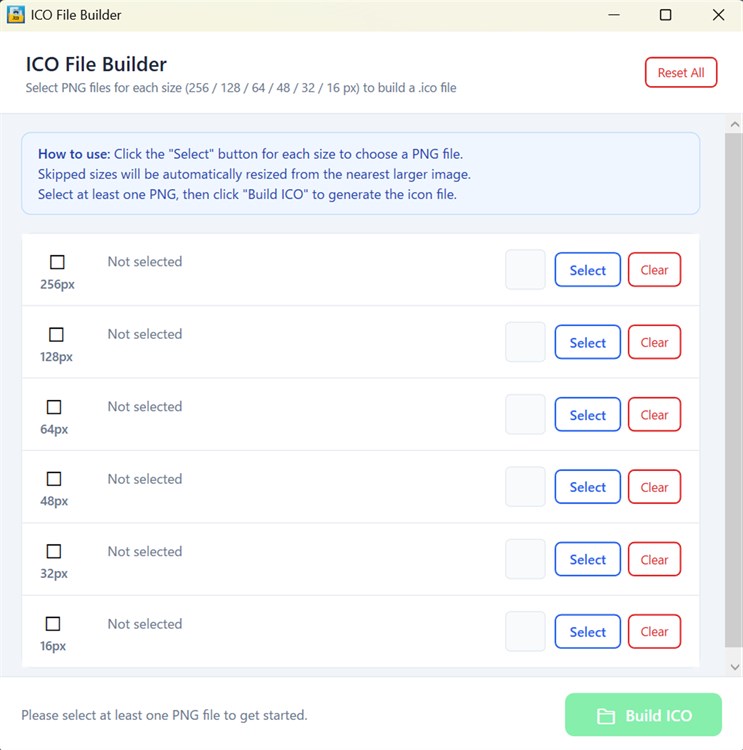
CustomIconFileCreator is a WPF desktop application for Windows that generates a single multi-size “.ico” format icon file from PNG images at six standard sizes: 256 / 128 / 64 / 48 / 32 / 16 px.
Why use size-specific PNGs? Automatically converting a single 256×256 image into 128×128, 64×64, 48×48, 32×32, 16×16 images produces blurry results on small size images, for example 32×32, 16×16 images. For crisp icons, inputting each size images individually created from a vector application such as Adobe Illustrator, Affinity Designer, or Inkscape into this application, and generate an icon file containing fine images.
#icon
#.ico
■How to Launch
Double-click EachSizeImageIconMakerApp.exe to start the application.
■Step-by-Step Instructions
① Launch the application. Six size rows are displayed: 256 / 128 / 64 / 48 / 32 / 16.
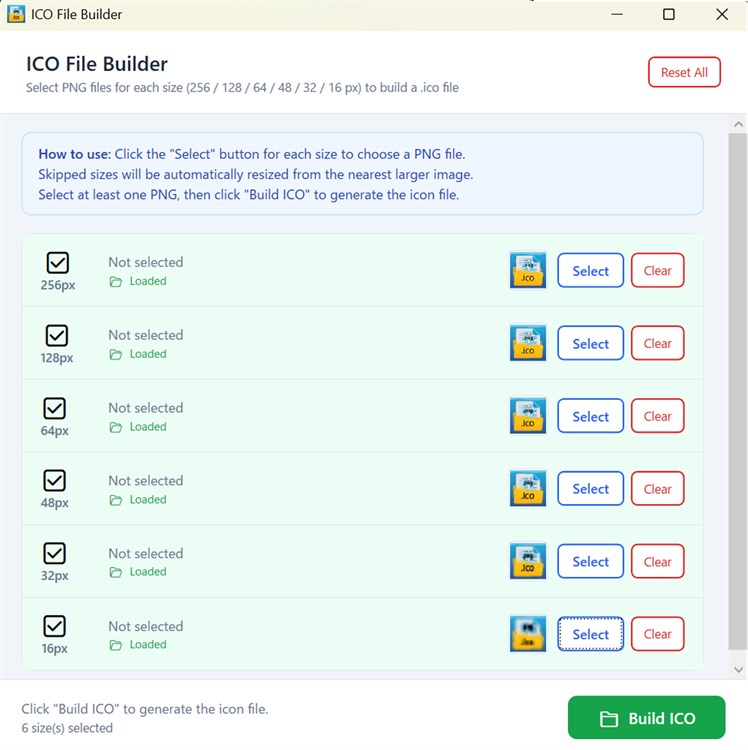
② Click the "Select" button on each row to choose the corresponding PNG file. A thumbnail preview appears immediately after loading.
③ Sizes you skip are automatically filled in by resizing the nearest larger image. Those rows turn orange and show "Will be auto-resized".
④ Once at least one PNG is loaded, the "Build ICO" button at the bottom becomes active.
⑤ Click "Build ICO", choose a destination folder and filename in the save dialog, then click Save. The .ico file is created instantly.
■ Color meanings
• ✅ Green (Loaded) — PNG file loaded successfully.
• 🔄 Orange (Auto-resize) — This size will be generated by resizing a larger loaded image.
• ⬜ White (Not set) — No source available; this size will not be included in the ICO.
■ Other Controls
• "Clear" button — Removes the PNG selection for that individual size row.
• "Reset All" button — Clears all size selections at once. A confirmation dialog is shown before clearing.
■ Auto-Resize Logic
When a size is skipped, the application scans the size array from largest to smallest (256 → 128 → 64 → 48 → 32 → 16) and uses the smallest loaded size that is still larger than the target as the resize source.
Example: If only 256 px and 64 px are loaded, then 128 px is auto-resized from 256 px, while 48, 32, and 16 px are auto-resized from 64 px.
If no larger loaded size exists for a given target (e.g., only 32 px and 16 px are provided, and 256 px is skipped), that size is omitted from the ICO entirely.
■ System Requirements
• Windows 10 or Windows 11
• .NET 8 Desktop Runtime (net8.0-windows)
• WPF (Windows Presentation Foundation)
■ Distribution
This application is available on the Microsoft Store. It can also be installed using the provided setup installer (EachSizeImageIconMakerApp_Setup_x.x.x.exe).
من المطوّر
المطوّر
- OPO Add Dreams
- المتابعون: 0
- المنصات: Windows تطبيقات (7) Windows ألعاب (2)
- العروض: 2
- قوائم: 0 0
- النقاط: 0
- الترتيب: 0
- تعليقات: 0
- الفيديوهات: 0
- RSS: اشتراك
قوائم 0
-
 CustomIconFileCreator
النقاط 0
-

- +1 نقطة

الترتيب 0
-
- تقييمك
ما الجديد
- الإصدار: PC
- آخر تحديث:
معلومات إضافية
- تاريخ الإصدار:
- الفئة:
تطبيقات Windows›أدوات المطور - نظام التشغيل:
HoloLensMobilePCSurface Hub - الحجم:
197 Mb - الميزات المتاحة:
Mixed reality - اللغات المدعومة:
الإنجليزية - تقييم المحتوى:
EVERYONE - Windows Store تقييم: ¡
0
تعليقات 0 ¡
درجة AppAgg
درجة AppAgg التقديرية لـ
CustomIconFileCreator
المطوّر: OPO Add Dreams
تشير الدرجة الأعلى عادةً إلى أداء أفضل في مؤشرات AppAgg.
استنادًا إلى: الشعبية · تقييمات المستخدمين · الحداثة · العروض · بيانات المتاجر · نشاط المجتمع
يُعاد حسابها يوميًا بناءً على أحدث بيانات AppAgg.
CustomIconFileCreator عنوان URL مختصر: تم النسخ!- Windows Store

