
Marcadores
| Desarrollador: | OPO Add Dreams (9) | ||
| Precio: | ▼ $1.59 | ||
| Puntuación: | 590 Bronce | ||
| Clasificaciones: | 0 | ||
| Comentarios: | 0 Publicar comentario | ||
| Listas: | 0 0 | ||
| Puntos: | 0 | ||
| +1 Punto | |||
Resumen
CustomIconFileCreator es una app de OPO Add Dreams de la categoría «Herramientas de desarrollo».
$1.59 en vez de $3.99. Nunca ha estado tan barata en AppAgg. En serio, hemos revisado todo el historial de precios.
Funciona incluso en HoloLens (Windows en realidad mixta).
Salió , todavía está bastante fresca.
Hasta tiene versión para Windows Mobile. Saludos desde el pasado.
Compatible incluso con Surface Hub, para las salas de reuniones grandes.
Su Puntuación de AppAgg es 590. De momento, nivel Bronce, con mucho margen para crecer.
Clasificación «EVERYONE»: sirve también para los más pequeños.
Habla un solo idioma, y no es el español.
Nadie en AppAgg la ha valorado todavía. Ahora te toca a ti romper el hielo.
El desarrollador tiene 2 juegos y 6 apps más en AppAgg. Vale la pena echar un vistazo.
Por cierto, este desarrollador tiene 2 ofertas ahora mismo.
¿Quieres enterarte antes que nadie de ofertas, actualizaciones y apps nuevas? Crea una alerta de precio, sigue al desarrollador o suscríbete al canal RSS. Las notificaciones push llegan con la app AppAgg Alerts para Android y iOS.
Capturas de pantalla 2
Otras plataformas 0
Historial de precios 1
- Precio actual: $1.59
$3.99-60% - Mínimo: ▼ $1.59
- Máximo: $3.99
Tu propio feed en la página de inicio
Descripción

■Overview
CustomIconFileCreator is a WPF desktop application for Windows that generates a single multi-size “.ico” format icon file from PNG images at six standard sizes: 256 / 128 / 64 / 48 / 32 / 16 px.
Why use size-specific PNGs? Automatically converting a single 256×256 image into 128×128, 64×64, 48×48, 32×32, 16×16 images produces blurry results on small size images, for example 32×32, 16×16 images. For crisp icons, inputting each size images individually created from a vector application such as Adobe Illustrator, Affinity Designer, or Inkscape into this application, and generate an icon file containing fine images.
#icon
#.ico
■How to Launch
Double-click EachSizeImageIconMakerApp.exe to start the application.
■Step-by-Step Instructions
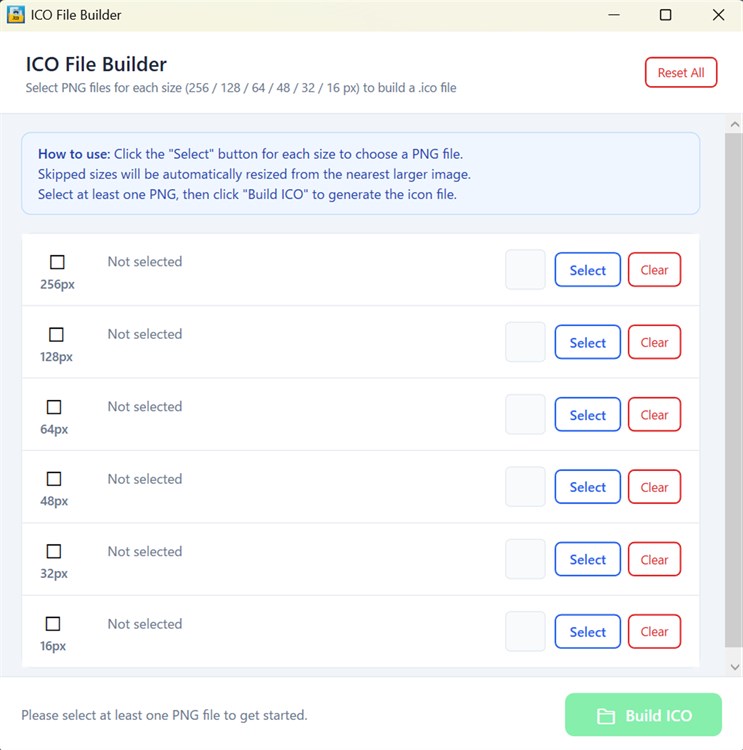
① Launch the application. Six size rows are displayed: 256 / 128 / 64 / 48 / 32 / 16.
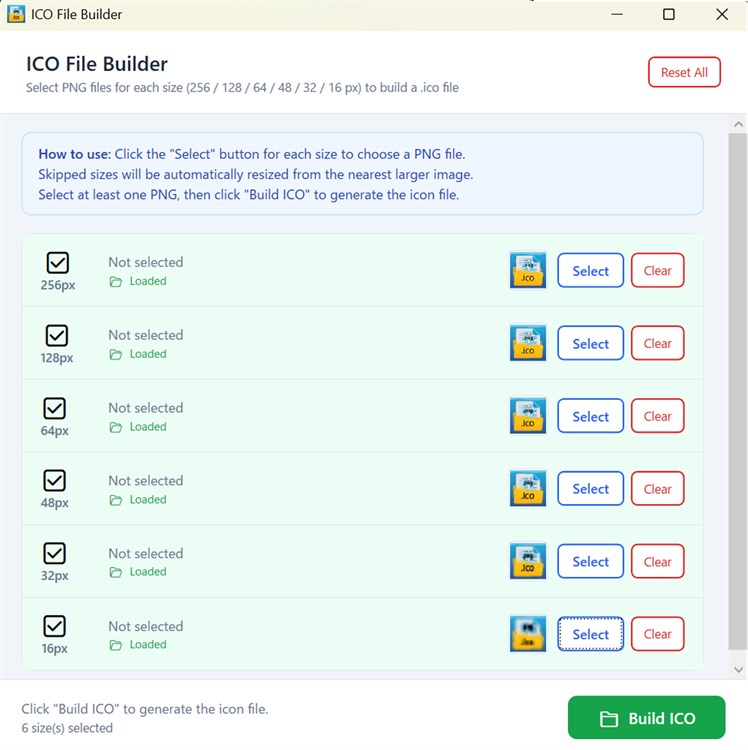
② Click the "Select" button on each row to choose the corresponding PNG file. A thumbnail preview appears immediately after loading.
③ Sizes you skip are automatically filled in by resizing the nearest larger image. Those rows turn orange and show "Will be auto-resized".
④ Once at least one PNG is loaded, the "Build ICO" button at the bottom becomes active.
⑤ Click "Build ICO", choose a destination folder and filename in the save dialog, then click Save. The .ico file is created instantly.
■ Color meanings
• ✅ Green (Loaded) — PNG file loaded successfully.
• 🔄 Orange (Auto-resize) — This size will be generated by resizing a larger loaded image.
• ⬜ White (Not set) — No source available; this size will not be included in the ICO.
■ Other Controls
• "Clear" button — Removes the PNG selection for that individual size row.
• "Reset All" button — Clears all size selections at once. A confirmation dialog is shown before clearing.
■ Auto-Resize Logic
When a size is skipped, the application scans the size array from largest to smallest (256 → 128 → 64 → 48 → 32 → 16) and uses the smallest loaded size that is still larger than the target as the resize source.
Example: If only 256 px and 64 px are loaded, then 128 px is auto-resized from 256 px, while 48, 32, and 16 px are auto-resized from 64 px.
If no larger loaded size exists for a given target (e.g., only 32 px and 16 px are provided, and 256 px is skipped), that size is omitted from the ICO entirely.
■ System Requirements
• Windows 10 or Windows 11
• .NET 8 Desktop Runtime (net8.0-windows)
• WPF (Windows Presentation Foundation)
■ Distribution
This application is available on the Microsoft Store. It can also be installed using the provided setup installer (EachSizeImageIconMakerApp_Setup_x.x.x.exe).
Del desarrollador
Desarrollador
- OPO Add Dreams
- Seguidores: 0
- Plataformas: Windows Aplicaciones (7) Windows Juegos (2)
- Ofertas: 2
- Listas: 0 0
- Puntos: 0
- Clasificaciones: 0
- Comentarios: 0
- Vídeos: 0
- RSS: Suscribirse
Listas 0
-
 CustomIconFileCreator
Puntos 0
-

- +1 Punto

Clasificaciones 0
-
- Tu valoración
Novedades
- Versión: PC
- Última actualización:
Información adicional
- Fecha de lanzamiento:
- Categoría:
Aplicaciones para Windows›Herramientas de desarrollo - Sistemas operativos:
HoloLensMobilePCSurface Hub - Tamaño:
197 Mb - Funciones disponibles:
Mixed reality - Idiomas admitidos:
Inglés - Clasificación de contenido:
EVERYONE - Windows Store Valoración: ¡
0
Comentarios 0 ¡
Puntuación de AppAgg
Puntuación estimada de AppAgg para
CustomIconFileCreator
Desarrollador: OPO Add Dreams
Una puntuación más alta suele reflejar mejores resultados en los indicadores de AppAgg.
Basado en: popularidad · valoraciones de usuarios · actualidad · ofertas · datos de tiendas · actividad de la comunidad
Se recalcula a diario con datos actualizados de AppAgg.
CustomIconFileCreator URL corta: Copiado!- Windows Store

