
북마크
| 개발자: | OPO Add Dreams (9) | ||
| 가격: | ▼ $1.59 | ||
| 종합 점수: | 590 브론즈 | ||
| 순위: | 0 | ||
| 댓글: | 0 댓글 게시 | ||
| 목록: | 0 0 | ||
| 포인트: | 0 | ||
| +1 포인트 | |||
요약
CustomIconFileCreator: OPO Add Dreams에서 만든 ‘개발자 도구’ 카테고리의 앱이에요.
$3.99 대신 $1.59. AppAgg에서 이렇게 싼 적은 처음이에요. 진짜로요, 가격 기록을 전부 확인했어요.
HoloLens에서도 쓸 수 있어요. 혼합 현실 속 Windows예요.
에 출시됐어요. 아직 꽤 따끈따끈해요.
Windows Mobile 버전까지 있어요. 과거에서 안부 전해요.
Surface Hub도 지원해요. 큰 회의실에 딱이에요.
AppAgg 점수는 590. 지금은 브론즈 등급이지만, 성장할 여지가 충분해요.
연령 등급은 ‘EVERYONE’, 아이들에게도 괜찮아요.
지원 언어는 딱 하나, 그런데 한국어는 아니에요.
AppAgg에서는 아직 아무도 평가하지 않았어요. 첫 번째가 될 기회는 바로 지금이에요.
이 개발자의 게임 2개와 앱 6개가 AppAgg에 더 있어요. 한번 둘러보세요.
참고로, 이 개발자는 지금 할인 2건 진행 중이에요.
할인, 업데이트, 새 앱 소식을 가장 먼저 받고 싶나요? 가격 알림을 설정하거나 개발자를 팔로우하거나 RSS 피드를 구독하세요. 푸시 알림은 Android와 iOS용 AppAgg Alerts 앱으로 받을 수 있어요.
스크린샷 2
다른 플랫폼 0
가격 기록 1
- 현재 가격: $1.59
$3.99-60% - 최소: ▼ $1.59
- 최대: $3.99
홈 화면의 나만의 피드
설명

■Overview
CustomIconFileCreator is a WPF desktop application for Windows that generates a single multi-size “.ico” format icon file from PNG images at six standard sizes: 256 / 128 / 64 / 48 / 32 / 16 px.
Why use size-specific PNGs? Automatically converting a single 256×256 image into 128×128, 64×64, 48×48, 32×32, 16×16 images produces blurry results on small size images, for example 32×32, 16×16 images. For crisp icons, inputting each size images individually created from a vector application such as Adobe Illustrator, Affinity Designer, or Inkscape into this application, and generate an icon file containing fine images.
#icon
#.ico
■How to Launch
Double-click EachSizeImageIconMakerApp.exe to start the application.
■Step-by-Step Instructions
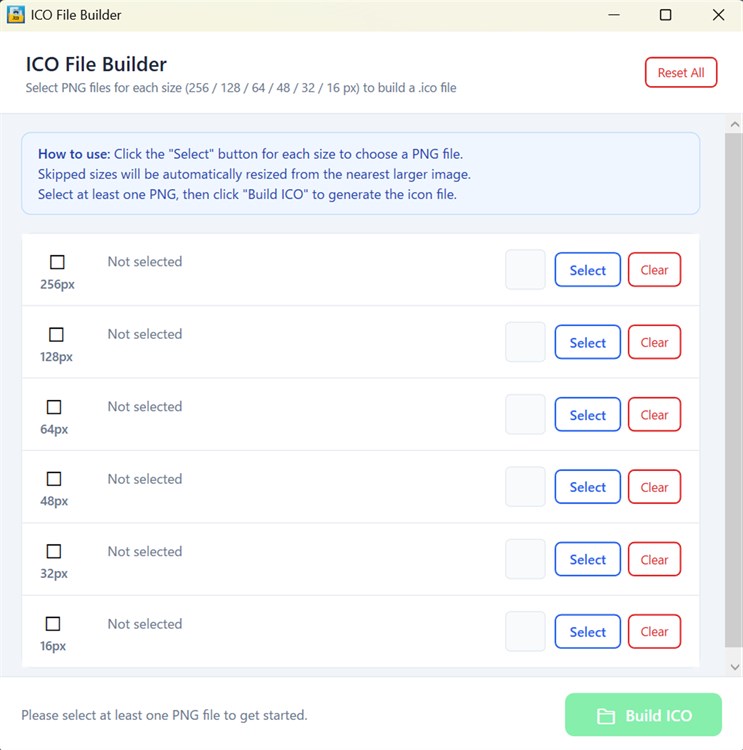
① Launch the application. Six size rows are displayed: 256 / 128 / 64 / 48 / 32 / 16.
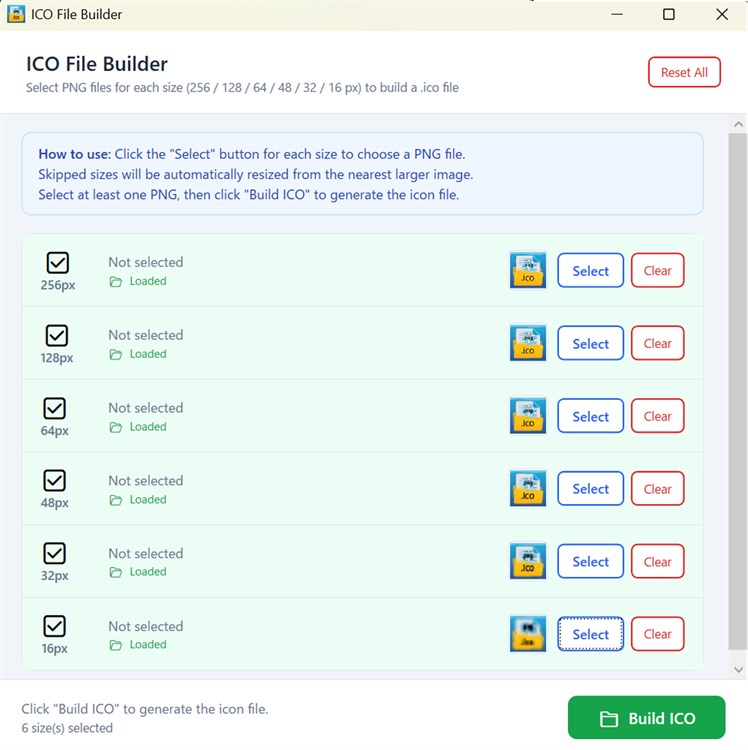
② Click the "Select" button on each row to choose the corresponding PNG file. A thumbnail preview appears immediately after loading.
③ Sizes you skip are automatically filled in by resizing the nearest larger image. Those rows turn orange and show "Will be auto-resized".
④ Once at least one PNG is loaded, the "Build ICO" button at the bottom becomes active.
⑤ Click "Build ICO", choose a destination folder and filename in the save dialog, then click Save. The .ico file is created instantly.
■ Color meanings
• ✅ Green (Loaded) — PNG file loaded successfully.
• 🔄 Orange (Auto-resize) — This size will be generated by resizing a larger loaded image.
• ⬜ White (Not set) — No source available; this size will not be included in the ICO.
■ Other Controls
• "Clear" button — Removes the PNG selection for that individual size row.
• "Reset All" button — Clears all size selections at once. A confirmation dialog is shown before clearing.
■ Auto-Resize Logic
When a size is skipped, the application scans the size array from largest to smallest (256 → 128 → 64 → 48 → 32 → 16) and uses the smallest loaded size that is still larger than the target as the resize source.
Example: If only 256 px and 64 px are loaded, then 128 px is auto-resized from 256 px, while 48, 32, and 16 px are auto-resized from 64 px.
If no larger loaded size exists for a given target (e.g., only 32 px and 16 px are provided, and 256 px is skipped), that size is omitted from the ICO entirely.
■ System Requirements
• Windows 10 or Windows 11
• .NET 8 Desktop Runtime (net8.0-windows)
• WPF (Windows Presentation Foundation)
■ Distribution
This application is available on the Microsoft Store. It can also be installed using the provided setup installer (EachSizeImageIconMakerApp_Setup_x.x.x.exe).
개발자 소식
개발자
- OPO Add Dreams
- 팔로워: 0
- 플랫폼: Windows 앱 (7) Windows 게임 (2)
- 할인: 2
- 목록: 0 0
- 포인트: 0
- 순위: 0
- 댓글: 0
- 동영상: 0
- RSS: 구독
목록 0
-
 CustomIconFileCreator
포인트 0
-

- +1 포인트

순위 0
-
- 내 평점
새로운 기능
- 버전: PC
- 마지막 업데이트:
추가 정보
댓글 0 ¡
AppAgg 점수
AppAgg 예상 점수:
CustomIconFileCreator
개발자: OPO Add Dreams
점수가 높을수록 대체로 AppAgg의 여러 지표에서 좋은 결과를 보인다는 뜻입니다.
기준: 인기 · 사용자 평점 · 최신성 · 할인 · 스토어 데이터 · 커뮤니티 활동
최신 AppAgg 데이터를 바탕으로 매일 다시 계산됩니다.
CustomIconFileCreator 단축 URL: 복사됨!- Windows Store


