
บุ๊กมาร์ก
| ผู้พัฒนา: | OPO Add Dreams (9) | ||
| ราคา: | ▼ $1.59 | ||
| คะแนน: | 590 บรอนซ์ | ||
| การจัดอันดับ: | 0 | ||
| ความคิดเห็น: | 0 โพสต์ความคิดเห็น | ||
| รายการ: | 0 0 | ||
| แต้ม: | 0 | ||
| +1 แต้ม | |||
สรุป
CustomIconFileCreator เป็นแอปในหมวด “เครื่องมือสำหรับนักพัฒนา” จาก OPO Add Dreams
$1.59 จากปกติ $3.99 ถูกที่สุดเท่าที่เคยมีบน AppAgg จริง ๆ นะ เราเช็กประวัติราคามาหมดแล้ว
ใช้ได้แม้แต่บน HoloLens (Windows ในโลกความเป็นจริงผสม)
ออกเมื่อ ยังสดใหม่อยู่เลย
มีเวอร์ชัน Windows Mobile ด้วยนะ สวัสดีจากอดีต
รองรับแม้แต่ Surface Hub เหมาะกับห้องประชุมใหญ่ ๆ
คะแนน AppAgg คือ 590 ตอนนี้อยู่ระดับ “บรอนซ์” ยังไปได้อีกไกล
จัดเรต “EVERYONE” เหมาะกับเด็ก ๆ ด้วย
รองรับแค่ภาษาเดียว และไม่ใช่ภาษาไทย
ยังไม่มีใครบน AppAgg ให้คะแนนเลย โอกาสเป็นคนแรกอยู่ตรงนี้แล้ว
ผู้พัฒนารายนี้มีเกมอื่นอีก 2 เกม และแอปอีก 6 แอปบน AppAgg ลองไปดูกัน
อีกอย่าง ตอนนี้ผู้พัฒนารายนี้มี ดีลลดราคา 2 รายการ ด้วยนะ
อยากรู้เรื่องลดราคา อัปเดต และแอปใหม่ก่อนใครไหม? ตั้งการแจ้งเตือนราคา ติดตาม ผู้พัฒนา หรือกดติดตาม ฟีด RSS ได้เลย การแจ้งเตือนแบบพุชส่งผ่านแอป AppAgg Alerts สำหรับ Android และ iOS
ภาพหน้าจอ 2
แพลตฟอร์มอื่น 0
ประวัติราคา 1
- ราคาปัจจุบัน: $1.59
$3.99-60% - ต่ำสุด: ▼ $1.59
- สูงสุด: $3.99
ฟีดของคุณเองบนหน้าแรก
คำอธิบาย

■Overview
CustomIconFileCreator is a WPF desktop application for Windows that generates a single multi-size “.ico” format icon file from PNG images at six standard sizes: 256 / 128 / 64 / 48 / 32 / 16 px.
Why use size-specific PNGs? Automatically converting a single 256×256 image into 128×128, 64×64, 48×48, 32×32, 16×16 images produces blurry results on small size images, for example 32×32, 16×16 images. For crisp icons, inputting each size images individually created from a vector application such as Adobe Illustrator, Affinity Designer, or Inkscape into this application, and generate an icon file containing fine images.
#icon
#.ico
■How to Launch
Double-click EachSizeImageIconMakerApp.exe to start the application.
■Step-by-Step Instructions
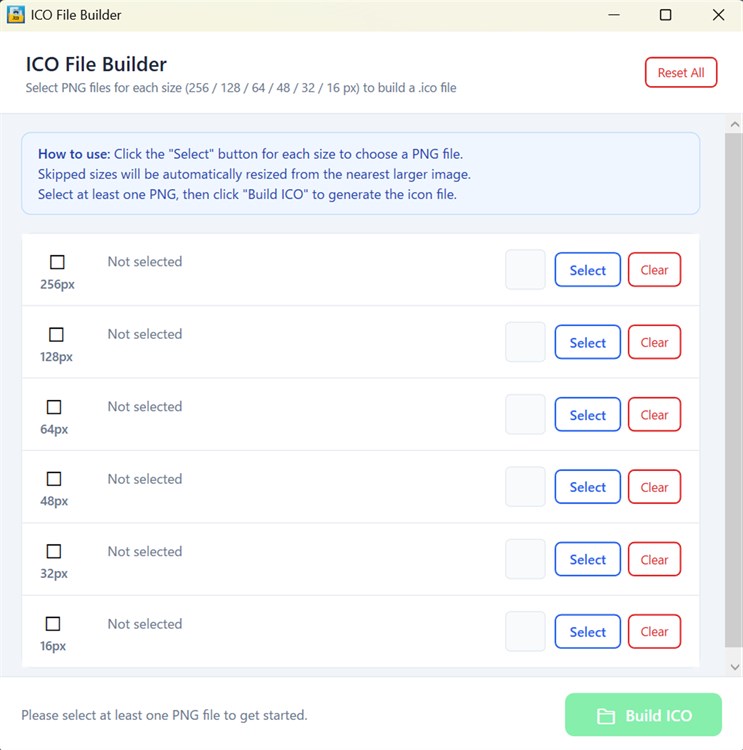
① Launch the application. Six size rows are displayed: 256 / 128 / 64 / 48 / 32 / 16.
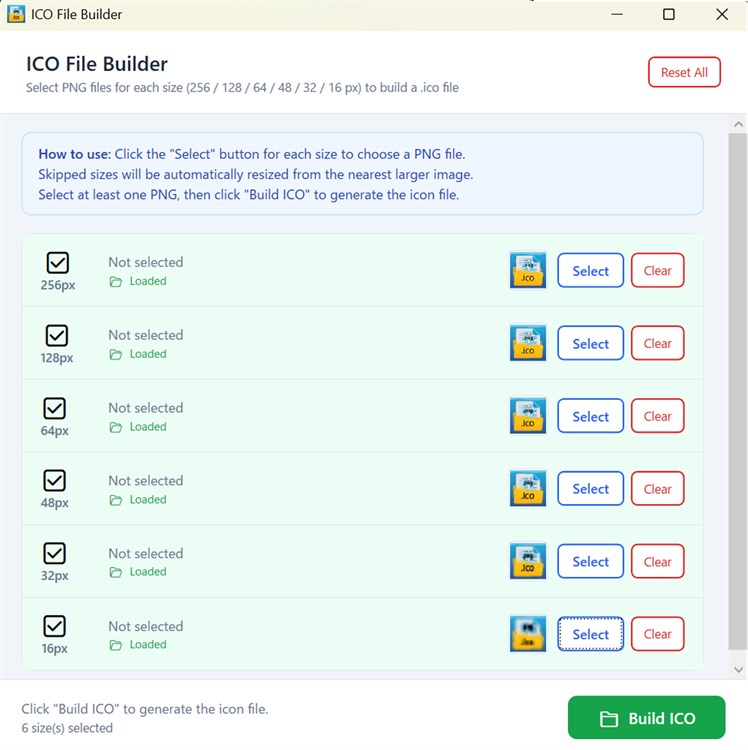
② Click the "Select" button on each row to choose the corresponding PNG file. A thumbnail preview appears immediately after loading.
③ Sizes you skip are automatically filled in by resizing the nearest larger image. Those rows turn orange and show "Will be auto-resized".
④ Once at least one PNG is loaded, the "Build ICO" button at the bottom becomes active.
⑤ Click "Build ICO", choose a destination folder and filename in the save dialog, then click Save. The .ico file is created instantly.
■ Color meanings
• ✅ Green (Loaded) — PNG file loaded successfully.
• 🔄 Orange (Auto-resize) — This size will be generated by resizing a larger loaded image.
• ⬜ White (Not set) — No source available; this size will not be included in the ICO.
■ Other Controls
• "Clear" button — Removes the PNG selection for that individual size row.
• "Reset All" button — Clears all size selections at once. A confirmation dialog is shown before clearing.
■ Auto-Resize Logic
When a size is skipped, the application scans the size array from largest to smallest (256 → 128 → 64 → 48 → 32 → 16) and uses the smallest loaded size that is still larger than the target as the resize source.
Example: If only 256 px and 64 px are loaded, then 128 px is auto-resized from 256 px, while 48, 32, and 16 px are auto-resized from 64 px.
If no larger loaded size exists for a given target (e.g., only 32 px and 16 px are provided, and 256 px is skipped), that size is omitted from the ICO entirely.
■ System Requirements
• Windows 10 or Windows 11
• .NET 8 Desktop Runtime (net8.0-windows)
• WPF (Windows Presentation Foundation)
■ Distribution
This application is available on the Microsoft Store. It can also be installed using the provided setup installer (EachSizeImageIconMakerApp_Setup_x.x.x.exe).
จากนักพัฒนา
ผู้พัฒนา
- OPO Add Dreams
- ผู้ติดตาม: 0
- แพลตฟอร์ม: Windows แอป (7) Windows เกม (2)
- ลดราคา: 2
- รายการ: 0 0
- แต้ม: 0
- การจัดอันดับ: 0
- ความคิดเห็น: 0
- วิดีโอ: 0
- RSS: ติดตาม
รายการ 0
-
 CustomIconFileCreator
แต้ม 0
-

- +1 แต้ม

การจัดอันดับ 0
-
- คะแนนของคุณ
มีอะไรใหม่
- เวอร์ชัน: PC
- อัปเดตล่าสุด:
ข้อมูลเพิ่มเติม
- วันที่วางจำหน่าย:
- หมวดหมู่:
แอปสำหรับ Windows›เครื่องมือสำหรับนักพัฒนา - ระบบปฏิบัติการ:
HoloLensMobilePCSurface Hub - ขนาด:
197 Mb - คุณสมบัติที่มีให้ใช้งาน:
Mixed reality - ภาษาที่รองรับ:
อังกฤษ - การจัดประเภทเนื้อหา:
EVERYONE - Windows Store คะแนน: ¡
0
ความคิดเห็น 0 ¡
คะแนน AppAgg
คะแนน AppAgg โดยประมาณของ
CustomIconFileCreator
ผู้พัฒนา: OPO Add Dreams
คะแนนที่สูงขึ้นมักสะท้อนตัวชี้วัดที่ดีกว่าบน AppAgg
อิงจาก: ความนิยม · คะแนนจากผู้ใช้ · ความสดใหม่ · ดีล · ข้อมูลร้านค้า · กิจกรรมชุมชน
คำนวณใหม่ทุกวันจากข้อมูล AppAgg ล่าสุด
CustomIconFileCreator URL แบบสั้น: คัดลอกแล้ว!- Windows Store

