
Yer imleri
| Geliştirici: | OPO Add Dreams (9) | ||
| Fiyat: | ▼ $1.59 | ||
| Skor: | 590 Bronz | ||
| Sıralamalar: | 0 | ||
| Yorumlar: | 0 Yorum gönder | ||
| Listeler: | 0 0 | ||
| Puanlar: | 0 | ||
| +1 Puan | |||
Özet
CustomIconFileCreator, OPO Add Dreams imzalı, Geliştirici araçları kategorisinde bir uygulama.
$3.99 yerine $1.59. AppAgg’de hiç bu kadar ucuz olmamıştı. Ciddiyiz, tüm fiyat geçmişine baktık.
HoloLens’te bile çalışıyor (karma gerçeklikte Windows).
çıktı, hâlâ epey taze.
Windows Mobile sürümü bile var. Geçmişten selamlar.
Surface Hub için bile hazır, büyük toplantı odaları için.
AppAgg skoru 590. Şimdilik Bronz, ama yükselmek için bolca yer var.
Yaş sınırı “EVERYONE”, yani çocuklar için de uygun.
Tek bir dil konuşuyor, o da Türkçe değil.
AppAgg’de henüz kimse puan vermedi. İlk olma şansın tam şu an.
Geliştiricinin AppAgg’de 2 oyunu ve 6 uygulaması daha var. Bir göz at.
Bu arada, bu geliştiricide şu an 2 indirim var.
İndirimleri, güncellemeleri ve yeni uygulamaları ilk sen mi duymak istiyorsun? Bir fiyat alarmı kur, geliştiriciyi takip et ya da RSS akışı ile haberdar ol. Push bildirimleri Android ve iOS için AppAgg Alerts uygulamasıyla gelir.
Ekran görüntüleri 2
Diğer platformlar 0
Fiyat Geçmişi 1
- Güncel fiyat: $1.59
$3.99-60% - En az: ▼ $1.59
- En fazla: $3.99
Ana sayfada kendi akışınız
Açıklama

■Overview
CustomIconFileCreator is a WPF desktop application for Windows that generates a single multi-size “.ico” format icon file from PNG images at six standard sizes: 256 / 128 / 64 / 48 / 32 / 16 px.
Why use size-specific PNGs? Automatically converting a single 256×256 image into 128×128, 64×64, 48×48, 32×32, 16×16 images produces blurry results on small size images, for example 32×32, 16×16 images. For crisp icons, inputting each size images individually created from a vector application such as Adobe Illustrator, Affinity Designer, or Inkscape into this application, and generate an icon file containing fine images.
#icon
#.ico
■How to Launch
Double-click EachSizeImageIconMakerApp.exe to start the application.
■Step-by-Step Instructions
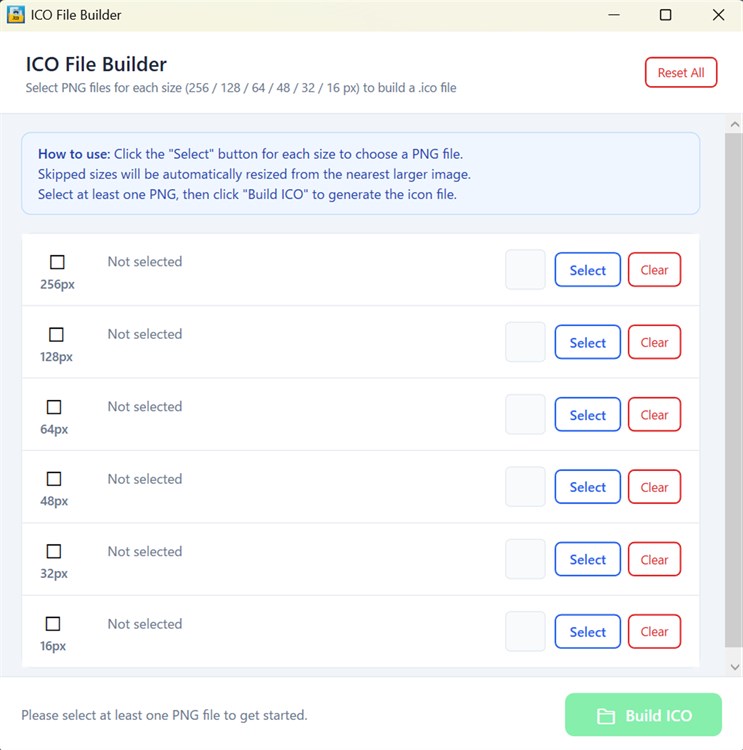
① Launch the application. Six size rows are displayed: 256 / 128 / 64 / 48 / 32 / 16.
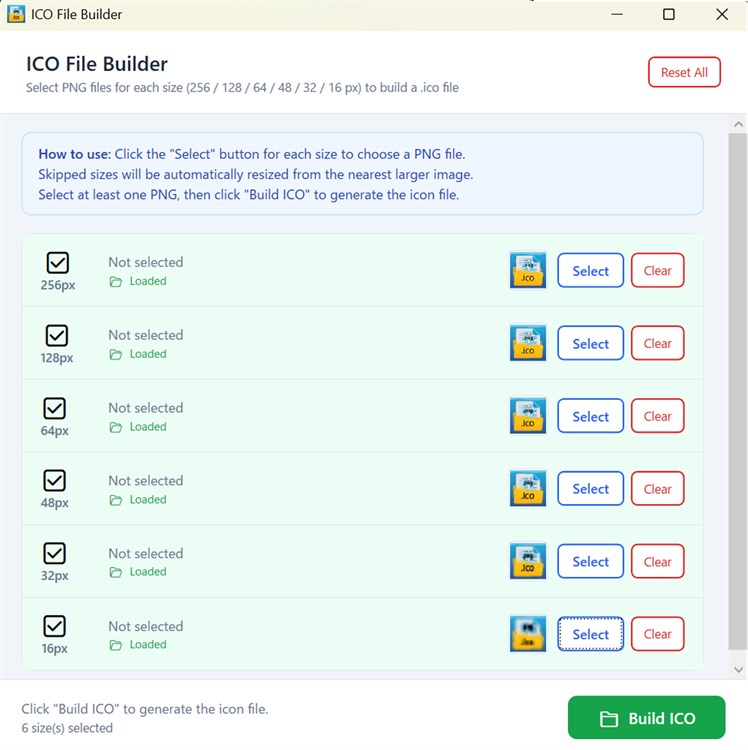
② Click the "Select" button on each row to choose the corresponding PNG file. A thumbnail preview appears immediately after loading.
③ Sizes you skip are automatically filled in by resizing the nearest larger image. Those rows turn orange and show "Will be auto-resized".
④ Once at least one PNG is loaded, the "Build ICO" button at the bottom becomes active.
⑤ Click "Build ICO", choose a destination folder and filename in the save dialog, then click Save. The .ico file is created instantly.
■ Color meanings
• ✅ Green (Loaded) — PNG file loaded successfully.
• 🔄 Orange (Auto-resize) — This size will be generated by resizing a larger loaded image.
• ⬜ White (Not set) — No source available; this size will not be included in the ICO.
■ Other Controls
• "Clear" button — Removes the PNG selection for that individual size row.
• "Reset All" button — Clears all size selections at once. A confirmation dialog is shown before clearing.
■ Auto-Resize Logic
When a size is skipped, the application scans the size array from largest to smallest (256 → 128 → 64 → 48 → 32 → 16) and uses the smallest loaded size that is still larger than the target as the resize source.
Example: If only 256 px and 64 px are loaded, then 128 px is auto-resized from 256 px, while 48, 32, and 16 px are auto-resized from 64 px.
If no larger loaded size exists for a given target (e.g., only 32 px and 16 px are provided, and 256 px is skipped), that size is omitted from the ICO entirely.
■ System Requirements
• Windows 10 or Windows 11
• .NET 8 Desktop Runtime (net8.0-windows)
• WPF (Windows Presentation Foundation)
■ Distribution
This application is available on the Microsoft Store. It can also be installed using the provided setup installer (EachSizeImageIconMakerApp_Setup_x.x.x.exe).
Geliştiriciden
Geliştirici
- OPO Add Dreams
- Takipçiler: 0
- Platformlar: Windows Uygulamalar (7) Windows Oyunlar (2)
- İndirimler: 2
- Listeler: 0 0
- Puanlar: 0
- Sıralamalar: 0
- Yorumlar: 0
- Video: 0
- RSS: Abone ol
Listeler 0
-
 CustomIconFileCreator
Puanlar 0
-

- +1 Puan

Sıralamalar 0
-
- Puanınız
Yenilikler
- Sürüm: PC
- Son güncelleme:
Ek Bilgi
- Çıkış tarihi:
- Kategori:
Windows uygulamaları›Geliştirici araçları - İşletim Sistemleri:
HoloLensMobilePCSurface Hub - Boyut:
197 Mb - Kullanılabilen özellikler:
Mixed reality - Desteklenen diller:
İngilizce - İçerik Derecelendirmesi:
EVERYONE - Windows Store Puan: ¡
0
Yorumlar 0 ¡
AppAgg Skoru
Tahmini AppAgg skoru:
CustomIconFileCreator
Geliştirici: OPO Add Dreams
Daha yüksek skorlar genellikle AppAgg’deki göstergelerin daha güçlü olduğunu belirtir.
Şunlara göre: popülerlik · kullanıcı puanları · güncellik · fırsatlar · mağaza verileri · topluluk etkinliği
Güncel AppAgg verileriyle her gün yeniden hesaplanır.
CustomIconFileCreator Kısa URL: Kopyalandı!- Windows Store

