
Yer imleri
Bu yer imi için bir başlık seçin.
Yer imi kaydedildi
| Geliştirici: | J.E Herizon LLC (8) | ||
| Fiyat: | Ücretsiz Yeni | ||
| Skor: | 580 Bronz | ||
| Sıralamalar: | 0 | ||
| Yorumlar: | 0 Yorum gönder | ||
| Listeler: | 0 + 0 | ||
| Puanlar: | 0 + 0 ¡ | ||
| +1 Puanlar | |||
Ekran görüntüleri
Reklâm
Açıklama

technicians, and small support teams handling a PC move. After the files
are migrated by your usual method, CutoverCheck answers the question the
customer actually asks: did everything I care about arrive intact? Capture
a baseline from agreed folders, map destination locations, compare selected
file hashes, and keep a local report of exactly what was checked.
Who this is for
---------------
This workflow fits bench technicians verifying a shop migration, IT staff
cutting over a small office, and support techs who hand a PC back to its
owner with proof of care. The job is always the same shape: agree what
matters, measure it before the move, measure it again after, and report
the comparison. CutoverCheck carries the measuring and the reporting; your
migration tools, your judgment, and your application testing carry the
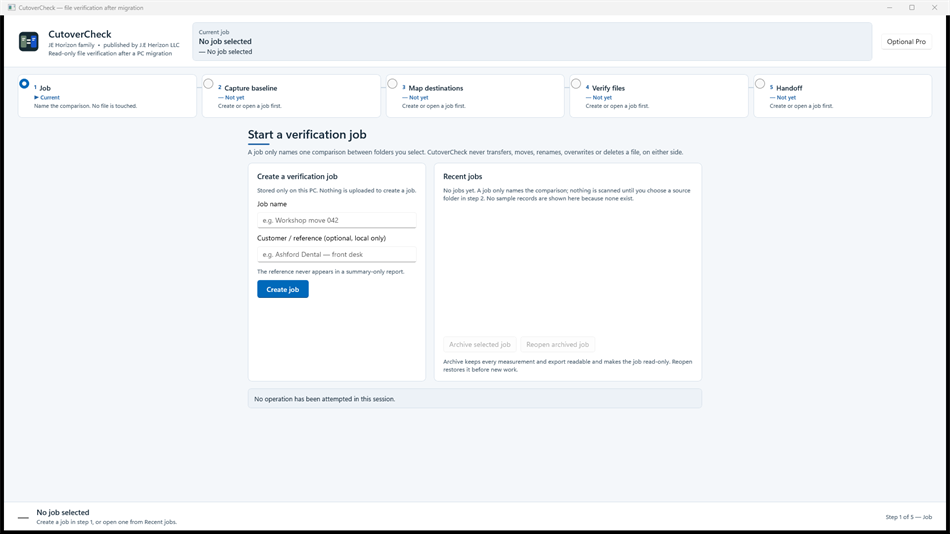
rest. Use it alongside your usual migration method, not instead of it. Five stages—job, baseline, mapping, verification, handoff—organize each check. Review results before a report export.
Agree the folders before you measure
--------------------------------------
Verification starts with agreement, not software. Sit with the PC owner —
or the ticket — and decide which folders belong in the check and which are
excluded: documents and photos in, caches and temp folders out, line-of-
business data by explicit decision. Create a job, select the source
folders and exclusions you intend to check, and capture the source
baseline before moving files with your own migration method. The baseline
is read-only: capturing it changes nothing on the source machine. What it
gives you is a fixed point of truth — names, locations, and hashes — that
every later comparison measures against.
Map first, compare second
--------------------------
After migration, map each source root to its destination folder and review
the mapping preview before comparison. Drive letters change, usernames
change, folder layouts get tidied mid-move; the mapping step absorbs all
of that so the comparison judges content, not paths. A careful mapping
means a missing file reads as genuinely missing rather than merely moved.
Review the mapping the way you reviewed the folder agreement — slowly, and
before you press Verify.
Read the result categories honestly
------------------------------------
The comparison reports each selected file by category: matched,
missing, different, unreadable, and unchecked. Matched means the selected
bytes agreed at the times measured. Missing means the destination has no
file at the mapped location. Different means both sides exist but the
hashes disagree. Unreadable means the file could not be opened for
reading. Unchecked means it fell outside the comparison for an explicit
reason. Keep these categories distinct in your head and in your report: a
different file is not a missing file, and an unchecked file is not a
passed file. Open the result categories, identify each group separately,
correct file placement or access with your own migration tools, then run
verification again against the retained baseline and export an updated
report.
Separate measured files from human attestations
------------------------------------------------
Files are only half the handoff. Applications must be opened, logged into,
and exercised by a person — no hash comparison can do that. CutoverCheck
keeps manual application attestations separate from measured file results
on purpose: the checklist records what the technician tested, and the
comparison records what the bytes said, and the report never mingles the
two. Test applications yourself, record the checklist honestly, and let
the customer see which confidence comes from measurement and which comes
from a human trying the thing.
Carry a baseline to the destination PC
---------------------------------------
When source and destination are different machines, finish the source
capture and export the portable baseline bundle. Move that bundle to the
destination PC by your chosen secure method, import it there, select the
destination roots, and verify the mapping preview before comparison. The
bundle carries measurement records, not the selected files, and
carries no customer data beyond names and hashes. The destination-side
comparison then runs against the same fixed point of truth the source
established.
Reports with the right privacy detail
--------------------------------------
Export the local HTML handoff report with full-detail or summary-only
choices, and choose the detail appropriate for its recipient. The bench
gets full detail: every file, every category, every hash. The customer
gets the summary: what was checked, what matched, what needs attention —
without the internals they cannot act on. Review the report before
sharing it either way. The report documents the selected verification
work; your team decides what else the PC move needs.
Honest limits — read before you rely
-------------------------------------
- CutoverCheck verifies selected files. It does not copy, move, delete,
repair, launch, or test applications.
- A matching hash means selected bytes agreed at the times measured. It
does not establish application functionality, logical database validity,
coverage of omitted folders, or that the old PC is safe to erase.
- Only agreed folders are checked. Anything excluded or unselected is
outside the verification, whatever the report total says.
- Keep matched, missing, different, unreadable, and unchecked results
distinct; never present a partial comparison as a complete one.
- File capture, mapping, verification, checklist, and reporting run
locally; no customer file content is uploaded for these checks.
- Review the Microsoft Store listing for availability and system requirements, including runtime prerequisites.
Getting started
----------------
Verify a PC move
1. Create a job and select the source folders and exclusions you intend to
check.
2. Capture the source baseline before moving files with your own migration
method.
3. Map each source root to its destination folder and run Verify.
4. Review matched, missing, different, unreadable, and unchecked results;
test applications yourself and record the checklist.
5. Export the local HTML handoff report, choosing the privacy detail
appropriate for its recipient.
Carry a baseline to the destination PC
1. Finish the source capture and export the portable baseline bundle.
2. Move that bundle to the destination PC by your chosen secure method.
3. Import the bundle, select the destination roots, and verify the mapping
preview before comparison.
Resolve a partial verification
1. Open the result categories and identify missing, different, unreadable,
and unchecked files separately.
2. Correct file placement or access with your own migration tools.
3. Run verification again against the retained baseline and export an
updated report.
Questions shops ask
--------------------
Does this replace our migration tool? No. Migrate with your own tools,
then verify with CutoverCheck. Measurement and movement are separate
jobs, done by separate tools.
The report shows missing files — now what? Fix placement or access with
your migration tools, re-run verification against the retained baseline,
and export the updated report. Iterate until the categories read clean.
Can the customer erase the old PC now? Not on the hash report alone. A
matching comparison covers selected files, not applications, databases,
or omitted folders. Say so on the handoff, in writing.
Where does customer data go? Nowhere off the bench. Capture, mapping,
verification, and reporting run locally; the portable bundle carries
measurements, not contents.
Download, help, and publisher
------------------------------
Download CutoverCheck for Windows from the Microsoft Store via the Store
button on the product landing page (jehorizon.com/cutovercheck). Help and
illustrated guides: https://jehorizon.com/help/cutovercheck. Product
overview: https://jehorizon.com/cutovercheck. Contact support@jehorizon.com
with your app version and the step you are working on. Published by J.E.
Herizon LLC, doing business as JE Horizon.
Diğer platformlar
| CutoverCheckWindows StoreBuradasınız | Ücretsiz |
Şu anda yalnızca bu mağazada.
Fiyat Geçmişi
- Güncel fiyat: Ücretsiz
- En az: Ücretsiz
- En fazla: Ücretsiz
Fiyatları takip et E-posta veya anlık bildirimle indirim uyarıları almak için bir listeye ekleyin
Listeler (0)
0
- CutoverCheck
Puanlar (0)
0
Sıralamalar (0)
-

- Puanınız

Yorumlar (0) ¡
İlk yorum yapan siz olun
Geliştirici
- J.E Herizon LLC
- Takipçiler: 0
- Platformlar: Windows Uygulamalar (8)
- İndirimler: 1
- Listeler: 0 + 1
- Puanlar: 1 + 0 ¡
- Sıralamalar: 0
- Yorumlar: 0
- Video: 0
- RSS: Abone ol
Yenilikler
- Sürüm: PC
- Son güncelleme:
Ek Bilgi
- Çıkış tarihi:
- Kategori:
Windows uygulamaları›Geliştirici araçları - İşletim Sistemleri:
PC - Boyut:
66 Mb - Desteklenen diller:
English - İçerik Derecelendirmesi:
EVERYONE - Windows Store Puan: ¡
0 - Web sitesi:
 http://jehorizon.com/
AppAgg Skoru
580
Tahmini AppAgg skoru:
CutoverCheck
Geliştirici: J.E Herizon LLC
580 Bronz
Daha yüksek skorlar genellikle AppAgg’deki göstergelerin daha güçlü olduğunu belirtir.
Şunlara göre: popülerlik · kullanıcı puanları · güncellik · fırsatlar · mağaza verileri · topluluk etkinliği
Güncel AppAgg verileriyle her gün yeniden hesaplanır.
Web sitesi için rozet:  Kopyalandı!
Özet
CutoverCheck Kısa URL: Kopyalandı!- Windows Store
AppAgg üzerinden J.E Herizon LLC tarafından geliştirilen “CutoverCheck” uygulamasını takip edebilirsiniz. Platform: Windows. Kategori: Geliştirici araçları. AppAgg skoru: 580 (Bronz). Uygulamanın AppAgg puanları — onaylı: 0; dolaylı: 0. Uygulamanın yer aldığı herkese açık liste sayısı: 0. Uygulamayı özel listelerine kaydeden kullanıcı sayısı: 0. AppAgg kullanıcıları uygulamayı henüz değerlendirmedi. Onaylı puanlar, oturum açmış AppAgg kullanıcılarının mağazaya geçişlerini kaydeder. Dolaylı puanlar mağaza verilerine dayanır. İki sayaç, uygulamanın veya oyunun yer aldığı herkese açık listelerin sayısını ve onu özel listelerine kaydeden kullanıcıların sayısını gösterir. Uygulama ilk kez tarihinde yayımlandı. Uygulamanın son güncellemesi: . Uygulama şu anda ücretsizdir. Uygulama şu dilleri destekler: English. Fiyat geçmişini inceleyin, uygulamayı bir listeye ekleyin veya geliştiriciyi takip edin. Uygulamayla ilgili yeni fırsatları ve güncellemeleri RSS akışı üzerinden takip edin. AppAgg bu uygulamayı barındırmaz veya dağıtmaz. Uygulamayla ilgili tüm ticari markalar, logolar ve ekran görüntüleri ilgili sahiplerine aittir.
Şunları da beğenebilirsiniz
Son tartışmalar
 UygulamaLocalDub – Real-Time Game Dubbing Hello Kırtay Interactive, I am using LocalDub - Real-Time Game Dubbing. I would like to know if Hind...
  rashid game5
  UygulamaNauticPlayer This app is absolute cinema. Honestly, it’s one of the best media players I’ve ever tried, and I’m s...
  Manuel16
  UygulamaScreen Beings - Desktop Pet & Study Companion This is my app so I’m a little bias but as someone from the ADHD community that teaches ADHD and neu...
  Tarelle Irwin6
  UygulamaAadi vault good it ia a encrypter and good you my work on office
  Aditya Rai5
  UygulamaTyping 365 | Daily Typing Trainer The best typing app ever. With Typing 365 you don’t have to force yourself for couple minutes traini...
  Ahmad Mozaffar5
  UygulamaZefir Calendar — Calendar in the Taskbar excelente app! Superando todas as espectativas!
  Diógenes Magnus5
  UygulamaLockinRa LockinRa 리뷰 LockinRa는 작업 관리, 집중력 도구, AI 코칭을 하나의 데스크톱 앱으로 통합한 무료 Windows 생산성 프로그램입니다. 클라우드 동기화 없이 로컬 ...
  abhilok reddy6
  UygulamaCN Vault I Love this app CN Vault is a user-friendly app that helps keep your passwords safe and secure. If y...
  Marjuk Amin5
