
Σελιδοδείκτες
| Προγραμματιστής: | Itay Sagui (9) | ||
| Τιμή: | $5.99 | ||
| Βαθμολογία: | 630 Ασημένιο | ||
| Κατατάξεις: | 0 | ||
| Σχόλια: | 0 Δημοσίευση σχολίου | ||
| Λίστες: | 0 0 | ||
| Πόντοι: | 0 | ||
| +1 Πόντος | |||
Σύνοψη
Γνώρισε το Data Format Workbench, μια εφαρμογή από Itay Sagui στην κατηγορία «Εργαλεία προγραμματισμού».
Κυκλοφόρησε , ακόμα αρκετά φρέσκια.
$5.99, και ούτε μία έκπτωση στο AppAgg μέχρι στιγμής. Σκληρό καρύδι.
Το Microsoft Store είναι ενσωματωμένο στα Windows, οπότε η εγκατάσταση γίνεται με δυο κλικ.
Η Βαθμολογία AppAgg είναι 630. «Ασημένιο», και αυτό δεν είναι καθόλου άσχημο.
Ηλικιακή κατάταξη «EVERYONE»: ταιριάζει και σε παιδιά.
Μιλάει μόνο μία γλώσσα, και δεν είναι τα ελληνικά.
Απόλυτη ησυχία εδώ μέχρι στιγμής. Ούτε βαθμολογίες, ούτε σχόλια. Σπάσε τη σιωπή.
Ο προγραμματιστής έχει ακόμα 8 εφαρμογές στο AppAgg. Αξίζει μια ματιά.
Μάθε πρώτος για προσφορές, ενημερώσεις και νέες εφαρμογές. Όρισε ειδοποίηση τιμής, ακολούθησε τον προγραμματιστή ή κάνε εγγραφή στη ροή RSS. Οι ειδοποιήσεις push έρχονται μέσω της εφαρμογής AppAgg Alerts για Android και iOS.
Στιγμιότυπα οθόνης 4
Άλλες πλατφόρμες 0
 | Data Format WorkbenchWindows Store630 ΑσημένιοWindows | $5.99 |
Προς το παρόν μόνο σε αυτό το κατάστημα.
Ιστορικό τιμών 0
- Τρέχουσα τιμή: $5.99
- Ελάχιστο: $5.99
- Μέγιστο: $5.99
Η δική σας ροή στην αρχική σελίδα
Περιγραφή
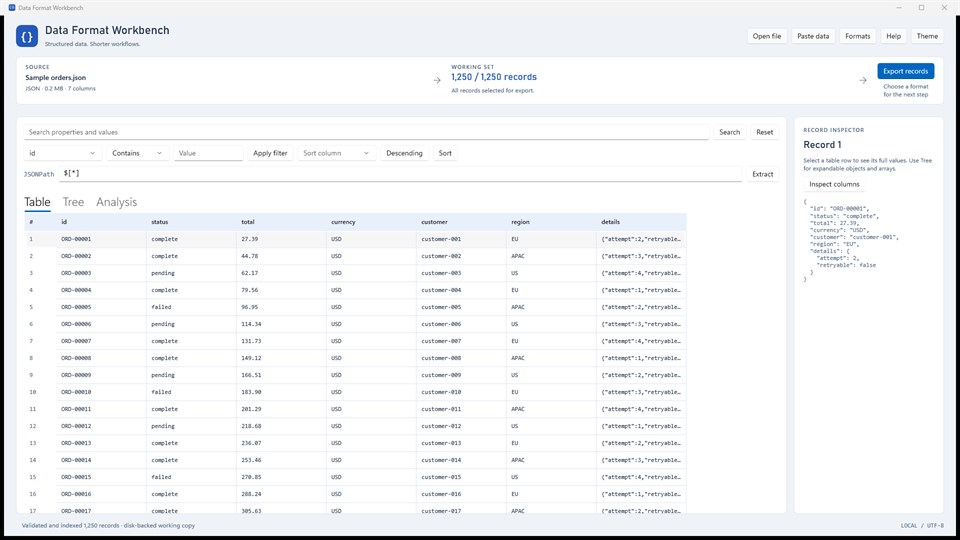
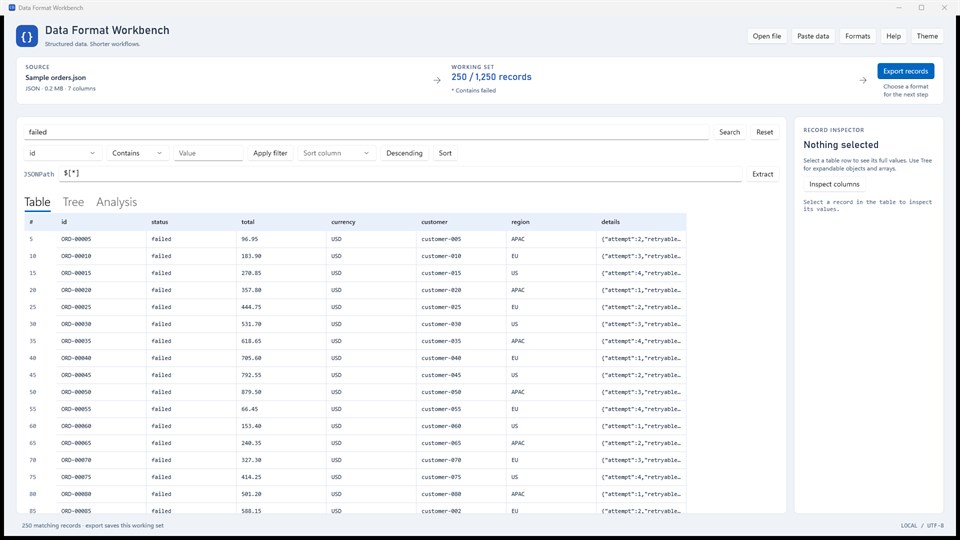
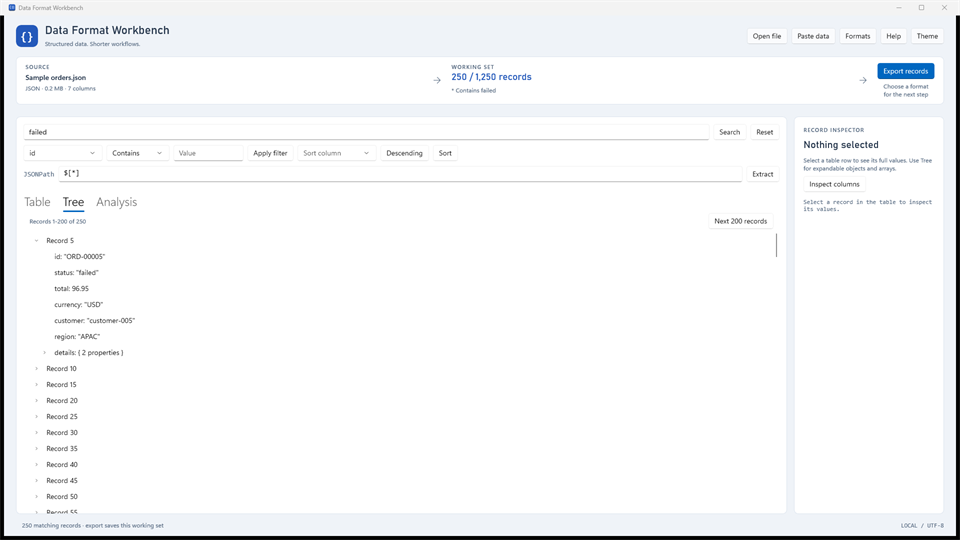
Select Open file, drop a file onto the window, or select Paste data and choose its format. Browse records in Table, select a row to inspect its values, or expand nested objects and arrays in Tree. Search properties and values, or choose a column, operator and value and select Apply filter. Select Export records to save the matching records in your chosen format. Reset restores all records in source order.
Work with JSON, JSON Lines/NDJSON, CSV, TSV, PSV, SSV, fixed-width text, YAML, XML, TOML, INI, JSON5, JSONC, Java properties, dotenv, ARFF and TOON. Set column widths for fixed-width files and choose automatic detection, semicolon or space separation for SSV.
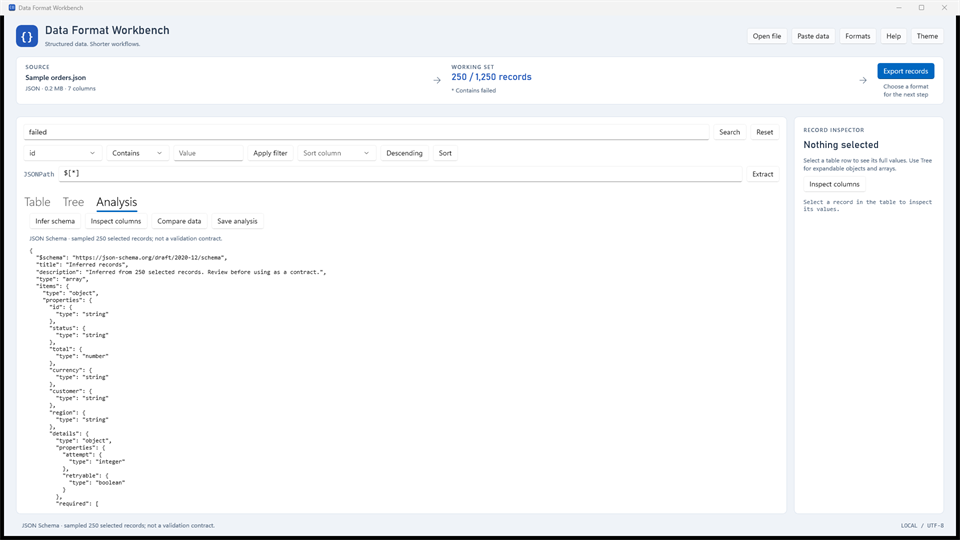
Use JSONPath to extract nested values into a new working set. In Analysis, inspect column types, infer a JSON Schema from sample records, or compare complete structured documents and save their differences. Comparison uses the complete source documents, not the filtered selection; arrays are compared by position.
The app does not require an account or an internet connection and includes no advertising or telemetry. Source files are not edited during inspection. Exports replace an existing destination only after conversion succeeds. Temporary working copies are stored locally and are not encrypted; do not rely on the app to protect secrets in your data.
JSON arrays, JSON Lines, delimited text, YAML sequences, fixed-width text and ARFF are read incrementally into a disk-backed working copy. XML, TOML, INI, properties, dotenv, JSON5, JSONC and TOON imports are limited to 32 MiB. A single large record must still fit in memory, and working copies require free temporary disk space.
Conversions preserve data within each format's rules, not the original comments or formatting. Text tables use strings, and configuration exports require compatible object shapes. Schema inference samples up to 1,000 records; it does not validate against an external schema. Help opens the local user guide, privacy policy and third-party notices. Closing the app normally removes its temporary working files; exported files remain.
Από τον προγραμματιστή
Λίστες 0
-
 Data Format Workbench
Πόντοι 0
-

- +1 Πόντος

Κατατάξεις 0
-
- Η βαθμολογία σας
Προγραμματιστής 9
- Itay Sagui
- Ακόλουθοι: 0
- Πλατφόρμες: Windows Εφαρμογές (9)
- Προσφορές: 0
- Λίστες: 0 0
- Πόντοι: 0
- Κατατάξεις: 0
- Σχόλια: 0
- Βίντεο: 0
- RSS: Εγγραφή
Τι νέο υπάρχει
- Έκδοση: PC
- Τελευταία ενημέρωση:
Πρόσθετες πληροφορίες
- Ημερομηνία κυκλοφορίας:
- Κατηγορία:
Εφαρμογές για Windows›Εργαλεία προγραμματισμού - Λειτουργικό σύστημα:
PC - Μέγεθος:
68 Mb - Υποστηριζόμενες γλώσσες:
Αγγλικά - Αξιολόγηση περιεχομένου:
EVERYONE - Windows Store Βαθμολογία: ¡
0
Βαθμολογία AppAgg
Εκτιμώμενη βαθμολογία AppAgg για
Data Format Workbench
Προγραμματιστής: Itay Sagui
Η υψηλότερη βαθμολογία συνήθως αντανακλά ισχυρότερους δείκτες στο AppAgg.
Βασισμένο σε: δημοτικότητα · αξιολογήσεις χρηστών · επικαιρότητα · προσφορές · δεδομένα καταστημάτων · δραστηριότητα κοινότητας
Υπολογίζεται εκ νέου καθημερινά με βάση τα πιο πρόσφατα δεδομένα του AppAgg.
Σχόλια 0 ¡
Κοινή χρήση
Data Format Workbench Σύντομο URL: Αντιγράφηκε!- Windows Store

