
บุ๊กมาร์ก
| ผู้พัฒนา: | Itay Sagui (9) | ||
| ราคา: | $5.99 | ||
| คะแนน: | 630 เงิน | ||
| การจัดอันดับ: | 0 | ||
| ความคิดเห็น: | 0 โพสต์ความคิดเห็น | ||
| รายการ: | 0 0 | ||
| แต้ม: | 0 | ||
| +1 แต้ม | |||
สรุป
มาทำความรู้จัก Data Format Workbench แอปในหมวด “เครื่องมือสำหรับนักพัฒนา” จาก Itay Sagui
ออกเมื่อ ยังสดใหม่อยู่เลย
$5.99 และยังไม่เคยลดราคาเลยสักครั้งบน AppAgg ของแข็งจริง ๆ
Microsoft Store มีมาในตัว Windows อยู่แล้ว ติดตั้งได้ในไม่กี่คลิก
คะแนน AppAgg คือ 630 ระดับ “เงิน” ถือว่าไม่เลวเลย
จัดเรต “EVERYONE” เหมาะกับเด็ก ๆ ด้วย
รองรับแค่ภาษาเดียว และไม่ใช่ภาษาไทย
ตอนนี้ที่นี่ยังเงียบกริบ ไม่มีคะแนน ไม่มีความคิดเห็น มาทำลายความเงียบกันเถอะ
ผู้พัฒนารายนี้มีแอปอื่นบน AppAgg อีก 8 แอป ลองไปดูกัน
อยากรู้เรื่องลดราคา อัปเดต และแอปใหม่ก่อนใครไหม? ตั้งการแจ้งเตือนราคา ติดตาม ผู้พัฒนา หรือกดติดตาม ฟีด RSS ได้เลย การแจ้งเตือนแบบพุชส่งผ่านแอป AppAgg Alerts สำหรับ Android และ iOS
ภาพหน้าจอ 4
แพลตฟอร์มอื่น 0
ประวัติราคา 0
- ราคาปัจจุบัน: $5.99
- ต่ำสุด: $5.99
- สูงสุด: $5.99
ฟีดของคุณเองบนหน้าแรก
คำอธิบาย

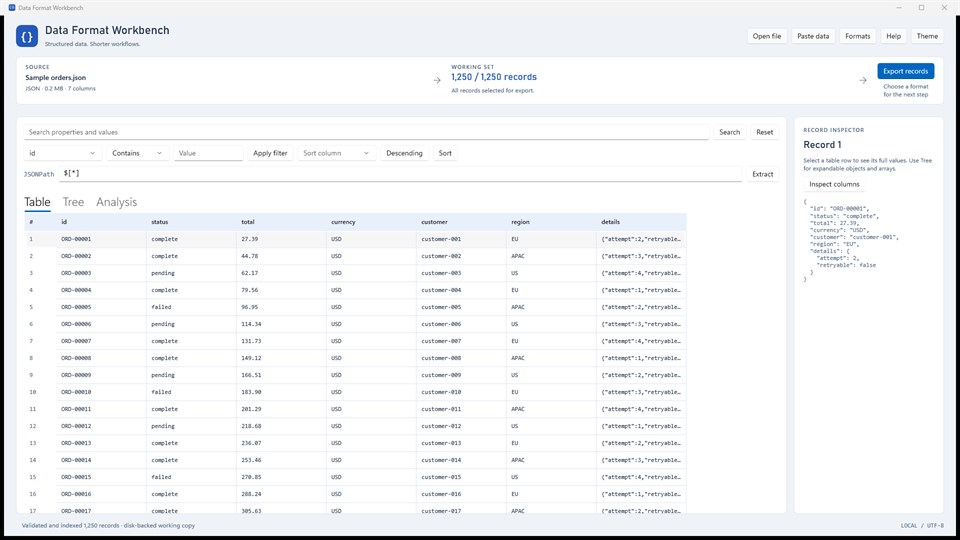
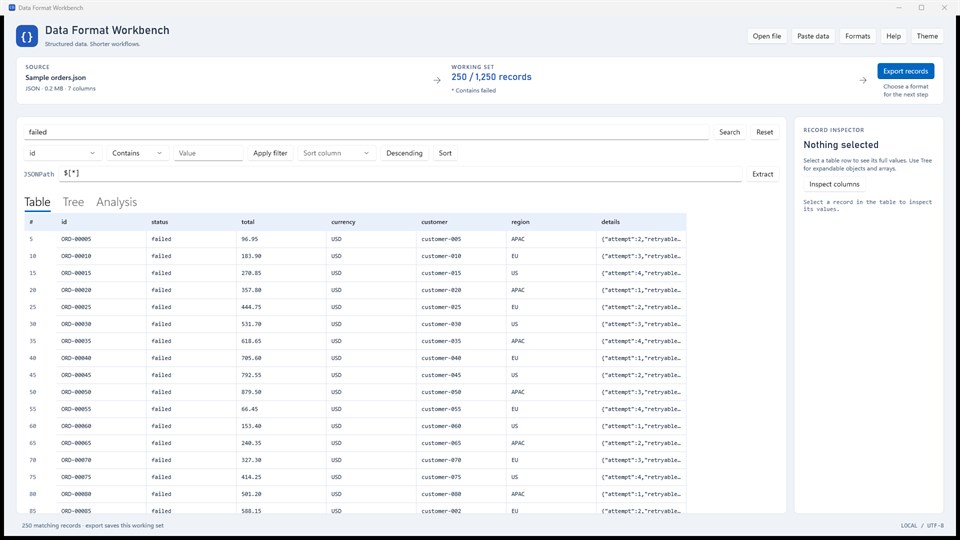
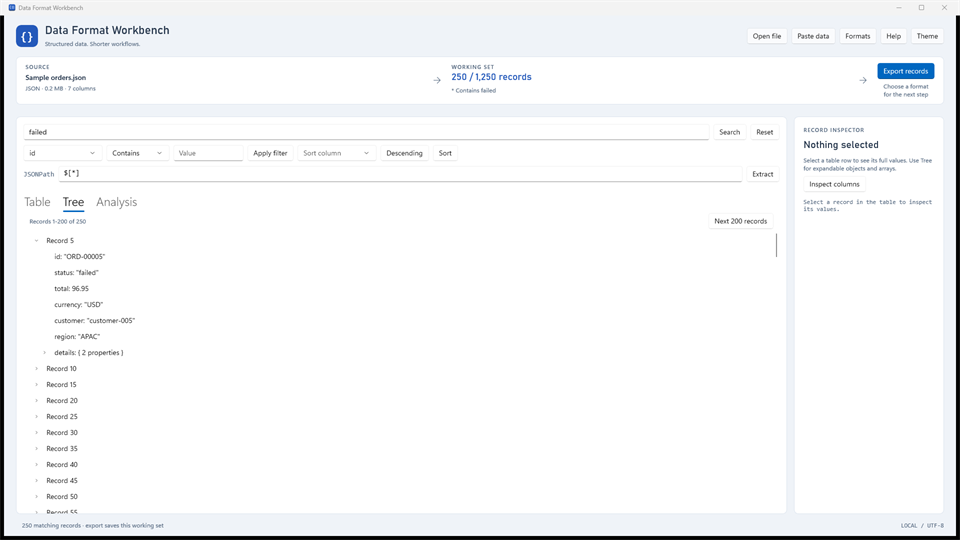
Select Open file, drop a file onto the window, or select Paste data and choose its format. Browse records in Table, select a row to inspect its values, or expand nested objects and arrays in Tree. Search properties and values, or choose a column, operator and value and select Apply filter. Select Export records to save the matching records in your chosen format. Reset restores all records in source order.
Work with JSON, JSON Lines/NDJSON, CSV, TSV, PSV, SSV, fixed-width text, YAML, XML, TOML, INI, JSON5, JSONC, Java properties, dotenv, ARFF and TOON. Set column widths for fixed-width files and choose automatic detection, semicolon or space separation for SSV.
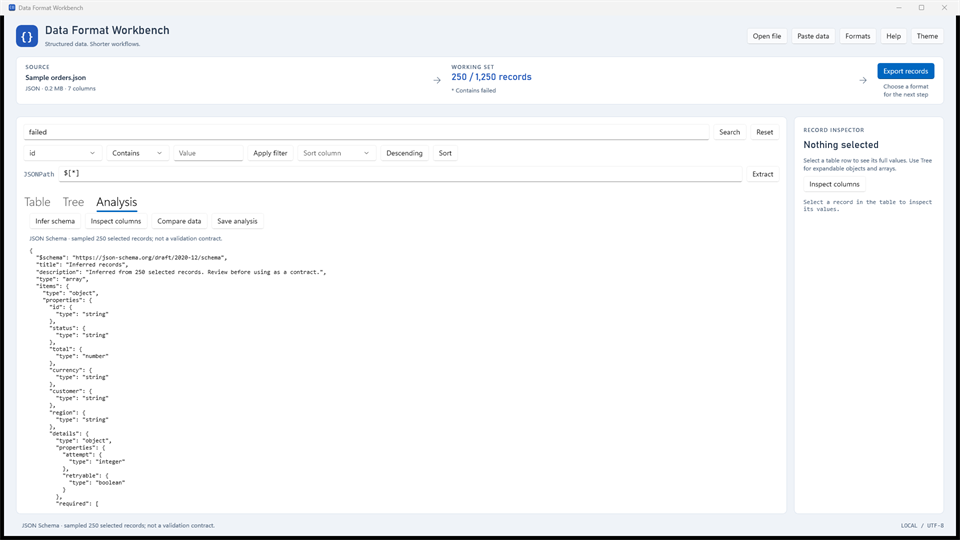
Use JSONPath to extract nested values into a new working set. In Analysis, inspect column types, infer a JSON Schema from sample records, or compare complete structured documents and save their differences. Comparison uses the complete source documents, not the filtered selection; arrays are compared by position.
The app does not require an account or an internet connection and includes no advertising or telemetry. Source files are not edited during inspection. Exports replace an existing destination only after conversion succeeds. Temporary working copies are stored locally and are not encrypted; do not rely on the app to protect secrets in your data.
JSON arrays, JSON Lines, delimited text, YAML sequences, fixed-width text and ARFF are read incrementally into a disk-backed working copy. XML, TOML, INI, properties, dotenv, JSON5, JSONC and TOON imports are limited to 32 MiB. A single large record must still fit in memory, and working copies require free temporary disk space.
Conversions preserve data within each format's rules, not the original comments or formatting. Text tables use strings, and configuration exports require compatible object shapes. Schema inference samples up to 1,000 records; it does not validate against an external schema. Help opens the local user guide, privacy policy and third-party notices. Closing the app normally removes its temporary working files; exported files remain.
จากนักพัฒนา
รายการ 0
-
 Data Format Workbench
แต้ม 0
-

- +1 แต้ม

การจัดอันดับ 0
-
- คะแนนของคุณ
ผู้พัฒนา 9
- Itay Sagui
- ผู้ติดตาม: 0
- แพลตฟอร์ม: Windows แอป (9)
- ลดราคา: 0
- รายการ: 0 0
- แต้ม: 0
- การจัดอันดับ: 0
- ความคิดเห็น: 0
- วิดีโอ: 0
- RSS: ติดตาม
มีอะไรใหม่
- เวอร์ชัน: PC
- อัปเดตล่าสุด:
ข้อมูลเพิ่มเติม
- วันที่วางจำหน่าย:
- หมวดหมู่:
แอปสำหรับ Windows›เครื่องมือสำหรับนักพัฒนา - ระบบปฏิบัติการ:
PC - ขนาด:
68 Mb - ภาษาที่รองรับ:
อังกฤษ - การจัดประเภทเนื้อหา:
EVERYONE - Windows Store คะแนน: ¡
0
คะแนน AppAgg
คะแนน AppAgg โดยประมาณของ
Data Format Workbench
ผู้พัฒนา: Itay Sagui
คะแนนที่สูงขึ้นมักสะท้อนตัวชี้วัดที่ดีกว่าบน AppAgg
อิงจาก: ความนิยม · คะแนนจากผู้ใช้ · ความสดใหม่ · ดีล · ข้อมูลร้านค้า · กิจกรรมชุมชน
คำนวณใหม่ทุกวันจากข้อมูล AppAgg ล่าสุด
ความคิดเห็น 0 ¡
แชร์
Data Format Workbench URL แบบสั้น: คัดลอกแล้ว!- Windows Store

