
Favoritos
| Desenvolvedor: | CodeSand Co. Ltd. (14) | ||
| Preço: | * Grátis | ||
| Pontuação: | 670 Prata | ||
| Classificações: | 0 | ||
| Comentários: | 0 Postar comentário | ||
| Listas: | 0 0 | ||
| Pontos: | 0 | ||
| +1 Ponto | |||
Resumo
DBerio é um app da categoria “Ferramentas de desenvolvedor”, criado por CodeSand Co. Ltd..
Lançado , ainda bem fresquinho.
Também está em Mac App Store, escolha onde preferir.
Entrar é grátis, mas a lojinha lá dentro está aberta.
A Microsoft Store já vem integrada ao Windows, então instala em dois cliques.
A Pontuação AppAgg é 670. Prata, e isso não é nada mal.
Só 14 megabytes, cabe até num disco lotado.
Classificação indicativa “EVERYONE”: serve para crianças também.
Conhece 3 idiomas, mas ainda não aprendeu português.
Já usou? Sua avaliação seria a primeira aqui.
O desenvolvedor tem mais 13 apps no AppAgg. Vale dar uma olhada.
Quer saber das atualizações e dos apps novos antes de todo mundo? Siga o desenvolvedor ou assine o feed RSS. As notificações push chegam pelo app AppAgg Alerts para Android e iOS.
Outras plataformas 1
 | DBerioWindows Store670 PrataWindowsCompras no aplicativo | Grátis |
 | DBerio - Database ClientMac App Store980 PratamacOSCompras no aplicativo $4.99 – $39.99 | Grátis |
Histórico de preços 0
- Preço atual: Grátis
- Mínimo: Grátis
- Máximo: Grátis
Seu próprio feed na página inicial
Capturas de tela 5
Descrição
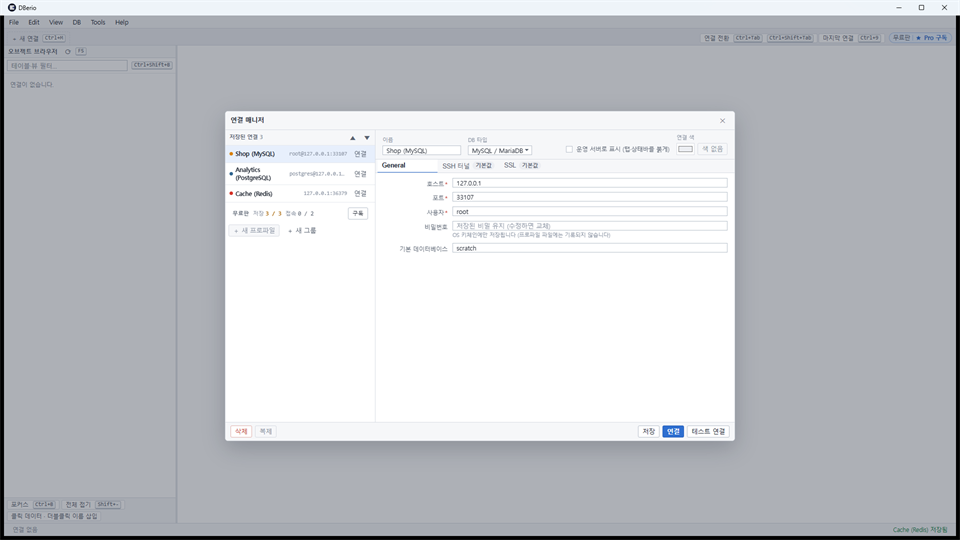
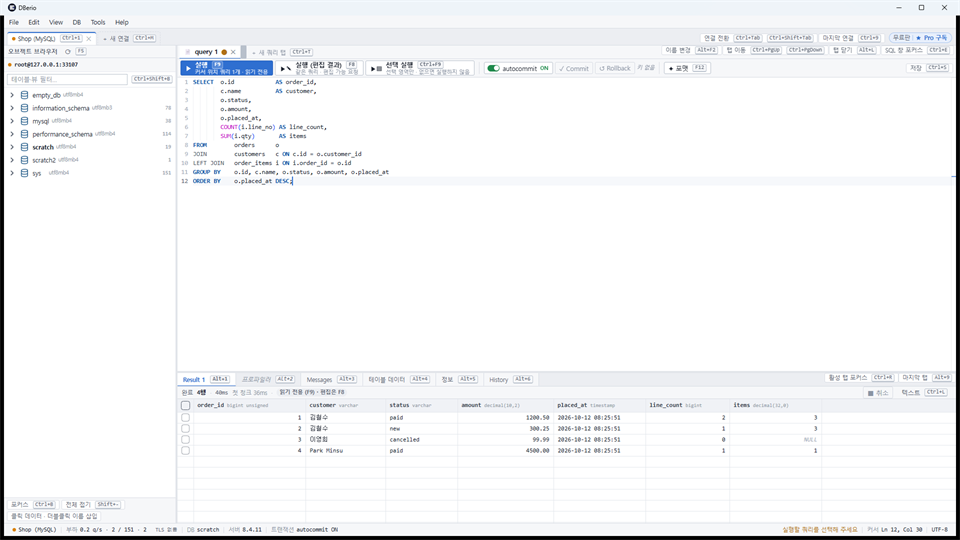
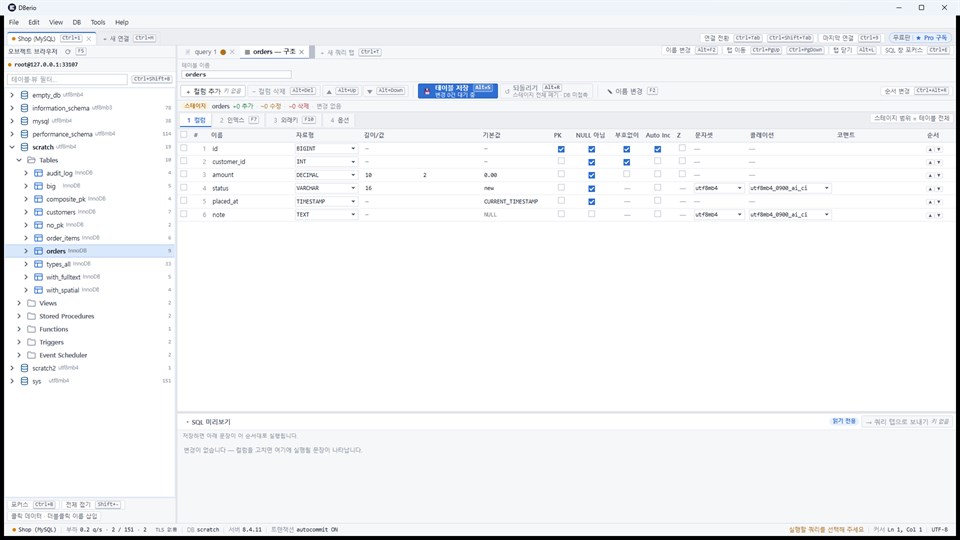
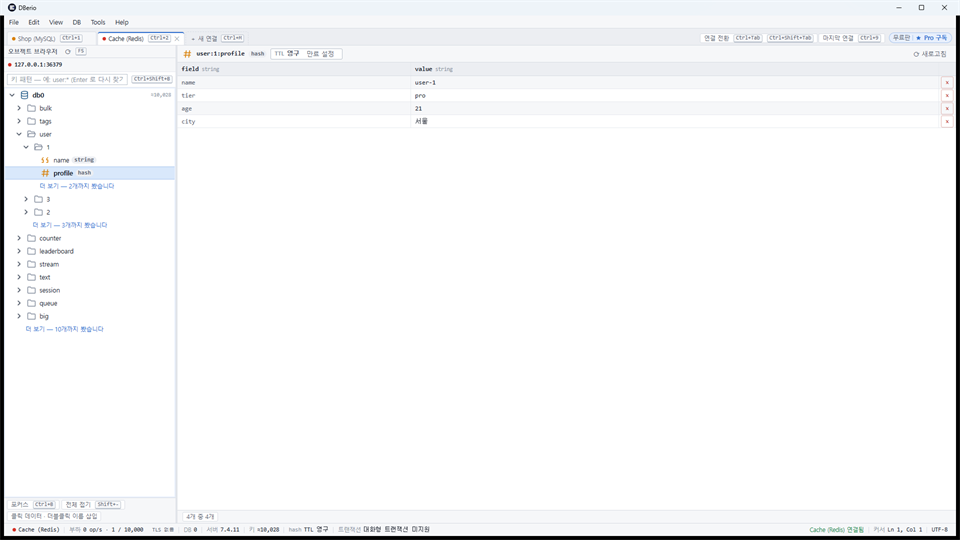
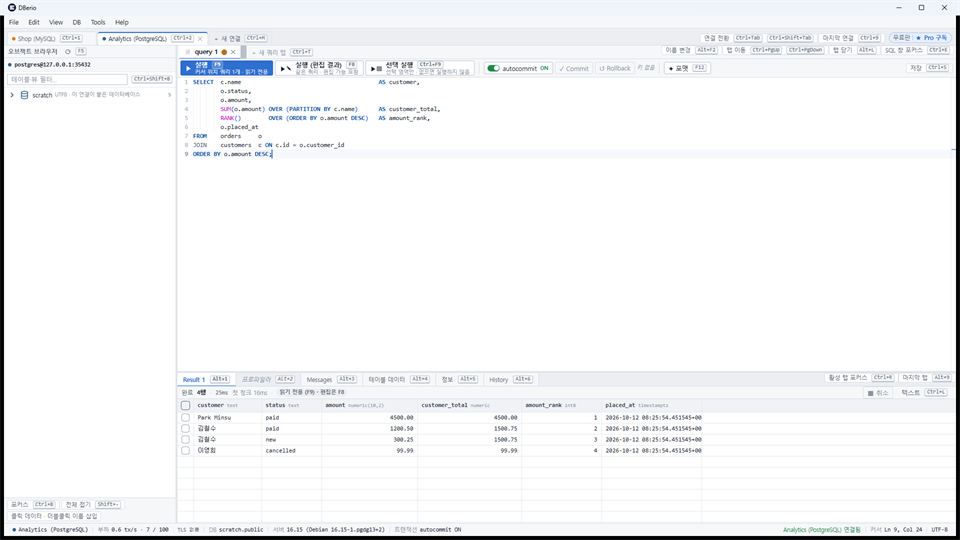
DBerio is a database client for managing MySQL, MariaDB, PostgreSQL, SQLite and Redis in one app. You don't need a separate program for each database. Browse tables, write queries, change table structures, and add, edit and delete data, all on the same screen.
Edit data right in the grid
Select a table and its data opens in a grid. Double-click a cell to change its value, add or delete rows, then save. You can work with your data even if you don't know SQL. When you change a table's structure, DBerio shows the SQL it will run before you save.
See the data behind your AI-built app
Apps built with AI most often use MySQL, SQLite, PostgreSQL (including Supabase) or Redis. But it is hard to see how your app actually stores its data. Connect with DBerio to view your tables, keys and stored data, and edit them right away.
Windows and macOS
DBerio has the same screens, features and shortcuts on Windows and macOS. If you switch operating systems, you don't need to learn a new program.
Shortcuts
Every feature has a keyboard shortcut, shown next to its button.
Protecting connections and production servers
• Passwords are stored only in Windows Credential Manager (Keychain on macOS), never in the settings file.
• SSH tunnels and TLS connections are supported.
• Connections you mark as production turn their tab and status bar red.
• Redis keys are listed with SCAN only, so browsing never blocks the server.
• No sign-up is required. Queries and data go only between your PC and your own servers. Usage statistics are sent to Google Analytics; turn them off in Settings.
Free and Pro
You can use up to 3 connection profiles and 2 simultaneous connections for free. All other features are the same. DBerio Pro removes both limits and is available as a monthly or yearly auto-renewing subscription. New subscribers get a 7-day free trial. You can cancel your subscription anytime from your Microsoft account.
Do desenvolvedor
Listas 0
-
 DBerio
Pontos 0
-

- +1 Ponto

Classificações 0
-
- Sua nota
Desenvolvedor 14
- CodeSand Co. Ltd.
- Seguidores: 0
- Plataformas: Android Apps (6) iOS Apps (6) macOS Apps (1) Windows Apps (1)
- Promoções: 0
- Listas: 0 0
- Pontos: 0
- Classificações: 0
- Comentários: 0
- Vídeos: 3
- RSS: Assinar
Novidades
- Versão: PC
- Última atualização:
- New
• Query plans — see the execution plan of PostgreSQL, MySQL and MariaDB queries as a tree in the result panel's Profiler tab, with the slowest step and points to check highlighted.
• Plan report — sum up a plan on one page, then print it or save it as an A4 PDF.
• Dark mode — choose Use System Setting, Light or Dark under View ▸ Theme.
• Settings window — open it from File ▸ Settings….
• The query editor toolbar now uses icons with tooltips.
• Database and table names that need quoting, such as names with hyphens, are quoted as you type.
Safety improvements
• DROP, TRUNCATE and ALTER … DROP run from the editor now ask for confirmation. On connections marked as production, you type the target name to run them.
• Canceling now responds right away even while a run is waiting for another task.
Usage statistics
• To improve the app, DBerio sends usage statistics to Google Analytics (United States), and a window explains this the first time you open version 1.2.0. After you close that window, basic statistics send the days the app is opened with the app version, OS, store channel and language, using a new random value per request that is never stored. Detailed statistics are sent only if you choose them in that window or turn them on in Settings. Query text, connection details, table names and data are never sent, and you can turn statistics off anytime in Settings ▸ Usage Statistics. See the Privacy Policy for details.
- New
• Create a view from a query — save the SELECT query in your editor as a view. Open it from the editor's right-click menu or the toolbar icon.
• Open a view in the query editor — open a view's SELECT body in a new tab, edit it, and save it again.
• Favorite queries — keep the queries you use often for each database and pick them from the tree. Favorites are saved on this PC only.
• Ctrl+F9 now runs exactly the text you selected.
• Menu names (File, Edit, View, Tools, Help) now appear in the language you choose.
Safety improvements
• While a query is running on a connection, pressing a run key again no longer replaces it — DBerio asks you to cancel first.
• More careful confirmation before risky statements, such as an UPDATE or DELETE without a WHERE clause.
• On connections marked as production, changes to databases, accounts and privileges ask for confirmation first.
• Data search is more accurate, and canceling a search responds better.
• Very large values show only their beginning in the result grid, so the app stays responsive.
• Opening and saving files is limited to the files you choose, for better protection.
• CSV and TSV exports now block values that a spreadsheet could run as formulas, by default. - Bug fixes and improvements:
• F9 now runs the query your cursor just finished, even when the cursor sits right after the semicolon.
• Disconnecting now asks before discarding unsaved queries, the same way quitting does.
• The status bar no longer keeps old messages from a previous run or another connection.
• The Messages tab now records the correct row count for large results.
• The query toolbar fits narrow windows, so the Format button is no longer cut off.
• Connecting to an SSH server for the first time now shows the host key fingerprint so you can trust it.
• If the connection list file is damaged, DBerio now sets it aside, tells you, and starts with an empty list instead of closing. - Fixed an issue where the subscription screen showed a price of 0.
Informações adicionais
- Data de lançamento:
- Categoria:
Aplicativos para Windows›Ferramentas de desenvolvedor - Sistemas operacionais:
PC - Tamanho:
14 Mb - Idiomas disponíveis:
Coreano,Inglês,Japonês - Classificação indicativa:
EVERYONE - Windows Store Nota: ¡
0 - Site:
 https://codesand.co.kr/
Pontuação AppAgg
Pontuação AppAgg estimada de
DBerio
Desenvolvedor: CodeSand Co. Ltd.
Uma pontuação mais alta geralmente reflete resultados melhores nos indicadores do AppAgg.
Com base em: popularidade · avaliações dos usuários · atualidade · ofertas · dados das lojas · atividade da comunidade
Recalculado diariamente com dados AppAgg atualizados.
Comentários 0 ¡
Compartilhar
DBerio URL curta: Copiado!- Windows Store

