
ブックマーク
このブックマークのタイトルを入力してください。
ブックマークを保存しました
概要
こちらはDesign System Graph。Floweareが贈る「開発者ツール」カテゴリのアプリです。
に出たばかりの新作。今なら一番乗りのひとりです。
無料。広告なし、アプリ内課金なし。あなたとアプリだけです。
Microsoft StoreはWindowsに組み込まれているので、数クリックでインストールできます。
AppAggスコアは660。「シルバー」なら、なかなかのものです。
年齢区分は「EVERYONE」なので、子どもでも安心です。
対応言語はひとつだけ、しかも日本語ではありません。
AppAggではまだ誰も評価していません。一番乗りのチャンスは今です。
AppAggにあるこの開発者のアプリはこれだけ。今のところは。
アップデートや新しいアプリを誰よりも早く知りたい?開発者をフォローするか、RSS フィードを購読しましょう。プッシュ通知は Android と iOS 向けの AppAgg Alerts アプリで届きます。
広告
他のプラットフォーム 0
価格履歴 0
- 現在の価格: 無料
- 最小値: 無料
- 最大値: 無料
ホームに自分だけのフィード
「新着・アップデート」のプラットフォームを選ぶと、ホームには必要なアプリとゲームだけが表示されます。
スクリーンショット 4
説明

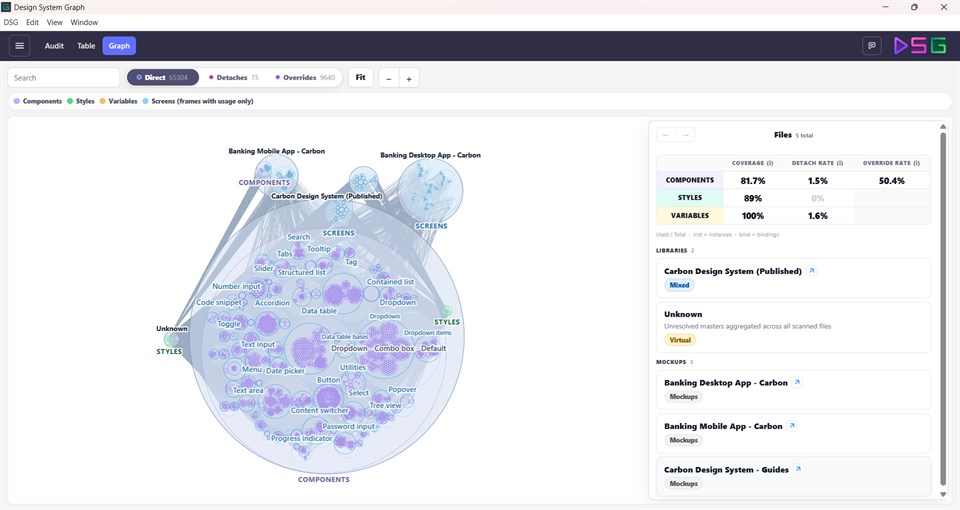
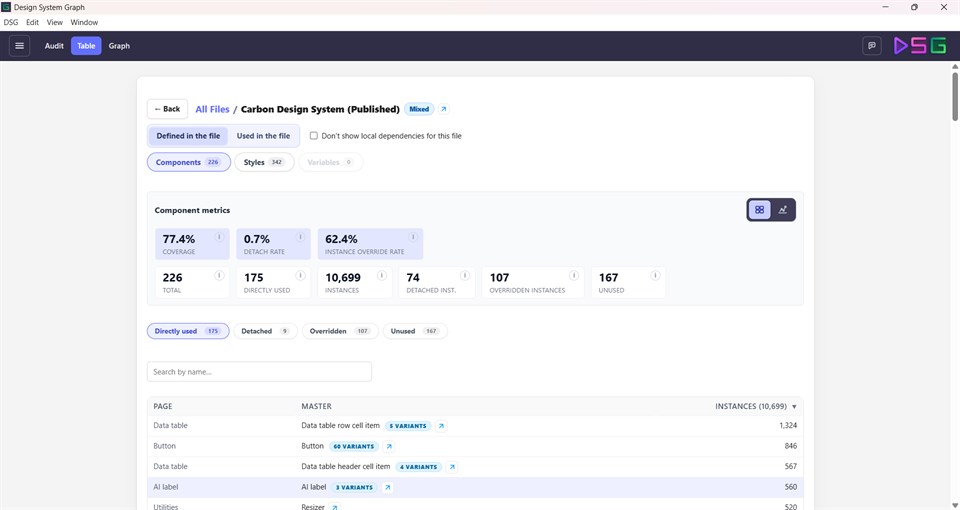
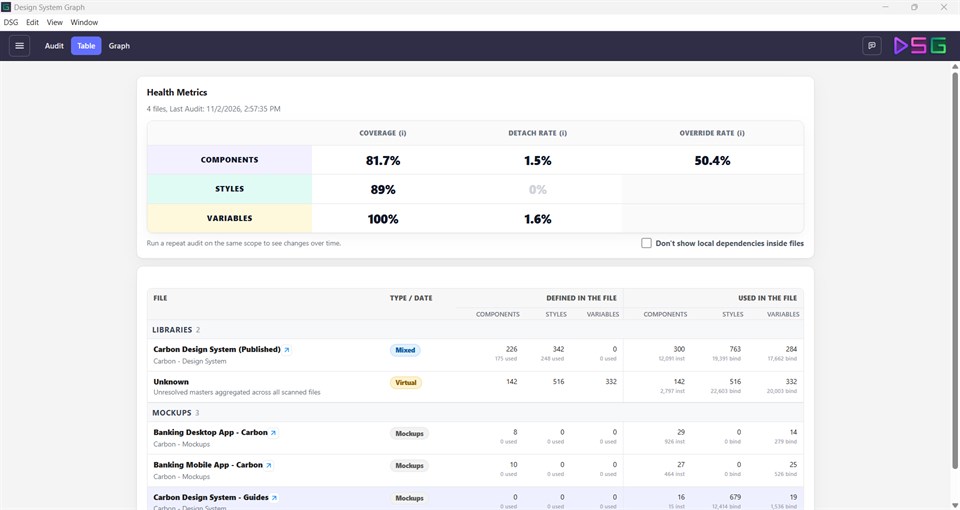
Design System Graph (DSG) is a Windows desktop app that analyzes components, styles, and variables across your Figma libraries and design files. Explore dependencies, review usage metrics, and identify areas for cleanup.
A Figma account, a Figma personal access token, and access to the files you want to analyze are required.
EXPLORE YOUR DESIGN SYSTEM
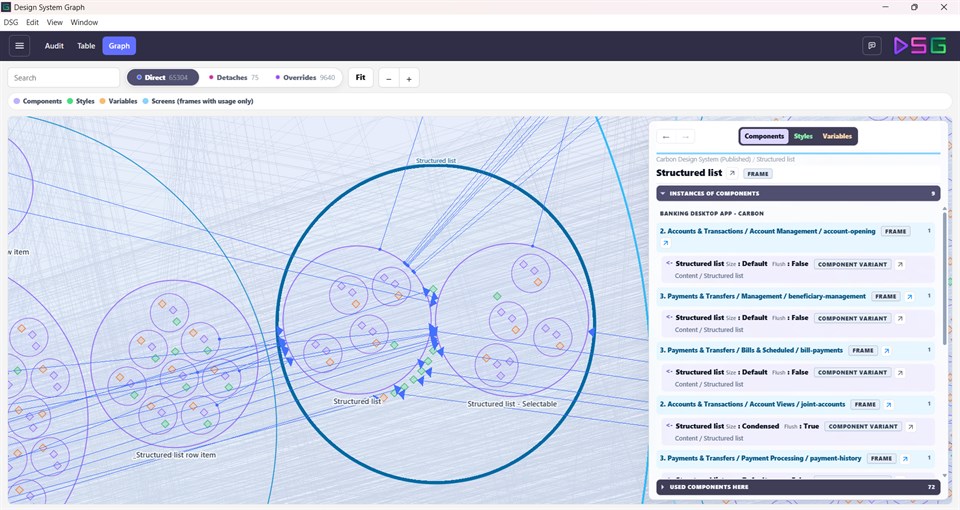
• Graph View: Explore connections between files, components, styles, and variables on an interactive, zoomable canvas.
• Table View: Review usage, unused assets, detaches, and overrides in detailed tables.
• Inspect the evidence: Drill down into the instances and bindings behind each count, then open the corresponding location in Figma.
• Choose your audit scope: Select the teams, projects, and files you want to analyze.
TURN AUDIT RESULTS INTO ACTION
• Trace where a component, style, or variable is used across files.
• See which component variants are used and inspect their instances.
• Review the library resources used by a product design file.
• Identify unused assets and inspect their dependencies before making changes.
• Investigate detached components and review instance overrides.
• Bring usage metrics and concrete examples into design system adoption reviews.
Audit results are stored locally on your Windows PC.
GET STARTED
1. Install and open DSG on Windows.
2. Enter your Figma personal access token.
3. Add your Figma team link and select projects and files.
4. Run an audit and explore the results in Graph View and Table View.
To include local variables, export them to the desktop app using the DSG companion plugin for Figma.
FREE TRIAL AND LICENSE
The free trial includes 3 audits covering up to 3 projects across 2 teams, including all files within the selected projects.
A paid license is required to run additional audits. Licenses are sold separately through Gumroad as a one-time purchase.
デベロッパーから
デベロッパーの方ですか?
ページの一番上にニュースを投稿すると、フォロワーにメールで届きます。YouTube 動画を追加すると、「動画」の一番上に表示されます。
リスト 0
-
 Design System Graph
ポイント 0
-

- +1 ポイント

ランキング 0
-
- あなたの評価
開発者 1
- Floweare
- フォロワー: 0
- プラットフォーム: Windows アプリ (1)
- セール: 0
- リスト: 0 0
- ポイント: 0
- ランキング: 0
- コメント: 0
- 動画: 0
- RSS: 購読する
新機能
- バージョン: PC
- 最終更新:
情報
AppAggスコア
660
AppAgg推定スコア:
Design System Graph
開発者: Floweare
660 シルバー
スコアが高いほど、AppAgg上の各指標が良好な傾向にあります。
基準: 人気 · ユーザー評価 · 新しさ · セール · ストアデータ · コミュニティ活動
最新のAppAggデータに基づいて毎日再計算されます。
ウェブサイト用バッジ:  コピーしました!
コメント 0 ¡
最初のコメントを書きましょう
シェア
Design System Graph 短縮 URL: コピーしました!- Windows Store

