
북마크
이 북마크의 제목을 입력하세요.
북마크가 저장되었습니다
| 개발자: | JK Global Enterprises (1) | ||
| 가격: | * 무료 | ||
| 종합 점수: | 580 브론즈 | ||
| 순위: | 0 | ||
| 댓글: | 0 댓글 게시 | ||
| 목록: | 0 0 | ||
| 포인트: | 0 | ||
| +1 포인트 | |||
요약
소개합니다. JK Global Enterprises에서 만든 ‘개발자 도구’ 카테고리 앱, DevWorkroom.
에 출시됐어요. 아직 꽤 따끈따끈해요.
다운로드는 무료. 그다음은 마음대로예요. 인앱 구매가 있거든요.
Microsoft Store는 Windows에 기본으로 들어 있어서 클릭 몇 번이면 설치돼요.
AppAgg 점수는 580. 지금은 브론즈 등급이지만, 성장할 여지가 충분해요.
연령 등급은 ‘EVERYONE’, 아이들에게도 괜찮아요.
지원 언어는 딱 하나, 그런데 한국어는 아니에요.
아직 여기는 조용해요. 평점도, 댓글도 없어요. 침묵을 깨 주세요.
AppAgg에 있는 이 개발자의 유일한 앱이에요. 아직까지는요.
업데이트와 새 앱 소식을 가장 먼저 받고 싶나요? 개발자를 팔로우하거나 RSS 피드를 구독하세요. 푸시 알림은 Android와 iOS용 AppAgg Alerts 앱으로 받을 수 있어요.
광고
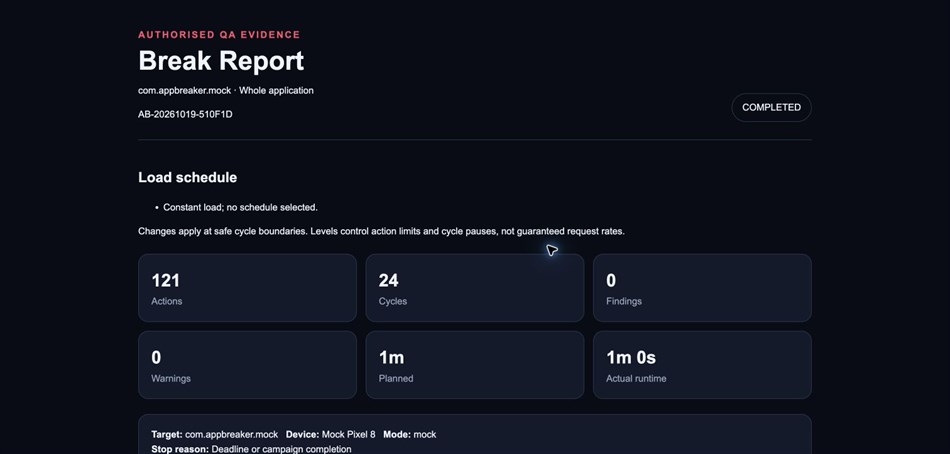
스크린샷 1
다른 플랫폼 0
가격 기록 0
- 현재 가격: 무료
- 최소: 무료
- 최대: 무료
홈 화면의 나만의 피드
“신규 및 업데이트” 피드의 플랫폼을 선택하면 홈 화면에 필요한 앱과 게임만 표시됩니다.
설명

IMPORTANT: Downloading and installing DevWorkroom is free. A confirmed DevWorkroom account and a paid DevWorkroom All Tools subscription are required to run tests. The subscription is purchased and managed at devworkroom.com, outside Microsoft Store, and includes all nine DevWorkroom tools. There is no free trial. Check devworkroom.com for current pricing and availability before downloading.
HOW IT WORKS
1. Open DevWorkroom to view the App Breaker dashboard and reports inside the desktop app.
2. Sign in with your DevWorkroom account and active subscription.
3. Choose an authorised target, the available testing mode, campaigns and duration.
4. Start the test and follow its progress, action history and captured evidence.
5. Review the report and export the evidence for your investigation or development workflow.
App Breaker supports timed campaigns, a manual stop control and reports that record what the test actually observed. Browser testing uses a bundled browser runtime. Other target modes require compatible devices, local development tools or platform-specific setup; see the guide before choosing a mode.
Tests can interact with the selected target. Use a test environment and test accounts, and only test systems you own or have explicit permission to test. A passing run means no covered problem was observed; it is not a security certificate or a guarantee that your app has no bugs.
The testing runner works locally on your computer. Internet access is required for account and subscription verification. Reports and screenshots can contain information from your test target; review them before sharing.
Guide and support: https://devworkroom.com/help/
Privacy: https://devworkroom.com/privacy/
Subscription terms: https://devworkroom.com/terms/
개발자 소식
개발자이신가요?
페이지 맨 위에 소식을 올리면 팔로워에게 이메일로 전달됩니다. YouTube 동영상을 추가하면 “동영상” 블록 맨 앞에 표시됩니다.
개발자
- JK Global Enterprises
- 팔로워: 0
- 플랫폼: Windows 앱 (1)
- 할인: 0
- 목록: 0 0
- 포인트: 0
- 순위: 0
- 댓글: 0
- 동영상: 0
- RSS: 구독
목록 0
-
 DevWorkroom
포인트 0
-

- +1 포인트

순위 0
-
- 내 평점
새로운 기능
- 버전: PC
- 마지막 업데이트:
- DevWorkroom desktop branding with the DW icon. Dashboard and reports stay inside the app window. App Breaker remains the testing tool within DevWorkroom.
추가 정보
 https://devworkroom.com
댓글 0 ¡
가장 먼저 댓글을 남겨주세요
AppAgg 점수
580
AppAgg 예상 점수:
DevWorkroom
개발자: JK Global Enterprises
580 브론즈
점수가 높을수록 대체로 AppAgg의 여러 지표에서 좋은 결과를 보인다는 뜻입니다.
기준: 인기 · 사용자 평점 · 최신성 · 할인 · 스토어 데이터 · 커뮤니티 활동
최신 AppAgg 데이터를 바탕으로 매일 다시 계산됩니다.
웹사이트용 배지:  복사됨!
DevWorkroom 단축 URL: 복사됨!- Windows Store


