
บุ๊กมาร์ก
| ผู้พัฒนา: | JK Global Enterprises (1) | ||
| ราคา: | * ฟรี | ||
| คะแนน: | 580 บรอนซ์ | ||
| การจัดอันดับ: | 0 | ||
| ความคิดเห็น: | 0 โพสต์ความคิดเห็น | ||
| รายการ: | 0 0 | ||
| แต้ม: | 0 | ||
| +1 แต้ม | |||
สรุป
มาทำความรู้จัก DevWorkroom แอปในหมวด “เครื่องมือสำหรับนักพัฒนา” จาก JK Global Enterprises
ออกเมื่อ ยังสดใหม่อยู่เลย
ดาวน์โหลดฟรี หลังจากนั้นแล้วแต่คุณ เพราะมีการซื้อภายในแอป
Microsoft Store มีมาในตัว Windows อยู่แล้ว ติดตั้งได้ในไม่กี่คลิก
คะแนน AppAgg คือ 580 ตอนนี้อยู่ระดับ “บรอนซ์” ยังไปได้อีกไกล
จัดเรต “EVERYONE” เหมาะกับเด็ก ๆ ด้วย
รองรับแค่ภาษาเดียว และไม่ใช่ภาษาไทย
ตอนนี้ที่นี่ยังเงียบกริบ ไม่มีคะแนน ไม่มีความคิดเห็น มาทำลายความเงียบกันเถอะ
เป็นแอปเดียวของผู้พัฒนารายนี้บน AppAgg อย่างน้อยก็ตอนนี้
อยากรู้เรื่องอัปเดตและแอปใหม่ก่อนใครไหม? ติดตาม ผู้พัฒนา หรือกดติดตาม ฟีด RSS ได้เลย การแจ้งเตือนแบบพุชส่งผ่านแอป AppAgg Alerts สำหรับ Android และ iOS
ภาพหน้าจอ 1
แพลตฟอร์มอื่น 0
ประวัติราคา 0
- ราคาปัจจุบัน: ฟรี
- ต่ำสุด: ฟรี
- สูงสุด: ฟรี
ฟีดของคุณเองบนหน้าแรก
คำอธิบาย

IMPORTANT: Downloading and installing DevWorkroom is free. A confirmed DevWorkroom account and a paid DevWorkroom All Tools subscription are required to run tests. The subscription is purchased and managed at devworkroom.com, outside Microsoft Store, and includes all nine DevWorkroom tools. There is no free trial. Check devworkroom.com for current pricing and availability before downloading.
HOW IT WORKS
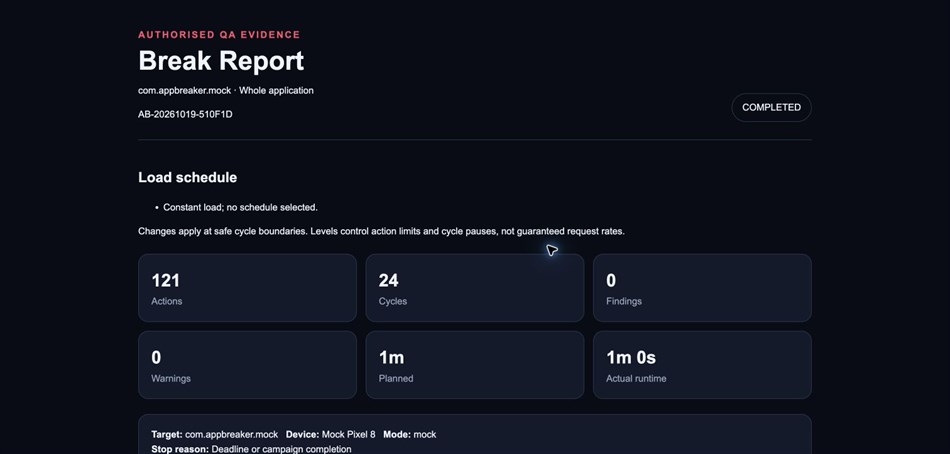
1. Open DevWorkroom to view the App Breaker dashboard and reports inside the desktop app.
2. Sign in with your DevWorkroom account and active subscription.
3. Choose an authorised target, the available testing mode, campaigns and duration.
4. Start the test and follow its progress, action history and captured evidence.
5. Review the report and export the evidence for your investigation or development workflow.
App Breaker supports timed campaigns, a manual stop control and reports that record what the test actually observed. Browser testing uses a bundled browser runtime. Other target modes require compatible devices, local development tools or platform-specific setup; see the guide before choosing a mode.
Tests can interact with the selected target. Use a test environment and test accounts, and only test systems you own or have explicit permission to test. A passing run means no covered problem was observed; it is not a security certificate or a guarantee that your app has no bugs.
The testing runner works locally on your computer. Internet access is required for account and subscription verification. Reports and screenshots can contain information from your test target; review them before sharing.
Guide and support: https://devworkroom.com/help/
Privacy: https://devworkroom.com/privacy/
Subscription terms: https://devworkroom.com/terms/
จากนักพัฒนา
ผู้พัฒนา
- JK Global Enterprises
- ผู้ติดตาม: 0
- แพลตฟอร์ม: Windows แอป (1)
- ลดราคา: 0
- รายการ: 0 0
- แต้ม: 0
- การจัดอันดับ: 0
- ความคิดเห็น: 0
- วิดีโอ: 0
- RSS: ติดตาม
รายการ 0
-
 DevWorkroom
แต้ม 0
-

- +1 แต้ม

การจัดอันดับ 0
-
- คะแนนของคุณ
มีอะไรใหม่
- เวอร์ชัน: PC
- อัปเดตล่าสุด:
- DevWorkroom desktop branding with the DW icon. Dashboard and reports stay inside the app window. App Breaker remains the testing tool within DevWorkroom.
ข้อมูลเพิ่มเติม
- วันที่วางจำหน่าย:
- หมวดหมู่:
แอปสำหรับ Windows›เครื่องมือสำหรับนักพัฒนา - ระบบปฏิบัติการ:
PC - ขนาด:
250 Mb - ภาษาที่รองรับ:
อังกฤษ - การจัดประเภทเนื้อหา:
EVERYONE - Windows Store คะแนน: ¡
0 - เว็บไซต์:
 https://devworkroom.com
ความคิดเห็น 0 ¡
คะแนน AppAgg
คะแนน AppAgg โดยประมาณของ
DevWorkroom
ผู้พัฒนา: JK Global Enterprises
คะแนนที่สูงขึ้นมักสะท้อนตัวชี้วัดที่ดีกว่าบน AppAgg
อิงจาก: ความนิยม · คะแนนจากผู้ใช้ · ความสดใหม่ · ดีล · ข้อมูลร้านค้า · กิจกรรมชุมชน
คำนวณใหม่ทุกวันจากข้อมูล AppAgg ล่าสุด
DevWorkroom URL แบบสั้น: คัดลอกแล้ว!- Windows Store

