
الإشارات المرجعية
| المطوّر: | Gen. (6) | ||
| السعر: | $9.99 | ||
| الدرجة: | 580 برونز | ||
| الترتيب: | 0 | ||
| تعليقات: | 0 انشر تعليقًا | ||
| قوائم: | 0 0 | ||
| النقاط: | 0 | ||
| +1 نقطة | |||
ملخص
تعرّف على Doc-Scanner، تطبيق من Gen. ضمن فئة «أدوات المطور».
صدر ، وما زال حديثًا نسبيًا.
$9.99، ولا خصم واحد على AppAgg حتى الآن. جوزة صعبة الكسر.
متجر Microsoft مدمج في Windows، فالتثبيت يتم بنقرتين.
درجة AppAgg هي 580. برونز حاليًا، والقادم أفضل.
12 ميغابايت فقط، حجم يناسب حتى القرص الممتلئ.
التصنيف العمري «EVERYONE»، أي أنه مناسب للأطفال أيضًا.
يتحدث لغة واحدة فقط، وليست العربية.
هل استخدمته؟ سيكون تعليقك الأول هنا.
لدى هذا المطوّر 5 تطبيقات أخرى على AppAgg. ألقِ نظرة.
تريد أن تعرف بالخصومات والتحديثات والتطبيقات الجديدة أولًا؟ فعّل تنبيه السعر أو تابع المطور أو اشترك في موجز RSS. تصلك الإشعارات عبر تطبيق AppAgg Alerts لنظامي Android وiOS.
لقطات الشاشة 2
منصات أخرى 0
سجل الأسعار 0
- السعر الحالي: $9.99
- الحد الأدنى: $9.99
- الحد الأقصى: $9.99
خلاصتك الخاصة في الصفحة الرئيسية
الوصف

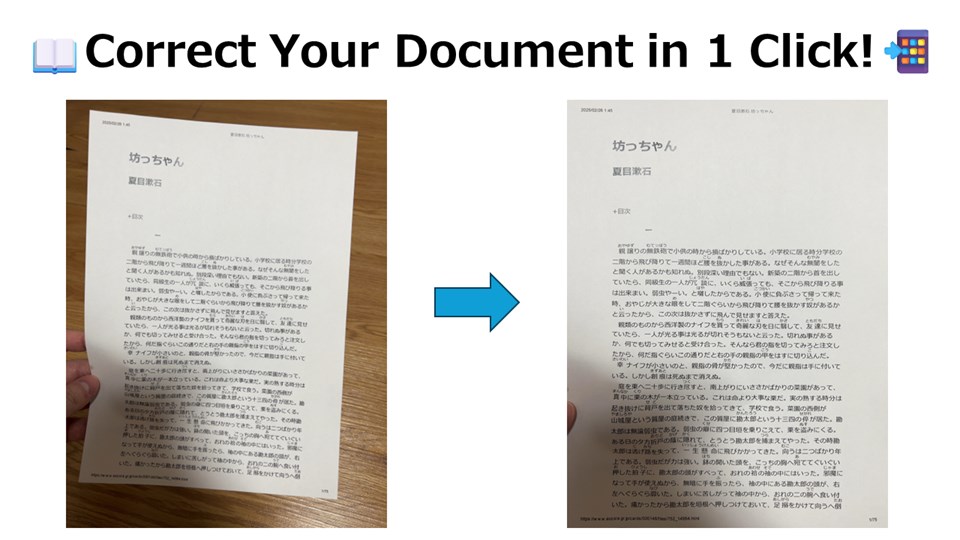
Doc-Scanner is the ultimate tool for transforming paper documents and books into professional-quality digital files. Using advanced image enhancement technology, it automatically corrects distortions, shadows, and uneven lighting, ensuring perfectly readable digital content.
Key Features
🔍 Professional-Grade Image Enhancement
Automatically enhances photos of documents taken with your smartphone or camera, making them look as if they were scanned with a high-quality scanner.
📚 Single & Batch Processing
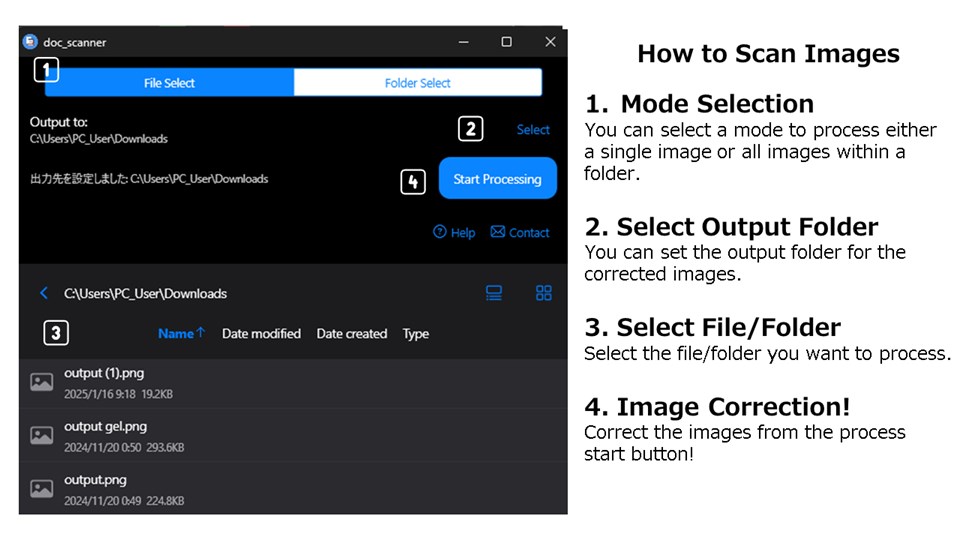
- File Selection Mode: Manually adjust individual images for precise control.
- Folder Selection Mode: Process multiple documents or book pages at once.
👁️ Real-Time Preview
Check the results before finalizing, allowing you to optimize settings while saving time.
💼 Easy File Management
- Drag & drop support
- Intuitive folder navigation
- Customizable output destination
🖼️ Supports Multiple Formats
Compatible with JPG, PNG, and other popular image formats.
Perfect for:
✅ Digitizing paper documents and books
✅ Professionals and students who want to store materials digitally
✅ Organizing household paperwork
✅ Creating high-quality eBooks
✅ Users who don’t own a scanner but need digital copies of documents
System Requirements
- Windows 10/11
- 2GB RAM or more
- At least 100MB of free storage (depends on the number of documents you want to scan)
Upgrade your document management with Doc-Scanner! Download now and easily create professional-quality digital books and documents.
من المطوّر
المطوّر
- Gen
- المتابعون: 0
- المنصات: Android تطبيقات (2) iOS تطبيقات (1) Windows تطبيقات (3)
- العروض: 0
- قوائم: 0 0
- النقاط: 0
- الترتيب: 0
- تعليقات: 0
- الفيديوهات: 1
- RSS: اشتراك
قوائم 0
-
 Doc-Scanner
النقاط 0
-

- +1 نقطة

الترتيب 0
-
- تقييمك
ما الجديد
- الإصدار: PC
- آخر تحديث:
معلومات إضافية
- تاريخ الإصدار:
- الفئة:
تطبيقات Windows›أدوات المطور - نظام التشغيل:
PC - الحجم:
12 Mb - اللغات المدعومة:
الإنجليزية - تقييم المحتوى:
EVERYONE - Windows Store تقييم: ¡
0 - الموقع الإلكتروني:
 https://gen-gen33.github.io/
تعليقات 0 ¡
درجة AppAgg
درجة AppAgg التقديرية لـ
Doc-Scanner
المطوّر: Gen.
تشير الدرجة الأعلى عادةً إلى أداء أفضل في مؤشرات AppAgg.
استنادًا إلى: الشعبية · تقييمات المستخدمين · الحداثة · العروض · بيانات المتاجر · نشاط المجتمع
يُعاد حسابها يوميًا بناءً على أحدث بيانات AppAgg.
Doc-Scanner عنوان URL مختصر: تم النسخ!- Windows Store

