
북마크
이 북마크의 제목을 입력하세요.
북마크가 저장되었습니다
요약
소개합니다. Gen.에서 만든 ‘개발자 도구’ 카테고리 앱, Doc-Scanner.
에 출시됐어요. 아직 꽤 따끈따끈해요.
$9.99, 그리고 AppAgg에서 지금까지 할인이 단 한 번도 없었어요. 만만치 않은 상대네요.
Microsoft Store는 Windows에 기본으로 들어 있어서 클릭 몇 번이면 설치돼요.
AppAgg 점수는 580. 지금은 브론즈 등급이지만, 성장할 여지가 충분해요.
겨우 12메가바이트. 꽉 찬 드라이브에도 쏙 들어가요.
연령 등급은 ‘EVERYONE’, 아이들에게도 괜찮아요.
지원 언어는 딱 하나, 그런데 한국어는 아니에요.
사용해 보셨나요? 여기서 첫 리뷰의 주인공이 되어 주세요.
이 개발자의 앱이 AppAgg에 5개 더 있어요. 한번 둘러보세요.
할인, 업데이트, 새 앱 소식을 가장 먼저 받고 싶나요? 가격 알림을 설정하거나 개발자를 팔로우하거나 RSS 피드를 구독하세요. 푸시 알림은 Android와 iOS용 AppAgg Alerts 앱으로 받을 수 있어요.
광고
스크린샷 2
다른 플랫폼 0
가격 기록 0
- 현재 가격: $9.99
- 최소: $9.99
- 최대: $9.99
홈 화면의 나만의 피드
“신규 및 업데이트” 피드의 플랫폼을 선택하면 홈 화면에 필요한 앱과 게임만 표시됩니다.
설명

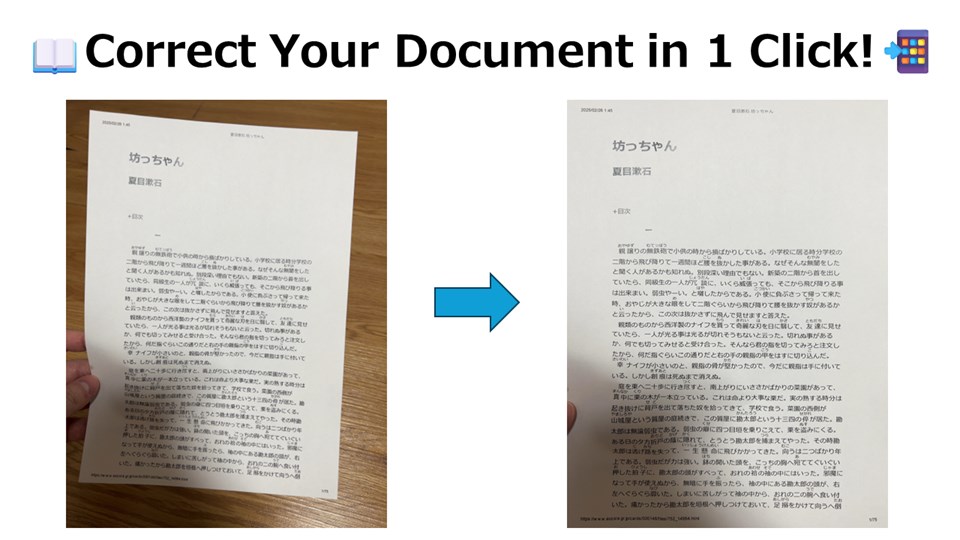
Doc-Scanner is the ultimate tool for transforming paper documents and books into professional-quality digital files. Using advanced image enhancement technology, it automatically corrects distortions, shadows, and uneven lighting, ensuring perfectly readable digital content.
Key Features
🔍 Professional-Grade Image Enhancement
Automatically enhances photos of documents taken with your smartphone or camera, making them look as if they were scanned with a high-quality scanner.
📚 Single & Batch Processing
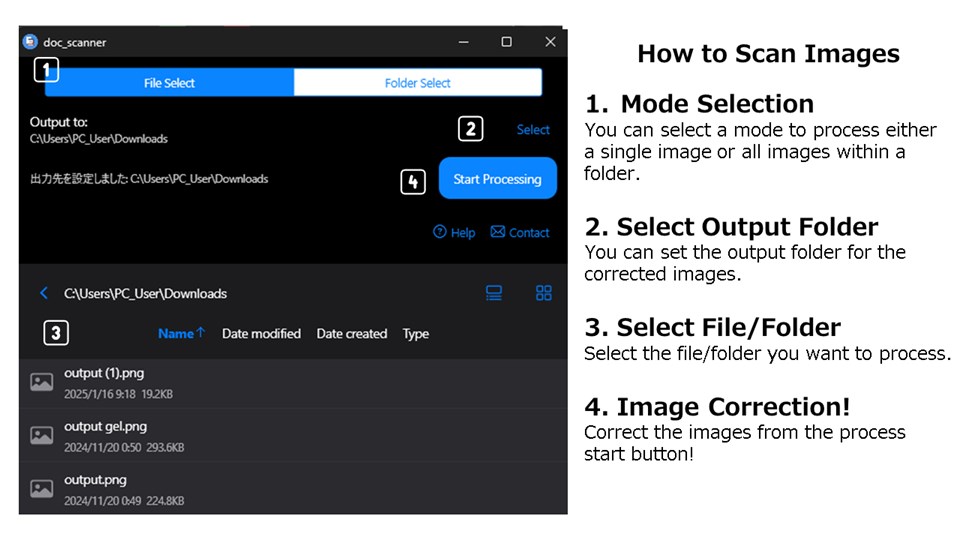
- File Selection Mode: Manually adjust individual images for precise control.
- Folder Selection Mode: Process multiple documents or book pages at once.
👁️ Real-Time Preview
Check the results before finalizing, allowing you to optimize settings while saving time.
💼 Easy File Management
- Drag & drop support
- Intuitive folder navigation
- Customizable output destination
🖼️ Supports Multiple Formats
Compatible with JPG, PNG, and other popular image formats.
Perfect for:
✅ Digitizing paper documents and books
✅ Professionals and students who want to store materials digitally
✅ Organizing household paperwork
✅ Creating high-quality eBooks
✅ Users who don’t own a scanner but need digital copies of documents
System Requirements
- Windows 10/11
- 2GB RAM or more
- At least 100MB of free storage (depends on the number of documents you want to scan)
Upgrade your document management with Doc-Scanner! Download now and easily create professional-quality digital books and documents.
개발자 소식
개발자이신가요?
페이지 맨 위에 소식을 올리면 팔로워에게 이메일로 전달됩니다. YouTube 동영상을 추가하면 “동영상” 블록 맨 앞에 표시됩니다.
개발자
목록 0
-
 Doc-Scanner
포인트 0
-

- +1 포인트

순위 0
-
- 내 평점
새로운 기능
- 버전: PC
- 마지막 업데이트:
추가 정보
 https://gen-gen33.github.io/
댓글 0 ¡
가장 먼저 댓글을 남겨주세요
AppAgg 점수
580
AppAgg 예상 점수:
Doc-Scanner
개발자: Gen.
580 브론즈
점수가 높을수록 대체로 AppAgg의 여러 지표에서 좋은 결과를 보인다는 뜻입니다.
기준: 인기 · 사용자 평점 · 최신성 · 할인 · 스토어 데이터 · 커뮤니티 활동
최신 AppAgg 데이터를 바탕으로 매일 다시 계산됩니다.
웹사이트용 배지:  복사됨!
Doc-Scanner 단축 URL: 복사됨!- Windows Store


