
บุ๊กมาร์ก
| ผู้พัฒนา: | Gen. (6) | ||
| ราคา: | $9.99 | ||
| คะแนน: | 580 บรอนซ์ | ||
| การจัดอันดับ: | 0 | ||
| ความคิดเห็น: | 0 โพสต์ความคิดเห็น | ||
| รายการ: | 0 0 | ||
| แต้ม: | 0 | ||
| +1 แต้ม | |||
สรุป
มาทำความรู้จัก Doc-Scanner แอปในหมวด “เครื่องมือสำหรับนักพัฒนา” จาก Gen.
ออกเมื่อ ยังสดใหม่อยู่เลย
$9.99 และยังไม่เคยลดราคาเลยสักครั้งบน AppAgg ของแข็งจริง ๆ
Microsoft Store มีมาในตัว Windows อยู่แล้ว ติดตั้งได้ในไม่กี่คลิก
คะแนน AppAgg คือ 580 ตอนนี้อยู่ระดับ “บรอนซ์” ยังไปได้อีกไกล
แค่ 12 เมกะไบต์ ต่อให้ไดรฟ์เต็มก็ยังลงได้
จัดเรต “EVERYONE” เหมาะกับเด็ก ๆ ด้วย
รองรับแค่ภาษาเดียว และไม่ใช่ภาษาไทย
เคยใช้แล้วเหรอ? รีวิวของคุณจะเป็นรีวิวแรกที่นี่
ผู้พัฒนารายนี้มีแอปอื่นบน AppAgg อีก 5 แอป ลองไปดูกัน
อยากรู้เรื่องลดราคา อัปเดต และแอปใหม่ก่อนใครไหม? ตั้งการแจ้งเตือนราคา ติดตาม ผู้พัฒนา หรือกดติดตาม ฟีด RSS ได้เลย การแจ้งเตือนแบบพุชส่งผ่านแอป AppAgg Alerts สำหรับ Android และ iOS
ภาพหน้าจอ 2
แพลตฟอร์มอื่น 0
ประวัติราคา 0
- ราคาปัจจุบัน: $9.99
- ต่ำสุด: $9.99
- สูงสุด: $9.99
ฟีดของคุณเองบนหน้าแรก
คำอธิบาย

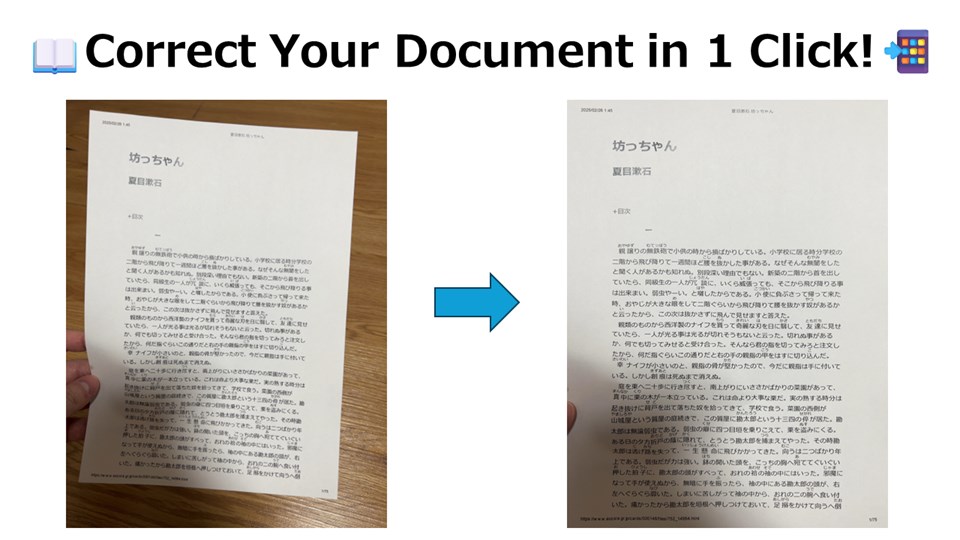
Doc-Scanner is the ultimate tool for transforming paper documents and books into professional-quality digital files. Using advanced image enhancement technology, it automatically corrects distortions, shadows, and uneven lighting, ensuring perfectly readable digital content.
Key Features
🔍 Professional-Grade Image Enhancement
Automatically enhances photos of documents taken with your smartphone or camera, making them look as if they were scanned with a high-quality scanner.
📚 Single & Batch Processing
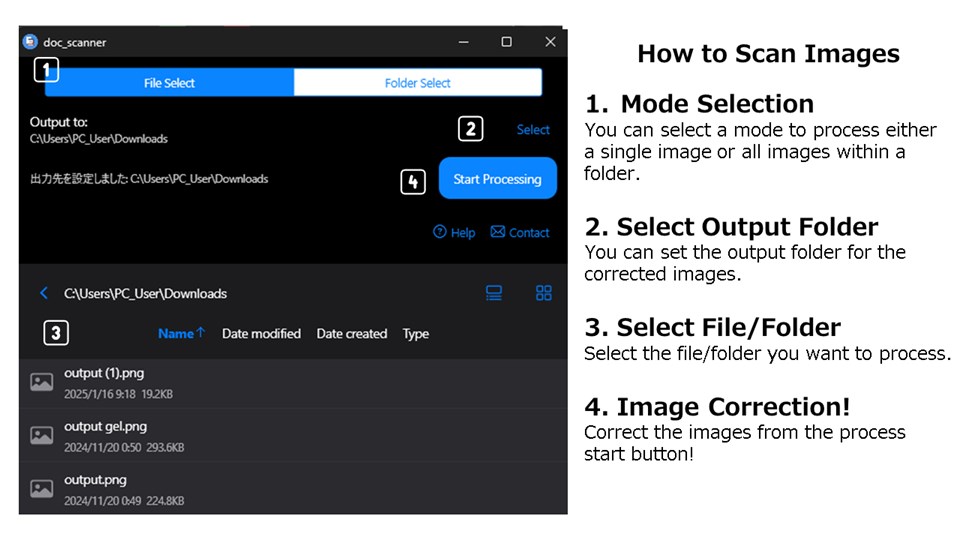
- File Selection Mode: Manually adjust individual images for precise control.
- Folder Selection Mode: Process multiple documents or book pages at once.
👁️ Real-Time Preview
Check the results before finalizing, allowing you to optimize settings while saving time.
💼 Easy File Management
- Drag & drop support
- Intuitive folder navigation
- Customizable output destination
🖼️ Supports Multiple Formats
Compatible with JPG, PNG, and other popular image formats.
Perfect for:
✅ Digitizing paper documents and books
✅ Professionals and students who want to store materials digitally
✅ Organizing household paperwork
✅ Creating high-quality eBooks
✅ Users who don’t own a scanner but need digital copies of documents
System Requirements
- Windows 10/11
- 2GB RAM or more
- At least 100MB of free storage (depends on the number of documents you want to scan)
Upgrade your document management with Doc-Scanner! Download now and easily create professional-quality digital books and documents.
จากนักพัฒนา
ผู้พัฒนา
- Gen
- ผู้ติดตาม: 0
- แพลตฟอร์ม: Android แอป (2) iOS แอป (1) Windows แอป (3)
- ลดราคา: 0
- รายการ: 0 0
- แต้ม: 0
- การจัดอันดับ: 0
- ความคิดเห็น: 0
- วิดีโอ: 1
- RSS: ติดตาม
รายการ 0
-
 Doc-Scanner
แต้ม 0
-

- +1 แต้ม

การจัดอันดับ 0
-
- คะแนนของคุณ
มีอะไรใหม่
- เวอร์ชัน: PC
- อัปเดตล่าสุด:
ข้อมูลเพิ่มเติม
- วันที่วางจำหน่าย:
- หมวดหมู่:
แอปสำหรับ Windows›เครื่องมือสำหรับนักพัฒนา - ระบบปฏิบัติการ:
PC - ขนาด:
12 Mb - ภาษาที่รองรับ:
อังกฤษ - การจัดประเภทเนื้อหา:
EVERYONE - Windows Store คะแนน: ¡
0 - เว็บไซต์:
 https://gen-gen33.github.io/
ความคิดเห็น 0 ¡
คะแนน AppAgg
คะแนน AppAgg โดยประมาณของ
Doc-Scanner
ผู้พัฒนา: Gen.
คะแนนที่สูงขึ้นมักสะท้อนตัวชี้วัดที่ดีกว่าบน AppAgg
อิงจาก: ความนิยม · คะแนนจากผู้ใช้ · ความสดใหม่ · ดีล · ข้อมูลร้านค้า · กิจกรรมชุมชน
คำนวณใหม่ทุกวันจากข้อมูล AppAgg ล่าสุด
Doc-Scanner URL แบบสั้น: คัดลอกแล้ว!- Windows Store

